Spectre and Meltdown Vulnerabilities


PvtJohnTowle

Well-known member
Member
Local time
11:53 PM
Posts
287
Location
Sydney Australia
OS
Windows 11 Pro 25H2 26200.7627
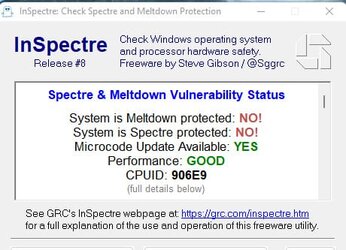
I was viewing this video and he says to to disable the Spectre and Meltdown with this app , he says having these patches enabled can affect your FPS in games. I have disabled these patches as per screenshot attached to my post.

However, it appears the trade-off is less security and increased vulnerabilty. Is it worth having these disabled and will there be any noticeable increase in my FPS (I haven't tested yet) or is not worth it?

 
Windows Build/Version
21H2

Attachments

  • bandicam 2023-03-24 09-53-13-433.jpg
    bandicam 2023-03-24 09-53-13-433.jpg
    32.5 KB · Views: 3

My Computers My Computers

  • At a glance

    Windows 11 Pro 25H2 26200.7627Ryzen 7 9800X3DG.Skill Trident Z5 RGB DDR5-6000 32GB (2×16GB...RTX 5080 Palit Gaming Pro
    OS
    Windows 11 Pro 25H2 26200.7627
    Computer type
    PC/Desktop
    Manufacturer/Model
    Gigababyte X870E Aorus Pro Rev 1.1
    CPU
    Ryzen 7 9800X3D
    Motherboard
    Gigababyte X870E Aorus Pro Rev 1.1
    Memory
    G.Skill Trident Z5 RGB DDR5-6000 32GB (2×16GB) CL30 2 x 16gb
    Graphics Card(s)
    RTX 5080 Palit Gaming Pro
    Sound Card
    Steel Series Arctis 1 Gaming Head phones
    Monitor(s) Displays
    Asus ROG Strix 27″ QHD OLED XG27AQDMG & Phillips 272V8
    Screen Resolution
    2560 X1440 27 Inch 240 HZ Asus
    PSU
    Corsair RM1000X
    Case
    Corsair CC750D (CC-9011078) Obsidian 750D Airflow Edition Black Full Tower ATX Case
    Cooling
    Corsair iCUE LINK TITAN 360 RX RGB
    Keyboard
    Razer BlackWidow V4 X Razer™ Yellow Mechanical Switches
    Mouse
    Logitech G502X Plus
    Internet Speed
    HFC 2000/100
    Browser
    Opera GX
    Antivirus
    Kaspersky Plus
  • At a glance

    Windows 11 23H2 22631.2715Intel i5-1135G78 GBIntel Iris Xe Graphics
    Operating System
    Windows 11 23H2 22631.2715
    Computer type
    Laptop
    Manufacturer/Model
    Dell XPS EVO 13.3" RNX9305C01AUSB
    CPU
    Intel i5-1135G7
    Motherboard
    Dell
    Memory
    8 GB
    Graphics card(s)
    Intel Iris Xe Graphics
    Monitor(s) Displays
    LED
    Screen Resolution
    1920 x 1080
    Hard Drives
    256GB SSD

    Other Info
    https://www.thegoodguys.com.au/dell-xps-evo-133-inches-win-11-laptop-rnx9305c01ausb
Before i explain how to detect the two bugs on your own system, let’s take a moment to fully understand what the two vulnerabilities are and how they work.

The CPU flaw allows a would-be hacker to expose almost any data that a computer processes. That includes passwords, encrypted messages, personal information, and anything else you can think of.

Meltdown only affects Intel processors. Worryingly, the bug has been present since 2011. It uses part of the out-of-order execution (OOOE) process to change the cache state of a CPU. It can then dump the contents of the memory when it usually would be inaccessible.

Spectre can attack Intel, AMD, and ARM processors, and can thus also affect phones, tablets, and smart devices. It uses a processor’s speculative execution and branch prediction in conjunction with cache attacks to trick apps into revealing information that should be hidden within the protected memory area.

Spectre attacks need to be customized on a machine-by-machine basis, meaning they are harder to execute. However, because it’s based on an established practice in the industry, it’s also harder to fix.


Microsoft has made available a PowerShell script that will quickly tell you whether your PC is protected or not. Running it will require the Powershell, but the process is easy to follow.

If you’re using Windows 7, you will first need to download the Windows Management Framework 5.0 software, which will install a newer version of PowerShell on your system. The script below won’t run properly without it. If you’re using Windows 10, you already have the latest version of PowerShell installed.

First, run PowerShell as an administrator: press Windows key + Q or open the Start Menu, type PowerShell, right-click the first result Windows PowerShell, and select Run as administrator.

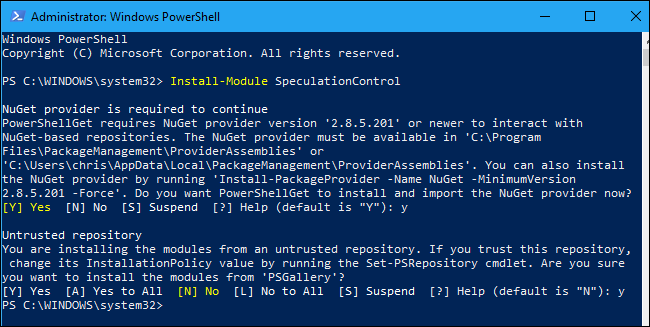
1. Type the following command into the PowerShell prompt and press Enter key to install the script on your system.

Code:
Install-Module SpeculationControl

Fr9lL35.png


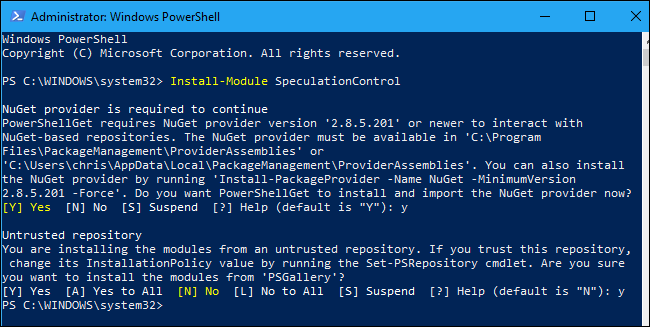
2. If you’re prompted to install the NuGet provider, type “y” and press Enter. You may also have to type “y” again and press Enter key to trust the software repository.

DAoieBW.png


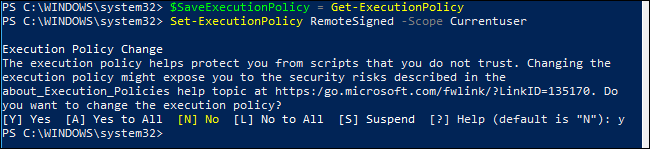
3. Execute following commands one at a time.

Code:
$SaveExecutionPolicy = Get-ExecutionPolicy

Code:
Set-ExecutionPolicy RemoteSigned -Scope Currentuser

4. Type “y” and press Enter key when you’re asked to confirm.

Qi3g1Lu.png


5. Then, to actually run the script, execute the following commands one at a time:

Code:
Import-Module SpeculationControl

Code:
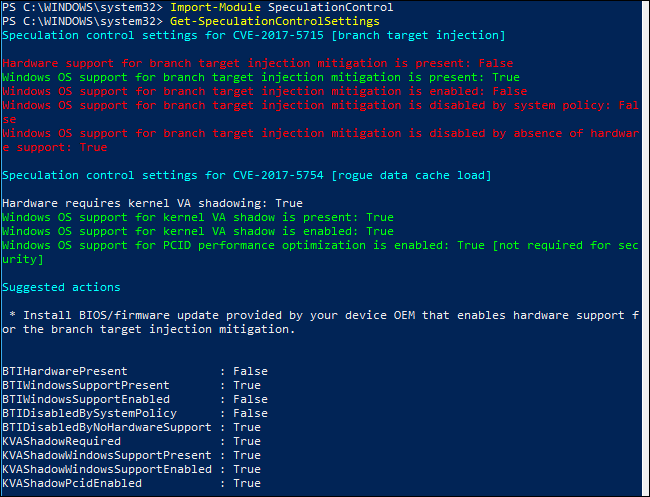
Get-SpeculationControlSettings

l42JUxf.png


The screenshot above, the command tells me that I have the Windows patch, but not the UEFI/BIOS update.

To fully protect against Meltdown and Spectre, you’ll need to install a UEFI or BIOS update from your PC’s manufacturer as well as the various software patches. These UEFI updates contain new Intel or AMD processor microcode that adds additional protection against these attacks. Unfortunately, they aren’t distributed via Windows Update—unless you’re using a Microsoft Surface device—so they must be downloaded from your manufacturer’s website and installed manually.

If “Windows OS support for branch target injection mitigation is present” is false, that means your PC hasn’t yet installed the operating system update that protects against these attacks.

Install all important Windows updates, if no updates are found, your antivirus software may be causing the problem, as Windows won’t install it if your antivirus software isn’t yet compatible. Contact your antivirus software provider and ask for more information about when their software will be compatible with the Meltdown and Spectre patch in Windows. This spreadsheet shows which antivirus software has been updated for compatibility with the patch.

You also need to install latest versions of your web browsers. If you use Microsoft Edge or Internet Explorer, the patch is included in the Windows Update. For Google Chrome and Mozilla Firefox, you’ll need to ensure you have the latest version—these browsers automatically update themselves unless you’ve gone out of your way to change that, so most users won’t have to do much.

Patches are now available to protect against Meltdown and Spectre on a wide variety of devices
 

My Computer My Computer

At a glance

Windows 11AMD Ryzen 7 5700GMicron Technology DDR4-3200 16GBNVIDIA GeForce RTX 3060
OS
Windows 11
Computer type
PC/Desktop
Manufacturer/Model
HP Pavilion
CPU
AMD Ryzen 7 5700G
Motherboard
Erica6
Memory
Micron Technology DDR4-3200 16GB
Graphics Card(s)
NVIDIA GeForce RTX 3060
Sound Card
Realtek ALC671
Monitor(s) Displays
Samsung SyncMaster U28E590
Screen Resolution
3840 x 2160
Hard Drives
SAMSUNG MZVLQ1T0HALB-000H1
Before i explain how to detect the two bugs on your own system, let’s take a moment to fully understand what the two vulnerabilities are and how they work.

The CPU flaw allows a would-be hacker to expose almost any data that a computer processes. That includes passwords, encrypted messages, personal information, and anything else you can think of.

Meltdown only affects Intel processors. Worryingly, the bug has been present since 2011. It uses part of the out-of-order execution (OOOE) process to change the cache state of a CPU. It can then dump the contents of the memory when it usually would be inaccessible.

Spectre can attack Intel, AMD, and ARM processors, and can thus also affect phones, tablets, and smart devices. It uses a processor’s speculative execution and branch prediction in conjunction with cache attacks to trick apps into revealing information that should be hidden within the protected memory area.

Spectre attacks need to be customized on a machine-by-machine basis, meaning they are harder to execute. However, because it’s based on an established practice in the industry, it’s also harder to fix.


Microsoft has made available a PowerShell script that will quickly tell you whether your PC is protected or not. Running it will require the Powershell, but the process is easy to follow.

If you’re using Windows 7, you will first need to download the Windows Management Framework 5.0 software, which will install a newer version of PowerShell on your system. The script below won’t run properly without it. If you’re using Windows 10, you already have the latest version of PowerShell installed.

First, run PowerShell as an administrator: press Windows key + Q or open the Start Menu, type PowerShell, right-click the first result Windows PowerShell, and select Run as administrator.

1. Type the following command into the PowerShell prompt and press Enter key to install the script on your system.

Code:
Install-Module SpeculationControl


5. Then, to actually run the script, execute the following commands one at a time:

Code:
Import-Module SpeculationControl

Code:
Get-SpeculationControlSettings


The screenshot above, the command tells me that I have the Windows patch, but not the UEFI/BIOS update.

To fully protect against Meltdown and Spectre, you’ll need to install a UEFI or BIOS update from your PC’s manufacturer as well as the various software patches. These UEFI updates contain new Intel or AMD processor microcode that adds additional protection against these attacks. Unfortunately, they aren’t distributed via Windows Update—unless you’re using a Microsoft Surface device—so they must be downloaded from your manufacturer’s website and installed manually.

If “Windows OS support for branch target injection mitigation is present” is false, that means your PC hasn’t yet installed the operating system update that protects against these attacks.

Install all important Windows updates, if no updates are found, your antivirus software may be causing the problem, as Windows won’t install it if your antivirus software isn’t yet compatible. Contact your antivirus software provider and ask for more information about when their software will be compatible with the Meltdown and Spectre patch in Windows. This spreadsheet shows which antivirus software has been updated for compatibility with the patch.

You also need to install latest versions of your web browsers. If you use Microsoft Edge or Internet Explorer, the patch is included in the Windows Update. For Google Chrome and Mozilla Firefox, you’ll need to ensure you have the latest version—these browsers automatically update themselves unless you’ve gone out of your way to change that, so most users won’t have to do much.

Patches are now available to protect against Meltdown and Spectre on a wide variety of devices
There is no newer bios on Gigabytes website for my Mobo. I have the latest F9E March 2018 and description of bios states:
  1. Update CPU Microcode
GA-Z270X-Gaming 7 (rev. 1.0) Support | Motherboard - GIGABYTE Australia


Also scanned my system here.

Intel® Driver & Support Assistant​


No supported driver or software updates are available for your system.​


However the "Inspectre" Says "Microcode Update Available YES .. It says I am not protected against Spectre and Meltdown. Why do I have go through this other process with Powershell? Don't you trust what this InSpectre says?

I am confused. That being said my FPS have increased in Battlefield 2042 by 30 fps and I believe it's due to these patches being disabled.

What is the risk ? Why would the Tech Yes City video tell me to disable these if there was a high risk of my computer being accessed illegally?
 
Last edited:

My Computers My Computers

  • At a glance

    Windows 11 Pro 25H2 26200.7627Ryzen 7 9800X3DG.Skill Trident Z5 RGB DDR5-6000 32GB (2×16GB...RTX 5080 Palit Gaming Pro
    OS
    Windows 11 Pro 25H2 26200.7627
    Computer type
    PC/Desktop
    Manufacturer/Model
    Gigababyte X870E Aorus Pro Rev 1.1
    CPU
    Ryzen 7 9800X3D
    Motherboard
    Gigababyte X870E Aorus Pro Rev 1.1
    Memory
    G.Skill Trident Z5 RGB DDR5-6000 32GB (2×16GB) CL30 2 x 16gb
    Graphics Card(s)
    RTX 5080 Palit Gaming Pro
    Sound Card
    Steel Series Arctis 1 Gaming Head phones
    Monitor(s) Displays
    Asus ROG Strix 27″ QHD OLED XG27AQDMG & Phillips 272V8
    Screen Resolution
    2560 X1440 27 Inch 240 HZ Asus
    PSU
    Corsair RM1000X
    Case
    Corsair CC750D (CC-9011078) Obsidian 750D Airflow Edition Black Full Tower ATX Case
    Cooling
    Corsair iCUE LINK TITAN 360 RX RGB
    Keyboard
    Razer BlackWidow V4 X Razer™ Yellow Mechanical Switches
    Mouse
    Logitech G502X Plus
    Internet Speed
    HFC 2000/100
    Browser
    Opera GX
    Antivirus
    Kaspersky Plus
  • At a glance

    Windows 11 23H2 22631.2715Intel i5-1135G78 GBIntel Iris Xe Graphics
    Operating System
    Windows 11 23H2 22631.2715
    Computer type
    Laptop
    Manufacturer/Model
    Dell XPS EVO 13.3" RNX9305C01AUSB
    CPU
    Intel i5-1135G7
    Motherboard
    Dell
    Memory
    8 GB
    Graphics card(s)
    Intel Iris Xe Graphics
    Monitor(s) Displays
    LED
    Screen Resolution
    1920 x 1080
    Hard Drives
    256GB SSD
    Other Info
    https://www.thegoodguys.com.au/dell-xps-evo-133-inches-win-11-laptop-rnx9305c01ausb
I just post tutorial i had you can use any method to verify protection from this flaw.
 

My Computer My Computer

At a glance

Windows 11AMD Ryzen 7 5700GMicron Technology DDR4-3200 16GBNVIDIA GeForce RTX 3060
OS
Windows 11
Computer type
PC/Desktop
Manufacturer/Model
HP Pavilion
CPU
AMD Ryzen 7 5700G
Motherboard
Erica6
Memory
Micron Technology DDR4-3200 16GB
Graphics Card(s)
NVIDIA GeForce RTX 3060
Sound Card
Realtek ALC671
Monitor(s) Displays
Samsung SyncMaster U28E590
Screen Resolution
3840 x 2160
Hard Drives
SAMSUNG MZVLQ1T0HALB-000H1
I just post tutorial i had you can use any method to verify protection from this flaw.
I don't need a tutorial nor need to know how to verify my protection. The InSpectre app does this already. I think you misunderstood me. That's why I posted a screenshot of the app in my OP showing my status with both of these patches.
 

My Computers My Computers

  • At a glance

    Windows 11 Pro 25H2 26200.7627Ryzen 7 9800X3DG.Skill Trident Z5 RGB DDR5-6000 32GB (2×16GB...RTX 5080 Palit Gaming Pro
    OS
    Windows 11 Pro 25H2 26200.7627
    Computer type
    PC/Desktop
    Manufacturer/Model
    Gigababyte X870E Aorus Pro Rev 1.1
    CPU
    Ryzen 7 9800X3D
    Motherboard
    Gigababyte X870E Aorus Pro Rev 1.1
    Memory
    G.Skill Trident Z5 RGB DDR5-6000 32GB (2×16GB) CL30 2 x 16gb
    Graphics Card(s)
    RTX 5080 Palit Gaming Pro
    Sound Card
    Steel Series Arctis 1 Gaming Head phones
    Monitor(s) Displays
    Asus ROG Strix 27″ QHD OLED XG27AQDMG & Phillips 272V8
    Screen Resolution
    2560 X1440 27 Inch 240 HZ Asus
    PSU
    Corsair RM1000X
    Case
    Corsair CC750D (CC-9011078) Obsidian 750D Airflow Edition Black Full Tower ATX Case
    Cooling
    Corsair iCUE LINK TITAN 360 RX RGB
    Keyboard
    Razer BlackWidow V4 X Razer™ Yellow Mechanical Switches
    Mouse
    Logitech G502X Plus
    Internet Speed
    HFC 2000/100
    Browser
    Opera GX
    Antivirus
    Kaspersky Plus
  • At a glance

    Windows 11 23H2 22631.2715Intel i5-1135G78 GBIntel Iris Xe Graphics
    Operating System
    Windows 11 23H2 22631.2715
    Computer type
    Laptop
    Manufacturer/Model
    Dell XPS EVO 13.3" RNX9305C01AUSB
    CPU
    Intel i5-1135G7
    Motherboard
    Dell
    Memory
    8 GB
    Graphics card(s)
    Intel Iris Xe Graphics
    Monitor(s) Displays
    LED
    Screen Resolution
    1920 x 1080
    Hard Drives
    256GB SSD
    Other Info
    https://www.thegoodguys.com.au/dell-xps-evo-133-inches-win-11-laptop-rnx9305c01ausb
I am confused. That being said my FPS have increased in Battlefield 2042 by 30 fps and I believe it's due to these patches being disabled.

What is the risk ? Why would the Tech Yes City video tell me to disable these if there was a high risk of my computer being accessed illegally?
It is one malware family out of millions. It is used with other malware so as long as you are protected, do not worry about it. Actually since it is patched automatically and it is only disabled per user basis, it is no longer exploited as much as before.
 

My Computer My Computer

At a glance

Home26H2CanAMD Ryzen 5 8600G (07/24)2x32GB Kingston FURY DDR5 5600 MHz CL36 @5200...ASROCK Radeon RX 6600 Challenger D 8G @48FPS ...
OS
Home26H2Can
Computer type
PC/Desktop
CPU
AMD Ryzen 5 8600G (07/24)
Motherboard
ASROCK B650M-HDV/M.2 (07/24) BIOS 4.21 AGESA ComboAM5 1.3.0.1 (04/26)
Memory
2x32GB Kingston FURY DDR5 5600 MHz CL36 @5200 CL36 (07/24)
Graphics Card(s)
ASROCK Radeon RX 6600 Challenger D 8G @48FPS (08/24)
Sound Card
Creative Sound BlasterX AE-5 Plus (05/24)
Monitor(s) Displays
24" Philips 24M1N3200ZS/00 (05/24)
Screen Resolution
1920×1080@165Hz via DP1.4
Hard Drives
Kingston KC3000 NVMe 2TB (05/24)
ADATA XPG GAMMIX S11 Pro 512GB (07/19)
PSU
Seasonic Core GM 550 Gold (04/24)
Case
Fractal Design Define 7 Mini with 3x Noctua NF-P14s/12@555rpm (04/24)
Cooling
Noctua NH-U12S with Noctua NF-P12 (04/24)
Keyboard
HP Pavilion Wired Keyboard 300 (07/24) + Rabalux 76017 Parker (01/24)
Mouse
Logitech M330 Silent Plus (01/26)
Internet Speed
500/100 Mbps via RouterOS (05/21) & TCP Optimizer
Browser
Edge, Brave for YouTube, LibreWolf for FB
Antivirus
NextDNS blocking 1/3 Traffic
Other Info
Phone: Motorola Moto G86 (02/26)
Backup: Hasleo Backup Suite (PreOS)
Headphones: Sennheiser RS170 (09/10)
Chair: Huzaro Force 4.4 Grey Mesh (05/24)
Notifier: Xiaomi Mi Band 9 Milanese (10/24)
FlexCore USB-C 3.2 Gen 1 (M) to LAN (F) (08/25)
I don't need a tutorial nor need to know how to verify my protection. The InSpectre app does this already. I think you misunderstood me. That's why I posted a screenshot of the app in my OP showing my status with both of these patches.
The sort of video you refer to and numerous forum threads along the same lines are aimed mostly at competetive game players, those who need those few extra frames per second to get a kill in multiplayer games.
For the average computer user or for professional (non gaming) users there is no real need to disable such protections, although you could argue that the chance of being hit by any form of malware using such attack vectors is extremely low.
The question you ask is not answerable by anyone else really.
So the choice is yours, do you use your machine for anything that could cause you severe issues, downtime and/ or monetary loss if your data was compromised, no matter how small the theoretical chance?
Only you really know the value of the data held on your devices, the potential impact to you of any form of attack and the risks you are willing to take.
 

My Computer My Computer

At a glance

Windows 11 Pro 22H2, build: 22621.521Intel i7-12700K 3.6GHz Base (5.0GHz Turbo)64GB DDR 3600MhzAsus Tuff RTX 3080 10GB OC
OS
Windows 11 Pro 22H2, build: 22621.521
Computer type
PC/Desktop
Manufacturer/Model
Scan 3XS Custom 1700
CPU
Intel i7-12700K 3.6GHz Base (5.0GHz Turbo)
Motherboard
Asus ProArt Creator B660 D4
Memory
64GB DDR 3600Mhz
Graphics Card(s)
Asus Tuff RTX 3080 10GB OC
Sound Card
Onboard Realtek
Monitor(s) Displays
Gigabyte G32QC 32inch 16:9 curved @2560 x 1440p 165Hz Freesync Premium Pro/ Dell SE2422H 24inch 16:9 1920 x 1080p 75Hz Freesync
Screen Resolution
2560 x 1440p & 1920 x 1080p
Hard Drives
WD SN570 1TB NVME (Boot), Samsung 870QVO 1TB (SSD), SanDisk 3D Ultra 500Gb (SSD) x2, Seagate 3Tb Expansion Desk (Ext HDD), 2x Toshiba 1Tb P300 (Ext HDD)
PSU
Corsair RM1000X Modular
Case
Corsair 4000D Airflow Desktop
Cooling
Corsair Hydro H150i RGB Pro XT 360mm Liquid Cooler, 3 x 120mm fans, 1x Exhaust
Keyboard
Microsoft Ergonomic
Mouse
Logitech G402
Internet Speed
800Mbs
Browser
Edge Chromium
Antivirus
Defender, Malwarebytes
I don't need a tutorial nor need to know how to verify my protection. The InSpectre app does this already. I think you misunderstood me. That's why I posted a screenshot of the app in my OP showing my status with both of these patches.
Tutorial there to show you how to patch your system if you don't want to do that i understand.
 

My Computer My Computer

At a glance

Windows 11AMD Ryzen 7 5700GMicron Technology DDR4-3200 16GBNVIDIA GeForce RTX 3060
OS
Windows 11
Computer type
PC/Desktop
Manufacturer/Model
HP Pavilion
CPU
AMD Ryzen 7 5700G
Motherboard
Erica6
Memory
Micron Technology DDR4-3200 16GB
Graphics Card(s)
NVIDIA GeForce RTX 3060
Sound Card
Realtek ALC671
Monitor(s) Displays
Samsung SyncMaster U28E590
Screen Resolution
3840 x 2160
Hard Drives
SAMSUNG MZVLQ1T0HALB-000H1
I was viewing this video and he says to to disable the Spectre and Meltdown with this app , he says having these patches enabled can affect your FPS in games. I have disabled these patches as per screenshot attached to my post.

However, it appears the trade-off is less security and increased vulnerabilty. Is it worth having these disabled and will there be any noticeable increase in my FPS (I haven't tested yet) or is not worth it?


Whether it's worth it or not is up to you. I wouldn't disable them, but that's me.
You can use a program like Unigine Heaven to see if it affects your fps.


My Computers My Computers

  • At a glance

    Win 11 Home ♦♦♦26200.8655 ♦♦♦♦♦♦♦25H2AMD Ryzen 7 3700XG.Skill (F4-3200C14D-16GTZKW)EVGA RTX 2070 (08G-P4-2171-KR)
    OS
    Win 11 Home ♦♦♦26200.8655 ♦♦♦♦♦♦♦25H2
    Computer type
    PC/Desktop
    Manufacturer/Model
    Built by Ghot® [May 2020]
    CPU
    AMD Ryzen 7 3700X
    Motherboard
    Asus Pro WS X570-ACE (BIOS 5302)
    Memory
    G.Skill (F4-3200C14D-16GTZKW)
    Graphics Card(s)
    EVGA RTX 2070 (08G-P4-2171-KR)
    Sound Card
    Realtek ALC1220P / ALC S1220A
    Monitor(s) Displays
    Dell U3011 30"
    Screen Resolution
    2560 x 1600
    Hard Drives
    2x Samsung 860 EVO 500GB,
    WD 4TB Black FZBX - SATA III,
    WD 8TB Black FZBX - SATA III,
    DRW-24B1ST CD/DVD Burner
    PSU
    PC Power & Cooling 750W Quad EPS12V
    Case
    Cooler Master ATCS 840 Tower
    Cooling
    CM Hyper 212 EVO (push/pull)
    Keyboard
    Ducky DK9008 Shine II Blue LED
    Mouse
    Logitech Optical M-100
    Internet Speed
    300/300
    Browser
    Firefox (latest)
    Antivirus
    Bitdefender Total Security
    Other Info
    Speakers: Klipsch Pro Media 2.1
  • At a glance

    Windows XP Pro 32bit w/SP3AMD Athlon 64 X2 5000+ (OC'd @ 3.2Ghz)TWIN2X2048-6400C4DHX (2 x 1GB, DDR2 800)EVGA 256-P2-N758-TR GeForce 8600GT SSC
    Operating System
    Windows XP Pro 32bit w/SP3
    Computer type
    PC/Desktop
    Manufacturer/Model
    Built by Ghot® (not in use)
    CPU
    AMD Athlon 64 X2 5000+ (OC'd @ 3.2Ghz)
    Motherboard
    ASUS M2N32-SLI Deluxe Wireless Edition
    Memory
    TWIN2X2048-6400C4DHX (2 x 1GB, DDR2 800)
    Graphics card(s)
    EVGA 256-P2-N758-TR GeForce 8600GT SSC
    Sound Card
    Onboard
    Monitor(s) Displays
    ViewSonic G90FB Black 19" Professional (CRT)
    Screen Resolution
    up to 2048 x 1536
    Hard Drives
    WD 36GB 10,000rpm Raptor SATA
    Seagate 80GB 7200rpm SATA
    Lite-On LTR-52246S CD/RW
    Lite-On LH-18A1P CD/DVD Burner
    PSU
    PC Power & Cooling Silencer 750 Quad EPS12V
    Case
    Generic Beige case, 80mm fans
    Cooling
    ZALMAN 9500A 92mm CPU Cooler
    Keyboard
    Logitech Classic Keybooard 200
    Mouse
    Logitech Optical M-BT96a
    Internet Speed
    300/300
    Browser
    Firefox 3.x ??
    Antivirus
    Symantec (Norton)
    Other Info
    Still assembled, still runs. Haven't turned it on for 15 years?
I was viewing this video and he says to to disable the Spectre and Meltdown with this app , he says having these patches enabled can affect your FPS in games. I have disabled these patches as per screenshot attached to my post.

However, it appears the trade-off is less security and increased vulnerabilty. Is it worth having these disabled and will there be any noticeable increase in my FPS (I haven't tested yet) or is not worth it?

I never trust random videos that tell you to disable security features in pursuit of "more fps".

It is not your pc and data they are risking.

As a minimum, you should backup all critical data, and I strongly recommend image backups as well to offline storage (external usbs).

In the end, if you really want more fps without risking your pc, the best approach is to either buy a separate pc only used for games or buy a more powerful pc.
 

My Computer My Computer

At a glance

Windows 11 Pro + Win11 Canary VM.I9 13th gen i9-13900H 2.60 GHZ16 GB solderedIntegrated Intel Iris XE
OS
Windows 11 Pro + Win11 Canary VM.
Computer type
Laptop
Manufacturer/Model
ASUS Zenbook 14
CPU
I9 13th gen i9-13900H 2.60 GHZ
Motherboard
Yep, Laptop has one.
Memory
16 GB soldered
Graphics Card(s)
Integrated Intel Iris XE
Sound Card
Realtek built in
Monitor(s) Displays
laptop OLED screen
Screen Resolution
2880x1800 touchscreen
Hard Drives
1 TB NVME SSD (only weakness is only one slot)
PSU
Internal + 65W thunderbolt USB4 charger
Case
Yep, got one
Cooling
Stella Artois (UK pint cans - 568 ml) - extra cost.
Keyboard
Built in UK keybd
Mouse
Bluetooth , wireless dongled, wired
Internet Speed
900 mbs (ethernet), wifi 6 typical 350-450 mb/s both up and down
Browser
Edge
Antivirus
Defender
Other Info
TPM 2.0, 2xUSB4 thunderbolt, 1xUsb3 (usb a), 1xUsb-c, hdmi out, 3.5 mm audio out/in combo, ASUS backlit trackpad (inc. switchable number pad)

Macrium Reflect Home V8
Office 365 Family (6 users each 1TB onedrive space)
Hyper-V (a vm runs almost as fast as my older laptop)
I never trust random videos that tell you to disable security features in pursuit of "more fps".

It is not your pc and data they are risking.

As a minimum, you should backup all critical data, and I strongly recommend image backups as well to offline storage (external usbs).

In the end, if you really want more fps without risking your pc, the best approach is to either buy a separate pc only used for games or buy a more powerful pc.
I have done Benchmark testing to see if there is any benefit in disabling these patches with InSpectre but there isn't . I tested with CineBench and also 3D Mark Time Spy 1.2 , in fact the score on 3D Mark is less with the patches disabled. 8060 vs 8044. CineBench was 6038 disabled then 6177 when enabled. So I have re-enabled both the patches for Spectre and Meltdown and rebooted my computer. It now says both are protected. It does say there is a Microcode update available. However I cannot locate where this is as nothing is on the Gigabyte support website to indicate a newer BIOS than what I already have.. Is this what I should be looking at ?
 

My Computers My Computers

  • At a glance

    Windows 11 Pro 25H2 26200.7627Ryzen 7 9800X3DG.Skill Trident Z5 RGB DDR5-6000 32GB (2×16GB...RTX 5080 Palit Gaming Pro
    OS
    Windows 11 Pro 25H2 26200.7627
    Computer type
    PC/Desktop
    Manufacturer/Model
    Gigababyte X870E Aorus Pro Rev 1.1
    CPU
    Ryzen 7 9800X3D
    Motherboard
    Gigababyte X870E Aorus Pro Rev 1.1
    Memory
    G.Skill Trident Z5 RGB DDR5-6000 32GB (2×16GB) CL30 2 x 16gb
    Graphics Card(s)
    RTX 5080 Palit Gaming Pro
    Sound Card
    Steel Series Arctis 1 Gaming Head phones
    Monitor(s) Displays
    Asus ROG Strix 27″ QHD OLED XG27AQDMG & Phillips 272V8
    Screen Resolution
    2560 X1440 27 Inch 240 HZ Asus
    PSU
    Corsair RM1000X
    Case
    Corsair CC750D (CC-9011078) Obsidian 750D Airflow Edition Black Full Tower ATX Case
    Cooling
    Corsair iCUE LINK TITAN 360 RX RGB
    Keyboard
    Razer BlackWidow V4 X Razer™ Yellow Mechanical Switches
    Mouse
    Logitech G502X Plus
    Internet Speed
    HFC 2000/100
    Browser
    Opera GX
    Antivirus
    Kaspersky Plus
  • At a glance

    Windows 11 23H2 22631.2715Intel i5-1135G78 GBIntel Iris Xe Graphics
    Operating System
    Windows 11 23H2 22631.2715
    Computer type
    Laptop
    Manufacturer/Model
    Dell XPS EVO 13.3" RNX9305C01AUSB
    CPU
    Intel i5-1135G7
    Motherboard
    Dell
    Memory
    8 GB
    Graphics card(s)
    Intel Iris Xe Graphics
    Monitor(s) Displays
    LED
    Screen Resolution
    1920 x 1080
    Hard Drives
    256GB SSD
    Other Info
    https://www.thegoodguys.com.au/dell-xps-evo-133-inches-win-11-laptop-rnx9305c01ausb
It does say there is a Microcode update available. However I cannot locate where this is as nothing is on the Gigabyte support website


The Microcode Update is a Windows patch.


Your 7700K is on both of these lists... but these are Windows 10 patches.


Then there's this...


The problem is, that technically your CPU doesn't support Windows 11.
So I don't think they ever wrote a Windows 11 Microcode patch for the 7700K.

 
Last edited:

My Computers My Computers

  • At a glance

    Win 11 Home ♦♦♦26200.8655 ♦♦♦♦♦♦♦25H2AMD Ryzen 7 3700XG.Skill (F4-3200C14D-16GTZKW)EVGA RTX 2070 (08G-P4-2171-KR)
    OS
    Win 11 Home ♦♦♦26200.8655 ♦♦♦♦♦♦♦25H2
    Computer type
    PC/Desktop
    Manufacturer/Model
    Built by Ghot® [May 2020]
    CPU
    AMD Ryzen 7 3700X
    Motherboard
    Asus Pro WS X570-ACE (BIOS 5302)
    Memory
    G.Skill (F4-3200C14D-16GTZKW)
    Graphics Card(s)
    EVGA RTX 2070 (08G-P4-2171-KR)
    Sound Card
    Realtek ALC1220P / ALC S1220A
    Monitor(s) Displays
    Dell U3011 30"
    Screen Resolution
    2560 x 1600
    Hard Drives
    2x Samsung 860 EVO 500GB,
    WD 4TB Black FZBX - SATA III,
    WD 8TB Black FZBX - SATA III,
    DRW-24B1ST CD/DVD Burner
    PSU
    PC Power & Cooling 750W Quad EPS12V
    Case
    Cooler Master ATCS 840 Tower
    Cooling
    CM Hyper 212 EVO (push/pull)
    Keyboard
    Ducky DK9008 Shine II Blue LED
    Mouse
    Logitech Optical M-100
    Internet Speed
    300/300
    Browser
    Firefox (latest)
    Antivirus
    Bitdefender Total Security
    Other Info
    Speakers: Klipsch Pro Media 2.1
  • At a glance

    Windows XP Pro 32bit w/SP3AMD Athlon 64 X2 5000+ (OC'd @ 3.2Ghz)TWIN2X2048-6400C4DHX (2 x 1GB, DDR2 800)EVGA 256-P2-N758-TR GeForce 8600GT SSC
    Operating System
    Windows XP Pro 32bit w/SP3
    Computer type
    PC/Desktop
    Manufacturer/Model
    Built by Ghot® (not in use)
    CPU
    AMD Athlon 64 X2 5000+ (OC'd @ 3.2Ghz)
    Motherboard
    ASUS M2N32-SLI Deluxe Wireless Edition
    Memory
    TWIN2X2048-6400C4DHX (2 x 1GB, DDR2 800)
    Graphics card(s)
    EVGA 256-P2-N758-TR GeForce 8600GT SSC
    Sound Card
    Onboard
    Monitor(s) Displays
    ViewSonic G90FB Black 19" Professional (CRT)
    Screen Resolution
    up to 2048 x 1536
    Hard Drives
    WD 36GB 10,000rpm Raptor SATA
    Seagate 80GB 7200rpm SATA
    Lite-On LTR-52246S CD/RW
    Lite-On LH-18A1P CD/DVD Burner
    PSU
    PC Power & Cooling Silencer 750 Quad EPS12V
    Case
    Generic Beige case, 80mm fans
    Cooling
    ZALMAN 9500A 92mm CPU Cooler
    Keyboard
    Logitech Classic Keybooard 200
    Mouse
    Logitech Optical M-BT96a
    Internet Speed
    300/300
    Browser
    Firefox 3.x ??
    Antivirus
    Symantec (Norton)
    Other Info
    Still assembled, still runs. Haven't turned it on for 15 years?
The Microcode Update is a Windows patch.


Your 7700K is on both of these lists... but these are Windows 10 patches.


Then there's this...


The problem is, that technically your CPU doesn't support Windows 11.
So I don't think they ever wrote a Windows 11 Microcode patch for the 7700K.


How do I know if I have to download it or if it is already installed?
The Microcode Update is a Windows patch.


Your 7700K is on both of these lists... but these are Windows 10 patches.


Then there's this...


The problem is, that technically your CPU doesn't support Windows 11.
So I don't think they ever wrote a Windows 11 Microcode patch for the 7700K.

I normally download all patches and updates from MS for my computer. I did have Windows 10 installed on the same Mobo and CPU. However I did a clean install for Windows 11. This wouldn't "erase" the Microcode update ? My Mobo does have TPM 1.2 and Secure Boot, so I was able to install Windows 11. I didn't install Windows 11 myself, I got an Airtasker to do it for me, due to the complications of TPM and Secure Boot being needed. I wasn't sure of this and how to find both or how to enable them as they weren't enabled at the time.

The last bios and latest for my Mobo is F9E and I have flashed to this Bios and it states "update CPU Microcode" 2018/03/09

Your 7700K is on both of these lists... but these are Windows 10 patches.

Are you saying I shouldn't download this as it is Windows 10 ? Why do I need to when InSpectre says I am protected against both ?
 
Last edited:

My Computers My Computers

  • At a glance

    Windows 11 Pro 25H2 26200.7627Ryzen 7 9800X3DG.Skill Trident Z5 RGB DDR5-6000 32GB (2×16GB...RTX 5080 Palit Gaming Pro
    OS
    Windows 11 Pro 25H2 26200.7627
    Computer type
    PC/Desktop
    Manufacturer/Model
    Gigababyte X870E Aorus Pro Rev 1.1
    CPU
    Ryzen 7 9800X3D
    Motherboard
    Gigababyte X870E Aorus Pro Rev 1.1
    Memory
    G.Skill Trident Z5 RGB DDR5-6000 32GB (2×16GB) CL30 2 x 16gb
    Graphics Card(s)
    RTX 5080 Palit Gaming Pro
    Sound Card
    Steel Series Arctis 1 Gaming Head phones
    Monitor(s) Displays
    Asus ROG Strix 27″ QHD OLED XG27AQDMG & Phillips 272V8
    Screen Resolution
    2560 X1440 27 Inch 240 HZ Asus
    PSU
    Corsair RM1000X
    Case
    Corsair CC750D (CC-9011078) Obsidian 750D Airflow Edition Black Full Tower ATX Case
    Cooling
    Corsair iCUE LINK TITAN 360 RX RGB
    Keyboard
    Razer BlackWidow V4 X Razer™ Yellow Mechanical Switches
    Mouse
    Logitech G502X Plus
    Internet Speed
    HFC 2000/100
    Browser
    Opera GX
    Antivirus
    Kaspersky Plus
  • At a glance

    Windows 11 23H2 22631.2715Intel i5-1135G78 GBIntel Iris Xe Graphics
    Operating System
    Windows 11 23H2 22631.2715
    Computer type
    Laptop
    Manufacturer/Model
    Dell XPS EVO 13.3" RNX9305C01AUSB
    CPU
    Intel i5-1135G7
    Motherboard
    Dell
    Memory
    8 GB
    Graphics card(s)
    Intel Iris Xe Graphics
    Monitor(s) Displays
    LED
    Screen Resolution
    1920 x 1080
    Hard Drives
    256GB SSD
    Other Info
    https://www.thegoodguys.com.au/dell-xps-evo-133-inches-win-11-laptop-rnx9305c01ausb
How do I know if I have to download it or if it is already installed?

I normally download all patches and updates from MS for my computer. I did have Windows 10 installed on the same Mobo and CPU. However I did a clean install for Windows 11. This wouldn't "erase" the Microcode update ? My Mobo does have TPM 1.2 and Secure Boot, so I was able to install Windows 11. I didn't install Windows 11 myself, I got an Airtasker to do it for me, due to the complications of TPM and Secure Boot being needed. I wasn't sure of this and how to find both or how to enable them as they weren't enabled at the time.

The last bios and latest for my Mobo is F9E and I have flashed to this Bios and it states "update CPU Microcode" 2018/03/09


Are you saying I shouldn't download this as it is Windows 10 ? Why do I need to when InSpectre says I am protected against both ?


Unlike BIOS updates... these patches are for Windows 10, not Windows 11..
On top of that, because you have a CPU that is incompatible with Windows 11, I have no idea if those patches would work, or if they would break something.

If it was me... I wouldn't use those patches.
 

My Computers My Computers

  • At a glance

    Win 11 Home ♦♦♦26200.8655 ♦♦♦♦♦♦♦25H2AMD Ryzen 7 3700XG.Skill (F4-3200C14D-16GTZKW)EVGA RTX 2070 (08G-P4-2171-KR)
    OS
    Win 11 Home ♦♦♦26200.8655 ♦♦♦♦♦♦♦25H2
    Computer type
    PC/Desktop
    Manufacturer/Model
    Built by Ghot® [May 2020]
    CPU
    AMD Ryzen 7 3700X
    Motherboard
    Asus Pro WS X570-ACE (BIOS 5302)
    Memory
    G.Skill (F4-3200C14D-16GTZKW)
    Graphics Card(s)
    EVGA RTX 2070 (08G-P4-2171-KR)
    Sound Card
    Realtek ALC1220P / ALC S1220A
    Monitor(s) Displays
    Dell U3011 30"
    Screen Resolution
    2560 x 1600
    Hard Drives
    2x Samsung 860 EVO 500GB,
    WD 4TB Black FZBX - SATA III,
    WD 8TB Black FZBX - SATA III,
    DRW-24B1ST CD/DVD Burner
    PSU
    PC Power & Cooling 750W Quad EPS12V
    Case
    Cooler Master ATCS 840 Tower
    Cooling
    CM Hyper 212 EVO (push/pull)
    Keyboard
    Ducky DK9008 Shine II Blue LED
    Mouse
    Logitech Optical M-100
    Internet Speed
    300/300
    Browser
    Firefox (latest)
    Antivirus
    Bitdefender Total Security
    Other Info
    Speakers: Klipsch Pro Media 2.1
  • At a glance

    Windows XP Pro 32bit w/SP3AMD Athlon 64 X2 5000+ (OC'd @ 3.2Ghz)TWIN2X2048-6400C4DHX (2 x 1GB, DDR2 800)EVGA 256-P2-N758-TR GeForce 8600GT SSC
    Operating System
    Windows XP Pro 32bit w/SP3
    Computer type
    PC/Desktop
    Manufacturer/Model
    Built by Ghot® (not in use)
    CPU
    AMD Athlon 64 X2 5000+ (OC'd @ 3.2Ghz)
    Motherboard
    ASUS M2N32-SLI Deluxe Wireless Edition
    Memory
    TWIN2X2048-6400C4DHX (2 x 1GB, DDR2 800)
    Graphics card(s)
    EVGA 256-P2-N758-TR GeForce 8600GT SSC
    Sound Card
    Onboard
    Monitor(s) Displays
    ViewSonic G90FB Black 19" Professional (CRT)
    Screen Resolution
    up to 2048 x 1536
    Hard Drives
    WD 36GB 10,000rpm Raptor SATA
    Seagate 80GB 7200rpm SATA
    Lite-On LTR-52246S CD/RW
    Lite-On LH-18A1P CD/DVD Burner
    PSU
    PC Power & Cooling Silencer 750 Quad EPS12V
    Case
    Generic Beige case, 80mm fans
    Cooling
    ZALMAN 9500A 92mm CPU Cooler
    Keyboard
    Logitech Classic Keybooard 200
    Mouse
    Logitech Optical M-BT96a
    Internet Speed
    300/300
    Browser
    Firefox 3.x ??
    Antivirus
    Symantec (Norton)
    Other Info
    Still assembled, still runs. Haven't turned it on for 15 years?
This type of Windows Update/Patches are specific to any Major Windows Build (21H2, 22H2, etc) of a specific version of Window (11, 10, 8.1 etc...). They install into that specific version and build of Windows - not like BIOS of Firmware updates - which use the storage of a given device to update the device itself. Same reason you can disable and/or uninstall them just as easily. While a Firmware/BIOS update - is not something you can easily Enable/Disable or remove/uninstall.
 

My Computer My Computer

At a glance

WinDOS 25H2Intel & AMDSO-DIMM SK Hynix 15.8 GB Dual-Channel DDR4-26...nVidia RTX 2060 6GB Mobile GPU (TU106M)
OS
WinDOS 25H2
Computer type
Laptop
CPU
Intel & AMD
Memory
SO-DIMM SK Hynix 15.8 GB Dual-Channel DDR4-2666 (2 x 8 GB) 1329MHz (19-19-19-43)
Graphics Card(s)
nVidia RTX 2060 6GB Mobile GPU (TU106M)
Sound Card
Onbord Realtek ALC1220
Screen Resolution
1920 x 1080
Hard Drives
1x Samsung PM981 NVMe PCIe M.2 512GB / 1x Seagate Expansion ST1000LM035 1TB
My Dell XPS 13 EVO 9305 (22H2) I have checked with the InSpectre and it says that Meltdown is not protected. It has a Tiger Lake Intel® Core™ i5-1135G7 Processor Why wouldn't this be protected as it is a 11th Gen CPU?
 

My Computers My Computers

  • At a glance

    Windows 11 Pro 25H2 26200.7627Ryzen 7 9800X3DG.Skill Trident Z5 RGB DDR5-6000 32GB (2×16GB...RTX 5080 Palit Gaming Pro
    OS
    Windows 11 Pro 25H2 26200.7627
    Computer type
    PC/Desktop
    Manufacturer/Model
    Gigababyte X870E Aorus Pro Rev 1.1
    CPU
    Ryzen 7 9800X3D
    Motherboard
    Gigababyte X870E Aorus Pro Rev 1.1
    Memory
    G.Skill Trident Z5 RGB DDR5-6000 32GB (2×16GB) CL30 2 x 16gb
    Graphics Card(s)
    RTX 5080 Palit Gaming Pro
    Sound Card
    Steel Series Arctis 1 Gaming Head phones
    Monitor(s) Displays
    Asus ROG Strix 27″ QHD OLED XG27AQDMG & Phillips 272V8
    Screen Resolution
    2560 X1440 27 Inch 240 HZ Asus
    PSU
    Corsair RM1000X
    Case
    Corsair CC750D (CC-9011078) Obsidian 750D Airflow Edition Black Full Tower ATX Case
    Cooling
    Corsair iCUE LINK TITAN 360 RX RGB
    Keyboard
    Razer BlackWidow V4 X Razer™ Yellow Mechanical Switches
    Mouse
    Logitech G502X Plus
    Internet Speed
    HFC 2000/100
    Browser
    Opera GX
    Antivirus
    Kaspersky Plus
  • At a glance

    Windows 11 23H2 22631.2715Intel i5-1135G78 GBIntel Iris Xe Graphics
    Operating System
    Windows 11 23H2 22631.2715
    Computer type
    Laptop
    Manufacturer/Model
    Dell XPS EVO 13.3" RNX9305C01AUSB
    CPU
    Intel i5-1135G7
    Motherboard
    Dell
    Memory
    8 GB
    Graphics card(s)
    Intel Iris Xe Graphics
    Monitor(s) Displays
    LED
    Screen Resolution
    1920 x 1080
    Hard Drives
    256GB SSD
    Other Info
    https://www.thegoodguys.com.au/dell-xps-evo-133-inches-win-11-laptop-rnx9305c01ausb
I have done Benchmark testing to see if there is any benefit in disabling these patches with InSpectre but there isn't . I tested with CineBench and also 3D Mark Time Spy 1.2 , in fact the score on 3D Mark is less with the patches disabled. 8060 vs 8044. CineBench was 6038 disabled then 6177 when enabled. So I have re-enabled both the patches for Spectre and Meltdown and rebooted my computer. It now says both are protected. It does say there is a Microcode update available. However I cannot locate where this is as nothing is on the Gigabyte support website to indicate a newer BIOS than what I already have.. Is this what I should be looking at ?
I cannot say but well done for doing your own testing and proving most of these claims are outdated "bollards".
 

My Computer My Computer

At a glance

Windows 11 Pro + Win11 Canary VM.I9 13th gen i9-13900H 2.60 GHZ16 GB solderedIntegrated Intel Iris XE
OS
Windows 11 Pro + Win11 Canary VM.
Computer type
Laptop
Manufacturer/Model
ASUS Zenbook 14
CPU
I9 13th gen i9-13900H 2.60 GHZ
Motherboard
Yep, Laptop has one.
Memory
16 GB soldered
Graphics Card(s)
Integrated Intel Iris XE
Sound Card
Realtek built in
Monitor(s) Displays
laptop OLED screen
Screen Resolution
2880x1800 touchscreen
Hard Drives
1 TB NVME SSD (only weakness is only one slot)
PSU
Internal + 65W thunderbolt USB4 charger
Case
Yep, got one
Cooling
Stella Artois (UK pint cans - 568 ml) - extra cost.
Keyboard
Built in UK keybd
Mouse
Bluetooth , wireless dongled, wired
Internet Speed
900 mbs (ethernet), wifi 6 typical 350-450 mb/s both up and down
Browser
Edge
Antivirus
Defender
Other Info
TPM 2.0, 2xUSB4 thunderbolt, 1xUsb3 (usb a), 1xUsb-c, hdmi out, 3.5 mm audio out/in combo, ASUS backlit trackpad (inc. switchable number pad)

Macrium Reflect Home V8
Office 365 Family (6 users each 1TB onedrive space)
Hyper-V (a vm runs almost as fast as my older laptop)

Latest Support Threads

Back
Top Bottom