
Standard User has access to Admin User folder


Rangoon

Member
Local time
4:38 PM
Posts
23
OS
Windows 11 Education version 24H2
This is my first time setting up multiple user accounts on one computer, so I don't have direct experience with the restrictions placed on standard user accounts. From what I've read, they aren't supposed to have access to other users' folders. I'm not sure what other access is restricted, so that's a secondary question I have. There's a lot of general information out there, but specifics aren't often discussed.

My main question is why a standard user account on this computer has access to my admin account user folder? It may have something to do with the following process that occurred when setting up this second account:

I created the account as a standard account. I found that I was unable to make certain tweaks to the user experience, so I changed it to an admin account. I made the changes I wanted, then converted it back to a standard account. I then moved most of the standard account's user subfolders to another drive (the same drive where my admin account user subfolders reside). I then discovered that the standard account had access to the admin account user folders (both the original C: drive folder and the one on the other drive). Windows didn't even challenge me with an "are you sure?" like it did when my primary admin account tried to access the other user account.

I realize I can manually change the permissions of specific folders, but I'm curious what happened here. Is this intended behavior? Shouldn't permissions have been revoked when the account was converted back to standard? I would like for the account to behave like it should in terms of this sort of access and all established user account restrictions. I worry that this is an indication that there are other "rules" that have been broken, not just folder permissions.

Edit: I did find this very helpful thread about permissions/restrictions of standard user accounts in Win 11.
 
Windows Build/Version
Windows 11 Education, 24H2

My Computer My Computer

At a glance

Windows 11 Education version 24H2i9-14900HX64GB DDR5RTX 4090
OS
Windows 11 Education version 24H2
Computer type
Laptop
Manufacturer/Model
Alienware m18 R2
CPU
i9-14900HX
Memory
64GB DDR5
Graphics Card(s)
RTX 4090
Screen Resolution
2560x1600
Hard Drives
2 4TB WD_BLACK SN850X
2 2TB WD_BLACK SN770M
I get the feeling that a Local Account was established in addition to the main/Microsoft Account. The Local Account can have either admin privileges or Standard privileges. Either type account with admin privileges can do all the same things. The first User established during Setup is an Administrator, has to at least one so changes, installs, etc., can be made. Also, to avoid file confusion each succeeding User after the first should have a slightly different name by at least one character or files may bet intermingled. Had to reinstall one for that issue, file ownership couldn't be proven, something like Joseph for the main and Joe for the Local.

Manage accounts:
 

My Computers My Computers

  • At a glance

    Win11 Pro RTM Version 24H2 Build 26100.4202Intel Core i5 11th Gen. 2.40GHz12GB
    OS
    Win11 Pro RTM Version 24H2 Build 26100.4202
    Computer type
    Laptop
    Manufacturer/Model
    Dell Vostro 3400
    CPU
    Intel Core i5 11th Gen. 2.40GHz
    Memory
    12GB
    Hard Drives
    256GB SSD NVMe M.2
  • At a glance

    Win11 Pro RTM Version 24H2 Build 26100.4202Intel Core i5 10th Gen. 2.90GHz16GBOnboard, no VGA, using a DisplayPort-to-VGA a...
    Operating System
    Win11 Pro RTM Version 24H2 Build 26100.4202
    Computer type
    PC/Desktop
    Manufacturer/Model
    Dell Vostro 5890
    CPU
    Intel Core i5 10th Gen. 2.90GHz
    Memory
    16GB
    Graphics card(s)
    Onboard, no VGA, using a DisplayPort-to-VGA adapter
    Monitor(s) Displays
    24" Dell
    Hard Drives
    512GB SSD NVMe, 4TB Seagate HDD
    Browser
    Firefox, Edge
    Antivirus
    Windows Defender/Microsoft Security

My Computer My Computer

At a glance

Microsoft Windows 11 HomeIntel Core i5-13490F2 x 16 Patriot Memory (PDP Systems) PSD516G56...GIGABYTE GeForce RTX 4070 WINDFORCE OC 12G (G...
OS
Microsoft Windows 11 Home
Computer type
PC/Desktop
Manufacturer/Model
MSI MS-7D98
CPU
Intel Core i5-13490F
Motherboard
MSI B760 GAMING PLUS WIFI
Memory
2 x 16 Patriot Memory (PDP Systems) PSD516G560081 6400MT (32-37-37-74); 1.35V)
Graphics Card(s)
GIGABYTE GeForce RTX 4070 WINDFORCE OC 12G (GV-N4070WF3OC-12GD)
Sound Card
Bluetooth Аудио
Monitor(s) Displays
INNOCN 15K1F
Screen Resolution
1920 x 1080
Hard Drives
WD_BLACK SN770 250GB
KINGSTON SNV2S1000G (ELFK0S.6)
PSU
Thermaltake Toughpower GF3 1000W
Case
CG560 - DeepCool
Cooling
ID-COOLING SE-224-XTS / 2 x 140Mm Fan - rear and top; 3 x 120Mm - front
Keyboard
Corsair K70 RGB TKL
Mouse
Corsair KATAR PRO XT
Internet Speed
100 Mbps
Browser
Firefox
Antivirus
Microsoft Defender Antivirus
Other Info
https://www.userbenchmark.com/UserRun/66553205

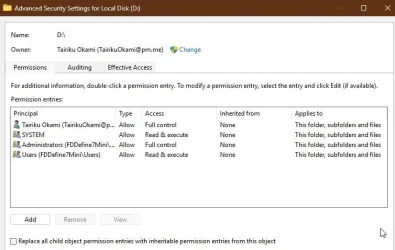
Thanks for the link. There's a lot of great information in there! However, it solidifies my question. I had already done what it says to do to revoke administrative permissions (see screenshot), but that account can still access the admin account's User folders.

Both accounts are Local. One is Admin, the other is Standard. Why is the Standard account still able to access other users' folders (especially an admin user's folders)? That's not how this should work, right?

2024-12-08_200937.webp
 

My Computer My Computer

At a glance

Windows 11 Education version 24H2i9-14900HX64GB DDR5RTX 4090
OS
Windows 11 Education version 24H2
Computer type
Laptop
Manufacturer/Model
Alienware m18 R2
CPU
i9-14900HX
Memory
64GB DDR5
Graphics Card(s)
RTX 4090
Screen Resolution
2560x1600
Hard Drives
2 4TB WD_BLACK SN850X
2 2TB WD_BLACK SN770M
Why is the Standard account still able to access other users' folders (especially an admin user's folders)? That's not how this should work, right?
As an admin user, if you try to access another user's folder you will be challenged. Here I am signed in as 'Owner' (a local admin account) and am trying to access the user folder for 'Maintenance'.

1733712251761.webp

If I click Continue I will be exercising my admin powers to grant my account permanent access to the Maintenance folder. Should I later demote Owner to a standard account it will still be able to access Maintenance, you don't need admin rights once your account has been granted permission. That's probably how your situation arose.

The solution is to look at the security permissions of your user folder. You'll almost certainly find that the standard (that was once an admin) account has full permissions. Just remove their account name from your folder's permissions and you'll be back to normal.
 

My Computers My Computers

  • At a glance

    Windows 11 HomeAMD Athlon Silver 3050U8GBRadeon Graphics
    OS
    Windows 11 Home
    Computer type
    Laptop
    Manufacturer/Model
    Acer Aspire 3 A315-23-R9VY
    CPU
    AMD Athlon Silver 3050U
    Memory
    8GB
    Graphics Card(s)
    Radeon Graphics
    Monitor(s) Displays
    laptop screen
    Screen Resolution
    1366x768 native resolution, up to 2560x1440 with Radeon Virtual Super Resolution
    Hard Drives
    1TB Samsung EVO 870 SSD (from April 2026: 250GB EVO 850)
    Internet Speed
    150 Mbps
    Browser
    Edge, Firefox
    Antivirus
    Defender
    Other Info
    UPDATE - 11 April 2026: due to lid hinges starting to break up this laptop has been retired from active duty. The OS with all software and files has been migrated to my System Seven in 'Other systems' to carry on as my general purpose 'main machine'.

    I've now clean installed 25H2 and used Garlin's scripts to update Secure Boot to CA 2023 and revoke the PCA 2011 certificates. It's new role is to test secure boot issues.

    Info for 2021-2026:
    fully 'Windows 11 ready' laptop. Windows 10 C: partition migrated from my old unsupported 'main machine' then upgraded to 11. A test migration ran Insider builds for 2 months. When 11 was released on 5th October 2021 it was re-imaged back to 10 and was offered the upgrade in Windows Update on 20th October. Windows Update offered the 22H2 Feature Update on 20th September 2022. It got the 23H2 Feature Update on 4th November 2023 through Windows Update, 24H2 on 3rd October 2024 through Windows Update by setting the Target Release Version for 24H2, and 25H2 on 30th September 2025 through Windows Update by setting the Target Release Version for 25H2.
  • At a glance

    Windows 11 ProIntel® Core™ i5-520M8GB(integrated graphics) Intel HD Graphics
    Operating System
    Windows 11 Pro
    Computer type
    Laptop
    Manufacturer/Model
    Dell Latitude E4310
    CPU
    Intel® Core™ i5-520M
    Motherboard
    0T6M8G
    Memory
    8GB
    Graphics card(s)
    (integrated graphics) Intel HD Graphics
    Screen Resolution
    1366x768
    Hard Drives
    500GB Crucial MX500 SSD
    Browser
    Firefox, Edge
    Antivirus
    Defender
    Other Info
    unsupported machine: Legacy bios, MBR, TPM 1.2, upgraded from W10 to W11 using W10/W11 hybrid install media workaround.

    In-place upgrade to 22H2 using ISO and a workaround.
    Feature Update to 23H2 by manually installing the Enablement Package.
    In-place upgrade to 24H2 using hybrid 23H2/24H2 install media.
    Upgraded to 25H2 by Enablement Package.

    Also running Insider Experimental 263xx and 29xxx builds and Windows 10 as native boot .vhdx.
  • My SYSTEM THREE is a Dell Latitude 5410, i7-10610U, 32GB RAM, 512GB NVMe ssd, supported device running Windows 11 Pro.

    My SYSTEM FOUR was a 2-in-1 convertible Lenovo Yoga 11e (1st gen) type 20DA, Celeron N2930, 8GB RAM, 256GB ssd. Unsupported device. This has now been sold. It has been replaced by my System Eight.

    My SYSTEM FIVE is a Dell Latitude 3190 2-in-1, Pentium Silver N5030, 8GB RAM, 1TB NVMe ssd, supported device running Windows 11 Pro, plus Insider Beta, Experimental 263xx and 29xxx builds (and a few others) as a native boot .vhdx.

    My SYSTEM SIX is a Dell Latitude 5550, Core Ultra 7 165H, 64GB RAM, 1TB NVMe SSD, supported device, Windows 11 Pro, Hyper-V host machine. Updated to 25H2 on 30th September 2025.

    My SYSTEM SEVEN is a Lenovo Thinkpad T580, 1920x1080 touchscreen, Intel Core i7-8650U, 16GB RAM, 512GB NVMe SSD + 2nd 512GB NVMe SSD, a supported device for Windows 11. This is my current general purpose 'main machine'. The installed Windows 11 Home from my System One has been migrated to this machine. As its new home has an existing digital licence for Pro I've been able to upgrade the migrated OS from Home to Pro.

    My SYSTEM EIGHT is a 2-in-1 convertible Lenovo Yoga 11e (5th gen) type 20LN, Celeron N4120, 8GB RAM, 512GB NVMe ssd, a supported device for Windows 11. Currently running Windows 11 Pro, plus Insider Beta, Experimental 263xx and 29xxx builds as native boot vhdx.
The solution is to look at the security permissions of your user folder. You'll almost certainly find that the standard (that was once an admin) account has full permissions. Just remove their account name from your folder's permissions and you'll be back to normal.

I'll take a look. I'm sure you're right, and that makes sense if reverting back to a standard doesn't actually revoke previously/specifically granted permissions. I just assumed it would, and worried that there could be other fallout from something that had gone awry. I'll manually set the permissions and then confirm, e.g., that account can't edit the registry or install/uninstall software.
 

My Computer My Computer

At a glance

Windows 11 Education version 24H2i9-14900HX64GB DDR5RTX 4090
OS
Windows 11 Education version 24H2
Computer type
Laptop
Manufacturer/Model
Alienware m18 R2
CPU
i9-14900HX
Memory
64GB DDR5
Graphics Card(s)
RTX 4090
Screen Resolution
2560x1600
Hard Drives
2 4TB WD_BLACK SN850X
2 2TB WD_BLACK SN770M
that makes sense if reverting back to a standard doesn't actually revoke previously/specifically granted permissions. I just assumed it would, and worried that there could be other fallout from something that had gone awry. I'll manually set the permissions and then confirm, e.g., that account can't edit the registry or install/uninstall software.
Permissions for folders are assigned on the basis of the SID (security ID) of the account concerned. If an account subsequently tries to access a folder, access is granted (or not) if its SID matches. Whether it's an admin or standard user plays no part in this.

Installing, registry editing, etc. does however checks for the account status each time. If it's an admin user it will be asked if it wants to continue with an OK/NO choice. A standard user will see the same challenge, but it will have the OK button greyed out until the user provides the name and password of an admin account.
 

My Computers My Computers

  • At a glance

    Windows 11 HomeAMD Athlon Silver 3050U8GBRadeon Graphics
    OS
    Windows 11 Home
    Computer type
    Laptop
    Manufacturer/Model
    Acer Aspire 3 A315-23-R9VY
    CPU
    AMD Athlon Silver 3050U
    Memory
    8GB
    Graphics Card(s)
    Radeon Graphics
    Monitor(s) Displays
    laptop screen
    Screen Resolution
    1366x768 native resolution, up to 2560x1440 with Radeon Virtual Super Resolution
    Hard Drives
    1TB Samsung EVO 870 SSD (from April 2026: 250GB EVO 850)
    Internet Speed
    150 Mbps
    Browser
    Edge, Firefox
    Antivirus
    Defender
    Other Info
    UPDATE - 11 April 2026: due to lid hinges starting to break up this laptop has been retired from active duty. The OS with all software and files has been migrated to my System Seven in 'Other systems' to carry on as my general purpose 'main machine'.

    I've now clean installed 25H2 and used Garlin's scripts to update Secure Boot to CA 2023 and revoke the PCA 2011 certificates. It's new role is to test secure boot issues.

    Info for 2021-2026:
    fully 'Windows 11 ready' laptop. Windows 10 C: partition migrated from my old unsupported 'main machine' then upgraded to 11. A test migration ran Insider builds for 2 months. When 11 was released on 5th October 2021 it was re-imaged back to 10 and was offered the upgrade in Windows Update on 20th October. Windows Update offered the 22H2 Feature Update on 20th September 2022. It got the 23H2 Feature Update on 4th November 2023 through Windows Update, 24H2 on 3rd October 2024 through Windows Update by setting the Target Release Version for 24H2, and 25H2 on 30th September 2025 through Windows Update by setting the Target Release Version for 25H2.
  • At a glance

    Windows 11 ProIntel® Core™ i5-520M8GB(integrated graphics) Intel HD Graphics
    Operating System
    Windows 11 Pro
    Computer type
    Laptop
    Manufacturer/Model
    Dell Latitude E4310
    CPU
    Intel® Core™ i5-520M
    Motherboard
    0T6M8G
    Memory
    8GB
    Graphics card(s)
    (integrated graphics) Intel HD Graphics
    Screen Resolution
    1366x768
    Hard Drives
    500GB Crucial MX500 SSD
    Browser
    Firefox, Edge
    Antivirus
    Defender
    Other Info
    unsupported machine: Legacy bios, MBR, TPM 1.2, upgraded from W10 to W11 using W10/W11 hybrid install media workaround.

    In-place upgrade to 22H2 using ISO and a workaround.
    Feature Update to 23H2 by manually installing the Enablement Package.
    In-place upgrade to 24H2 using hybrid 23H2/24H2 install media.
    Upgraded to 25H2 by Enablement Package.

    Also running Insider Experimental 263xx and 29xxx builds and Windows 10 as native boot .vhdx.
  • My SYSTEM THREE is a Dell Latitude 5410, i7-10610U, 32GB RAM, 512GB NVMe ssd, supported device running Windows 11 Pro.

    My SYSTEM FOUR was a 2-in-1 convertible Lenovo Yoga 11e (1st gen) type 20DA, Celeron N2930, 8GB RAM, 256GB ssd. Unsupported device. This has now been sold. It has been replaced by my System Eight.

    My SYSTEM FIVE is a Dell Latitude 3190 2-in-1, Pentium Silver N5030, 8GB RAM, 1TB NVMe ssd, supported device running Windows 11 Pro, plus Insider Beta, Experimental 263xx and 29xxx builds (and a few others) as a native boot .vhdx.

    My SYSTEM SIX is a Dell Latitude 5550, Core Ultra 7 165H, 64GB RAM, 1TB NVMe SSD, supported device, Windows 11 Pro, Hyper-V host machine. Updated to 25H2 on 30th September 2025.

    My SYSTEM SEVEN is a Lenovo Thinkpad T580, 1920x1080 touchscreen, Intel Core i7-8650U, 16GB RAM, 512GB NVMe SSD + 2nd 512GB NVMe SSD, a supported device for Windows 11. This is my current general purpose 'main machine'. The installed Windows 11 Home from my System One has been migrated to this machine. As its new home has an existing digital licence for Pro I've been able to upgrade the migrated OS from Home to Pro.

    My SYSTEM EIGHT is a 2-in-1 convertible Lenovo Yoga 11e (5th gen) type 20LN, Celeron N4120, 8GB RAM, 512GB NVMe ssd, a supported device for Windows 11. Currently running Windows 11 Pro, plus Insider Beta, Experimental 263xx and 29xxx builds as native boot vhdx.
11 has introduced some changes, it is best to remove inherited permissions and users, to be able to apply new ones.
Code:
takeown /s %computername% /u %username% /f D: /r /d y
icacls D: /inheritance:r
icacls D: /grant:r %username%:(OI)(CI)F /t /l /q /c
icacls D: /grant "System":(OI)(CI)RX /t /l /q /c
icacls D: /grant "Users":(OI)(CI)RX /t /l /q /c

capture_12092024_154937.webp
 

My Computer My Computer

At a glance

Home2FH2CanAMD Ryzen 5 8600G (07/24)2x32GB Kingston FURY DDR5 5600 MHz CL36 @5200...ASROCK Radeon RX 6600 Challenger D 8G @48FPS ...
OS
Home2FH2Can
Computer type
PC/Desktop
CPU
AMD Ryzen 5 8600G (07/24)
Motherboard
ASROCK B650M-HDV/M.2 (07/24) BIOS 4.43 AGESA ComboAM5 1.3.0.1b Patch A (07/26)
Memory
2x32GB Kingston FURY DDR5 5600 MHz CL36 @5200 CL40 (07/24)
Graphics Card(s)
ASROCK Radeon RX 6600 Challenger D 8G @48FPS (08/24)
Sound Card
Creative Sound BlasterX AE-5 Plus (05/24)
Monitor(s) Displays
24" Philips 24M1N3200ZS/00 (05/24)
Screen Resolution
1920×1080@165Hz via DP1.4
Hard Drives
Kingston KC3000 NVMe 2TB (05/24)
ADATA XPG GAMMIX S11 Pro 512GB (07/19)
PSU
Seasonic Core GM 550 Gold (04/24)
Case
Fractal Design Define 7 Mini with 3x Noctua NF-P14s/12@555rpm (04/24)
Cooling
Noctua NH-U12S with Noctua NF-P12 (04/24)
Keyboard
HP Pavilion Wired Keyboard 300 (07/24) + Rabalux 76017 Parker (01/24)
Mouse
Logitech M330 Silent Plus (07/26)
Internet Speed
500/100 Mbps via RouterOS (05/21) & TCP Optimizer
Browser
Edge, Brave for YouTube, LibreWolf for FB
Antivirus
NextDNS blocking 1/3 Traffic
Other Info
Phone: Motorola Moto G86 (02/26)
Backup: Hasleo Backup Suite (PreOS)
Headphones: Sennheiser RS170 (09/10)
Chair: Huzaro Force 4.4 Grey Mesh (05/24)
Notifier: Xiaomi Mi Band 9 Milanese (10/24)
FlexCore USB-C 3.2 Gen 1 (M) to LAN (F) (08/25)
11 has introduced some changes, it is best to remove inherited permissions and users, to be able to apply new ones.

What sorts of changes? I did to much customizing on the 2nd account to want to delete it and recreate it. The customizing is why I had to change it to an admin account in the first place, then back to standard. They required admin status. Will other unintended things be off about an admin account turned standard?
 

My Computer My Computer

At a glance

Windows 11 Education version 24H2i9-14900HX64GB DDR5RTX 4090
OS
Windows 11 Education version 24H2
Computer type
Laptop
Manufacturer/Model
Alienware m18 R2
CPU
i9-14900HX
Memory
64GB DDR5
Graphics Card(s)
RTX 4090
Screen Resolution
2560x1600
Hard Drives
2 4TB WD_BLACK SN850X
2 2TB WD_BLACK SN770M
The issue which @Bree raises in post 5 is explained in this MS article. Continue dialog box for folder access in Windows Explorer when user only has access with elevated token - Windows Server . Workaround #1 can also be done with any third party file manager.

The key message is never click continue!

As regards fixing the permissions you might find SetAcl Studio helpful. SetACL Studio - Free & Intuitive Permission and ACL Management • Helge Klein It enables backup and restore privileges if you run it as an administrator, so you have access to every object's security, So be be very careful.

If you do want to move your user folders, do make sure that you correctly duplicate the permissions in the folders you have chosen.
I did to much customizing on the 2nd account to want to delete it and recreate it. The customizing is why I had to change it to an admin account in the first place, then back to standard. They required admin status.
I'm puzzled by this. If a tweak says it requires admin access, it normally applies to all profiles, so performing the tweak from a different administrative account should affect all accounts. In the tutorials on this site @Brink is very clear about this. If you want different tweaks on different accounts, then you'll have to make appropriate changes in your profile for which a normal user account should be ok. Most tweaks that involve changes to HKCR can be done per user, although the method may be different. Ask if you get stuck.

If a tweak is a User Policy that can be set using Group Policy Editor, you can't apply it to a standard user account using the instructions for direct registry editing, but this shouldn't affect you because you will have Group Policy Editor. There's a workaround for those who only have Windows Home.
 

My Computers My Computers

  • At a glance

    Windows 11 25H2 Pro Build 26200i3-1215U8GB
    OS
    Windows 11 25H2 Pro Build 26200
    Computer type
    PC/Desktop
    Manufacturer/Model
    MSI PRO ADL-U Cubi 5 (MS-B0A8)
    CPU
    i3-1215U
    Memory
    8GB
    Monitor(s) Displays
    Sony 43" 4k TV
    Screen Resolution
    3840x2160
    Hard Drives
    250GB NVMe M.2 PCIe Gen 3 SSD
    PSU
    External 65W
    Case
    Mini PC
    Browser
    FireFox
    Antivirus
    MS
  • At a glance

    Windows 11 Pro 25H2Intel i3-910016GB DDR4
    Operating System
    Windows 11 Pro 25H2
    Computer type
    PC/Desktop
    Manufacturer/Model
    Dell Optiplex 3070 SFF
    CPU
    Intel i3-9100
    Memory
    16GB DDR4
    Monitor(s) Displays
    Dell S2721
    Screen Resolution
    3840 x 2160
    Hard Drives
    Samsung 500GB nvMe
    Case
    Dell small form factor
    Keyboard
    Cherry mechanical (Blue)
    Mouse
    Microsoft
    Antivirus
    MS Defender
Thanks for the insights here! I also was confused that the tweaks on the second account required admin privileges. A friend of mine, who knows much more than I do, was doing the tweaks with me. I'll try to get a few examples that weren't working otherwise. They didn't carry over from when they were performed on my main admin account, but that just gave me an idea. I wonder if we should have gone back and just run those tweaks again my admin account. So, maybe it's best to create the admin, then any standard accounts, then run tweaks on the admin account, followed by user tweaks on the others. Would that make sense?

If so, perhaps I'll just delete the standard account and recreate it anew and it'll never need to become an admin account. That's a much more elegant solution if it works.
 

My Computer My Computer

At a glance

Windows 11 Education version 24H2i9-14900HX64GB DDR5RTX 4090
OS
Windows 11 Education version 24H2
Computer type
Laptop
Manufacturer/Model
Alienware m18 R2
CPU
i9-14900HX
Memory
64GB DDR5
Graphics Card(s)
RTX 4090
Screen Resolution
2560x1600
Hard Drives
2 4TB WD_BLACK SN850X
2 2TB WD_BLACK SN770M
I'm puzzled by this. If a tweak says it requires admin access, it normally applies to all profiles, so performing the tweak from a different administrative account should affect all accounts.

There were some user-side tweaks that required editing the registry and a standard user doesn't have such permission, so it was necessary to elevate to admin.

I created a couple of test accounts on that system, one admin and one standard. I have definitely changed permissions on the original accounts that were not intended, by comparing to the new ones. I need to learn more about this. I may try that utility you referenced first, but I might end up just clean installing Windows and starting over with more attention to the process.
 

My Computer My Computer

At a glance

Windows 11 Education version 24H2i9-14900HX64GB DDR5RTX 4090
OS
Windows 11 Education version 24H2
Computer type
Laptop
Manufacturer/Model
Alienware m18 R2
CPU
i9-14900HX
Memory
64GB DDR5
Graphics Card(s)
RTX 4090
Screen Resolution
2560x1600
Hard Drives
2 4TB WD_BLACK SN850X
2 2TB WD_BLACK SN770M
Latest Support Threads

Back
Top Bottom




