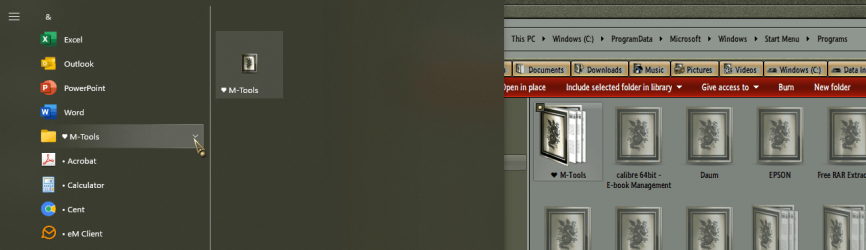
Hi, as an experiment I added a folder including other folders containing shortcuts in
C:\ProgramData\Microsoft\Windows\Start Menu\Programs
In Win 10, this would have been seen in the Start Menu. Not in Win 11.
I tried placing a folder containing shortcuts directly there. Still not seen.
I'm guessing that perhaps only installed programs are now visible via the Start Menu.
I also used Brink's tutorial to change to the 'Classic' Win 10 style menu. Same behaviour.
This implies
- can't add e.g. portable programs to the start menu
- can't structure a very large start menu into categories
There could be new issues for people with large menus upgrading from e.g. Win 7.
(Ok.. the answer's Open Shell...)
C:\ProgramData\Microsoft\Windows\Start Menu\Programs
In Win 10, this would have been seen in the Start Menu. Not in Win 11.
I tried placing a folder containing shortcuts directly there. Still not seen.
I'm guessing that perhaps only installed programs are now visible via the Start Menu.
I also used Brink's tutorial to change to the 'Classic' Win 10 style menu. Same behaviour.
This implies
- can't add e.g. portable programs to the start menu
- can't structure a very large start menu into categories
There could be new issues for people with large menus upgrading from e.g. Win 7.
(Ok.. the answer's Open Shell...)
My Computer
At a glance
Windows 11 Proi7-8650U16GBIntel UHD 620
- OS
- Windows 11 Pro
- Computer type
- Laptop
- Manufacturer/Model
- Lenovo t480s
- CPU
- i7-8650U
- Memory
- 16GB
- Graphics Card(s)
- Intel UHD 620
- Screen Resolution
- 1920x1080
- Hard Drives
- C SN810 SDCPNRY-512G-1006
- Browser
- Edge, Firefox
- Antivirus
- Defender