System backup - really easy - no extra software needed


jimbo45

Well-known member
Pro User
VIP
Local time
3:00 PM
Posts
5,780
Location
Hafnarfjörður IS
OS
Windows XP,11 Linux Fedora Rawhide pre-release 45
Hi folks
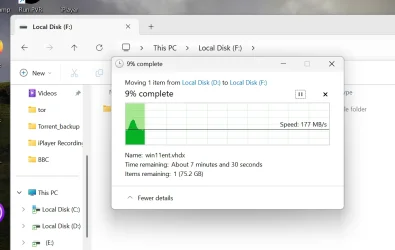
These days with Subscription models or "Go Pro" where the features you want are extra paid for things - why not for system backups switch to using Virtual hard disks (vhdx or vhd) drives. Then simply use Windows explorer to copy the vhd(x) file to backup.

HDD space isn't usually a problem these days, a decent Windows system image with loads of apps on it can be 50 - 90 GB etc and backup only takes around 10 mins with decent hardware.

A lot of the software on offer these days is really trying to solve C20 problems on legacy hardware. I've totally no need for Macrium etc these days.

Note DATA backup / Archive backup e.g video, music, etc is another issue which is totally separate from Systerm backup plus everybody has different needs. Also with cheap decent cloud storage really important stuff can be readily backed up to and retrieved from the cloud server.
Screenshot 2026-05-21 110811.webp


Cheers
jimbo
 

My Computer

System One

  • OS
    Windows XP,11 Linux Fedora Rawhide pre-release 45
    Computer type
    PC/Desktop
    CPU
    2 X Intel i7
    Screen Resolution
    4KUHD X 2
I have several VHDs and VHDXs running in Oracle's VirtualBox plus a Native Boot VHDX.

But the VirtualBox machines are slower because the hardware is virtualised.

What is your method and do you no longer operate real machines? Can you turn a virtual machine int a real one?
 

My Computers

System One System Two

  • OS
    Windows 11 Pro 25H2 26200.8524
    Computer type
    Laptop
    Manufacturer/Model
    Acemagic LX15PRO
    CPU
    AMD Ryzen 7 5825U with Radeon Graphics
    Memory
    16GB
    Screen Resolution
    1920 x 1080
    Hard Drives
    SSD 2TB
    Internet Speed
    30 Mbps
    Browser
    Brave
    Antivirus
    Webroot Secure Anywhere
    Other Info
    System 3

    Acer Swift SF114-34 laptop
    OS Windows 11 Pro 26200.8524
    CPU Pentium Silver N6000
    RAM 4GB
    SSD Samsung 970 EVO Plus SSD 2TB (an upgrade)
  • Operating System
    Windows 11 Pro 23H2 22631.2506
    Computer type
    Laptop
    Manufacturer/Model
    HP Mini 210-1090NR PC (bought in late 2009!)
    CPU
    Atom N450 1.66GHz
    Memory
    2GB
    Browser
    Brave
    Antivirus
    Webroot
HDD space isn't usually a problem these days, a decent Windows system image with loads of apps on it can be 50 - 90 GB etc and backup only takes around 10 mins with decent hardware.
It takes me less than half that time using Macrium X... "really easy"?
 

My Computer

System One

  • OS
    windows 11 Pro
    Computer type
    Laptop
    Manufacturer/Model
    Dell XPS 15 9510
    CPU
    11th Gen Intel(R) Core(TM) i7-11800H @ 2.30GHz (16 CPUs
    Memory
    16 GB
    Graphics Card(s)
    NVIDIA GeForce RTX 3050 Ti
    Hard Drives
    512GB Solid State Drive
    Browser
    Firefox
It takes me less than half that time using Macrium X... "really easy"?
Time wasn't the issue -- I was referring to FREE or NON subscription ways to do this !!!

cheers
jimbo
 

My Computer

System One

  • OS
    Windows XP,11 Linux Fedora Rawhide pre-release 45
    Computer type
    PC/Desktop
    CPU
    2 X Intel i7
    Screen Resolution
    4KUHD X 2
- why not for system backups switch to using Virtual hard disks (vhdx or vhd) drives. Then simply use Windows explorer to copy the vhd(x) file to backup.

You haven't explained how to create a system backup vhd(x) file.
 

My Computer

System One

  • OS
    Windows 11
    Computer type
    Laptop
Time wasn't the issue -- I was referring to FREE or NON subscription ways to do this !!!

cheers
jimbo
Nothing is "free". Everything has a "cost", in time and/or money.
Me, I choose to subscribe to MacriumX for my systems backups because the yearly cost is well worth the time savings to me.
For $25/year/system, the cost is minuscule compared to what it would cost me if I lost a system disk image or any data disk image.
You may have different priorities, of course.
 
Last edited:

My Computers

System One System Two

  • OS
    Win11 25H2 26200.7623
    Computer type
    PC/Desktop
    Manufacturer/Model
    Lenovo P520
    CPU
    Intel XEON W-2245 8c/16t
    Memory
    128GB DDR4-2933 ECC
    Graphics Card(s)
    Nvidia Quadro K4200
    Sound Card
    Bultin
    Monitor(s) Displays
    LCD 24in
    Screen Resolution
    1920x1200
    Hard Drives
    1TB SSD system, 16TB data 3.5in HDD, 16TB backup 3.5in HDD
    PSU
    900W
    Cooling
    Air
    Internet Speed
    1Gb
    Browser
    Firefox & Chrome
    Antivirus
    MalwareBytes
  • Operating System
    Win10 22H2
    Computer type
    Laptop
    Manufacturer/Model
    Lenovo T530
    CPU
    Intel Core i7-3520m
    Memory
    16GB
    Graphics card(s)
    integrated CPU graphics
    Hard Drives
    1TB SSD
    Internet Speed
    1Gb
    Browser
    Fiefox & Chrome
    Antivirus
    Malwarebytes
You haven't explained how to create a system backup vhd(x) file.

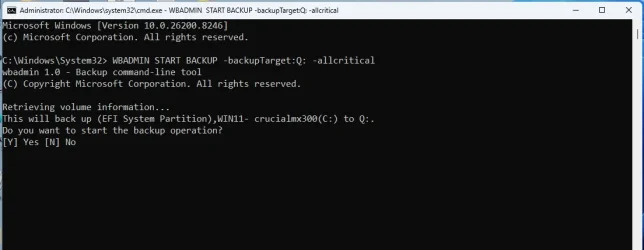
not all the commands are available in consumer editions. The basic start backup commands are

for example:

-allCritical Specifies that all critical volumes (volumes that contain operating system's state) be included in the backups. This parameter is useful if you're creating a backup for bare metal recovery. It should be used only when -backupTarget is specified, otherwise the command fails. Can be used with the -include option.

at admin cmd prompt

WBADMIN START BACKUP -backupTarget:Q: -allcritical

wbadmin-start backup.webp


or

wbadmin start backup -backupTarget:T: -include:C:

it will warn you that is not enough for bare metal restore
 
Last edited:

My Computers

System One System Two

  • OS
    Win7,Win11
    Computer type
    PC/Desktop
    CPU
    i7-9700
    Motherboard
    gigabyte b365m ds3h
    Memory
    2x16gb 3600mhz
    Monitor(s) Displays
    benq gw2480
    PSU
    bequiet pure power 11 400CM
    Cooling
    cryorig m9i
  • Operating System
    win7,win11
    Computer type
    PC/Desktop
    CPU
    i5-8400
    Motherboard
    gigabyte b365m ds3h
    Memory
    2x8gb 3200
    PSU
    xfx pro 450
Time wasn't the issue -- I was referring to FREE or NON subscription ways to do this !!!

cheers
jimbo
Free? Hasleo Backup Suite Free. A real backup app that provides convenient backup capabilities, and a USB bootable recovery capability.
 

My Computers

System One System Two

  • OS
    Win 11 Pro 25H2, Build 26200.8524
    Computer type
    PC/Desktop
    Manufacturer/Model
    Home Brew
    CPU
    Intel Core i5 14500
    Motherboard
    Gigabyte B760M G P WIFI
    Memory
    64GB DDR4
    Graphics Card(s)
    GeForce RTX 4060
    Sound Card
    Chipset Realtek
    Monitor(s) Displays
    LG 45" Ultragear, Acer 24" 1080p
    Screen Resolution
    5120x1440, 1920x1080
    Hard Drives
    Crucial P310 2TB 2280 PCIe Gen4 3D NAND NVMe M.2 SSD (O/S)
    Silicon Power 2TB US75 NVMe PCIe Gen4 M.2 2280 SSD (backup)
    Crucial BX500 2TB 3D NAND (2nd backup)
    Seagate 4TB Ironwolf, rotating HDD archive files
    External off-line backup Drives: 2 NVMe 4TB drives in external enclosures
    PSU
    Thermaltake Toughpower GF3 750W
    Case
    LIAN LI LANCOOL 216 E-ATX PC Case
    Cooling
    Lots of fans!
    Keyboard
    Microsoft Comfort Curve 2000
    Mouse
    Logitech G305
    Internet Speed
    Verizon FiOS 1GB
    Browser
    Firefox
    Antivirus
    Malware Bytes & Windows Defender Security
  • Operating System
    Win 11 Pro 25H2, Build 26200.8524
    Computer type
    PC/Desktop
    Manufacturer/Model
    Home Brew
    CPU
    Intel Core i5 14400
    Motherboard
    Gigabyte B760M DS3H AX
    Memory
    32GB DDR5
    Graphics card(s)
    Intel 700 Embedded GPU
    Sound Card
    Realtek Embedded
    Monitor(s) Displays
    27" HP 1080p
    Screen Resolution
    1920x1080
    Hard Drives
    Crucial P310 2TB 2280 PCIe Gen4 eD NAND PCIe SSD
    Samsung EVO 990 2TB NVMe Gen4 SSD
    Samsung 2TB SATA SSD
    PSU
    Thermaltake Smart BM3 650W
    Case
    Okinos Micro ATX Case
    Cooling
    Fans
    Keyboard
    Microsoft Comfort Curve 2000
    Mouse
    Logitech G305
    Internet Speed
    Verizon FiOS 1GB
    Browser
    Firefox
    Antivirus
    Malware Bytes & Windows Defender Security

Latest Support Threads

Back
Top Bottom