System protection Y/N


Bikeit

Well-known member
Member
VIP
Local time
3:19 PM
Posts
266
OS
Windows 11 pro
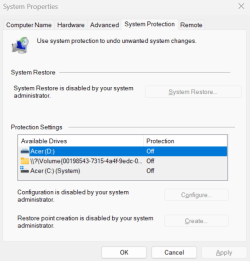
Is it better, safer to have system protection turned on or off? Laptop has three SSD installed as you can see only one has system protection turned on?
Screenshot 2024-10-09 194551.jpg
 

My Computer My Computer

At a glance

Windows 11 proIntel(R) Core(TM) i7-8850H CPU @ 2.60GHz 2.59...32GBNvidia Quadro P3200
OS
Windows 11 pro
Computer type
Laptop
Manufacturer/Model
HP Zbook
CPU
Intel(R) Core(TM) i7-8850H CPU @ 2.60GHz 2.59 GHz
Motherboard
HP 842D
Memory
32GB
Graphics Card(s)
Nvidia Quadro P3200
Hard Drives
Samsung 980 1TB M.2
Toshiba KXG50ZNV512G M.2
Crucial P5 Plus 2TB M.2
Mouse
MX Master 3
Internet Speed
500MBPS
Browser
Chrome, Edge
Antivirus
Windows defender
I used to trust system protection (system restore) but the last few times have failed. If I'm lucky I just get the "unsuccessful message" at the next boot. The last two times I've ended up having to do a repair by reinstall as system restore corrupted something. I keep mine active but I can't trust it to allow me to go longer durations between system backups.
 

My Computers My Computers

  • At a glance

    Windows 11Intel i7-7700K32GB 2666Mhz (Kingston Hyper X Fury)Powercolor RX6600XT
    OS
    Windows 11
    Computer type
    PC/Desktop
    Manufacturer/Model
    Custom
    CPU
    Intel i7-7700K
    Motherboard
    Asus Prime Z-270A
    Memory
    32GB 2666Mhz (Kingston Hyper X Fury)
    Graphics Card(s)
    Powercolor RX6600XT
    Sound Card
    N/A
    Monitor(s) Displays
    KTC
    Screen Resolution
    2560 x 1440
    Hard Drives
    1TB Western Digital SN770 (System) and 2TB Western Digital SN770 (Storage)
    Antivirus
    Windows Security
  • At a glance

    Windows 11 Homei9-11900H32GBIntegrated Intel and Nvidia 3050Ti
    Operating System
    Windows 11 Home
    Computer type
    Laptop
    Manufacturer/Model
    Dell/XPS 15 9510
    CPU
    i9-11900H
    Motherboard
    Unknown
    Memory
    32GB
    Graphics card(s)
    Integrated Intel and Nvidia 3050Ti
    Sound Card
    Integrated (Realtek)
    Monitor(s) Displays
    None
    Screen Resolution
    1920 x 1200 (non-Touch)
    Hard Drives
    2TB SK Hynix P41 Platinum
    Antivirus
    Windows Security
i always keep it on for the system drive (typically C). may help out in case of a registry corruption, etc.
definitely recommend making a system clone regularly though. i make 1 clone weekly.

*i should annotate that for my C, i always set it to 1-2% (roughly 8-9gb max). dont need to waste too much space. i also run disk cleanup and delete all but most recent weekly too... its really there for a 'just in case'
 
Last edited:

My Computer My Computer

At a glance

Windows 11 Pro
OS
Windows 11 Pro
Is it better, safer to have system protection turned on or off? Laptop has three SSD installed as you can see only one has system protection turned on?
I've never run 'System Protection' since it caused a major headache for me about 10 years ago.
In my opinion, you would be better off using a system image utility - Macrium Reflect X (which I use) or AOMEI Backupper Pro; others are available
 

My Computer My Computer

At a glance

Windows 11 Pro 26H2 (Build 26300.9550)Intel Core Ultra 9 285 5.6 GHz32.00 GBIntel Integrated Graphics (128 MB)
OS
Windows 11 Pro 26H2 (Build 26300.9550)
Computer type
PC/Desktop
Manufacturer/Model
Dell Pro Max Tower T2 FCT2250
CPU
Intel Core Ultra 9 285 5.6 GHz
Motherboard
64-bit operating system, x64-based processor
Memory
32.00 GB
Graphics Card(s)
Intel Integrated Graphics (128 MB)
Sound Card
Realtek Audio
Monitor(s) Displays
Dell P2714H Monitor
Screen Resolution
1920 x 1080
Hard Drives
1 x 512GB M.2 XG10d SED KIOXIA PCIe solid state drive (Internal)
1 x 2TB Seagate ST2000DM008-2UB102 HDD (Internal)
1 x 4TB Seagate STGX4000400 External HDD
1 x 6TB WD Elements AE 2689 External HDD
PSU
500 Watts
Cooling
Air
Keyboard
Microsoft Wired Keyboard 600
Mouse
Microsoft USB Basic Optical Mouse v2.0
Browser
Firefox
Antivirus
Windows Defender + Malwarebytes Premium
Other Info
BaseBoard Manufacturer Dell Inc.
BaseBoard Product 022RY57
BaseBoard Version A01
I just took a look at my "system properties" it looks the same as the screenshot above - however my "C" drive is "on" .. my other two are off. I never had an issue with system restore. (except back in windows 98.)
 

Attachments

  • on.jpg
    on.jpg
    35.8 KB · Views: 1

My Computer My Computer

At a glance

Windows 11 25H2 (OS Build 26200.9550)Processor: 11th Gen Intel(R) Core(TM) i5-1135...12GBIntel R Iris R XE Graphics family
OS
Windows 11 25H2 (OS Build 26200.9550)
Computer type
Laptop
Manufacturer/Model
Dell
CPU
Processor: 11th Gen Intel(R) Core(TM) i5-1135G7 @ 2.40G
Motherboard
64-bit operating system Dell 0XMF7W
Memory
12GB
Graphics Card(s)
Intel R Iris R XE Graphics family
Sound Card
Cirrus Speakers High Definition Audio
Monitor(s) Displays
Generic PnP monitor
Screen Resolution
1920 x 1080
Hard Drives
NVMe 670p SSDPEKNU512GZ NVMe I NTEL 512GB
Case
cheap
Mouse
Logitech wireless mouse
Internet Speed
16 Mps download
Browser
Google Chrome
Antivirus
Security: Microsoft Defender & Malwarebytes Premium (with browser guard)
Other Info
Dell model: Inspiron 15 3511
Haven't used it in years and have it disabled. It's entirely up to you so use it if you think it's useful.


1728502157922.png
 

My Computers My Computers

  • At a glance

    Win 11 ProAMD Ryzen™ 7 7730U24GB Dual-Channel DDR4 @ 1596MHz (22-22-22-52)512MB ATI AMD Radeon Graphics (ASUStek Comput...
    OS
    Win 11 Pro
    Computer type
    Laptop
    Manufacturer/Model
    ASUS Vivobook
    CPU
    AMD Ryzen™ 7 7730U
    Motherboard
    M1605YA
    Memory
    24GB Dual-Channel DDR4 @ 1596MHz (22-22-22-52)
    Graphics Card(s)
    512MB ATI AMD Radeon Graphics (ASUStek Computer Inc)
    Monitor(s) Displays
    Generic PnP Monitor (1920x1200@60Hz) - P1 PLUS (1920x1080@59Hz)
    Screen Resolution
    1920 X 1200
    Hard Drives
    953GB Western Digital WD
    PSU
    45 Watts
    Mouse
    Lenovo Bluetooth.
    Internet Speed
    500 Mbps
    Browser
    Edge
    Antivirus
    Defender
  • At a glance

    Windows 11AMD Ryzen 7 5800H / 3.2 GHz32 GB DDR4 SDRAM 3200 MHzNVIDIA GeForce RTX 3060 6 GB GDDR6 SDRAM
    Operating System
    Windows 11
    Computer type
    Laptop
    Manufacturer/Model
    ACER NITRO
    CPU
    AMD Ryzen 7 5800H / 3.2 GHz
    Motherboard
    CZ Scala_CAS (FP6)
    Memory
    32 GB DDR4 SDRAM 3200 MHz
    Graphics card(s)
    NVIDIA GeForce RTX 3060 6 GB GDDR6 SDRAM
    Sound Card
    Realtek Audio. NVIDIA High Definition Audio
    Monitor(s) Displays
    15.6" LED backlight 1920 x 1080 (Full HD) 144 Hz
    Screen Resolution
    1920 x 1080 (Full HD)
    Hard Drives
    Samsung 970 Evo Plus 2TB NVMe M.2
    PSU
    180 Watt, 19.5 V
    Mouse
    Lenovo Bluetooth
    Internet Speed
    500 Mbps
    Browser
    Edge
    Antivirus
    Defender
The first thing I do when I clean install windows is to turn this option off!
I make a backup image of my windows before any important change and test software on VM. So I really do not need this.
 

My Computer My Computer

At a glance

WindowsIntel i7-12800HX32 GB DDR5 4800 MHz dual-channelNVIDIA® GeForce RTX™ 3070 Ti
OS
Windows
Computer type
Laptop
Manufacturer/Model
Lenovo Legion 7i
CPU
Intel i7-12800HX
Memory
32 GB DDR5 4800 MHz dual-channel
Graphics Card(s)
NVIDIA® GeForce RTX™ 3070 Ti
Sound Card
Steinberg UR44
Hard Drives
1 TB SSD (M.2 NVMe PCIe 4.0 x4
2 TB SSD Samsung 980 PRO NNMe
Browser
Firefox
Antivirus
Windows Defender + Malwarebytes
Back
Top Bottom