Solved System Protection Continues Creating Backups While Disabled


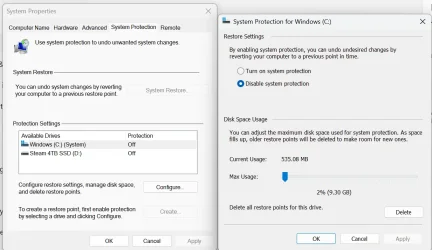
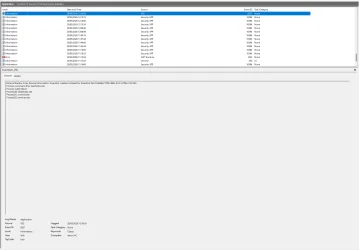
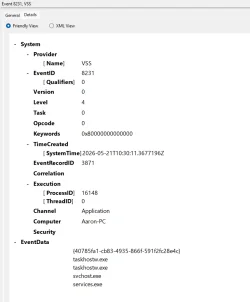
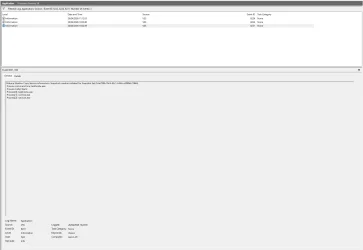
So I've left it for a day as I've had other things on, but using that reg file above as mentioned to disable System Protection was actually still making back ups. Today I checked Event Viewer for codes 8222, 8224 & 8231 and found these. Although I can't find what is making these backup requests. I'm still monitoring this.
 

Attachments
  • Screenshot 2026-04-26 125024.webp
    Screenshot 2026-04-26 125024.webp
    62.5 KB · Views: 3
  • Screenshot 2026-04-26 125123.webp
    Screenshot 2026-04-26 125123.webp
    72.9 KB · Views: 4

My Computers

System One System Two

  • OS
    Windows 11 Pro 25H2
    Computer type
    PC/Desktop
    Manufacturer/Model
    ASUS ROG Strix X570-F Gaming
    CPU
    AMD Ryzen 7 5800X 3.80GHz Stock; OC 4.50GHz
    Motherboard
    ROG Strix X570-F Gaming
    Memory
    64GB DDR4 3600MT/s
    Graphics Card(s)
    MSI GeForce RTX 4060 Ti 16GB
    Sound Card
    Onboard Realtek Audio
    Monitor(s) Displays
    iiyama ProLite XU2792UHSU 4K 27"
    Screen Resolution
    3840 x 2160
    Hard Drives
    Samsung 980 PRO 500GB - OS
    Samsung 990 PRO 1TB - Data & Games
    PSU
    Corsair 850w RMx Series
    Case
    Corsair 4000D Black
    Cooling
    Corsair ICUE Link H150i RGB
    Internet Speed
    1Gbps
    Browser
    Google Chrome
    Antivirus
    ESET Smart Security
    Other Info
    TP-Link TX201 2.5Gbps PCIe Network Card
  • Operating System
    Windows 11 Pro 25H2
    Computer type
    Laptop
    Manufacturer/Model
    Acer Aspire 15 - A15-61M
    CPU
    AMD Ryzen 7 8840HS 3.3 GHz
    Motherboard
    HWK
    Memory
    16GB DDR5 5600 MT/s
    Graphics card(s)
    AMD Radeon 780M 512MB
    Sound Card
    Onboard Senary Audio
    Screen Resolution
    1920 x 1080
    Hard Drives
    WD PC SN5000S 1TB SSD
    Internet Speed
    1Gbps
    Browser
    Google Chrome
    Antivirus
    ESET Smart Security
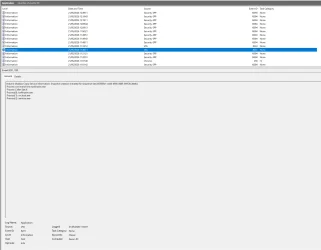
I've been monitoring this since the last post, I believe this is what is triggering the system restore points., System Protection is off as I don't use it but it still continues to make back ups for no reason. It seems a taskhostw.exe is calling up followed by svhost and services. Any clue in how to stop this.


Screenshot 2026-05-20 193814.webp
 

My Computers

System One System Two

  • OS
    Windows 11 Pro 25H2
    Computer type
    PC/Desktop
    Manufacturer/Model
    ASUS ROG Strix X570-F Gaming
    CPU
    AMD Ryzen 7 5800X 3.80GHz Stock; OC 4.50GHz
    Motherboard
    ROG Strix X570-F Gaming
    Memory
    64GB DDR4 3600MT/s
    Graphics Card(s)
    MSI GeForce RTX 4060 Ti 16GB
    Sound Card
    Onboard Realtek Audio
    Monitor(s) Displays
    iiyama ProLite XU2792UHSU 4K 27"
    Screen Resolution
    3840 x 2160
    Hard Drives
    Samsung 980 PRO 500GB - OS
    Samsung 990 PRO 1TB - Data & Games
    PSU
    Corsair 850w RMx Series
    Case
    Corsair 4000D Black
    Cooling
    Corsair ICUE Link H150i RGB
    Internet Speed
    1Gbps
    Browser
    Google Chrome
    Antivirus
    ESET Smart Security
    Other Info
    TP-Link TX201 2.5Gbps PCIe Network Card
  • Operating System
    Windows 11 Pro 25H2
    Computer type
    Laptop
    Manufacturer/Model
    Acer Aspire 15 - A15-61M
    CPU
    AMD Ryzen 7 8840HS 3.3 GHz
    Motherboard
    HWK
    Memory
    16GB DDR5 5600 MT/s
    Graphics card(s)
    AMD Radeon 780M 512MB
    Sound Card
    Onboard Senary Audio
    Screen Resolution
    1920 x 1080
    Hard Drives
    WD PC SN5000S 1TB SSD
    Internet Speed
    1Gbps
    Browser
    Google Chrome
    Antivirus
    ESET Smart Security
Turn the max disk usage to 0 as a workaround?
320MB is minimum, but that should basically prevent most restore points.
Code:
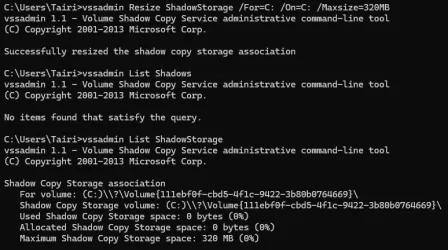
vssadmin Resize ShadowStorage /For=C: /On=C: /Maxsize=320MB
schtasks /Change /TN "Microsoft\Windows\SystemRestore\SR" /Disable
reg add "HKLM\Software\Policies\Microsoft\Windows NT\SystemRestore" /v "DisableSR" /t REG_DWORD /d "1" /f
They should be also removed beforehand, but this command also clears previous file versions and some other "important" stuff.
Code:
vssadmin delete shadows /for=c: /all /quiet
 

Attachments

  • capture_05212026_081419.webp
    capture_05212026_081419.webp
    61 KB · Views: 2

My Computer

System One

  • OS
    Home26H2Can
    Computer type
    PC/Desktop
    CPU
    AMD Ryzen 5 8600G (07/24)
    Motherboard
    ASROCK B650M-HDV/M.2 (07/24) BIOS 4.21 AGESA ComboAM5 1.3.0.1 (04/26)
    Memory
    2x32GB Kingston FURY DDR5 5600 MHz CL36 @5200 CL36 (07/24)
    Graphics Card(s)
    ASROCK Radeon RX 6600 Challenger D 8G @48FPS (08/24)
    Sound Card
    Creative Sound BlasterX AE-5 Plus (05/24)
    Monitor(s) Displays
    24" Philips 24M1N3200ZS/00 (05/24)
    Screen Resolution
    1920×1080@165Hz via DP1.4
    Hard Drives
    Kingston KC3000 NVMe 2TB (05/24)
    ADATA XPG GAMMIX S11 Pro 512GB (07/19)
    PSU
    Seasonic Core GM 550 Gold (04/24)
    Case
    Fractal Design Define 7 Mini with 3x Noctua NF-P14s/12@555rpm (04/24)
    Cooling
    Noctua NH-U12S with Noctua NF-P12 (04/24)
    Keyboard
    HP Pavilion Wired Keyboard 300 (07/24) + Rabalux 76017 Parker (01/24)
    Mouse
    Logitech M330 Silent Plus (01/26)
    Internet Speed
    500/100 Mbps via RouterOS (05/21) & TCP Optimizer
    Browser
    Edge, Brave for YouTube, LibreWolf for FB
    Antivirus
    NextDNS blocking 1/3 Traffic
    Other Info
    Phone: Motorola Moto G86 (02/26)
    Backup: Hasleo Backup Suite (PreOS)
    Headphones: Sennheiser RS170 (09/10)
    Chair: Huzaro Force 4.4 Grey Mesh (05/24)
    Notifier: Xiaomi Mi Band 9 Milanese (10/24)
    FlexCore USB-C 3.2 Gen 1 (M) to LAN (F) (08/25)
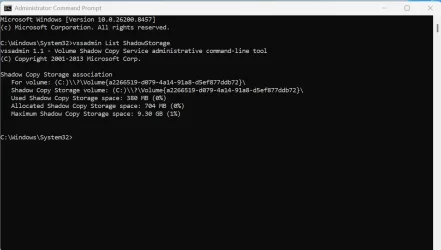
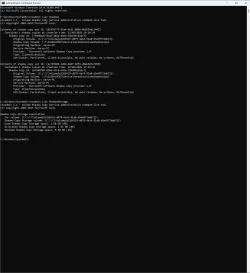
Thank you TairikuOkami, I was away from the PC earlier but it still did a back up. I have done all the above commands just now. Seems it somehow doing backups..
 

Attachments

  • Screenshot 2026-05-21 164634.webp
    Screenshot 2026-05-21 164634.webp
    102 KB · Views: 1
  • Screenshot 2026-05-21 164659.webp
    Screenshot 2026-05-21 164659.webp
    48.6 KB · Views: 2
  • Screenshot 2026-05-21 164904.webp
    Screenshot 2026-05-21 164904.webp
    54.2 KB · Views: 1

My Computers

System One System Two

  • OS
    Windows 11 Pro 25H2
    Computer type
    PC/Desktop
    Manufacturer/Model
    ASUS ROG Strix X570-F Gaming
    CPU
    AMD Ryzen 7 5800X 3.80GHz Stock; OC 4.50GHz
    Motherboard
    ROG Strix X570-F Gaming
    Memory
    64GB DDR4 3600MT/s
    Graphics Card(s)
    MSI GeForce RTX 4060 Ti 16GB
    Sound Card
    Onboard Realtek Audio
    Monitor(s) Displays
    iiyama ProLite XU2792UHSU 4K 27"
    Screen Resolution
    3840 x 2160
    Hard Drives
    Samsung 980 PRO 500GB - OS
    Samsung 990 PRO 1TB - Data & Games
    PSU
    Corsair 850w RMx Series
    Case
    Corsair 4000D Black
    Cooling
    Corsair ICUE Link H150i RGB
    Internet Speed
    1Gbps
    Browser
    Google Chrome
    Antivirus
    ESET Smart Security
    Other Info
    TP-Link TX201 2.5Gbps PCIe Network Card
  • Operating System
    Windows 11 Pro 25H2
    Computer type
    Laptop
    Manufacturer/Model
    Acer Aspire 15 - A15-61M
    CPU
    AMD Ryzen 7 8840HS 3.3 GHz
    Motherboard
    HWK
    Memory
    16GB DDR5 5600 MT/s
    Graphics card(s)
    AMD Radeon 780M 512MB
    Sound Card
    Onboard Senary Audio
    Screen Resolution
    1920 x 1080
    Hard Drives
    WD PC SN5000S 1TB SSD
    Internet Speed
    1Gbps
    Browser
    Google Chrome
    Antivirus
    ESET Smart Security
I'm still having issues with this, with all applied above it still making backups!. When I set it to 320MB it successfully does, but then it resets itself back to 2% 9GB. I cannot find what is causing this, I haven't' removed or installed any new software, to the fact I've been working on and off the PC last couple of days. I would like to find out what's calling VSS to make the backups.
 

Attachments

  • Screenshot 2026-05-23 101058.webp
    Screenshot 2026-05-23 101058.webp
    159.7 KB · Views: 1

My Computers

System One System Two

  • OS
    Windows 11 Pro 25H2
    Computer type
    PC/Desktop
    Manufacturer/Model
    ASUS ROG Strix X570-F Gaming
    CPU
    AMD Ryzen 7 5800X 3.80GHz Stock; OC 4.50GHz
    Motherboard
    ROG Strix X570-F Gaming
    Memory
    64GB DDR4 3600MT/s
    Graphics Card(s)
    MSI GeForce RTX 4060 Ti 16GB
    Sound Card
    Onboard Realtek Audio
    Monitor(s) Displays
    iiyama ProLite XU2792UHSU 4K 27"
    Screen Resolution
    3840 x 2160
    Hard Drives
    Samsung 980 PRO 500GB - OS
    Samsung 990 PRO 1TB - Data & Games
    PSU
    Corsair 850w RMx Series
    Case
    Corsair 4000D Black
    Cooling
    Corsair ICUE Link H150i RGB
    Internet Speed
    1Gbps
    Browser
    Google Chrome
    Antivirus
    ESET Smart Security
    Other Info
    TP-Link TX201 2.5Gbps PCIe Network Card
  • Operating System
    Windows 11 Pro 25H2
    Computer type
    Laptop
    Manufacturer/Model
    Acer Aspire 15 - A15-61M
    CPU
    AMD Ryzen 7 8840HS 3.3 GHz
    Motherboard
    HWK
    Memory
    16GB DDR5 5600 MT/s
    Graphics card(s)
    AMD Radeon 780M 512MB
    Sound Card
    Onboard Senary Audio
    Screen Resolution
    1920 x 1080
    Hard Drives
    WD PC SN5000S 1TB SSD
    Internet Speed
    1Gbps
    Browser
    Google Chrome
    Antivirus
    ESET Smart Security
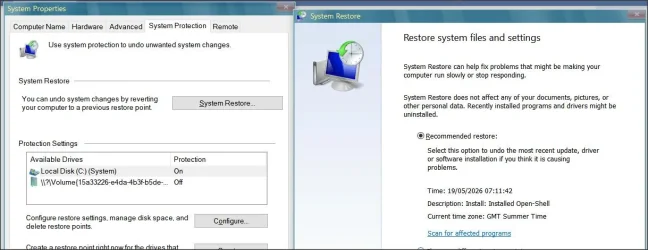
As you believe System Restore points are being created, does System Restore actually list any timed and dated restore points?


You show reports of
Volume Shadow Copy Service information: Snapshot creation initiated
- and this may not necessarily be related to System Restore.

A VSS snapshot is a point-in-time copy of your files or volumes. This message indicates a backup, System Restore, or synchronization task has begun. VSS safely freezes active Input/Output (I/O) processes, takes a snapshot, and then lets applications resume, allowing you to back up open files without interruption
I see screenshots of space usage, but nothing to show actual restore points. May have missed it.. (this is from Win 10 as I'm using that presently)

1.webp
 

My Computer

System One

  • OS
    Windows 11 Pro
    Computer type
    Laptop
    Manufacturer/Model
    Lenovo t480s
    CPU
    i7-8650U
    Memory
    16GB
    Graphics Card(s)
    Intel UHD 620
    Screen Resolution
    1920x1080
    Hard Drives
    C SN810 SDCPNRY-512G-1006
    Browser
    Edge, Firefox
    Antivirus
    Defender
I used this command above to add a reg key,

reg add "HKLM\Software\Policies\Microsoft\Windows NT\SystemRestore" /v "DisableSR" /t REG_DWORD /d "1" /f

Also I disabled VSS; temp to see what would happen which it did nothing, but with that reg applied I can't configure, create restore points. I don't have a clue what's causing all this, I uninstalled my backup software, repaired windows via Win Update also.
 

My Computers

System One System Two

  • OS
    Windows 11 Pro 25H2
    Computer type
    PC/Desktop
    Manufacturer/Model
    ASUS ROG Strix X570-F Gaming
    CPU
    AMD Ryzen 7 5800X 3.80GHz Stock; OC 4.50GHz
    Motherboard
    ROG Strix X570-F Gaming
    Memory
    64GB DDR4 3600MT/s
    Graphics Card(s)
    MSI GeForce RTX 4060 Ti 16GB
    Sound Card
    Onboard Realtek Audio
    Monitor(s) Displays
    iiyama ProLite XU2792UHSU 4K 27"
    Screen Resolution
    3840 x 2160
    Hard Drives
    Samsung 980 PRO 500GB - OS
    Samsung 990 PRO 1TB - Data & Games
    PSU
    Corsair 850w RMx Series
    Case
    Corsair 4000D Black
    Cooling
    Corsair ICUE Link H150i RGB
    Internet Speed
    1Gbps
    Browser
    Google Chrome
    Antivirus
    ESET Smart Security
    Other Info
    TP-Link TX201 2.5Gbps PCIe Network Card
  • Operating System
    Windows 11 Pro 25H2
    Computer type
    Laptop
    Manufacturer/Model
    Acer Aspire 15 - A15-61M
    CPU
    AMD Ryzen 7 8840HS 3.3 GHz
    Motherboard
    HWK
    Memory
    16GB DDR5 5600 MT/s
    Graphics card(s)
    AMD Radeon 780M 512MB
    Sound Card
    Onboard Senary Audio
    Screen Resolution
    1920 x 1080
    Hard Drives
    WD PC SN5000S 1TB SSD
    Internet Speed
    1Gbps
    Browser
    Google Chrome
    Antivirus
    ESET Smart Security
I used this command above to add a reg key,

reg add "HKLM\Software\Policies\Microsoft\Windows NT\SystemRestore" /v "DisableSR" /t REG_DWORD /d "1" /f

Also I disabled VSS; temp to see what would happen which it did nothing, but with that reg applied I can't configure, create restore points. I don't have a clue what's causing all this, I uninstalled my backup software, repaired windows via Win Update also.

i would be careful here as the last time i fully disabled system restore using that registry entry Windows update failed and i ended up with a very broken system and had to re-install Windows as the system went into a continued loop restarting after the update. so please tread with care here please.

i believe Windows update makes a system restore point automatically and if it fails to create that restore point the update could fail
which happened to me but it failed after restarting the system to apply the update, hence the reboot loop.
best of luck Steve ..
 

My Computers

System One System Two

  • OS
    Debian 13 KDE .. Windows 11 Home
    Computer type
    PC/Desktop
    Manufacturer/Model
    HP 24" AiO
    CPU
    Ryzen 7 5825u
    Motherboard
    HP
    Memory
    64GB DDR4 3200
    Graphics Card(s)
    Ryzen 7 5825u
    Sound Card
    RealTek
    Monitor(s) Displays
    24" HP AiO
    Screen Resolution
    1920 x 1080 @60 Hz
    Hard Drives
    1TB WD Blue SN580 M2 SSD Partitioned.
    2x 1TB USB HDD External Backup/Storage.
    PSU
    90W external power brick
    Case
    24" All in One
    Cooling
    Default Air Cooling
    Keyboard
    HP WiFi UK extended
    Mouse
    HP WiFi 3 Button
    Internet Speed
    1GB full fibre
    Browser
    Edge & Firefox
    Antivirus
    AVG Internet Security/Windows Defender
    Other Info
    Mainly Open Source Software
  • Operating System
    Ubuntu 22.04.5 LTS
    Computer type
    Laptop
    Manufacturer/Model
    Dell 13" Latitude 2017
    CPU
    i5 7200u
    Motherboard
    Dell
    Memory
    16GB DDR4
    Graphics card(s)
    Intel
    Sound Card
    Intel
    Monitor(s) Displays
    13" Dell Laptop
    Hard Drives
    250GB Crucial 2.5" SSD
    Mouse
    Generic WiFi 3 button
    Internet Speed
    WiFi only
    Browser
    Firefox
    Antivirus
    ClamAV TK
    Other Info
    Mainly Open Source Software
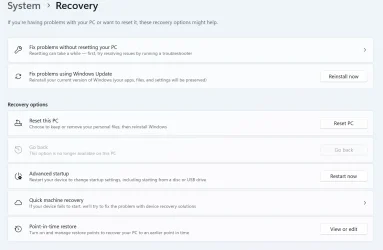
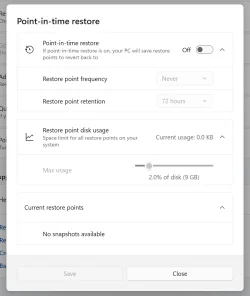
I finally found the issue that took a while!. While going though System in the Recovery tab I came across this Point-in-Time restore open. When I clicked on it it brings up a little window with some settings. After turning off Point-In-Time restore and removing that last lot of backups. My PC hasn't since made anymore new backups phew!. Is this a fairly new option that overrides the original System Restore?
 

Attachments

  • Screenshot 2026-05-28 111351.webp
    Screenshot 2026-05-28 111351.webp
    53 KB · Views: 1
  • Screenshot 2026-05-28 111401.webp
    Screenshot 2026-05-28 111401.webp
    28.6 KB · Views: 1

My Computers

System One System Two

  • OS
    Windows 11 Pro 25H2
    Computer type
    PC/Desktop
    Manufacturer/Model
    ASUS ROG Strix X570-F Gaming
    CPU
    AMD Ryzen 7 5800X 3.80GHz Stock; OC 4.50GHz
    Motherboard
    ROG Strix X570-F Gaming
    Memory
    64GB DDR4 3600MT/s
    Graphics Card(s)
    MSI GeForce RTX 4060 Ti 16GB
    Sound Card
    Onboard Realtek Audio
    Monitor(s) Displays
    iiyama ProLite XU2792UHSU 4K 27"
    Screen Resolution
    3840 x 2160
    Hard Drives
    Samsung 980 PRO 500GB - OS
    Samsung 990 PRO 1TB - Data & Games
    PSU
    Corsair 850w RMx Series
    Case
    Corsair 4000D Black
    Cooling
    Corsair ICUE Link H150i RGB
    Internet Speed
    1Gbps
    Browser
    Google Chrome
    Antivirus
    ESET Smart Security
    Other Info
    TP-Link TX201 2.5Gbps PCIe Network Card
  • Operating System
    Windows 11 Pro 25H2
    Computer type
    Laptop
    Manufacturer/Model
    Acer Aspire 15 - A15-61M
    CPU
    AMD Ryzen 7 8840HS 3.3 GHz
    Motherboard
    HWK
    Memory
    16GB DDR5 5600 MT/s
    Graphics card(s)
    AMD Radeon 780M 512MB
    Sound Card
    Onboard Senary Audio
    Screen Resolution
    1920 x 1080
    Hard Drives
    WD PC SN5000S 1TB SSD
    Internet Speed
    1Gbps
    Browser
    Google Chrome
    Antivirus
    ESET Smart Security
I finally found the issue that took a while!. While going though System in the Recovery tab I came across this Point-in-Time restore open. When I clicked on it it brings up a little window with some settings. After turning off Point-In-Time restore and removing that last lot of backups. My PC hasn't since made anymore new backups phew!. Is this a fairly new option that overrides the original System Restore?
Thanks for finding that. Been having the same problem -now solved.
 

My Computers

System One System Two

  • OS
    Win 11 Pro 25H2
    Computer type
    PC/Desktop
    Manufacturer/Model
    User Built
    CPU
    Intel Ultra i7 270K Plus
    Motherboard
    Asrock Taichi Z890 OCF
    Memory
    Kingston Fury Renegrade 2x24 8400 M/tu
    Graphics Card(s)
    MSI - GeForce RTX 5070 12 GB GAMING TRIO OC
    Sound Card
    Headphone DAC
    Monitor(s) Displays
    AOC QD OLED 4K 32" + Eizo 32" FlexScan 4K
    Screen Resolution
    3840x2160
    Hard Drives
    1x 9100 Pro 2TB Nvme 1x 990 Pro 2TB 1X 1TB 990 Pro
    PSU
    Be Quiet Pure Power 13 1K Watt ATX 3.1
    Case
    Corsair 5000T Air Flow
    Cooling
    Arctic Freezer 3 360 Pro
    Keyboard
    Cherry G80-3000N
    Mouse
    Corsair
    Internet Speed
    500Mbps
    Browser
    Firefox x64
    Antivirus
    Defender
    Other Info
    Backup software MR ver 10
  • Operating System
    Win 11 Pro 25H2
    Computer type
    PC/Desktop
    Manufacturer/Model
    User Built
    CPU
    Ultra i7 270K Plus
    Motherboard
    Asus Z890 Strix - F
    Memory
    Kingston Fury 2x16 7200 M/tu
    Graphics card(s)
    MSI RTX 4070 Super OC 12 GB
    Sound Card
    Onboard
    Monitor(s) Displays
    KVM switch to AOC 4K 32" QD OLED
    Screen Resolution
    3840x2160
    Hard Drives
    Samsung 990 Pro 4TB+990 Pro 2TB +990 Pro 1TB
    PSU
    Super Flower Ledex 3 ATX 3.1 850 Watts
    Case
    Corsair 500d
    Cooling
    Noctua D15 Cromax
I finally found the issue that took a while!. While going though System in the Recovery tab I came across this Point-in-Time restore open. When I clicked on it it brings up a little window with some settings. After turning off Point-In-Time restore and removing that last lot of backups. My PC hasn't since made anymore new backups phew!. Is this a fairly new option that overrides the original System Restore?
Ah I forgot that recent feature addition which obviously would create a shadow copy. Glad you got it straightened out.
 

My Computers

System One System Two

  • OS
    Windows 11 Pro x64
    Computer type
    PC/Desktop
    Manufacturer/Model
    📷🔈🎧 🪛 DIY Photoshop/Audio/Game/tinker
    CPU
    i9 14900K P/E 5.8/4.5 GHz, cache 5.0 GHz
    Motherboard
    Asus ROG Maximus Z790 Dark Hero
    Memory
    🐏 96GB (2x48) G.skill Ripjaws 6800 MT/s
    Graphics Card(s)
    Asus ROG Strix 4070 Ti OC
    Sound Card
    🔊Bowers & Wilkins 606 S3 speakers; Audiolabs 7000a integrated amp; RSL 10S Mk2 sub; Creative Pebble Pro Minimilist
    Monitor(s) Displays
    🖥️🖥️ Eizo CG2730 ColorEdge, ViewSonic VP2768
    Screen Resolution
    🖥️🖥️ 2560 x 1440p x 2
    Hard Drives
    💾 WDC SN850X 4TB nvme, SN850 1TB nvme, SK-Hynix 2 TB P41 nvme,. Sabrent USB-C DS-SC5B 5-bay docking station: 6TB WDC Black, 6TB Ironwolf Pro; 2x 2TB WDC Black HDD
    PSU
    ⚡️ 850W Seasonic Vertex PX-850 ATX 3.0/PCI-E 5.0
    Case
    Fractal Design North XL Mesh, Black Walnut
    Cooling
    ❄️ EK Nucleus black 360 AIO w/Phanteks T30-120 fans, 2 Noctua NF-A14 Chromax case fan, 1 T30-120 fan cooling memory
    Keyboard
    ⌨️ Keychron Q3 Max TKL with custom GMK Redsuns Red Samuri keycaps, TX Stabs
    Mouse
    🖱️ Logitech G305 wireless gaming
    Internet Speed
    ⬇️ 500 Mb/s ⬆️ 12 Mb/s
    Browser
    🔥🦊 Firefox
    Antivirus
    🦺 Defender, Macrium Reflect X 🏆
    Other Info
    Phangkey Amaterasu V2 Desk Mat
  • Computer type
    Laptop
    Manufacturer/Model
    💻 Apple 13" Macbook Pro 2020 (m1)
    CPU
    Apple M1
    Screen Resolution
    2560x1600
    Browser
    Firefox
Back
Top Bottom