i've never seen this error message before. I got this when i tried to save a PDF from this program. Download - NAPS2
A search led me to this video, so I added "everyone" to the permissions list how do I fix error System.UnauthorizedAccessException: Access to the path 'C:\Users\phil\Documents' is denied
Still no joy. I really like this nap2 scanner program. All I need to do is be able to save scans into some directory. I can fully replace the HP bloated and buggy software for my HP 9010e AIO.
My Computer
At a glance
Windows 11 2H25AMD 9900X64 GBAMD 9070 XT
OS
Windows 11 2H25
Computer type
PC/Desktop
Manufacturer/Model
DIY
CPU
AMD 9900X
Motherboard
MSI X870E Carbon
Memory
64 GB
Graphics Card(s)
AMD 9070 XT
Sound Card
built-in
Monitor(s) Displays
Dell 24"
Hard Drives
Sabrent 1 TB NVMe, 4 x SSD (need to check models), 4 x 3.5" HDD, 8-16 TB, all WD
PSU
Seasonic 850
Case
Fractal Design North XL (which I likw)
Cooling
Corsair AIO for CPU, fans for case
Keyboard
Das Keyboard 4
Mouse
Corsair M65 (white)
Internet Speed
1 TB download
Browser
Firefox
Antivirus
Bitdefender
Other Info
Also have Lenovo T14S laptop (me) and Lenovo Slim 71 (wife)
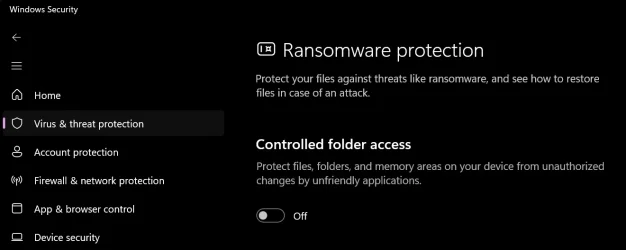
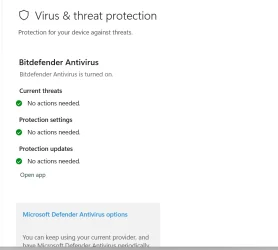
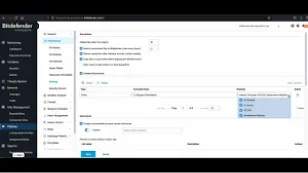
Something that had not occurred to me. However, I have BitDefender Total Security installed, so here is the relevant options panel I o;ened the BitDefender settings panel and I didn't see anything about Controlled Folder Access.
Could Controlled Folder Access be ON, even though I am not using Defender?
My Computer
At a glance
Windows 11 2H25AMD 9900X64 GBAMD 9070 XT
OS
Windows 11 2H25
Computer type
PC/Desktop
Manufacturer/Model
DIY
CPU
AMD 9900X
Motherboard
MSI X870E Carbon
Memory
64 GB
Graphics Card(s)
AMD 9070 XT
Sound Card
built-in
Monitor(s) Displays
Dell 24"
Hard Drives
Sabrent 1 TB NVMe, 4 x SSD (need to check models), 4 x 3.5" HDD, 8-16 TB, all WD
PSU
Seasonic 850
Case
Fractal Design North XL (which I likw)
Cooling
Corsair AIO for CPU, fans for case
Keyboard
Das Keyboard 4
Mouse
Corsair M65 (white)
Internet Speed
1 TB download
Browser
Firefox
Antivirus
Bitdefender
Other Info
Also have Lenovo T14S laptop (me) and Lenovo Slim 71 (wife)
I'm not sure. Look in HKEY_LOCAL_MACHINE\SOFTWARE\Microsoft\Windows Defender\Windows Defender Exploit Guard\Controlled Folder Access. See if there's a value called EnableControlledFolderAccess and if it's set to 1 (enabled).
I'm not sure. Look in HKEY_LOCAL_MACHINE\SOFTWARE\Microsoft\Windows Defender\Windows Defender Exploit Guard\Controlled Folder Access. See if there's a valucalled EnableControlledFolderAccess and if it's set to 1 (enabled).
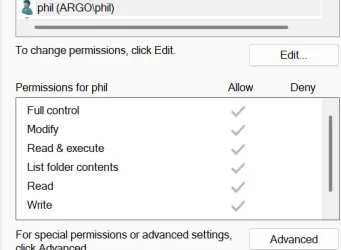
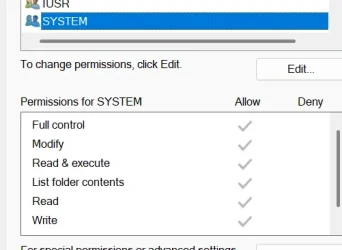
Darn. I as hoping that a mis-set registry key was the problem. All the keys in ControlledFolderAccess have no values set. After I did some futzing around with Securty Permissions I notied that user phil, has grey checkmarks. I've never seen that before. , (that's me the logged in user) Standard Account, not Admin. Also same for Administrators and System
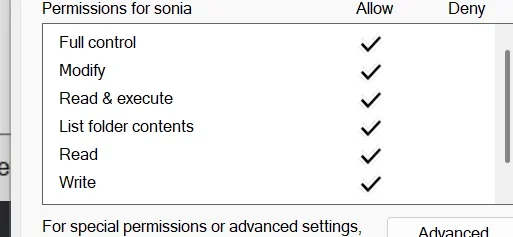
But here it gets even weirder. There is another user account, also standard, where the checkmarks are black..
Attachments
1782613787346.webp
15.1 KB
· Views: 1
My Computer
At a glance
Windows 11 2H25AMD 9900X64 GBAMD 9070 XT
OS
Windows 11 2H25
Computer type
PC/Desktop
Manufacturer/Model
DIY
CPU
AMD 9900X
Motherboard
MSI X870E Carbon
Memory
64 GB
Graphics Card(s)
AMD 9070 XT
Sound Card
built-in
Monitor(s) Displays
Dell 24"
Hard Drives
Sabrent 1 TB NVMe, 4 x SSD (need to check models), 4 x 3.5" HDD, 8-16 TB, all WD
PSU
Seasonic 850
Case
Fractal Design North XL (which I likw)
Cooling
Corsair AIO for CPU, fans for case
Keyboard
Das Keyboard 4
Mouse
Corsair M65 (white)
Internet Speed
1 TB download
Browser
Firefox
Antivirus
Bitdefender
Other Info
Also have Lenovo T14S laptop (me) and Lenovo Slim 71 (wife)
If the check marks are grey, it's inheriting permissions from a parent folder. This is normal for the Documents folder; it should be getting permissions from your %USERPROFILE% folder by default. The black checkmark ones are permissions specifically on that folder/file.
I was hoping someone with Bitdefender might chime in. Does it have a thing similar to Controlled Folder Access, where if it sees something suspicious writing to the documents folder, it blocks it? I dunno.
So you inspired me to do a search on Bitdefender equivalent to Controlled Folder Access. Here is the google response, for the benefit of everyone who uses BitDefender.
Bitdefender’s equivalent to Windows Controlled Folder Access is called Safe Files (or Application Access). It protects your personal files from unauthorized changes and malicious ransomware. Only trusted applications on your approved list are allowed to modify files in protected directories. [1, 2, 3, 4, 5, 6, 7]
How to manage Safe Files in Bitdefender
To safeguard your folders and authorize specific programs, adjust your settings using these steps: [1]
Open your Bitdefender Dashboard.
Go to the Protection tab on the left sidebar.
Click View Features (if applicable) and locate the Safe Files module.
Click Settings and go to Application Access.
Select the + (plus) icon to add an app.
Choose the executable (.exe) file of the application that needs access to your protected folders.
Change its status from "Blocked" to Allowed. [1, 2, 3]
If you are using Bitdefender GravityZone in a corporate environment, this feature is managed via Ransomware Mitigation policies under the On-Access settings. [1]
For a visual guide on setting up Bitdefender's file protection exceptions and resolving blocked applications, watch this video:
My Computer
At a glance
Windows 11 2H25AMD 9900X64 GBAMD 9070 XT
OS
Windows 11 2H25
Computer type
PC/Desktop
Manufacturer/Model
DIY
CPU
AMD 9900X
Motherboard
MSI X870E Carbon
Memory
64 GB
Graphics Card(s)
AMD 9070 XT
Sound Card
built-in
Monitor(s) Displays
Dell 24"
Hard Drives
Sabrent 1 TB NVMe, 4 x SSD (need to check models), 4 x 3.5" HDD, 8-16 TB, all WD
PSU
Seasonic 850
Case
Fractal Design North XL (which I likw)
Cooling
Corsair AIO for CPU, fans for case
Keyboard
Das Keyboard 4
Mouse
Corsair M65 (white)
Internet Speed
1 TB download
Browser
Firefox
Antivirus
Bitdefender
Other Info
Also have Lenovo T14S laptop (me) and Lenovo Slim 71 (wife)