Task Manager: CPU Reporting Regression & Unreliable Task Termination in Windows Insider Preview Dev Channel Build 26120.3380


Local time
1:38 PM
Posts
15
OS
Windows 11 Pro
I’ve identified a critical performance issue with Task Manager that’s impacting its core functionality. When left open for a few minutes, the interface begins to stutter, and the CPU usage metrics become significantly inaccurate. Even during stress tests—where I expect the CPU usage to reach 100%—the numbers are underreported, a behavior that was not present in previous builds.
This regression not only skews performance data but also undermines Task Manager’s reliability when terminating unresponsive or crashed tasks. Accurate monitoring is essential for system stability, so I respectfully request that the development team investigate and resolve this issue as a high priority.

Link: The Windows Insider Program

Please Upvote on this Feedback Hub Post so that Microsoft Notices this issue.
 
Windows Build/Version
26120.3380

My Computer

System One

  • OS
    Windows 11 Pro
    Computer type
    Laptop
    Manufacturer/Model
    HP
    CPU
    Intel Core i3-7020U
    Motherboard
    Hewlett-Packard
    Memory
    12 GB
    Graphics Card(s)
    Intel HD Graphics 620 (iGPU)
    Sound Card
    Realtek Audio
    Monitor(s) Displays
    HP Generic Monitor (Included with Laptop)
    Screen Resolution
    1920 X 1080
    Hard Drives
    EVM 128GB SSD (Windows Drive)
    Toshiba MQ04ABF100 1TB Drive (Storage Drive)
    PSU
    Integrated PSU
    Case
    NONE
    Cooling
    Inbuilt CPU Cooler
    Keyboard
    HP Integrated Keyboard (Non-Backlight)
    Mouse
    Lenovo Mouse
    Internet Speed
    30 Mbps
    Browser
    Microsoft Edge
    Antivirus
    Bitdefender Total Security

I’ve identified a critical performance issue with Task Manager that’s impacting its core functionality. When left open for a few minutes, the interface begins to stutter, and the CPU usage metrics become significantly inaccurate. Even during stress tests—where I expect the CPU usage to reach 100%—the numbers are underreported, a behavior that was not present in previous builds.
This regression not only skews performance data but also undermines Task Manager’s reliability when terminating unresponsive or crashed tasks. Accurate monitoring is essential for system stability, so I respectfully request that the development team investigate and resolve this issue as a high priority.

Link: The Windows Insider Program

Please Upvote on this Feedback Hub Post so that Microsoft Notices this issue.
I would gladly upvote you but I can't duplicate the issue with the build mentioned.
I have 2 systems with it, both non-virtual, on which Task Manager was left running for about 30 minutes.
There was none of the abnormality you reported.
On how many systems have you observed this issue?
 

My Computers

System One System Two

  • OS
    All Branches but Release
    Computer type
    Laptop
    Manufacturer/Model
    Acer Nitro ANV15-51
    CPU
    AMD Ryzen 7 7735HS 3200-4500 Mhz 8 cores x 2
    Motherboard
    Sportage_RBH
    Memory
    32 GB DDR5
    Graphics Card(s)
    Radeon Graphic / NVIDIA GeForce RTX 4060 8 GB GDDR6
    Sound Card
    AMD/Realtek(R) Audio
    Monitor(s) Displays
    Integrated Monitor (15.3"vis)
    Screen Resolution
    FHD 1920X1080 16:9 144Hz
    Hard Drives
    KINGSTON OM8SEP4512Q-AA 1TB
    Western Digital 256GB
    PSU
    19V DC 6.32 A 120 W
    Cooling
    Dual Fans
    Mouse
    MS Bluetooth
    Internet Speed
    Fiber 1GB Cox -us & 1GB Orange-fr
    Browser
    Edge Canary- Firefox Nightly-Chrome Dev-Chrome Dev
    Antivirus
    Windows Defender
  • Operating System
    Windows 11 Beta
    Computer type
    Laptop
    Manufacturer/Model
    Asus X751BP
    CPU
    AMD A9-9420
    Memory
    8 GB of DDR4
    Graphics card(s)
    AMD Radeon R5
    Screen Resolution
    1600x900
    Hard Drives
    Seagate 1 TB
I noticed it on 4 laptops which were all running the same build..are you using AMD or Intel? I am using Intel on all my PCs.
 

My Computer

System One

  • OS
    Windows 11 Pro
    Computer type
    Laptop
    Manufacturer/Model
    HP
    CPU
    Intel Core i3-7020U
    Motherboard
    Hewlett-Packard
    Memory
    12 GB
    Graphics Card(s)
    Intel HD Graphics 620 (iGPU)
    Sound Card
    Realtek Audio
    Monitor(s) Displays
    HP Generic Monitor (Included with Laptop)
    Screen Resolution
    1920 X 1080
    Hard Drives
    EVM 128GB SSD (Windows Drive)
    Toshiba MQ04ABF100 1TB Drive (Storage Drive)
    PSU
    Integrated PSU
    Case
    NONE
    Cooling
    Inbuilt CPU Cooler
    Keyboard
    HP Integrated Keyboard (Non-Backlight)
    Mouse
    Lenovo Mouse
    Internet Speed
    30 Mbps
    Browser
    Microsoft Edge
    Antivirus
    Bitdefender Total Security

I noticed it on 4 laptops which were all running the same build..are you using AMD or Intel? I am using Intel on all my PCs.
Both. 1 AMD & 1 Intel.
Both on ASUS boards.
Also running 2 VMs with same builds (as both Beta & Dev are same builds right now)
I cannot replicate the issue on any of them.
Anyone else is seeing this?
 

My Computers

System One System Two

  • OS
    All Branches but Release
    Computer type
    Laptop
    Manufacturer/Model
    Acer Nitro ANV15-51
    CPU
    AMD Ryzen 7 7735HS 3200-4500 Mhz 8 cores x 2
    Motherboard
    Sportage_RBH
    Memory
    32 GB DDR5
    Graphics Card(s)
    Radeon Graphic / NVIDIA GeForce RTX 4060 8 GB GDDR6
    Sound Card
    AMD/Realtek(R) Audio
    Monitor(s) Displays
    Integrated Monitor (15.3"vis)
    Screen Resolution
    FHD 1920X1080 16:9 144Hz
    Hard Drives
    KINGSTON OM8SEP4512Q-AA 1TB
    Western Digital 256GB
    PSU
    19V DC 6.32 A 120 W
    Cooling
    Dual Fans
    Mouse
    MS Bluetooth
    Internet Speed
    Fiber 1GB Cox -us & 1GB Orange-fr
    Browser
    Edge Canary- Firefox Nightly-Chrome Dev-Chrome Dev
    Antivirus
    Windows Defender
  • Operating System
    Windows 11 Beta
    Computer type
    Laptop
    Manufacturer/Model
    Asus X751BP
    CPU
    AMD A9-9420
    Memory
    8 GB of DDR4
    Graphics card(s)
    AMD Radeon R5
    Screen Resolution
    1600x900
    Hard Drives
    Seagate 1 TB

26120-3360 Changes and Improvements gradually being rolled out to the Dev Channel with toggle on*

[Task Manager]

  • We are beginning to roll out a change to the way Task Manager calculates CPU utilization for the Processes, Performance, and Users pages. Task Manager will now use the standard metrics to display CPU workload consistently across all pages and aligning with industry standards and third-party tools. For backward compatibility, a new optional column called CPU Utility is available (hidden by default) on the Details tab showing the previous CPU value used on the Processes page.


maybe related:
 

My Computer

System One

  • OS
    Windows 11
    Computer type
    PC/Desktop
  • Like
Reactions: OAT
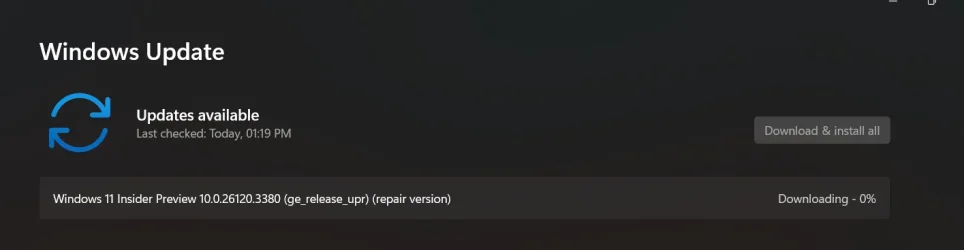
I'll try to perform a repair update on all my PCs and check if the problem still exists, and I will update here again.1742111487994.webp
 

My Computer

System One

  • OS
    Windows 11 Pro
    Computer type
    Laptop
    Manufacturer/Model
    HP
    CPU
    Intel Core i3-7020U
    Motherboard
    Hewlett-Packard
    Memory
    12 GB
    Graphics Card(s)
    Intel HD Graphics 620 (iGPU)
    Sound Card
    Realtek Audio
    Monitor(s) Displays
    HP Generic Monitor (Included with Laptop)
    Screen Resolution
    1920 X 1080
    Hard Drives
    EVM 128GB SSD (Windows Drive)
    Toshiba MQ04ABF100 1TB Drive (Storage Drive)
    PSU
    Integrated PSU
    Case
    NONE
    Cooling
    Inbuilt CPU Cooler
    Keyboard
    HP Integrated Keyboard (Non-Backlight)
    Mouse
    Lenovo Mouse
    Internet Speed
    30 Mbps
    Browser
    Microsoft Edge
    Antivirus
    Bitdefender Total Security
Back
Top Bottom