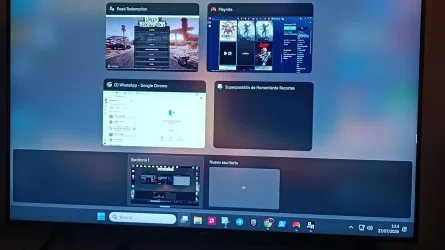
Task View (Win+Tab overlay) constantly pops up when moving cursor over the taskbar without clicking


Matrushko

Member
Member
Local time
12:49 AM
Posts
6
OS
Windows 11 64-bit
Hi everyone,

I am experiencing a very annoying issue on Windows 11. Whenever I move my mouse cursor over the taskbar icons (without clicking anything), the full Task View screen (the overlay showing open windows at the top and Virtual Desktops at the bottom) constantly triggers automatically.

Key details:
- I am NOT pressing Win + Tab or clicking any mouse buttons.
- Simply moving or hovering the mouse cursor across the taskbar triggers the Task View overlay repeatedly.
- It happens regardless of which mouse or pointing device I use.
- I want to stop Task View from triggering automatically when moving over the taskbar, so it ONLY opens when I manually press keys.
-- Important detail: This issue does NOT happen when I am on the clean Desktop. It ONLY happens when I have an application window open and active on screen (like Chrome, File Explorer, etc.).

Has anyone encountered this taskbar hover bug or knows how to disable this specific behavior?

Thanks in advance!

P.S. The attached photos were taken with my phone because while the Task View overlay is triggered, standard screenshot shortcuts (like Win + Shift + S or Snipping Tool) do not work. But that is what constantly pops up, and google antigravity tried more than 20 tricks , none of them worked.
 

Attachments
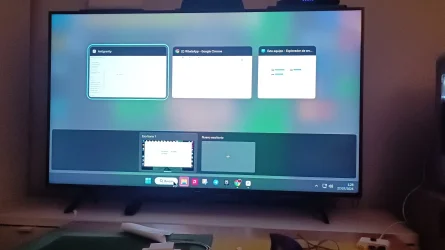
  • photo_2026-07-27_02-20-54.webp
    photo_2026-07-27_02-20-54.webp
    252.7 KB · Views: 3
  • photo_2026-07-27_02-20-49.webp
    photo_2026-07-27_02-20-49.webp
    68.2 KB · Views: 4

My Computer My Computer

At a glance

Windows 11 64-bitAmd Ryzen 5 560016GB VENGEANCE 32002ª MSI AMD RX 6750 xt 12Gb
OS
Windows 11 64-bit
Computer type
PC/Desktop
Manufacturer/Model
Custom Built
CPU
Amd Ryzen 5 5600
Motherboard
ASUS TUFF GAMING B450 PLUS II
Memory
16GB VENGEANCE 3200
Graphics Card(s)
2ª MSI AMD RX 6750 xt 12Gb
Sound Card
Realtek ALC887 / ALC897 High Definition Audio
Monitor(s) Displays
TV SAMSUNG Q60R 120hz (2k) 60hz (4k)
That issue happens to me as well, but I like it that way, and all other features that you describe work for me. Here is 10 points for filling out your specs. I have not tried to stop it.

System and Software Fixes
    • Restart Windows Explorer: Open the Task Manager (Ctrl + Shift + Esc), find Windows Explorer under the Processes tab, right-click it, and select Restart.
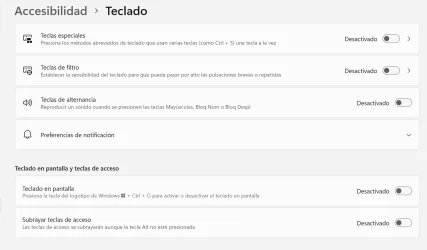
    • Disable Sticky Keys: Go to Settings > Accessibility > Keyboard, and make sure Sticky Keys, Filter Keys, and Toggle Keys are turned off.
    • Perform a restart: Shut down your computer completely and turn it back on to clear temporary system glitches. [1, 2, 3]
 

My Computers My Computers

  • At a glance

    Windows11 Pro 26200.9267Intel Core i9 14900F (24 -Core, 68 MB Total C...32GB DDR5RTX 4080 Super w/610.74
    OS
    Windows11 Pro 26200.9267
    Computer type
    PC/Desktop
    Manufacturer/Model
    Dell Alienware Aurora R16
    CPU
    Intel Core i9 14900F (24 -Core, 68 MB Total Cache)
    Motherboard
    Dell Alienware
    Memory
    32GB DDR5
    Graphics Card(s)
    RTX 4080 Super w/610.74
    Sound Card
    Realtec
    Monitor(s) Displays
    Corsair XENEON 32QHD165
    Screen Resolution
    2560 X 1440
    Hard Drives
    1-2TB Samsung 990 Pro PCIe NVMe M2 SSD
    1-4TB Samsung 990 Pro PCIe NVMe M2 SSD
    PSU
    1000 Watt Platinum Dell
    Case
    Alienware
    Cooling
    Liquid Closed Loop
    Keyboard
    Corsair Strafe RGB
    Mouse
    Logitech MK270 Wireless
    Internet Speed
    100Gb's Down-20 Up
    Browser
    Firefox 154.0
    Antivirus
    Defender
    Other Info
    Very Quiet And Fast
    CyberPower UPS CP1500PFCLCD
  • At a glance

    PClinuxOS Mate (2025.7)13th Gen Inter(R) Core(TM) i3-1315U64 GB DDR4 @3200 MHz.Internal
    Operating System
    PClinuxOS Mate (2025.7)
    Computer type
    PC/Desktop
    Manufacturer/Model
    Intel
    CPU
    13th Gen Inter(R) Core(TM) i3-1315U
    Motherboard
    Intel
    Memory
    64 GB DDR4 @3200 MHz.
    Graphics card(s)
    Internal
    Sound Card
    None
    Monitor(s) Displays
    Dell 2419HGCF
    Screen Resolution
    1920 X 1080
    Hard Drives
    SAMSUNG 980 PRO SSD 2TB, PCIe 4.0 M.2 2280
    PSU
    Chicony 30 Watt
    Case
    Small
    Keyboard
    Dell
    Mouse
    Razor
    Internet Speed
    1GB
    Browser
    Slimjet
Thanks for the reply!

Personally, I really dislike this behavior because it feels way too aggressive and constantly interrupts what I'm doing. I'm not sure if it's less sensitive on your setup, but for me it was very frustrating.

Even though all Sticky Keys, Filter Keys, and Toggle Keys were already OFF... wait! I followed your suggestion and manually restarted Windows Explorer from Task Manager after restoring all registry keys to factory defaults, and IT ACTUALLY FIXED IT!

It turns out that after google antigravity clear out all custom registry policies and resetting Explorer to default settings, restarting the Windows Explorer process completely flushed the DWM shell memory cache where the glitched taskbar hover buffer was stuck.

Now, the Task View overlay is no longer popping up automatically when I move the mouse over the taskbar icons. It's incredible that a clean Explorer restart completely resolved the glitch.

Thanks a lot for the help!
 

Attachments

  • accesibility.webp
    accesibility.webp
    44.7 KB · Views: 2

My Computer My Computer

At a glance

Windows 11 64-bitAmd Ryzen 5 560016GB VENGEANCE 32002ª MSI AMD RX 6750 xt 12Gb
OS
Windows 11 64-bit
Computer type
PC/Desktop
Manufacturer/Model
Custom Built
CPU
Amd Ryzen 5 5600
Motherboard
ASUS TUFF GAMING B450 PLUS II
Memory
16GB VENGEANCE 3200
Graphics Card(s)
2ª MSI AMD RX 6750 xt 12Gb
Sound Card
Realtek ALC887 / ALC897 High Definition Audio
Monitor(s) Displays
TV SAMSUNG Q60R 120hz (2k) 60hz (4k)
Welcome to the forum and glad you solved it. If you would please mark your thread as solved. Check the box at top of thread.
 

My Computers My Computers

  • At a glance

    Windows 11 Pro 25H2 26200.9168i9-10900 10 core 20 threads32 gbnone-Intel UHD Graphics 630
    OS
    Windows 11 Pro 25H2 26200.9168
    Computer type
    PC/Desktop
    Manufacturer/Model
    Dell Optiplex 7080
    CPU
    i9-10900 10 core 20 threads
    Motherboard
    DELL 0J37VM
    Memory
    32 gb
    Graphics Card(s)
    none-Intel UHD Graphics 630
    Sound Card
    Integrated Realtek
    Monitor(s) Displays
    Benq 27
    Screen Resolution
    2560x1440
    Hard Drives
    2x1tb Solidigm m.2 nvme /External drives 512gb Samsung m.2 sata+2tb Kingston m2.nvme
    PSU
    500w
    Case
    MT
    Cooling
    Dell Premium
    Keyboard
    Logitech wired
    Mouse
    Logitech wireless
    Internet Speed
    so slow I'm too embarrassed to tell
    Browser
    #1 Edge #2 Firefox
    Antivirus
    Defender+MWB Premium
  • At a glance

    Windows 11 Pro 24H2 26200.9168AMD Ryzen 7 6800U32 gbintegrated
    Operating System
    Windows 11 Pro 24H2 26200.9168
    Computer type
    PC/Desktop
    Manufacturer/Model
    Beelink Mini PC SER5
    CPU
    AMD Ryzen 7 6800U
    Memory
    32 gb
    Graphics card(s)
    integrated
    Sound Card
    integrated
    Monitor(s) Displays
    Benq 27
    Screen Resolution
    2560x1440
    Hard Drives
    1TB Crucial nvme
    Keyboard
    Logitech wired
    Mouse
    Logitech wireless
    Internet Speed
    still too embarrassed to tell
    Browser
    Firefox
    Antivirus
    Defender
  • System 3 is non compliant Dell 9020 i7-4770/24gb ram Win11 PRO 26200.9168
Oh my godness... No, it is not solved anymore. It happen again.. after a system reboot. I don't know what else to do .

Look ALL the things google antigravity tried: and NO ONE worked. So know, again, each time i put the mouse down to the taskbar icons....uops? it constantly shows up the multitask/desktops view.

  1. ShowTaskViewButton = 0 (Hide Task View icon via Registry).
  2. Mouse Software termination (Killed mouse background process ipoint.exe).
  3. EnableEdgeUI = 0 (Disable screen edge UI gestures via Registry).
  4. DisableTLcorner (Disable active top-left screen corner).
  5. ExtendedUIHoverTime = 10000 (Increase thumbnail hover delay).
  6. TabletMode = 0 (Force disable Tablet Mode via Registry).
  7. AllowEdgeSwipe = 0 (Block edge swipe gestures via Group Policy).
  8. VirtualDesktopAltTabFilter = 1 & TaskbarFilter = 1 (Isolate virtual desktops).
  9. Chrome Remote Desktop termination (Stopped remoting_host.exe service).
  10. Virtual Desktops memory purge (Deleted subkeys in HKCU:\...\VirtualDesktops\Desktops).
  11. TaskbarAl = 0 (Align taskbar icons to the left).
  12. SeparateProcess = 0 & SnapAssist = 0 (Disable separate Explorer process & Snap Assist).
  13. AllowTaskbarTouchGestures = 0 (Disable taskbar touch gestures).
  14. SearchboxTaskbarMode = 0 (Hide Search box).
  15. DragWidth/Height = 200 & NoTaskbarDrag = 1 (Disable thumbnail dragging).
  16. TaskbarGlomLevel = 1 (Change icon grouping mode).
  17. BlockTaskView.ps1 (Background script monitoring and closing TaskView via Esc).
  18. WinTabBlocker.ps1 (Low-level C# WH_KEYBOARD_LL hook).
  19. Explorer Process Restart (Clean Explorer restart after resetting Registry to default).
 

My Computer My Computer

At a glance

Windows 11 64-bitAmd Ryzen 5 560016GB VENGEANCE 32002ª MSI AMD RX 6750 xt 12Gb
OS
Windows 11 64-bit
Computer type
PC/Desktop
Manufacturer/Model
Custom Built
CPU
Amd Ryzen 5 5600
Motherboard
ASUS TUFF GAMING B450 PLUS II
Memory
16GB VENGEANCE 3200
Graphics Card(s)
2ª MSI AMD RX 6750 xt 12Gb
Sound Card
Realtek ALC887 / ALC897 High Definition Audio
Monitor(s) Displays
TV SAMSUNG Q60R 120hz (2k) 60hz (4k)
You will have to look for the needle in the haystack.
First of all what kind of mouse are you using? I would first rule out it being a mouse issue. If it is a bluetooth mouse, unpair it and test using a plain old corded usb mouse. If it is already a corded mouse try another one.

1. Rule out it being software. Perform a clean boot to eliminate software conflict causing the issue. If it doesn't happen in a clean boot, you have some software conflicting with Windows. You have to use process of elimination to find which one. While many softwares can casue weird GUI problems, first suspects are the ones that alter the GUI. Perform a Clean Boot in Windows 11 to Troubleshoot Software Conflicts Tutorial

2. Make sure you have no corrupt system files that is causing this problem. Open a command prompt as administrator and type dism /online /cleanup-image /restorehealth
Restart the device. Then open command prompt as admin again and run sfc /scannow
Pay attention to the scan results to see if SFC found anything it could not repair.

3. See if you have the issue in safe boot. Boot to Safe Mode in Windows 11

4. Make sure it is not a user account corruption problem. Create another LOCAL user account to test with. If the trouble does not exist using another account, then your account is corrupted.
How to Create a new local account
Settings>Accounts>Scroll down and click on Other Users.
Select add account>select I don't have this person's signin information

This will let you create a local account

In user name box name the account and assign a password.
Very Important- Make the new user an administrator. Once account is created, to the right of the new user name click down arrow. Select Change account type.
Click arrow to right of standard user and select Administrator.
Restart and you will have 2 users on signin screen. Select the new one and your new desktop will be created.
If it happens to end up being account corruption, report back and we can tell you the proper way to migrate you data from old account into new.
 

My Computers My Computers

  • At a glance

    Windows 11 Pro 25H2 26200.9168i9-10900 10 core 20 threads32 gbnone-Intel UHD Graphics 630
    OS
    Windows 11 Pro 25H2 26200.9168
    Computer type
    PC/Desktop
    Manufacturer/Model
    Dell Optiplex 7080
    CPU
    i9-10900 10 core 20 threads
    Motherboard
    DELL 0J37VM
    Memory
    32 gb
    Graphics Card(s)
    none-Intel UHD Graphics 630
    Sound Card
    Integrated Realtek
    Monitor(s) Displays
    Benq 27
    Screen Resolution
    2560x1440
    Hard Drives
    2x1tb Solidigm m.2 nvme /External drives 512gb Samsung m.2 sata+2tb Kingston m2.nvme
    PSU
    500w
    Case
    MT
    Cooling
    Dell Premium
    Keyboard
    Logitech wired
    Mouse
    Logitech wireless
    Internet Speed
    so slow I'm too embarrassed to tell
    Browser
    #1 Edge #2 Firefox
    Antivirus
    Defender+MWB Premium
  • At a glance

    Windows 11 Pro 24H2 26200.9168AMD Ryzen 7 6800U32 gbintegrated
    Operating System
    Windows 11 Pro 24H2 26200.9168
    Computer type
    PC/Desktop
    Manufacturer/Model
    Beelink Mini PC SER5
    CPU
    AMD Ryzen 7 6800U
    Memory
    32 gb
    Graphics card(s)
    integrated
    Sound Card
    integrated
    Monitor(s) Displays
    Benq 27
    Screen Resolution
    2560x1440
    Hard Drives
    1TB Crucial nvme
    Keyboard
    Logitech wired
    Mouse
    Logitech wireless
    Internet Speed
    still too embarrassed to tell
    Browser
    Firefox
    Antivirus
    Defender
  • System 3 is non compliant Dell 9020 i7-4770/24gb ram Win11 PRO 26200.9168
Thank you very much, mate. I'm currently away on vacation without access to the computer.

The only thing I can confirm for now is that I'm 100% sure it's not a mouse issue, as I have already tested with different ones. Also, I already tried all those steps you saw in the status I posted regarding Google Gravity.

Once I get back on August 6th or 7th, I'll dive into the rest of your suggestions. It’s really uncomfortable to deal with, and it only started happening very recently.

Thanks again!
 

My Computer My Computer

At a glance

Windows 11 64-bitAmd Ryzen 5 560016GB VENGEANCE 32002ª MSI AMD RX 6750 xt 12Gb
OS
Windows 11 64-bit
Computer type
PC/Desktop
Manufacturer/Model
Custom Built
CPU
Amd Ryzen 5 5600
Motherboard
ASUS TUFF GAMING B450 PLUS II
Memory
16GB VENGEANCE 3200
Graphics Card(s)
2ª MSI AMD RX 6750 xt 12Gb
Sound Card
Realtek ALC887 / ALC897 High Definition Audio
Monitor(s) Displays
TV SAMSUNG Q60R 120hz (2k) 60hz (4k)
Don't ask me why, but it fixed itself "on its own" again (after applying the changes mentioned above, suggested by Gemini). I was about to try yours, but it wasn't necessary—it's not doing it anymore.

That said, a minor bug still persists: when I pin the Snipping Tool to the taskbar and click on it, the overlay/panel does pop up, but as soon as the tip of the cursor leaves the taskbar area, the panel disappears (it goes behind the active window).

The Snipping Tool itself works perfectly fine—if I right-click it, I can select "Take new screenshot", etc. But when I left-click it to bring up the full panel, no luck, it vanishes. I'm sure if I restart the PC it'll probably fix itself... who knows!
You will have to look for the needle in the haystack.
 

My Computer My Computer

At a glance

Windows 11 64-bitAmd Ryzen 5 560016GB VENGEANCE 32002ª MSI AMD RX 6750 xt 12Gb
OS
Windows 11 64-bit
Computer type
PC/Desktop
Manufacturer/Model
Custom Built
CPU
Amd Ryzen 5 5600
Motherboard
ASUS TUFF GAMING B450 PLUS II
Memory
16GB VENGEANCE 3200
Graphics Card(s)
2ª MSI AMD RX 6750 xt 12Gb
Sound Card
Realtek ALC887 / ALC897 High Definition Audio
Monitor(s) Displays
TV SAMSUNG Q60R 120hz (2k) 60hz (4k)
no foodle.... Now it happens again. I will try to post a video, in order to make myself more clear about this annoying issue.
google drive: maldito issue multitarea.mp4
 

My Computer My Computer

At a glance

Windows 11 64-bitAmd Ryzen 5 560016GB VENGEANCE 32002ª MSI AMD RX 6750 xt 12Gb
OS
Windows 11 64-bit
Computer type
PC/Desktop
Manufacturer/Model
Custom Built
CPU
Amd Ryzen 5 5600
Motherboard
ASUS TUFF GAMING B450 PLUS II
Memory
16GB VENGEANCE 3200
Graphics Card(s)
2ª MSI AMD RX 6750 xt 12Gb
Sound Card
Realtek ALC887 / ALC897 High Definition Audio
Monitor(s) Displays
TV SAMSUNG Q60R 120hz (2k) 60hz (4k)
Do you have any other USB devices plugged in?
Such as :
  • Controllers
  • Touch Devices
  • Tablets
  • Various dongles
 

My Computer My Computer

At a glance

Windows 11 Pro 25H2i7 12700k64GB DDR5 [CMK64GX5M2B5200C40]MSI 4060 2x Ventus 8G
OS
Windows 11 Pro 25H2
Computer type
PC/Desktop
Manufacturer/Model
DIY
CPU
i7 12700k
Motherboard
7E07vM9 [Z790 Pro Max Wifi]
Memory
64GB DDR5 [CMK64GX5M2B5200C40]
Graphics Card(s)
MSI 4060 2x Ventus 8G
Sound Card
Realtek® ALC4080 Codec
Monitor(s) Displays
ASUS VA24DQSB
Screen Resolution
1920x1080 @ 75hz
Hard Drives
Samsung 980 Pro 1TB (OS Drive)
Samsung 980 Pro 2TB (Secondary Drive)
Samsung 980 Pro 1TB (Other)
Samsung 860 Pro 512 (Other)
WD6400AAKS (Other)
PSU
Corsair 850x
Cooling
Noctua NH-D15
Mouse
G502 X Lightspeed
Browser
Chrome, Firefox
Antivirus
Malwarebytes Premium, Defender
here are a few guides to have a look at in regard to disabling Windows overlay


hopefully they will provide an answer
best of luck Steve ..
 

My Computers My Computers

  • At a glance

    Windows 11 HomeRyzen 7 5825u64GB DDR4 3200Ryzen 7 5825u
    OS
    Windows 11 Home
    Computer type
    PC/Desktop
    Manufacturer/Model
    HP 24" AiO
    CPU
    Ryzen 7 5825u
    Motherboard
    HP
    Memory
    64GB DDR4 3200
    Graphics Card(s)
    Ryzen 7 5825u
    Sound Card
    RealTek
    Monitor(s) Displays
    24" HP AiO
    Screen Resolution
    1920 x 1080 @60 Hz
    Hard Drives
    1TB WD Blue SN580 M2 SSD Partitioned.
    2x 1TB USB HDD External Backup/Storage.
    PSU
    90W external power brick
    Case
    24" All in One
    Cooling
    Default Air Cooling
    Keyboard
    HP WiFi UK extended
    Mouse
    HP WiFi 3 Button
    Internet Speed
    1GB full fibre
    Browser
    Edge & Firefox
    Antivirus
    AVG Internet Security/Windows Defender
    Other Info
    Mainly Open Source Software
  • At a glance

    Ubuntu 22.04.5 LTSi5 7200u16GB DDR4Intel
    Operating System
    Ubuntu 22.04.5 LTS
    Computer type
    Laptop
    Manufacturer/Model
    Dell 13" Latitude 2017
    CPU
    i5 7200u
    Motherboard
    Dell
    Memory
    16GB DDR4
    Graphics card(s)
    Intel
    Sound Card
    Intel
    Monitor(s) Displays
    13" Dell Laptop
    Hard Drives
    250GB Crucial 2.5" SSD
    Mouse
    Generic WiFi 3 button
    Internet Speed
    WiFi only
    Browser
    Firefox
    Antivirus
    ClamAV TK
    Other Info
    Mainly Open Source Software
Disable all that stuff in Start-up menu. This thing was bloody annoying and disabling all that worked like a charm for me. Enjoy.1786701002028.webp
 

My Computer My Computer

At a glance

Windows 11
OS
Windows 11
Computer type
PC/Desktop
Manufacturer/Model
AsRock
Back
Top Bottom