- Local time
- 4:41 AM
- Posts
- 6
- OS
- Windows 11 64-bit
Hi everyone,
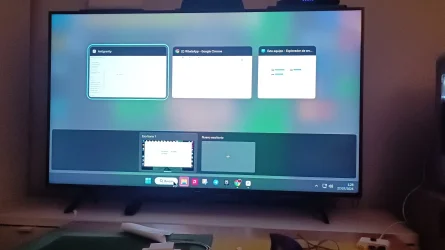
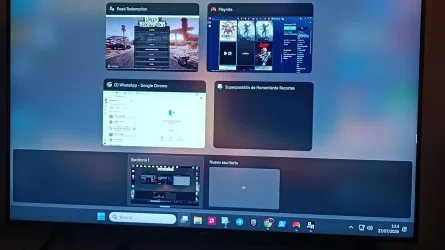
I am experiencing a very annoying issue on Windows 11. Whenever I move my mouse cursor over the taskbar icons (without clicking anything), the full Task View screen (the overlay showing open windows at the top and Virtual Desktops at the bottom) constantly triggers automatically.
Key details:
- I am NOT pressing Win + Tab or clicking any mouse buttons.
- Simply moving or hovering the mouse cursor across the taskbar triggers the Task View overlay repeatedly.
- It happens regardless of which mouse or pointing device I use.
- I want to stop Task View from triggering automatically when moving over the taskbar, so it ONLY opens when I manually press keys.
-- Important detail: This issue does NOT happen when I am on the clean Desktop. It ONLY happens when I have an application window open and active on screen (like Chrome, File Explorer, etc.).
Has anyone encountered this taskbar hover bug or knows how to disable this specific behavior?
Thanks in advance!
P.S. The attached photos were taken with my phone because while the Task View overlay is triggered, standard screenshot shortcuts (like Win + Shift + S or Snipping Tool) do not work. But that is what constantly pops up, and google antigravity tried more than 20 tricks , none of them worked.
I am experiencing a very annoying issue on Windows 11. Whenever I move my mouse cursor over the taskbar icons (without clicking anything), the full Task View screen (the overlay showing open windows at the top and Virtual Desktops at the bottom) constantly triggers automatically.
Key details:
- I am NOT pressing Win + Tab or clicking any mouse buttons.
- Simply moving or hovering the mouse cursor across the taskbar triggers the Task View overlay repeatedly.
- It happens regardless of which mouse or pointing device I use.
- I want to stop Task View from triggering automatically when moving over the taskbar, so it ONLY opens when I manually press keys.
-- Important detail: This issue does NOT happen when I am on the clean Desktop. It ONLY happens when I have an application window open and active on screen (like Chrome, File Explorer, etc.).
Has anyone encountered this taskbar hover bug or knows how to disable this specific behavior?
Thanks in advance!
P.S. The attached photos were taken with my phone because while the Task View overlay is triggered, standard screenshot shortcuts (like Win + Shift + S or Snipping Tool) do not work. But that is what constantly pops up, and google antigravity tried more than 20 tricks , none of them worked.
Attachments
My Computer
At a glance
Windows 11 64-bitAmd Ryzen 5 560016GB VENGEANCE 32002ª MSI AMD RX 6750 xt 12Gb
- OS
- Windows 11 64-bit
- Computer type
- PC/Desktop
- Manufacturer/Model
- Custom Built
- CPU
- Amd Ryzen 5 5600
- Motherboard
- ASUS TUFF GAMING B450 PLUS II
- Memory
- 16GB VENGEANCE 3200
- Graphics Card(s)
- 2ª MSI AMD RX 6750 xt 12Gb
- Sound Card
- Realtek ALC887 / ALC897 High Definition Audio
- Monitor(s) Displays
- TV SAMSUNG Q60R 120hz (2k) 60hz (4k)