- Local time
- 2:36 PM
- Posts
- 5
- OS
- Windows 11
The WPS hint led me to a solution. I'm going to write it down here, but it's possibly incredibly specific to my ASUS XT9 mesh, but here it goes anyway.
When you set up this particular mesh (I've got 1 base unit + 1 node), this is the procedure:
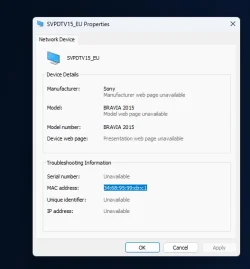
However I found out using a tool called Wifi Analyzer (Open Source) on Android (any other scanner that can detect network features like WPS will do, probably) that one of my stations was still emitting a WPS-enabled network, which probably pinged the Tesla, and propagated to whatever Windows Connect wizardry is discovering.
So I enabled SSH access (in administration), logged in with my credentials and inspected the NVRAM of the node and base station.
On the base station, everything seemed disabled, but on the node, I found this:
The parameter wl0.1_wps_mode still was enabled. I suppose that's WLAN 1, or whatever internal wlan it chooses for backhaul functionality. I YOLO'd it to
And when the unit rebooted: no more WPS detected, no more WPS-enabled devices in my Windows networks.
So yeah, TL;DR: Somewhere, somehow, on your network, some AP is doing WPS and reacting to a Tesla. In my case, my Asus router has some firmware bug which led to WPS being disabled in the GUI but not fully on the device.
Manually verify (using an external scanner) that none of your networks have WPS enabled. If you require WPS - well, you're out of luck.
When you set up this particular mesh (I've got 1 base unit + 1 node), this is the procedure:
- Reset all units
- Use a pen to hit tiny reset button in the marked hole in the bottom. Note that the units have to be fully booted before this works. You know you've reached the reset when the front LED starts blinking yellow rapidly, after which the device rebooted.
- Several Asus docs refer to using the WPS button to reset - this does NOT work for this model.
- Power base unit, configure it using web browser or the app
- Connect node unit (wired, in my case - my house has network cabling)
However I found out using a tool called Wifi Analyzer (Open Source) on Android (any other scanner that can detect network features like WPS will do, probably) that one of my stations was still emitting a WPS-enabled network, which probably pinged the Tesla, and propagated to whatever Windows Connect wizardry is discovering.
So I enabled SSH access (in administration), logged in with my credentials and inspected the NVRAM of the node and base station.
On the base station, everything seemed disabled, but on the node, I found this:
Code:
>nvram show | grep wps

wl0.1_wps_mode=enabled
wl0.2_wps_mode=disabled
wl0.3_wps_mode=disabled
wl0.4_wps_mode=disabled
wl0.5_wps_mode=disabled
wl0_wps_config_state=0
wl0_wps_mode=disabled
wl0_wps_reg=enabled
wl1.1_wps_mode=disabled
wl1.2_wps_mode=disabled
wl1.3_wps_mode=disabled
wl1_wps_config_state=0
wl1_wps_mode=disabled
wl1_wps_reg=enabled
wl2.1_wps_mode=disabled
wl2.2_wps_mode=disabled
wl2.3_wps_mode=disabled
wl2.4_wps_mode=disabled
wl2.5_wps_mode=disabled
wl2.6_wps_mode=disabled
The parameter wl0.1_wps_mode still was enabled. I suppose that's WLAN 1, or whatever internal wlan it chooses for backhaul functionality. I YOLO'd it to
Code:
>nvram set wl0.1_wps_mode=disabled
>nvram commit && reboot
And when the unit rebooted: no more WPS detected, no more WPS-enabled devices in my Windows networks.
So yeah, TL;DR: Somewhere, somehow, on your network, some AP is doing WPS and reacting to a Tesla. In my case, my Asus router has some firmware bug which led to WPS being disabled in the GUI but not fully on the device.
Manually verify (using an external scanner) that none of your networks have WPS enabled. If you require WPS - well, you're out of luck.
Last edited:
My Computer
At a glance
Windows 11
- OS
- Windows 11
- Computer type
- PC/Desktop