Text Highlight Color Issue after Windows Update


mccmw

Well-known member
Member
VIP
Local time
12:24 AM
Posts
518
OS
Windows 11
After yesterdays update (I'm now on 26200.9550...it could just be a coincidence), I'm having an issue where after my computer sleeps, app text highlights is the default Windows blue color. It seems to be fine on my laptop...only desktop affected so it could be something else.

Windows 11 elements (file explorer, Start menu, etc.) retain the color I've picked in Settings>Personalization>color, but other apps don't. Changing colors in Settings>Personalization>colors don't have any effect either. Restarting my machine restores the correct color, but the issue returns after machine has been in sleep. I just did a repair by reinstall (Windows Update) and the issue persists. Is there another way to make sure that my personalized color selection is retained across all apps (Windows and others)? Thanks.
 

My Computers My Computers

  • At a glance

    Windows 11Intel i7-7700K32GB 2666Mhz (Kingston Hyper X Fury)Powercolor RX6600XT
    OS
    Windows 11
    Computer type
    PC/Desktop
    Manufacturer/Model
    Custom
    CPU
    Intel i7-7700K
    Motherboard
    Asus Prime Z-270A
    Memory
    32GB 2666Mhz (Kingston Hyper X Fury)
    Graphics Card(s)
    Powercolor RX6600XT
    Sound Card
    N/A
    Monitor(s) Displays
    KTC
    Screen Resolution
    2560 x 1440
    Hard Drives
    1TB Western Digital SN770 (System) and 2TB Western Digital SN770 (Storage)
    Antivirus
    Windows Security
  • At a glance

    Windows 11 Homei9-11900H32GBIntegrated Intel and Nvidia 3050Ti
    Operating System
    Windows 11 Home
    Computer type
    Laptop
    Manufacturer/Model
    Dell/XPS 15 9510
    CPU
    i9-11900H
    Motherboard
    Unknown
    Memory
    32GB
    Graphics card(s)
    Integrated Intel and Nvidia 3050Ti
    Sound Card
    Integrated (Realtek)
    Monitor(s) Displays
    None
    Screen Resolution
    1920 x 1200 (non-Touch)
    Hard Drives
    2TB SK Hynix P41 Platinum
    Antivirus
    Windows Security
Can you do a System Restore and undo the last update?

go to Settings > Windows Update > Update History > Uninstall updates

check if that made the difference.

Another thing you might be able to do is try a different user account and apply personalisation there - does the issue persist across a different user account?
 

My Computers My Computers

  • At a glance

    Windows 11AMD Ryzen 5 560016 GBSapphire Radeon RX 6500XT (8 GB version)
    OS
    Windows 11
    Computer type
    PC/Desktop
    CPU
    AMD Ryzen 5 5600
    Motherboard
    MSI B550-A Pro
    Memory
    16 GB
    Graphics Card(s)
    Sapphire Radeon RX 6500XT (8 GB version)
    Monitor(s) Displays
    BenQ Mobuiz EX2710Q QHD, Iiyama ProLite X23377HDS
    Hard Drives
    MSI Spatium M461 4TB
  • At a glance

    Windows 11Intel Celeron N4020
    Operating System
    Windows 11
    Computer type
    Laptop
    Manufacturer/Model
    Acer A114
    CPU
    Intel Celeron N4020
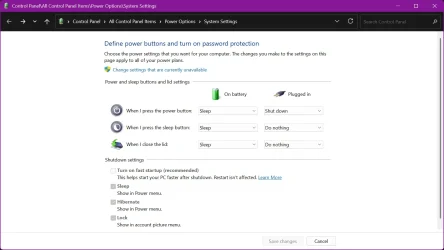
What you are describing sounds like a classic case of what happens when Windows Fast Startup is enabled. Note that I am specifically talking about the Windows setting, not a Fast Startup that you may find in your BIOS / UEFI settings.

Check to see if you have this enabled and then disable it as a test if it is enabled. To do so, follow these steps...

Press WinKey + R to open the run dialog. Paste this text into the Run box and press ENTER:

control /name Microsoft.PowerOptions /page pageGlobalSettings

Click on Change settings that are currently unavailable.

Uncheck Fast Startup and then save the changes.

Im1.webp

Now see what happens after coming out of sleep. If that works, I'll give you some other suggestions that may resolve this without having to turn off fast startup.


My Computers My Computers

  • At a glance

    Win11 Pro 26H2 (Release Preview)Intel i7-14650HX32 GBNo GPU - Built-in Intel Graphics
    OS
    Win11 Pro 26H2 (Release Preview)
    Computer type
    PC/Desktop
    Manufacturer/Model
    Acemagic Matrix M5
    CPU
    Intel i7-14650HX
    Memory
    32 GB
    Graphics Card(s)
    No GPU - Built-in Intel Graphics
    Sound Card
    Integrated
    Monitor(s) Displays
    Varies as machine will often be moved to locations with different monitors
    Screen Resolution
    Varies
    Hard Drives
    1 x 1TB Gen 4 NVMe SSD
    PSU
    120W Power Brick
    Keyboard
    Corsair K70 Max RGB Magnetic Keyboard
    Mouse
    Logitech MX Master 3
    Internet Speed
    1Gb Up / 1 Gb Down
    Browser
    Edge
    Antivirus
    Windows Defender
  • At a glance

    Win11 Pro 26H2 (Release Preview)Intel i7-1255U16 GBIntel Iris Xe Graphics
    Operating System
    Win11 Pro 26H2 (Release Preview)
    Computer type
    Laptop
    Manufacturer/Model
    Lenovo ThinkBook 13x Gen 2
    CPU
    Intel i7-1255U
    Memory
    16 GB
    Graphics card(s)
    Intel Iris Xe Graphics
    Sound Card
    Realtek® ALC3306-CG codec
    Monitor(s) Displays
    13.3-inch IPS Display
    Screen Resolution
    WQXGA (2560 x 1600)
    Hard Drives
    4 TB 4 x 4 NVMe SSD
    PSU
    USB-C / Thunderbolt 4 Power / Charging Using an Anker 160W Charger
    Keyboard
    Backlit, spill resistant keyboard
    Mouse
    Buttonless Glass Precision Touchpad
    Internet Speed
    1Gb Up / 1Gb Down
    Browser
    Edge
    Antivirus
    Windows Defender
    Other Info
    WiFi 6e / Bluetooth 5.1 / Facial Recognition / Fingerprint Sensor / ToF (Time of Flight) Human Presence Sensor
Hi, and thanks for the responses. I have hibernate disabled on this machine so fast boot was already off. I just checked.

I just checked on my wife's computer and hers exhibited the same behavior. Accent colors correctly apply to everything except non-Windows apps text highlight...i.e. titlebars (if applicable) have the selected accent color. I think the reason I'm just noticing it now is that I've used StartAllBack for so long. There is a checkbox in there for accent color. When enabled, I don't have the issue. Only when disabled or if StartAllBack is disabled/uninstalled. I did have to recently uninstall and reinstall it when an update wouldn't download.

That being said, I'm sure there is a registry entry to change the menu highlight color...I'm assuming that is what StartAllBack is doing.
 
Last edited:

My Computers My Computers

  • At a glance

    Windows 11Intel i7-7700K32GB 2666Mhz (Kingston Hyper X Fury)Powercolor RX6600XT
    OS
    Windows 11
    Computer type
    PC/Desktop
    Manufacturer/Model
    Custom
    CPU
    Intel i7-7700K
    Motherboard
    Asus Prime Z-270A
    Memory
    32GB 2666Mhz (Kingston Hyper X Fury)
    Graphics Card(s)
    Powercolor RX6600XT
    Sound Card
    N/A
    Monitor(s) Displays
    KTC
    Screen Resolution
    2560 x 1440
    Hard Drives
    1TB Western Digital SN770 (System) and 2TB Western Digital SN770 (Storage)
    Antivirus
    Windows Security
  • At a glance

    Windows 11 Homei9-11900H32GBIntegrated Intel and Nvidia 3050Ti
    Operating System
    Windows 11 Home
    Computer type
    Laptop
    Manufacturer/Model
    Dell/XPS 15 9510
    CPU
    i9-11900H
    Motherboard
    Unknown
    Memory
    32GB
    Graphics card(s)
    Integrated Intel and Nvidia 3050Ti
    Sound Card
    Integrated (Realtek)
    Monitor(s) Displays
    None
    Screen Resolution
    1920 x 1200 (non-Touch)
    Hard Drives
    2TB SK Hynix P41 Platinum
    Antivirus
    Windows Security
Back
Top Bottom