Microsoft 365 Insider Blog:
We’re making an update to the default text predictions experience in Microsoft Word and Microsoft Outlook, giving you more control over whether you receive suggestions as you type.
What’s new
Text predictions will continue to be available, but it will no longer be turned on by default in Word for Windows, for the web, for Android, and for iOS, and in classic Outlook for Windows and Outlook for Mac.You will still be able to turn on the feature from your Settings anytime. Additionally, some Outlook for Android and for iOS experiences already have text predictions turned off by default – no changes are being made to those experiences as part of this rollout.
Why it matters
Text predictions helps you write documents and emails more efficiently by suggesting words and phrases as you type. While some people find these suggestions useful, others prefer to write without predictive text. This update gives you more flexibility, allowing you to customize your editing experience and create a workflow that best suits your needs.Our goal is to provide a more consistent and user-controlled writing experience across Microsoft 365 applications. This update helps ensure that predictive text remains available for people who find it helpful, while reducing unwanted interruptions for those who prefer to write without suggestions appearing automatically.
How it works
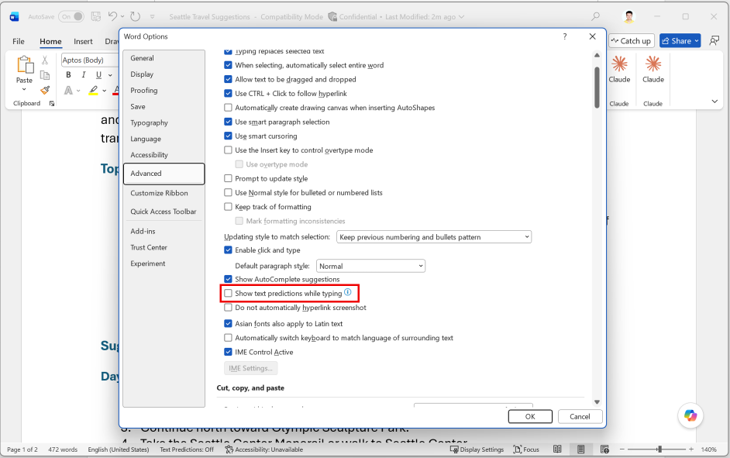
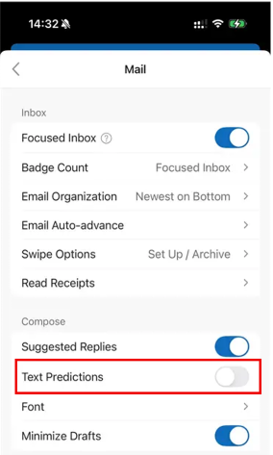
- Open Word or Outlook on your desktop or mobile device, and under Settings you will see that Text Predictions is turned off by default. You can turn it on by selecting the checkbox or toggle.
Availability
This change is rolling out to users running Word for the web or:- Word for Windows: Version 2609 (Build 20430.20000) or later.
- Classic Outlook for Windows: Version 2608 (Build 20329.20000) or later.
- Outlook for Mac: Version 16.113 (26080119) or later.
- Word for Android: Build 16.0.20326.20000 or later.
- Word for iOS: Version 2.112 (Build 26080127) or later.
Feedback
We’d love to hear what you think about this update! To provide feedback, select Help > Feedback in Word or Outlook. Source:

Text predictions off by default in Word and Outlook
We’re making an update to the default text predictions experience in Microsoft Word and Microsoft Outlook, giving you more control over whether you receive...
 techcommunity.microsoft.com