HiagoVieira
Member
- Local time
- 3:24 AM
- Posts
- 4
- OS
- Windows11,10?
Well, everything start with a rain that burn my old item i5, and my gtx 1060 from 2017.
After some extra cash i decide to provide me a good upgrade to get no problems with software and hardware when moving to Windows 11.
All the experience is done only by me. After manage, to find the hardware i want, i did all the parts and assemble the PC alone. After that got a Kingston 16gb Clean USB, and ask a friend if he can let me use his PC, after that i download from Microsoft Website the media Creation Tool, with the Windows 11. I was so happy, and dind know about the nightmare.
Come to my house, plug the pc, and for the first time got no erros, and got to UEFI screen, well, Plug the USB on the PC, with only the Storage, cpu, memory and gpu. Did a install letting windows create all his partions and no trouble. When the Windows 11 get up, in the OOBE Screen, i shutdown the PC, and get a backup from the NVME, because i know something is going to happen.
Right now, is the same backup i did, its THE FIRST time the PC got turned on.
But lets get back in the history, i dont know how is process from the big companys, but, i MURST believe the impossible Happen.
Before the Intel PC Got Burned Up, and i live so long with that pc, and remember the name of every driver, every info. Well, i was loging in my Own House, with my internet. But when i got to my house and plug the NEW PC, with a NEW HARDWARE, in the Same internet, the chaos start to happen.
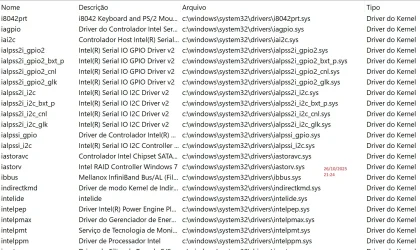
What is the odds, that my new pc, CPU AMD, Chipset amd, and everything different from intel, get the same drivers, same services, same things. Well, That target is on my IP? And the thing i am really enjoy, its "Someone" decide to configure the PC, the Way he likes. In Intel i got Sata drivers, and in my new one i got a NVME driver, and my SSD was NVME now its SSD Sata. And a lot of garbage my low pc from 2017 have. And the surprise is so good, my configuration start to freeze, and windows got not response for like 2 secs.
The another thing i am really loving, and this is the most obscure part, and sorry to say its a humiliation because, the user experience got dead. The same and same prompt every site telling to find my administrator, THE A LOT OF ADS i see browsing in the internet, to get support to my ORGANIZATION or the Company i never have in my life.
Another funny thing, its got a lot of places in the internet that says i buy a motherboard with a license attacht on the motheboard. Since i buy all the pieces one by one.
Well, the support in Brazil, its not cool, and this is the only thing i want to say.
I dind even know if my system boot using my hardware or idk what. Right now windows dont restart yet, but after that i am going to get my 365 enterprise, i dind never every buy? And all the pages in the internet, and the tags windows have that i think try to make a descrition from me, with only pre judgment.
Developer, Windows Server, A License server, a Azure IDK what, IT pro, Gov idk what.
Well, my goal here, its to try to find a community may try to know whats happening, and tell me truth, and of course i can provide every info wanted, and every Windows Log if ask.
But you wanna know where windows get me with my PC info? With nothing !!! The info's that windows gave, is like if the pc is normal, but i can see the names from drivers services, from the old PC.
Well, I dont know if this is Windows 11, i dont know if my new pc have all the things that need to support windows 11.
I Really want to know what is my company. Because i think i cant even been a good administrator in my on house or pc.
When browsing in the USA Microsoft Website about the content and Windows 11, i only can see a dream its not possible to brazilians achieve. Well, just want the PC Works and thats it. Someone here think that windows can have fps isssues in destiny 2 using a gtx 5070? Well, i have !!!!
Well, My name is Hiago, i am from Brazil, and really want to get a least a humble experience with my hardware. But is not possible.
PS: Sorry about my TERRIBLE english X_X
Att
After some extra cash i decide to provide me a good upgrade to get no problems with software and hardware when moving to Windows 11.
All the experience is done only by me. After manage, to find the hardware i want, i did all the parts and assemble the PC alone. After that got a Kingston 16gb Clean USB, and ask a friend if he can let me use his PC, after that i download from Microsoft Website the media Creation Tool, with the Windows 11. I was so happy, and dind know about the nightmare.
Come to my house, plug the pc, and for the first time got no erros, and got to UEFI screen, well, Plug the USB on the PC, with only the Storage, cpu, memory and gpu. Did a install letting windows create all his partions and no trouble. When the Windows 11 get up, in the OOBE Screen, i shutdown the PC, and get a backup from the NVME, because i know something is going to happen.
Right now, is the same backup i did, its THE FIRST time the PC got turned on.
But lets get back in the history, i dont know how is process from the big companys, but, i MURST believe the impossible Happen.
Before the Intel PC Got Burned Up, and i live so long with that pc, and remember the name of every driver, every info. Well, i was loging in my Own House, with my internet. But when i got to my house and plug the NEW PC, with a NEW HARDWARE, in the Same internet, the chaos start to happen.
What is the odds, that my new pc, CPU AMD, Chipset amd, and everything different from intel, get the same drivers, same services, same things. Well, That target is on my IP? And the thing i am really enjoy, its "Someone" decide to configure the PC, the Way he likes. In Intel i got Sata drivers, and in my new one i got a NVME driver, and my SSD was NVME now its SSD Sata. And a lot of garbage my low pc from 2017 have. And the surprise is so good, my configuration start to freeze, and windows got not response for like 2 secs.
The another thing i am really loving, and this is the most obscure part, and sorry to say its a humiliation because, the user experience got dead. The same and same prompt every site telling to find my administrator, THE A LOT OF ADS i see browsing in the internet, to get support to my ORGANIZATION or the Company i never have in my life.
Another funny thing, its got a lot of places in the internet that says i buy a motherboard with a license attacht on the motheboard. Since i buy all the pieces one by one.
Well, the support in Brazil, its not cool, and this is the only thing i want to say.
I dind even know if my system boot using my hardware or idk what. Right now windows dont restart yet, but after that i am going to get my 365 enterprise, i dind never every buy? And all the pages in the internet, and the tags windows have that i think try to make a descrition from me, with only pre judgment.
Developer, Windows Server, A License server, a Azure IDK what, IT pro, Gov idk what.
Well, my goal here, its to try to find a community may try to know whats happening, and tell me truth, and of course i can provide every info wanted, and every Windows Log if ask.
But you wanna know where windows get me with my PC info? With nothing !!! The info's that windows gave, is like if the pc is normal, but i can see the names from drivers services, from the old PC.
Well, I dont know if this is Windows 11, i dont know if my new pc have all the things that need to support windows 11.
I Really want to know what is my company. Because i think i cant even been a good administrator in my on house or pc.
When browsing in the USA Microsoft Website about the content and Windows 11, i only can see a dream its not possible to brazilians achieve. Well, just want the PC Works and thats it. Someone here think that windows can have fps isssues in destiny 2 using a gtx 5070? Well, i have !!!!
Well, My name is Hiago, i am from Brazil, and really want to get a least a humble experience with my hardware. But is not possible.
PS: Sorry about my TERRIBLE english X_X
Att
- Windows Build/Version
- Microsoft Windows 24H2 26100.1742
My Computer
At a glance
Windows11,10?Amd Ryzen 870032 gb ddr5Geforce RTX 5070
- OS
- Windows11,10?
- Computer type
- PC/Desktop
- Manufacturer/Model
- Asus
- CPU
- Amd Ryzen 8700
- Motherboard
- Asus Tuf x670e
- Memory
- 32 gb ddr5
- Graphics Card(s)
- Geforce RTX 5070
- Sound Card
- realtek?
- Monitor(s) Displays
- Samsung TV
- Screen Resolution
- 3840x2160
- Hard Drives
- Kingston NV3 PCIe 4.0 NVMe M.2
- PSU
- XPG 850W
- Case
- Husky Midtower
- Cooling
- Water Cooler 360MM
- Keyboard
- Redragon
- Mouse
- Dazz Deathstroke
- Internet Speed
- 1 Giga
- Browser
- Edge
- Antivirus
- Dont Defender