Traffic Monitor Alternative - Windows Defender Threats


mccmw

Well-known member
Member
VIP
Local time
1:51 PM
Posts
495
OS
Windows 11
I have been using TrafficMonitor (from GitHub...popular software) for several years now. In the past six months Windows Defender has started to regularly and annoyingly go after one of the drivers (TrafficMonitor.sys). I've read it is beacause of its age. Windows Defender treats it as a threat and if I "allow" it tries to remove it again...but calling it a completely different threat. TrafficMonitor works great because you can make it blend in to the taskbar as if it is part of Windows (e.g. simple font on the taskbar that nearly matches the clock/calendar).

I've done some searches but not tried anything. Is there another basic system monitor that has this feature...i.e. not a bunch of colored graphics, graphs, hover over, etc. Just simple data that blends into taskbar/notification area?
 

My Computers

System One System Two

  • OS
    Windows 11
    Computer type
    PC/Desktop
    Manufacturer/Model
    Custom
    CPU
    Intel i7-7700K
    Motherboard
    Asus Prime Z-270A
    Memory
    32GB 2666Mhz (Kingston Hyper X Fury)
    Graphics Card(s)
    Asus Nvidia 1050Ti
    Sound Card
    N/A
    Monitor(s) Displays
    Samsung C27F390
    Screen Resolution
    1920 x 1080
    Hard Drives
    1TB Western Digital SN770 (System) and 2TB Western Digital SN770 (Storage)
    Antivirus
    Windows Security
  • Operating System
    Windows 11 Home
    Computer type
    Laptop
    Manufacturer/Model
    Dell/XPS 15 9510
    CPU
    i9-11900H
    Motherboard
    Unknown
    Memory
    32GB
    Graphics card(s)
    Integrated Intel and Nvidia 3050Ti
    Sound Card
    Integrated (Realtek)
    Monitor(s) Displays
    None
    Screen Resolution
    1920 x 1200 (non-Touch)
    Hard Drives
    2TB SK Hynix P41 Platinum
    Antivirus
    Windows Security
I am betting that its due to the driver needing to be digitally signed, which small free apps don't usually bother with due to cost and constant upkeep. So while the app itself might not be dangerous, the methods it uses to gather that information could be a security risk to your pc. All of the built in windows options are better than using a third party app with a driver.

Perhaps relevant article:


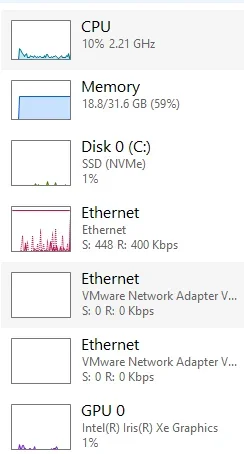
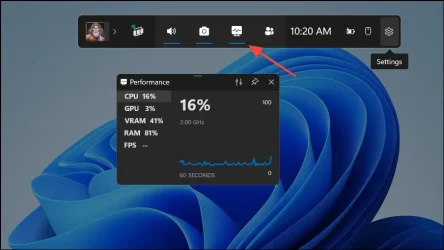
There is a tool built into windows though for dealing with this. You can simply launch task manager and double click on the white space on the left and have this floating window. Or use game bar performance overlay, which allows to be permanently displayed on top of windows by pinning it. You can even set the opacity to low so it blends in well. This is probably the option for you since you didn't want colored graphs.

1758288640246.webp1758288753394.webp

This video shows you can even bring it to your taskbar.

 
Last edited:

My Computers

System One System Two

  • OS
    Windows 11 Pro
    Computer type
    PC/Desktop
    Manufacturer/Model
    Custom Built
    CPU
    Ryzen 7 5700 X3D
    Motherboard
    MSI MPG B550 GAMING PLUS
    Memory
    64 GB DDR4 3600mhz Gskill Ripjaws V
    Graphics Card(s)
    RTX 4070 Super , 12GB VRAM Asus EVO Overclock
    Monitor(s) Displays
    Gigabyte M27Q (rev. 2.0) 2560 x 1440 @ 170hz HDR
    Hard Drives
    2TB Samsung nvme ssd
    4TB Western Digital nvme ssd
    PSU
    CORSAIR RMx SHIFT Series™ RM750x 80 PLUS Gold Fully Modular ATX Power Supply
    Case
    CORSAIR 3500X ARGB Mid-Tower ATX PC Case – Black
    Cooling
    ID-COOLING FROSTFLOW X 240 CPU Water Cooler
    Keyboard
    Logitech G213
    Mouse
    Logitech G203
    Internet Speed
    1.2gbps Fiber 😎
  • Operating System
    Chrome OS
    Computer type
    Laptop
    Manufacturer/Model
    HP Chromebook
    CPU
    Intel Pentium Quad Core
    Memory
    4GB LPDDR4
    Monitor(s) Displays
    14 Inch HD SVA anti glare micro edge display
    Hard Drives
    64 GB emmc
Thanks...I'll have to check out the XBox game bar. Yes...the WinRing0 is one of the threats. However, if I "allow it" sometimes Defender attempts to flag it again as another/different threat.
 

My Computers

System One System Two

  • OS
    Windows 11
    Computer type
    PC/Desktop
    Manufacturer/Model
    Custom
    CPU
    Intel i7-7700K
    Motherboard
    Asus Prime Z-270A
    Memory
    32GB 2666Mhz (Kingston Hyper X Fury)
    Graphics Card(s)
    Asus Nvidia 1050Ti
    Sound Card
    N/A
    Monitor(s) Displays
    Samsung C27F390
    Screen Resolution
    1920 x 1080
    Hard Drives
    1TB Western Digital SN770 (System) and 2TB Western Digital SN770 (Storage)
    Antivirus
    Windows Security
  • Operating System
    Windows 11 Home
    Computer type
    Laptop
    Manufacturer/Model
    Dell/XPS 15 9510
    CPU
    i9-11900H
    Motherboard
    Unknown
    Memory
    32GB
    Graphics card(s)
    Integrated Intel and Nvidia 3050Ti
    Sound Card
    Integrated (Realtek)
    Monitor(s) Displays
    None
    Screen Resolution
    1920 x 1200 (non-Touch)
    Hard Drives
    2TB SK Hynix P41 Platinum
    Antivirus
    Windows Security

Latest Support Threads

Back
Top Bottom