
jhallesy
Member
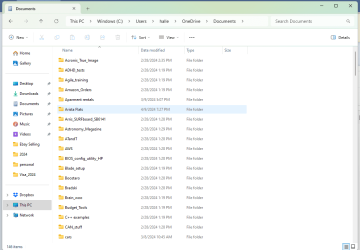
When I run the dir command, it does not show most of the folders in my Documents folder:
C:\Users\halle\Documents>dir
Volume in drive C is Windows
Volume Serial Number is E2B8-E74C
Directory of C:\Users\halle\Documents
02/29/2024 04:13 PM <DIR> .
04/09/2024 10:45 PM <DIR> ..
02/28/2024 03:35 PM <DIR> Acronis_True_Image
02/29/2024 04:13 PM <DIR> Amazon_Returns
02/29/2024 11:43 AM <DIR> Medical
0 File(s) 0 bytes
5 Dir(s) 355,425,300,480 bytes free
In the screenshot, you will see there are many folders.
This issue is preventing from using Oracle's Vmanage command to convert an iso to vdi, which is typically done on the command line;
I can't cd into the folder hosting my .iso file.
C:\Users\halle\Documents>dir
Volume in drive C is Windows
Volume Serial Number is E2B8-E74C
Directory of C:\Users\halle\Documents
02/29/2024 04:13 PM <DIR> .
04/09/2024 10:45 PM <DIR> ..
02/28/2024 03:35 PM <DIR> Acronis_True_Image
02/29/2024 04:13 PM <DIR> Amazon_Returns
02/29/2024 11:43 AM <DIR> Medical
0 File(s) 0 bytes
5 Dir(s) 355,425,300,480 bytes free
In the screenshot, you will see there are many folders.
This issue is preventing from using Oracle's Vmanage command to convert an iso to vdi, which is typically done on the command line;
I can't cd into the folder hosting my .iso file.
Attachments
My Computer
At a glance
Windows 11AMD Ryzen3 with Radeon Graphics,2402Mhz, 4 cores8GBIntel built-in
- OS
- Windows 11
- Computer type
- PC/Desktop
- Manufacturer/Model
- Hewlett Packard
- CPU
- AMD Ryzen3 with Radeon Graphics,2402Mhz, 4 cores
- Motherboard
- Manufacturer HP, BaseBoard Product No. 8B4E
- Memory
- 8GB
- Graphics Card(s)
- Intel built-in
- Sound Card
- RealTek audio
- Monitor(s) Displays
- HP
- Screen Resolution
- 1600x1024
- Hard Drives
- Only one 1GB SSD showing with Disk Mangement. Should be moe.






