Two BSOD's in one week after upgrading to 22H2


BoomSchtick

Member
Local time
4:29 PM
Posts
26
OS
Windows 11
My MiniDump folder has 5 dumps in it, but two of them have been within the last week. BlueScreenView just shows the problem is ntoskrnl, which isn't super useful.

Build number (Version 22H2 22621.521)
 

My Computer My Computer

At a glance

Windows 11Intel(R) Core(TM) i7-8665U CPU @ 1.90GHz, 211Crucial CT16G48C40S5.M8A1 16 Gig DDR5 (x2)Intel(R) Iris(R) Xe Graphics
OS
Windows 11
Computer type
Laptop
Manufacturer/Model
HP ZBook Firefly 16 inch G9
CPU
Intel(R) Core(TM) i7-8665U CPU @ 1.90GHz, 211
Motherboard
HP KBC Version 20.5E.00
Memory
Crucial CT16G48C40S5.M8A1 16 Gig DDR5 (x2)
Graphics Card(s)
Intel(R) Iris(R) Xe Graphics
Hard Drives
SAMSUNG MZVL2512HCJQ-00BH1
Antivirus
Sentinel One
A quick web search turned up this


My Computers My Computers

  • At a glance

    Win 11 Pro 25H2 26200.9550Intel® Core™ i7-14700KG.SKILL Ripjaws S5 Series 64GB (2 x 32GB) DDR5ASUS GeForce RTX 4070 Super 12GB
    OS
    Win 11 Pro 25H2 26200.9550
    Computer type
    PC/Desktop
    Manufacturer/Model
    Self Built
    CPU
    Intel® Core™ i7-14700K
    Motherboard
    ASUS TUF Z690-PLUS WIFI (BIOS 4505)
    Memory
    G.SKILL Ripjaws S5 Series 64GB (2 x 32GB) DDR5
    Graphics Card(s)
    ASUS GeForce RTX 4070 Super 12GB
    Sound Card
    Sound Blaster AE-5 Plus
    Monitor(s) Displays
    ASUS TUF Gaming 27" 2K HDR Gaming
    Screen Resolution
    2560 x 1440
    Hard Drives
    Samsung 990 Pro 1TB NVMe (Win 11 25H2)
    SK hynix P41 500GB NVMe
    SK hynix P41 2TB NVMe (x3)
    Crucial P3 Plus 4TB
    PSU
    Corsair RM850x Shift
    Case
    Antec Dark Phantom DP502 FLUX
    Cooling
    Corsair Nautilus 360 RS AIO
    Keyboard
    Logitech MK 320
    Mouse
    Razer Basilisk V3
    Internet Speed
    750Mbs
    Browser
    Firefox
    Antivirus
    Winows Security
    Other Info
    MR 8.1 Home
  • At a glance

    Win 11 Pro 25H2 26200.9550Intel Core i5-1140064 GB DDR4MSI GeForce RTX 3060 Ventus 2X 12GB
    Operating System
    Win 11 Pro 25H2 26200.9550
    Computer type
    PC/Desktop
    Manufacturer/Model
    Self Built
    CPU
    Intel Core i5-11400
    Motherboard
    Asus TUF Gaming Z590 Plus WiFi (BIOS 2803)
    Memory
    64 GB DDR4
    Graphics card(s)
    MSI GeForce RTX 3060 Ventus 2X 12GB
    Sound Card
    SoundBlaster Audigy Fx V2
    Monitor(s) Displays
    Samsung F27T350
    Screen Resolution
    1920x1080
    Hard Drives
    Samsung 980 Pro 1TB
    Samsung 970 EVO Plus 2TB
    Samsung 870 EVO 500GB SSD
    PSU
    Corsair HX750
    Case
    Cougar MX330-G Window
    Cooling
    Thermalright Frozen Edge 240 Black AIO
    Internet Speed
    350Mbps
    Browser
    Firefox
    Antivirus
    Windows Security
  • System Three
    Win 11 Pro 25H2 26200.9550
    ASUS PRIME Z370-P II BIOS 3004 7/12/21
    Intel Core i7-8700 CPU @ 3.20GHz
    32GB DDR4 RAM (4x8)
    EVGA RTX 2060 (used)
    iGPU Intel UHD Graphics 630 (backup)
    Cooler Master Hyper 212
    Mid-Tower Desktop
A quick web search turned up this

Thanks, but I've already tried all of what that article references. Everything checks out system wise.
 

My Computer My Computer

At a glance

Windows 11Intel(R) Core(TM) i7-8665U CPU @ 1.90GHz, 211Crucial CT16G48C40S5.M8A1 16 Gig DDR5 (x2)Intel(R) Iris(R) Xe Graphics
OS
Windows 11
Computer type
Laptop
Manufacturer/Model
HP ZBook Firefly 16 inch G9
CPU
Intel(R) Core(TM) i7-8665U CPU @ 1.90GHz, 211
Motherboard
HP KBC Version 20.5E.00
Memory
Crucial CT16G48C40S5.M8A1 16 Gig DDR5 (x2)
Graphics Card(s)
Intel(R) Iris(R) Xe Graphics
Hard Drives
SAMSUNG MZVL2512HCJQ-00BH1
Antivirus
Sentinel One

My Computer My Computer

At a glance

Windows 11Intel(R) Core(TM) i7-8665U CPU @ 1.90GHz, 211Crucial CT16G48C40S5.M8A1 16 Gig DDR5 (x2)Intel(R) Iris(R) Xe Graphics
OS
Windows 11
Computer type
Laptop
Manufacturer/Model
HP ZBook Firefly 16 inch G9
CPU
Intel(R) Core(TM) i7-8665U CPU @ 1.90GHz, 211
Motherboard
HP KBC Version 20.5E.00
Memory
Crucial CT16G48C40S5.M8A1 16 Gig DDR5 (x2)
Graphics Card(s)
Intel(R) Iris(R) Xe Graphics
Hard Drives
SAMSUNG MZVL2512HCJQ-00BH1
Antivirus
Sentinel One
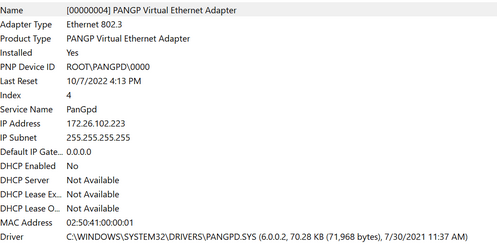
Your most recent BSOD appears to be related to your PanGP Virtual Miniport driver.

Code:
DRIVER_POWER_STATE_FAILURE (9f)

A driver has failed to complete a power IRP within a specific time.
Arguments:
Arg1: 0000000000000004, The power transition timed out waiting to synchronize with the Pnp
    subsystem.
Arg2: 0000000000000258, Timeout in seconds.
Arg3: ffffb58806fbf040, The thread currently holding on to the Pnp lock.
Arg4: ffffef0e073bf800, nt!TRIAGE_9F_PNP on Win7 and higher

Debugging Details:
------------------

Implicit thread is now ffffb588`06fbf040
*** WARNING: Unable to verify timestamp for pangpd.sys


FAULTING_MODULE: fffff805955e0000 pangpd

I hope this helps you track down the culprit. See if you can find an updated driver for it. It will be related to your Global Protect VPN software. As a test you could uninstall the software and see if the BSOD goes away.

1665351053525.png
 

My Computers My Computers

  • At a glance

    Windows 11Intel Core i58GB
    OS
    Windows 11
    Computer type
    Laptop
    Manufacturer/Model
    Microsoft Surface
    CPU
    Intel Core i5
    Memory
    8GB
    Internet Speed
    900MB/s
    Browser
    MS Edge
    Antivirus
    Microsoft Defender
  • At a glance

    Win 11Intel i5 - 10th gen8GBIntel Iris plus
    Operating System
    Win 11
    Computer type
    Laptop
    Manufacturer/Model
    Microsoft Surface 3
    CPU
    Intel i5 - 10th gen
    Memory
    8GB
    Graphics card(s)
    Intel Iris plus
Your most recent BSOD appears to be related to your PanGP Virtual Miniport driver.

Code:
DRIVER_POWER_STATE_FAILURE (9f)

A driver has failed to complete a power IRP within a specific time.
Arguments:
Arg1: 0000000000000004, The power transition timed out waiting to synchronize with the Pnp
    subsystem.
Arg2: 0000000000000258, Timeout in seconds.
Arg3: ffffb58806fbf040, The thread currently holding on to the Pnp lock.
Arg4: ffffef0e073bf800, nt!TRIAGE_9F_PNP on Win7 and higher

Debugging Details:
------------------

Implicit thread is now ffffb588`06fbf040
*** WARNING: Unable to verify timestamp for pangpd.sys


FAULTING_MODULE: fffff805955e0000 pangpd

I hope this helps you track down the culprit. See if you can find an updated driver for it. It will be related to your Global Protect VPN software. As a test you could uninstall the software and see if the BSOD goes away.

View attachment 41928
Thanks. I'll try updating to the latest version.
 

My Computer My Computer

At a glance

Windows 11Intel(R) Core(TM) i7-8665U CPU @ 1.90GHz, 211Crucial CT16G48C40S5.M8A1 16 Gig DDR5 (x2)Intel(R) Iris(R) Xe Graphics
OS
Windows 11
Computer type
Laptop
Manufacturer/Model
HP ZBook Firefly 16 inch G9
CPU
Intel(R) Core(TM) i7-8665U CPU @ 1.90GHz, 211
Motherboard
HP KBC Version 20.5E.00
Memory
Crucial CT16G48C40S5.M8A1 16 Gig DDR5 (x2)
Graphics Card(s)
Intel(R) Iris(R) Xe Graphics
Hard Drives
SAMSUNG MZVL2512HCJQ-00BH1
Antivirus
Sentinel One

Latest Support Threads

Back
Top Bottom