Unable to add another valid 16:9 resolutions.


ineuw

Well-known member
Local time
2:31 PM
Posts
21
Location
Canada
OS
Windows 11 24H2
My required display resolution is 1664 x 936, which is a true 16:9 geometry from this list-of-true-169-resolutions. In Windows 10, I was able to set this and other 16:9 resolutions using the Intel software.

Now, with a new motherboard, which also has an Intel UHD Graphics 610 chipset, I installed Windows 11 and I am unable to set this resolution. The display monitor is a standard LG 24". 1920 x 1080 is the only true 16:9 resolution available. 1600 x 900 is not a true 16:9 resolution and I notice the difference.

Can someone have a suggestion?

Code:
Edition    Windows 11 Pro
Version    22H2
Installed on    ‎2023-‎07-‎23
OS build    22621.1992
Experience    Windows Feature Experience Pack 1000.22644.1000.0

Device name    win11pde
Processor    Intel(R) Pentium(R) Gold G6400 CPU @ 4.00GHz   4.01 GHz
Installed RAM    16.0 GB (15.6 GB usable)
Device ID    D53F0D09-F10A-4BFA-BE17-F3F45315A463
Product ID    00330-80000-00000-AA459
System type    64-bit operating system, x64-based processor
Pen and touch    No pen or touch input is available for this display
 
Windows Build/Version
Windows 11 Pro 22H2 OS build 22261.1992

My Computer My Computer

At a glance

Windows 11 24H2Pentium Gold Pro 6500 4.00GHz16GBIntel on board
OS
Windows 11 24H2
Computer type
PC/Desktop
Manufacturer/Model
user assembled standard hardware
CPU
Pentium Gold Pro 6500 4.00GHz
Motherboard
AsRock Z590 Steel Legend
Memory
16GB
Graphics Card(s)
Intel on board
Sound Card
on board
Monitor(s) Displays
24" LG
Screen Resolution
Preferred 1600 x 900 or 1664 x 936 (16:9)
Hard Drives
128GB internal system SSD
1TB data SSD
PSU
Antec 650w Bronze
Case
Antec Mid Tower
Cooling
standard CPU and 120mm case fan
Keyboard
104 US or French Canada Qwerty
Mouse
Microsoft wireless
Internet Speed
60Mbit
Browser
Firefox, Vivaldi, Google Chrome Edge
Antivirus
Windows 11 Pro

My Computers My Computers

  • At a glance

    Windows 11 Pro 25H2 26200.8655i9-10900 10 core 20 threads32 gbnone-Intel UHD Graphics 630
    OS
    Windows 11 Pro 25H2 26200.8655
    Computer type
    PC/Desktop
    Manufacturer/Model
    Dell Optiplex 7080
    CPU
    i9-10900 10 core 20 threads
    Motherboard
    DELL 0J37VM
    Memory
    32 gb
    Graphics Card(s)
    none-Intel UHD Graphics 630
    Sound Card
    Integrated Realtek
    Monitor(s) Displays
    Benq 27
    Screen Resolution
    2560x1440
    Hard Drives
    2x1tb Solidigm m.2 nvme /External drives 512gb Samsung m.2 sata+2tb Kingston m2.nvme
    PSU
    500w
    Case
    MT
    Cooling
    Dell Premium
    Keyboard
    Logitech wired
    Mouse
    Logitech wireless
    Internet Speed
    so slow I'm too embarrassed to tell
    Browser
    #1 Edge #2 Firefox
    Antivirus
    Defender+MWB Premium
  • At a glance

    Windows 11 Pro 24H2 26200.8457AMD Ryzen 7 6800U32 gbintegrated
    Operating System
    Windows 11 Pro 24H2 26200.8457
    Computer type
    PC/Desktop
    Manufacturer/Model
    Beelink Mini PC SER5
    CPU
    AMD Ryzen 7 6800U
    Memory
    32 gb
    Graphics card(s)
    integrated
    Sound Card
    integrated
    Monitor(s) Displays
    Benq 27
    Screen Resolution
    2560x1440
    Hard Drives
    1TB Crucial nvme
    Keyboard
    Logitech wired
    Mouse
    Logitech wireless
    Internet Speed
    still too embarrassed to tell
    Browser
    Firefox
    Antivirus
    Defender
    Other Info
    System 3 is non compliant Dell 9020 i7-4770/24gb ram Win11 PRO 26200.8457
Hello @ineuw and welcome to ElevenForum. :-)


You should be running your display at it's "native resolution".
Then if you want to adjust the screen to make it easier on the eyes... do it with the Settings > System > Display > Scale.
Or use Settings > Accessibility > Magnifier or Settings > Accessibility > Text Size.
 
Last edited:

My Computers My Computers

  • At a glance

    Win 11 Home ♦♦♦26200.8737 ♦♦♦♦♦♦♦25H2AMD Ryzen 7 3700XG.Skill (F4-3200C14D-16GTZKW)EVGA RTX 2070 (08G-P4-2171-KR)
    OS
    Win 11 Home ♦♦♦26200.8737 ♦♦♦♦♦♦♦25H2
    Computer type
    PC/Desktop
    Manufacturer/Model
    Built by Ghot® [May 2020]
    CPU
    AMD Ryzen 7 3700X
    Motherboard
    Asus Pro WS X570-ACE (BIOS 5302)
    Memory
    G.Skill (F4-3200C14D-16GTZKW)
    Graphics Card(s)
    EVGA RTX 2070 (08G-P4-2171-KR)
    Sound Card
    Realtek ALC1220P / ALC S1220A
    Monitor(s) Displays
    Dell U3011 30"
    Screen Resolution
    2560 x 1600
    Hard Drives
    2x Samsung 860 EVO 500GB,
    WD 4TB Black FZBX - SATA III,
    WD 8TB Black FZBX - SATA III,
    DRW-24B1ST CD/DVD Burner
    PSU
    PC Power & Cooling 750W Quad EPS12V
    Case
    Cooler Master ATCS 840 Tower
    Cooling
    CM Hyper 212 EVO (push/pull)
    Keyboard
    Ducky DK9008 Shine II Blue LED
    Mouse
    Logitech Optical M-100
    Internet Speed
    300/300
    Browser
    Firefox (latest)
    Antivirus
    Bitdefender Total Security
    Other Info
    Speakers: Klipsch Pro Media 2.1
  • At a glance

    Windows XP Pro 32bit w/SP3AMD Athlon 64 X2 5000+ (OC'd @ 3.2Ghz)TWIN2X2048-6400C4DHX (2 x 1GB, DDR2 800)EVGA 256-P2-N758-TR GeForce 8600GT SSC
    Operating System
    Windows XP Pro 32bit w/SP3
    Computer type
    PC/Desktop
    Manufacturer/Model
    Built by Ghot® (not in use)
    CPU
    AMD Athlon 64 X2 5000+ (OC'd @ 3.2Ghz)
    Motherboard
    ASUS M2N32-SLI Deluxe Wireless Edition
    Memory
    TWIN2X2048-6400C4DHX (2 x 1GB, DDR2 800)
    Graphics card(s)
    EVGA 256-P2-N758-TR GeForce 8600GT SSC
    Sound Card
    Onboard
    Monitor(s) Displays
    ViewSonic G90FB Black 19" Professional (CRT)
    Screen Resolution
    up to 2048 x 1536
    Hard Drives
    WD 36GB 10,000rpm Raptor SATA
    Seagate 80GB 7200rpm SATA
    Lite-On LTR-52246S CD/RW
    Lite-On LH-18A1P CD/DVD Burner
    PSU
    PC Power & Cooling Silencer 750 Quad EPS12V
    Case
    Generic Beige case, 80mm fans
    Cooling
    ZALMAN 9500A 92mm CPU Cooler
    Keyboard
    Logitech Classic Keybooard 200
    Mouse
    Logitech Optical M-BT96a
    Internet Speed
    300/300
    Browser
    Firefox 3.x ??
    Antivirus
    Symantec (Norton)
    Other Info
    Still assembled, still runs. Haven't turned it on for 15 years?
Thanks for both posts and the welcome. In Windows 11, the option to declare custom resolution is gone. I accepted it, use the default and modify the size by adjusting the scale.

This is an interesting Microsoft solution to reduce video problems due to the legions of users who have difficulty, but my monitor displays any resolution below 1920x1080 using xrandr in Linux. But, that is not relevant here. :-)
 

My Computer My Computer

At a glance

Windows 11 24H2Pentium Gold Pro 6500 4.00GHz16GBIntel on board
OS
Windows 11 24H2
Computer type
PC/Desktop
Manufacturer/Model
user assembled standard hardware
CPU
Pentium Gold Pro 6500 4.00GHz
Motherboard
AsRock Z590 Steel Legend
Memory
16GB
Graphics Card(s)
Intel on board
Sound Card
on board
Monitor(s) Displays
24" LG
Screen Resolution
Preferred 1600 x 900 or 1664 x 936 (16:9)
Hard Drives
128GB internal system SSD
1TB data SSD
PSU
Antec 650w Bronze
Case
Antec Mid Tower
Cooling
standard CPU and 120mm case fan
Keyboard
104 US or French Canada Qwerty
Mouse
Microsoft wireless
Internet Speed
60Mbit
Browser
Firefox, Vivaldi, Google Chrome Edge
Antivirus
Windows 11 Pro
Hello @ineuw and welcome to ElevenForum. :-)


You should be running your display at it's "native resolution".
Then if you want to adjust the screen to make it easier on the eyes... do it with the Settings > Display > Scale.
Or use Settings > Accessibility > Magnifier.
I am really hobbled by Intel's display limitations. Magnification does not affect the software I am using, and the magnification distorts my vision.

Would a separate video card can set other true 16:9 resolutions? After all it's a 1 year old 24" 16:9 display monitor, and Linux has no problem displaying my desired resolution required for my vision.
 

My Computer My Computer

At a glance

Windows 11 24H2Pentium Gold Pro 6500 4.00GHz16GBIntel on board
OS
Windows 11 24H2
Computer type
PC/Desktop
Manufacturer/Model
user assembled standard hardware
CPU
Pentium Gold Pro 6500 4.00GHz
Motherboard
AsRock Z590 Steel Legend
Memory
16GB
Graphics Card(s)
Intel on board
Sound Card
on board
Monitor(s) Displays
24" LG
Screen Resolution
Preferred 1600 x 900 or 1664 x 936 (16:9)
Hard Drives
128GB internal system SSD
1TB data SSD
PSU
Antec 650w Bronze
Case
Antec Mid Tower
Cooling
standard CPU and 120mm case fan
Keyboard
104 US or French Canada Qwerty
Mouse
Microsoft wireless
Internet Speed
60Mbit
Browser
Firefox, Vivaldi, Google Chrome Edge
Antivirus
Windows 11 Pro
I am really hobbled by Intel's display limitations. Magnification does not affect the software I am using, and the magnification distorts my vision.

Would a separate video card can set other true 16:9 resolutions? After all it's a 1 year old 24" 16:9 display monitor, and Linux has no problem displaying my desired resolution required for my vision.


Unfortunately, I'm not familiar with Integrated Graphics Processors (IGPs).
I've always use discreet video cards.

Again, I suggest running the monitor at it's "native" resolution, which would be 1920 x 1080?
If the text, etc., is too small at that resolution, then find alternate ways to "enlarge" things to suit your eyesight.

Like... Settings > System > Display > Scale. "Scale" is probably your best option.
Ofc you'll need to find a percentage that does "not" distort text or images. (115.3%, is what you want but it's not offered).
Lemme see if I can find the registry entry related to scaling.

Monitors and drivers always work the best at the monitor's "native" resolution.


Well I can't get the scaling to work on any but the percentages that are offered.
But I can set the text size in Settings > System > Display > Scale > Text Size

Setting the Text Size to 115% and clicking Apply, should work.
 
Last edited:

My Computers My Computers

  • At a glance

    Win 11 Home ♦♦♦26200.8737 ♦♦♦♦♦♦♦25H2AMD Ryzen 7 3700XG.Skill (F4-3200C14D-16GTZKW)EVGA RTX 2070 (08G-P4-2171-KR)
    OS
    Win 11 Home ♦♦♦26200.8737 ♦♦♦♦♦♦♦25H2
    Computer type
    PC/Desktop
    Manufacturer/Model
    Built by Ghot® [May 2020]
    CPU
    AMD Ryzen 7 3700X
    Motherboard
    Asus Pro WS X570-ACE (BIOS 5302)
    Memory
    G.Skill (F4-3200C14D-16GTZKW)
    Graphics Card(s)
    EVGA RTX 2070 (08G-P4-2171-KR)
    Sound Card
    Realtek ALC1220P / ALC S1220A
    Monitor(s) Displays
    Dell U3011 30"
    Screen Resolution
    2560 x 1600
    Hard Drives
    2x Samsung 860 EVO 500GB,
    WD 4TB Black FZBX - SATA III,
    WD 8TB Black FZBX - SATA III,
    DRW-24B1ST CD/DVD Burner
    PSU
    PC Power & Cooling 750W Quad EPS12V
    Case
    Cooler Master ATCS 840 Tower
    Cooling
    CM Hyper 212 EVO (push/pull)
    Keyboard
    Ducky DK9008 Shine II Blue LED
    Mouse
    Logitech Optical M-100
    Internet Speed
    300/300
    Browser
    Firefox (latest)
    Antivirus
    Bitdefender Total Security
    Other Info
    Speakers: Klipsch Pro Media 2.1
  • At a glance

    Windows XP Pro 32bit w/SP3AMD Athlon 64 X2 5000+ (OC'd @ 3.2Ghz)TWIN2X2048-6400C4DHX (2 x 1GB, DDR2 800)EVGA 256-P2-N758-TR GeForce 8600GT SSC
    Operating System
    Windows XP Pro 32bit w/SP3
    Computer type
    PC/Desktop
    Manufacturer/Model
    Built by Ghot® (not in use)
    CPU
    AMD Athlon 64 X2 5000+ (OC'd @ 3.2Ghz)
    Motherboard
    ASUS M2N32-SLI Deluxe Wireless Edition
    Memory
    TWIN2X2048-6400C4DHX (2 x 1GB, DDR2 800)
    Graphics card(s)
    EVGA 256-P2-N758-TR GeForce 8600GT SSC
    Sound Card
    Onboard
    Monitor(s) Displays
    ViewSonic G90FB Black 19" Professional (CRT)
    Screen Resolution
    up to 2048 x 1536
    Hard Drives
    WD 36GB 10,000rpm Raptor SATA
    Seagate 80GB 7200rpm SATA
    Lite-On LTR-52246S CD/RW
    Lite-On LH-18A1P CD/DVD Burner
    PSU
    PC Power & Cooling Silencer 750 Quad EPS12V
    Case
    Generic Beige case, 80mm fans
    Cooling
    ZALMAN 9500A 92mm CPU Cooler
    Keyboard
    Logitech Classic Keybooard 200
    Mouse
    Logitech Optical M-BT96a
    Internet Speed
    300/300
    Browser
    Firefox 3.x ??
    Antivirus
    Symantec (Norton)
    Other Info
    Still assembled, still runs. Haven't turned it on for 15 years?
@ineuw

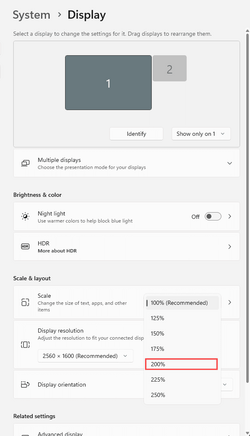
In the Scaling settings... 200% also works, and keeps a 16:9 ratio.
Even multiples of 100% all work to give 16:9 resolutions. Like 300%, 400%... etc.

In short... 100%, 200%, 300%, 400% and 500%, will all keep a 16:9 resolution.
Any "offered" percentage in between will break the 16:9 ratio.


Image1.png
 

My Computers My Computers

  • At a glance

    Win 11 Home ♦♦♦26200.8737 ♦♦♦♦♦♦♦25H2AMD Ryzen 7 3700XG.Skill (F4-3200C14D-16GTZKW)EVGA RTX 2070 (08G-P4-2171-KR)
    OS
    Win 11 Home ♦♦♦26200.8737 ♦♦♦♦♦♦♦25H2
    Computer type
    PC/Desktop
    Manufacturer/Model
    Built by Ghot® [May 2020]
    CPU
    AMD Ryzen 7 3700X
    Motherboard
    Asus Pro WS X570-ACE (BIOS 5302)
    Memory
    G.Skill (F4-3200C14D-16GTZKW)
    Graphics Card(s)
    EVGA RTX 2070 (08G-P4-2171-KR)
    Sound Card
    Realtek ALC1220P / ALC S1220A
    Monitor(s) Displays
    Dell U3011 30"
    Screen Resolution
    2560 x 1600
    Hard Drives
    2x Samsung 860 EVO 500GB,
    WD 4TB Black FZBX - SATA III,
    WD 8TB Black FZBX - SATA III,
    DRW-24B1ST CD/DVD Burner
    PSU
    PC Power & Cooling 750W Quad EPS12V
    Case
    Cooler Master ATCS 840 Tower
    Cooling
    CM Hyper 212 EVO (push/pull)
    Keyboard
    Ducky DK9008 Shine II Blue LED
    Mouse
    Logitech Optical M-100
    Internet Speed
    300/300
    Browser
    Firefox (latest)
    Antivirus
    Bitdefender Total Security
    Other Info
    Speakers: Klipsch Pro Media 2.1
  • At a glance

    Windows XP Pro 32bit w/SP3AMD Athlon 64 X2 5000+ (OC'd @ 3.2Ghz)TWIN2X2048-6400C4DHX (2 x 1GB, DDR2 800)EVGA 256-P2-N758-TR GeForce 8600GT SSC
    Operating System
    Windows XP Pro 32bit w/SP3
    Computer type
    PC/Desktop
    Manufacturer/Model
    Built by Ghot® (not in use)
    CPU
    AMD Athlon 64 X2 5000+ (OC'd @ 3.2Ghz)
    Motherboard
    ASUS M2N32-SLI Deluxe Wireless Edition
    Memory
    TWIN2X2048-6400C4DHX (2 x 1GB, DDR2 800)
    Graphics card(s)
    EVGA 256-P2-N758-TR GeForce 8600GT SSC
    Sound Card
    Onboard
    Monitor(s) Displays
    ViewSonic G90FB Black 19" Professional (CRT)
    Screen Resolution
    up to 2048 x 1536
    Hard Drives
    WD 36GB 10,000rpm Raptor SATA
    Seagate 80GB 7200rpm SATA
    Lite-On LTR-52246S CD/RW
    Lite-On LH-18A1P CD/DVD Burner
    PSU
    PC Power & Cooling Silencer 750 Quad EPS12V
    Case
    Generic Beige case, 80mm fans
    Cooling
    ZALMAN 9500A 92mm CPU Cooler
    Keyboard
    Logitech Classic Keybooard 200
    Mouse
    Logitech Optical M-BT96a
    Internet Speed
    300/300
    Browser
    Firefox 3.x ??
    Antivirus
    Symantec (Norton)
    Other Info
    Still assembled, still runs. Haven't turned it on for 15 years?
"The display monitor is a standard LG 24". 1920 x 1080 is the only true 16:9 resolution available. 1600 x 900 is not a true 16:9 resolution and I notice the difference."

The 1920 x 1080 is physical pixels of the display panel, nothing changes that.

1600 x 900 would be scaled up, so would 1664 x 936, both would not look so good.

Complete waste of time using something unusual like 1664 x 936.

You can set unusual resolutions in the Intel Graphics Command Centre, but in this case totally pointless complication.

You are going on about "true 16:9 resolutions" when that is the aspect ratio. There is only one true resolution of your monitor 1920 x 1080.

With some monitors you maybe able to display just the centre chunk of 1664 x 936 pixels surrounded by a black border, but why reduce your screen area.

A separate Graphics Card makes no difference, except you would be dealing with a different graphics control panel.
 

My Computer My Computer

At a glance

Windows 11
OS
Windows 11
Back
Top Bottom