
Unable to create bootable media with AOMEI Backupper Pro


LarsErikOsterud

Active member
Member
Local time
9:05 PM
Posts
56
OS
Windows 10
Just upgraded to AOMEI Backupper Pro. But can't create a bootable media (worked fine in the old free version).
No matter if I select ISO or bootable the window just closed when I click "Next". No message or anything.
ANyone else have experieced this and know how to fix it?
 

My Computers

System One System Two

  • OS
    Windows 10
    Computer type
    PC/Desktop
    Manufacturer/Model
    Asus
    CPU
    Intel Core i5-6600 3.30Ghz
    Motherboard
    Asus B150M
    Memory
    16 GB
    Graphics Card(s)
    Asus Nvidia GeForce GTX 960
    Sound Card
    Onboard
    Monitor(s) Displays
    Samsung
    Hard Drives
    Samsung SSD 850 EBO 128 GB
    WDC WD1003FZEX-00MK2A0
  • Operating System
    Windows 11
    Computer type
    Laptop
    Manufacturer/Model
    Asus ExpertBook
    CPU
    11the Gen Intel Core i5-1135G7 2.40 GHz
    Memory
    8 GB
    Graphics card(s)
    Intel Xe
    Sound Card
    Onboard
    Hard Drives
    NVMe WDC PC SN530 SDBPNPZ 256 GB
My Computers

System One System Two

  • OS
    Windows 11 Pro
    Computer type
    PC/Desktop
    Manufacturer/Model
    GMKtec K11
    CPU
    AMD Ryzen 9 8945HS
    Memory
    32GB DDR5 SO-DIMM
    Graphics Card(s)
    Integrated AMD Radeon 780M (4.00 GHz)
    Monitor(s) Displays
    Benq 2250HM
    Screen Resolution
    1920 x 1080
    Hard Drives
    1 TB PCIe 4.0 NVMe M.2 SSD
  • Operating System
    Windows 11 Home
    Computer type
    Laptop
    Manufacturer/Model
    ASUS Zenbook 14 OLED 14" Laptop - UX3405CA-QL192W
    CPU
    Intel® Core™ Ultra 7 - 255H processor
    Memory
    16 GB LPDDR5 SDRAM
    Graphics card(s)
    Intel Arc 140T onboard graphics
    Screen Resolution
    1920 x 1200 (16:10 WUXGA resolution) OLED Touchscreen
    Hard Drives
    1TB SSD
There is no difference in the standard or pro boot iso.
 

My Computer

System One

  • OS
    Win 10 Pro 19045.6937 Win 11 25H2 VM
    Computer type
    Laptop
    Manufacturer/Model
    Dell Precicion 15 Workstation
    CPU
    Xeon W-10885M
    Motherboard
    Dell
    Memory
    64GB ECC DDR4 128GB max
    Graphics Card(s)
    Intel 1080p + Quadro RTX 5000 Max-Q 16GB 4K
    Sound Card
    onboard Realtec
    Monitor(s) Displays
    NA
    Screen Resolution
    1080p to 4k
    Hard Drives
    1 TB Samsung 9100 M2 SSD main
    2 TB Samsung 9100 M2 SSD storage
    500 GB Corsair T500 storage M2 SSD (6 TB max)
    PSU
    NA
    Case
    NA
    Cooling
    NA
    Keyboard
    backlit
    Mouse
    Logitec M720 Bluetooth Free scroll
    Internet Speed
    slow
    Browser
    Pale Moon 33.9.x.x - x64 AVX2 build
    Antivirus
    Windows Defender
It worked as it should on my Windows 11 laptop.
Left the X for WinPE unchecked and the it worked.
So apperently something missing on my Windows 10 system
 

My Computers

System One System Two

  • OS
    Windows 10
    Computer type
    PC/Desktop
    Manufacturer/Model
    Asus
    CPU
    Intel Core i5-6600 3.30Ghz
    Motherboard
    Asus B150M
    Memory
    16 GB
    Graphics Card(s)
    Asus Nvidia GeForce GTX 960
    Sound Card
    Onboard
    Monitor(s) Displays
    Samsung
    Hard Drives
    Samsung SSD 850 EBO 128 GB
    WDC WD1003FZEX-00MK2A0
  • Operating System
    Windows 11
    Computer type
    Laptop
    Manufacturer/Model
    Asus ExpertBook
    CPU
    11the Gen Intel Core i5-1135G7 2.40 GHz
    Memory
    8 GB
    Graphics card(s)
    Intel Xe
    Sound Card
    Onboard
    Hard Drives
    NVMe WDC PC SN530 SDBPNPZ 256 GB
My AoMEI-resque can only boot in "wimboot-modus" , still dont know why it cant boot " normal " !
Using this ISO in Ventoy..........
 

My Computer

System One

  • OS
    Windows11 Pro 25H2
    Computer type
    PC/Desktop
    Manufacturer/Model
    Asus
    CPU
    i7
    Motherboard
    z97k
    Memory
    32GB
    Graphics Card(s)
    nVidia
    Sound Card
    Realtek
    Hard Drives
    3
    Cooling
    air
    Browser
    Edge
    Antivirus
    ESET
It worked as it should on my Windows 11 laptop.
Left the X for WinPE unchecked and the it worked.
So apperently something missing on my Windows 10 system
Then you made an Linux boot iso. It should still run at boot.
I have a WinPE ISO if you want me to upload it somewhere for you.
To build the WinPE ISO you have to download the Windows ADK
And the WinPE addon.
 

My Computer

System One

  • OS
    Win 10 Pro 19045.6937 Win 11 25H2 VM
    Computer type
    Laptop
    Manufacturer/Model
    Dell Precicion 15 Workstation
    CPU
    Xeon W-10885M
    Motherboard
    Dell
    Memory
    64GB ECC DDR4 128GB max
    Graphics Card(s)
    Intel 1080p + Quadro RTX 5000 Max-Q 16GB 4K
    Sound Card
    onboard Realtec
    Monitor(s) Displays
    NA
    Screen Resolution
    1080p to 4k
    Hard Drives
    1 TB Samsung 9100 M2 SSD main
    2 TB Samsung 9100 M2 SSD storage
    500 GB Corsair T500 storage M2 SSD (6 TB max)
    PSU
    NA
    Case
    NA
    Cooling
    NA
    Keyboard
    backlit
    Mouse
    Logitec M720 Bluetooth Free scroll
    Internet Speed
    slow
    Browser
    Pale Moon 33.9.x.x - x64 AVX2 build
    Antivirus
    Windows Defender
No. It was a WinPE image. I just uncheck to download WinPE from the net.
Apperently Windows 11 has a WinPE image that it could use.
 

My Computers

System One System Two

  • OS
    Windows 10
    Computer type
    PC/Desktop
    Manufacturer/Model
    Asus
    CPU
    Intel Core i5-6600 3.30Ghz
    Motherboard
    Asus B150M
    Memory
    16 GB
    Graphics Card(s)
    Asus Nvidia GeForce GTX 960
    Sound Card
    Onboard
    Monitor(s) Displays
    Samsung
    Hard Drives
    Samsung SSD 850 EBO 128 GB
    WDC WD1003FZEX-00MK2A0
  • Operating System
    Windows 11
    Computer type
    Laptop
    Manufacturer/Model
    Asus ExpertBook
    CPU
    11the Gen Intel Core i5-1135G7 2.40 GHz
    Memory
    8 GB
    Graphics card(s)
    Intel Xe
    Sound Card
    Onboard
    Hard Drives
    NVMe WDC PC SN530 SDBPNPZ 256 GB
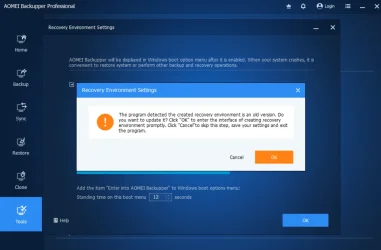
With AOMEI I do an occasional check under tools, and Recovery Environment. Make sure "Enable the boot option of AOMEI Backupper recovery environment box is ticked. Select ok. If it closes you have the UpToDate WinPE, otherwise it will create the latest WinPe image. Once it has been created and rebooted I'll create a new Bootable Media.

Snipaste_2025-08-15_15-49-03.webp Snipaste_2025-08-15_15-48-36.webp

Snipaste_2025-08-15_15-51-00.webp
 

My Computers

System One System Two

  • OS
    Win 11 Pro
    Computer type
    Laptop
    Manufacturer/Model
    ASUS Vivobook
    CPU
    AMD Ryzen™ 7 7730U
    Motherboard
    M1605YA
    Memory
    24GB Dual-Channel DDR4 @ 1596MHz (22-22-22-52)
    Graphics Card(s)
    512MB ATI AMD Radeon Graphics (ASUStek Computer Inc)
    Monitor(s) Displays
    Generic PnP Monitor (1920x1200@60Hz) - P1 PLUS (1920x1080@59Hz)
    Screen Resolution
    1920 X 1200
    Hard Drives
    953GB Western Digital WD
    PSU
    45 Watts
    Mouse
    Lenovo Bluetooth.
    Internet Speed
    500 Mbps
    Browser
    Edge
    Antivirus
    Defender
  • Operating System
    Windows 11
    Computer type
    Laptop
    Manufacturer/Model
    ACER NITRO
    CPU
    AMD Ryzen 7 5800H / 3.2 GHz
    Motherboard
    CZ Scala_CAS (FP6)
    Memory
    32 GB DDR4 SDRAM 3200 MHz
    Graphics card(s)
    NVIDIA GeForce RTX 3060 6 GB GDDR6 SDRAM
    Sound Card
    Realtek Audio. NVIDIA High Definition Audio
    Monitor(s) Displays
    15.6" LED backlight 1920 x 1080 (Full HD) 144 Hz
    Screen Resolution
    1920 x 1080 (Full HD)
    Hard Drives
    Samsung 970 Evo Plus 2TB NVMe M.2
    PSU
    180 Watt, 19.5 V
    Mouse
    Lenovo Bluetooth
    Internet Speed
    500 Mbps
    Browser
    Edge
    Antivirus
    Defender
I also have Partition Assistent Pro and have added the AOMEI tool to the recovery menu from there.
But is is always good to have a bootable USB to in case the PC won't boot to recovery.
 

My Computers

System One System Two

  • OS
    Windows 10
    Computer type
    PC/Desktop
    Manufacturer/Model
    Asus
    CPU
    Intel Core i5-6600 3.30Ghz
    Motherboard
    Asus B150M
    Memory
    16 GB
    Graphics Card(s)
    Asus Nvidia GeForce GTX 960
    Sound Card
    Onboard
    Monitor(s) Displays
    Samsung
    Hard Drives
    Samsung SSD 850 EBO 128 GB
    WDC WD1003FZEX-00MK2A0
  • Operating System
    Windows 11
    Computer type
    Laptop
    Manufacturer/Model
    Asus ExpertBook
    CPU
    11the Gen Intel Core i5-1135G7 2.40 GHz
    Memory
    8 GB
    Graphics card(s)
    Intel Xe
    Sound Card
    Onboard
    Hard Drives
    NVMe WDC PC SN530 SDBPNPZ 256 GB
Just upgraded to AOMEI Backupper Pro. But can't create a bootable media (worked fine in the old free version).
No matter if I select ISO or bootable the window just closed when I click "Next". No message or anything.
ANyone else have experieced this and know how to fix it?
LarsErikOsterud did you happen to fix the problem, ive just started using pro free trial it shows in the window in Aomei that it is creating the bootabe media but the USB pendrive is empty.
 

My Computer

System One

  • OS
    Windows 11 pro
    Computer type
    Laptop
    Manufacturer/Model
    HP Zbook
    CPU
    Intel(R) Core(TM) i7-8850H CPU @ 2.60GHz 2.59 GHz
    Motherboard
    HP 842D
    Memory
    32GB
    Graphics Card(s)
    Nvidia Quadro P3200
    Hard Drives
    Samsung 980 1TB M.2
    Toshiba KXG50ZNV512G M.2
    Crucial P5 Plus 2TB M.2
    Mouse
    MX Master 3
    Internet Speed
    500MBPS
    Browser
    Chrome, Edge
    Antivirus
    Windows defender
There is no difference between the Pro or Free version of the bootable media.
I have created from both and they are the same size.
 

My Computer

System One

  • OS
    Win 10 Pro 19045.6937 Win 11 25H2 VM
    Computer type
    Laptop
    Manufacturer/Model
    Dell Precicion 15 Workstation
    CPU
    Xeon W-10885M
    Motherboard
    Dell
    Memory
    64GB ECC DDR4 128GB max
    Graphics Card(s)
    Intel 1080p + Quadro RTX 5000 Max-Q 16GB 4K
    Sound Card
    onboard Realtec
    Monitor(s) Displays
    NA
    Screen Resolution
    1080p to 4k
    Hard Drives
    1 TB Samsung 9100 M2 SSD main
    2 TB Samsung 9100 M2 SSD storage
    500 GB Corsair T500 storage M2 SSD (6 TB max)
    PSU
    NA
    Case
    NA
    Cooling
    NA
    Keyboard
    backlit
    Mouse
    Logitec M720 Bluetooth Free scroll
    Internet Speed
    slow
    Browser
    Pale Moon 33.9.x.x - x64 AVX2 build
    Antivirus
    Windows Defender
I'm not sure why this is happening it goes through the whole process the pendrive is visible with items from the rescue media being added to it then after the final item arrived all goes blank and the pendrive is empty
 

My Computer

System One

  • OS
    Windows 11 pro
    Computer type
    Laptop
    Manufacturer/Model
    HP Zbook
    CPU
    Intel(R) Core(TM) i7-8850H CPU @ 2.60GHz 2.59 GHz
    Motherboard
    HP 842D
    Memory
    32GB
    Graphics Card(s)
    Nvidia Quadro P3200
    Hard Drives
    Samsung 980 1TB M.2
    Toshiba KXG50ZNV512G M.2
    Crucial P5 Plus 2TB M.2
    Mouse
    MX Master 3
    Internet Speed
    500MBPS
    Browser
    Chrome, Edge
    Antivirus
    Windows defender
Try creating it as an ISO, and then burn it to the pen drive using Rufus.
Or instead Try Ventoy for Windows:
install it to your pen drive and then just copy the Aomei *.ISO to the drive
and any other bootable *.ISO you may wish to copy to it.
My Ventoy drive has several versions of Linux,Windows, and repair ISOs on it and they all boot just fine.
 

My Computer

System One

  • OS
    Win 10 Pro 19045.6937 Win 11 25H2 VM
    Computer type
    Laptop
    Manufacturer/Model
    Dell Precicion 15 Workstation
    CPU
    Xeon W-10885M
    Motherboard
    Dell
    Memory
    64GB ECC DDR4 128GB max
    Graphics Card(s)
    Intel 1080p + Quadro RTX 5000 Max-Q 16GB 4K
    Sound Card
    onboard Realtec
    Monitor(s) Displays
    NA
    Screen Resolution
    1080p to 4k
    Hard Drives
    1 TB Samsung 9100 M2 SSD main
    2 TB Samsung 9100 M2 SSD storage
    500 GB Corsair T500 storage M2 SSD (6 TB max)
    PSU
    NA
    Case
    NA
    Cooling
    NA
    Keyboard
    backlit
    Mouse
    Logitec M720 Bluetooth Free scroll
    Internet Speed
    slow
    Browser
    Pale Moon 33.9.x.x - x64 AVX2 build
    Antivirus
    Windows Defender
Try creating it as an ISO, and then burn it to the pen drive using Rufus.
Or instead Try Ventoy for Windows:
install it to your pen drive and then just copy the Aomei *.ISO to the drive
and any other bootable *.ISO you may wish to copy to it.
My Ventoy drive has several versions of Linux,Windows, and repair ISOs on it and they all boot just fine.
My AoMEI-ISO on Ventoy ( made within the AoMEI-program ) boots only in WimBoot-modus !
It downloaded a WinPE when making the boot-ISO.
HOW to make it boot "normal" in Ventoy.............?? :unsure:
 

My Computer

System One

  • OS
    Windows11 Pro 25H2
    Computer type
    PC/Desktop
    Manufacturer/Model
    Asus
    CPU
    i7
    Motherboard
    z97k
    Memory
    32GB
    Graphics Card(s)
    nVidia
    Sound Card
    Realtek
    Hard Drives
    3
    Cooling
    air
    Browser
    Edge
    Antivirus
    ESET
I assume you have the license for the pro version.

Try uninstalling the software with an Uninstaller (Revo or Soft Organizer) and then do a clean installation of the Pro version.

If it still doesn’t work, contact their support for help.

If no help from their support team is forthcoming, send me a direct message and I will suggest a solution.
 
Last edited:

My Computer

System One

  • OS
    Win 7,8.1,10,11, Mint, Kde Plasma, Debian
    Computer type
    Laptop
    Manufacturer/Model
    Dell
    CPU
    Intel(R) Core(TM) i7-6500U CPU @ 2.50GHz
    Memory
    16 GB
    Graphics Card(s)
    Intel(R) HD Graphics 520/Nvidia GeForce 930M
    Sound Card
    Intel(R) Display Audio/RealtekAudio
    Monitor(s) Displays
    Generic Pnp Monitor
    Screen Resolution
    1366 X 768
    Hard Drives
    ST2000LM024-1EJ164
    Keyboard
    Eng (US)
    Mouse
    Sanwa Supply
    Browser
    Firefox
    Antivirus
    Avast One
    Other Info
    Too many laptops with different system specifications.
I assume you have the license for the pro version.

Try uninstalling the software with an Uninstaller (Revo or Soft Office) and then do a clean installation of the Pro version.

If it still doesn’t work, contact their support for help.

If no help from their support team is forthcoming, send me a direct message and I will suggest a solution.
What is Soft Office?
 

My Computers

System One System Two

  • OS
    Windows 11 Pro
    Computer type
    PC/Desktop
    Manufacturer/Model
    Stigg's Build
    CPU
    Intel Core i9-10900X
    Motherboard
    GIGABYTE X299X DESIGNARE 10G
    Memory
    Corsair 64 GB (4 x 16 GB) CMW64GX4M4C3000C15 Vengeance RGB Pro 3000Mhz DDR4
    Graphics Card(s)
    GIGABYTE GeForce GTX 1660 Super Mini ITX 6 GB OC
    Sound Card
    Realtek ALC1220
    Monitor(s) Displays
    Samsung 27" FHD LED FreeSync Gaming Monitor (LS27F350FHEXXY)
    Screen Resolution
    1920 x 1080
    Hard Drives
    Samsung 970 Pro Series 1TB M.2 2280 NVMe SSD
    Western Digital Red Pro WD8003FFBX-68B9AN0 8 TB, 7200 RPM, SATA-III
    Western Digital Red Pro WD8003FFBX-68B9AN0 8 TB, 7200 RPM, SATA-III
    PSU
    Corsair HX1200 1200W 80 Plus Platinum
    Case
    Fractal Design Define 7 Black Solid Case
    Cooling
    Noctua NH-D15 Chromax Black
    Keyboard
    Razer Ornata V2
    Mouse
    Razer DeathAdder Essential
    Internet Speed
    FTTN 100Mbps / 40Mbps
    Browser
    Mozilla Firefox
    Antivirus
    N/A
    Other Info
    Logitech BRIO 4k Ultra HD USB-C Webcam
  • Operating System
    Windows 10 Pro
    Computer type
    Laptop
    Manufacturer/Model
    ASUS ROG Zephyrus M GM501GS
    CPU
    Core i7-8750H
    Motherboard
    Zephyrus M GM501GS
    Memory
    SK Hynix 32 GB (2 x 16 GB) HMA82GS6CJR8N-VK 16 GB DDR4-2666 DDR4 SDRAM
    Graphics card(s)
    NVIDIA GeForce GTX 1070
    Sound Card
    Realtek ALC294
    Monitor(s) Displays
    AU Optronics B156HAN07.1 [15.6" LCD]
    Screen Resolution
    1920 x 1080
    Hard Drives
    Samsung MZVKW512HMJP-00000 512 GB, PCI-E 3.0 x4
    Samsung SSD 860 QVO 4TB 4 TB, SATA-III
    PSU
    N/A
    Case
    N/A
    Cooling
    N/A
    Keyboard
    PC/AT Enhanced PS2 Keyboard (101/102-Key)
    Mouse
    Razer DeathAdder Essential
    Internet Speed
    FTTN 100Mbps / 40Mbps
    Browser
    Mozilla Firefox
    Antivirus
    N/A
    Other Info
    USB2.0 HD UVC Webcam
Oops, it should be Soft Organizer from ChemTable. It is a software uninstaller just like Revo Uninstaller. Now I know I am getting old. It’s time I took my memory pill.

Here is the link:
 

My Computer

System One

  • OS
    Win 7,8.1,10,11, Mint, Kde Plasma, Debian
    Computer type
    Laptop
    Manufacturer/Model
    Dell
    CPU
    Intel(R) Core(TM) i7-6500U CPU @ 2.50GHz
    Memory
    16 GB
    Graphics Card(s)
    Intel(R) HD Graphics 520/Nvidia GeForce 930M
    Sound Card
    Intel(R) Display Audio/RealtekAudio
    Monitor(s) Displays
    Generic Pnp Monitor
    Screen Resolution
    1366 X 768
    Hard Drives
    ST2000LM024-1EJ164
    Keyboard
    Eng (US)
    Mouse
    Sanwa Supply
    Browser
    Firefox
    Antivirus
    Avast One
    Other Info
    Too many laptops with different system specifications.
FYI: I have found that trying to use the Create Bootable Media tool DOES work OK, in that it creates and ejects a bootable DVD, it hangs at 99%, in the routine makedisc.exe. That is VERY handy to boot from, as it INCLUDES the BACKUPPER environment, so that you can do a proper full clone, under WinPE with NO missed files (see my other post on this) at AOMEI Backupper version update

AOMEI say they cannot replicate the hang in the CBM tool in the the latest (same as mine) Windows 11.

Can anyone else replicate this under Windows 11 25H2 build 26200.7171, as I get it on BOTH my laptop with Windows Home 25H2 and desktop with Windows 11 Pro 25H2?
 

My Computer

System One

  • OS
    Windows 11 25H2 (Build 26200.7171)
    Computer type
    PC/Desktop
    Manufacturer/Model
    Gigabyte
    CPU
    AMD 5600G
    Motherboard
    Gigabyte B550M DSH3
    Memory
    16GB (Corsair DDR4 CMK16GX4M2D3600C18 x 2)
    Graphics Card(s)
    AMD Radion Graphics Embedded in 5600G CPU
    Sound Card
    N/A
    Monitor(s) Displays
    Samsung 24"
    Screen Resolution
    1920x1080
    Hard Drives
    Sabrent Rocket Q4 1TB x 2 (C: and E: for cloning).
    PSU
    550W
    Case
    Antec
    Cooling
    Smart Fans
    Keyboard
    AUKEY
    Mouse
    logi
    Browser
    Firefox
    Antivirus
    MalwareBytes premium
If there is problem why not use aomei to create the iso and use windows to burn the iso to dvd
 

My Computers

System One System Two

  • OS
    Win7,Win11
    Computer type
    PC/Desktop
    CPU
    i7-9700
    Motherboard
    gigabyte b365m ds3h
    Memory
    2x16gb 3600mhz
    Monitor(s) Displays
    benq gw2480
    PSU
    bequiet pure power 11 400CM
    Cooling
    cryorig m9i
  • Operating System
    win7,win11
    Computer type
    PC/Desktop
    CPU
    i5-8400
    Motherboard
    gigabyte b365m ds3h
    Memory
    2x8gb 3200
    PSU
    xfx pro 450
If there is problem why not use aomei to create the iso and use windows to burn the iso to dvd
FYI: The program WORKS in that it DOES create a bootable DVD, with AOMEI Backupper integrated in the boot, BUT, as stated the internal Backupper tool program that does the DVD creation hangs at 99%, and stops responding to Windows. There is an Event ID 1002 created:
"The program MakeDisc.exe version 6.6.0.0 stopped interacting with Windows and was closed."

The reason for this post, is to ask if anyone else can reproduce this issue, under Windows 11, 25H2, build 26200.7171.
 

My Computer

System One

  • OS
    Windows 11 25H2 (Build 26200.7171)
    Computer type
    PC/Desktop
    Manufacturer/Model
    Gigabyte
    CPU
    AMD 5600G
    Motherboard
    Gigabyte B550M DSH3
    Memory
    16GB (Corsair DDR4 CMK16GX4M2D3600C18 x 2)
    Graphics Card(s)
    AMD Radion Graphics Embedded in 5600G CPU
    Sound Card
    N/A
    Monitor(s) Displays
    Samsung 24"
    Screen Resolution
    1920x1080
    Hard Drives
    Sabrent Rocket Q4 1TB x 2 (C: and E: for cloning).
    PSU
    550W
    Case
    Antec
    Cooling
    Smart Fans
    Keyboard
    AUKEY
    Mouse
    logi
    Browser
    Firefox
    Antivirus
    MalwareBytes premium

Latest Support Threads

Back
Top Bottom





