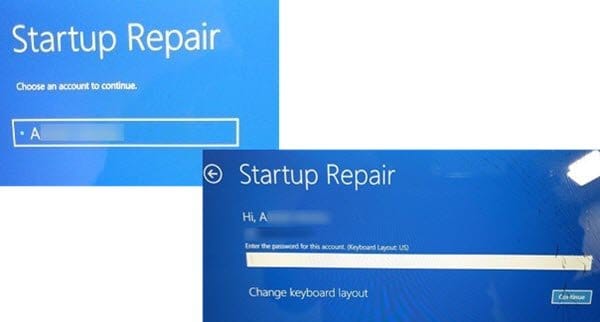
Update messed up my start files


TheLastFrontier

Well-known member
Local time
12:32 PM
Posts
54
OS
Win11
OK so I was on my laptop last night. Little bit of info on that laptop. For long time now I have had blue screen crashes at startup that I have not been able to resolve so just been dealing with it. Lately the crashes have been foci8ng me to restart for anywhere between 30-60 minutes before the system would start up.

Now NOT asking for support about that issue.

But anyways last night I had a large forced update for windows 11. Had no way to postpone it so I just went ahead and shut down letting it do it's think. When the system got to a certain point it then restarted for the update and started to run through that crash issue I mentioned above. It crashed for a bit and then I got the below screen pop up claiming

\windows\system32\winload.efi

was missing or corrupted and said I needed to restore my system. Because of the crashing issue restore has never worked on my system and when I tried pressing F1 to get into the restore area hoping maybe it might just fix the start issue but when I click that the system restarts gets to the alienware logo then crashes and when it then restarts it then returns me back to the same screen pictured below.

So my question is this. Being I can not get into the system restore area on that laptop, IF I get a USB Flash Drive and make a Windows Boot Disk will that let me repair the start up for the laptop or not? Will it let me replace this missing or corrupted winload.efi file and then get booted back into that system. Don't want to waste money on a disk even if cheap if it's not going to work as if it's not going to work then I need to talk my wife into getting a new laptop.

IMG_20251023_114421497_HDR1.webp
 

My Computer My Computer

At a glance

Win11
OS
Win11
If you are considering getting a new laptop anyway, why not just reinstall windows 11? Get a new SSD to clean install Windows 11. Then access your files from the old drive using any method you have to read an old hard drive.
 

My Computers My Computers

  • At a glance

    Windows 11 ProAMD Ryzen 7 9800X3D32GB DDR5 CL30 Kingston FuryASUS Prime Radeon RX 9060 XT OC Edition 16GB
    OS
    Windows 11 Pro
    Computer type
    PC/Desktop
    CPU
    AMD Ryzen 7 9800X3D
    Motherboard
    MSI PRO B850-P Wifi
    Memory
    32GB DDR5 CL30 Kingston Fury
    Graphics Card(s)
    ASUS Prime Radeon RX 9060 XT OC Edition 16GB
    Monitor(s) Displays
    LG Ultrawide 34" + LG 27" 1080p
    Screen Resolution
    3440x1440
    Hard Drives
    Main Boot Drive : 512GB Adata XPG RGB Gen3x4 NVMe M.2 SSD
    PSU
    EVGA 750 Watts 80+ Gold
    Case
    Deepcool Genome II
    Cooling
    Thermalright Burst Assassin 120
    Internet Speed
    1Gbps
    Browser
    Chrome
    Antivirus
    "Moderna"
  • At a glance

    Windows 11 Proi7-4790K16GB Corsair Vengeance ProMSI R9 290
    Operating System
    Windows 11 Pro
    Computer type
    PC/Desktop
    CPU
    i7-4790K
    Motherboard
    ASRock Xtreme6 Z97
    Memory
    16GB Corsair Vengeance Pro
    Graphics card(s)
    MSI R9 290
    Monitor(s) Displays
    LG Ultrawide 34"
    Screen Resolution
    3440x1440
    Hard Drives
    500GB Adata SSD (OS Only)
    PSU
    Thermaltake 475 Watts 80 Bronze
    Case
    Thermaltake Commander I Snow Edition
    Cooling
    Deep Cool Archer Air Cooler
    Keyboard
    Armageddon MKA-5R RGB-Hornet
    Mouse
    Logitech G402
    Internet Speed
    1Gbps
    Browser
    Chrome
    Antivirus
    Moderna :)
If you are considering getting a new laptop anyway, why not just reinstall windows 11? Get a new SSD to clean install Windows 11. Then access your files from the old drive using any method you have to read an old hard drive.
well problem is money $$$ if I am getting a new computer it's got to pass the wifes approval and I know she's already not happy that I have to replace this so just hoping I can simply repair the windows start files on that laptop and get back in. I have most the stuff backed up but some things still need backing up. I was sort of mid process when this happened last night
 

My Computer My Computer

At a glance

Win11
OS
Win11
So my question is this. Being I can not get into the system restore area on that laptop, IF I get a USB Flash Drive and make a Windows Boot Disk will that let me repair the start up for the laptop or not? Will it let me replace this missing or corrupted winload.efi file and then get booted back into that system. Don't want to waste money on a disk even if cheap if it's not going to work as if it's not going to work then I need to talk my wife into getting a new laptop.
yes. heres a pretty simplified breakdown of how to
 

My Computer My Computer

At a glance

Windows 11 Pro
OS
Windows 11 Pro
well problem is money $$$ if I am getting a new computer it's got to pass the wifes approval and I know she's already not happy that I have to replace this so just hoping I can simply repair the windows start files on that laptop and get back in. I have most the stuff backed up but some things still need backing up. I was sort of mid process when this happened last night
What i meant was, since you are considering replacing your old laptop, it's as good as abandoning your old Windows OS. Your cheaper alternative is just to buy a new SSD instead of a new laptop and do a clean install. I am suggesting to replace the drive in case you have files that you need to recover from it. Otherwise, just wipe it off and do a clean install.
 

My Computers My Computers

  • At a glance

    Windows 11 ProAMD Ryzen 7 9800X3D32GB DDR5 CL30 Kingston FuryASUS Prime Radeon RX 9060 XT OC Edition 16GB
    OS
    Windows 11 Pro
    Computer type
    PC/Desktop
    CPU
    AMD Ryzen 7 9800X3D
    Motherboard
    MSI PRO B850-P Wifi
    Memory
    32GB DDR5 CL30 Kingston Fury
    Graphics Card(s)
    ASUS Prime Radeon RX 9060 XT OC Edition 16GB
    Monitor(s) Displays
    LG Ultrawide 34" + LG 27" 1080p
    Screen Resolution
    3440x1440
    Hard Drives
    Main Boot Drive : 512GB Adata XPG RGB Gen3x4 NVMe M.2 SSD
    PSU
    EVGA 750 Watts 80+ Gold
    Case
    Deepcool Genome II
    Cooling
    Thermalright Burst Assassin 120
    Internet Speed
    1Gbps
    Browser
    Chrome
    Antivirus
    "Moderna"
  • At a glance

    Windows 11 Proi7-4790K16GB Corsair Vengeance ProMSI R9 290
    Operating System
    Windows 11 Pro
    Computer type
    PC/Desktop
    CPU
    i7-4790K
    Motherboard
    ASRock Xtreme6 Z97
    Memory
    16GB Corsair Vengeance Pro
    Graphics card(s)
    MSI R9 290
    Monitor(s) Displays
    LG Ultrawide 34"
    Screen Resolution
    3440x1440
    Hard Drives
    500GB Adata SSD (OS Only)
    PSU
    Thermaltake 475 Watts 80 Bronze
    Case
    Thermaltake Commander I Snow Edition
    Cooling
    Deep Cool Archer Air Cooler
    Keyboard
    Armageddon MKA-5R RGB-Hornet
    Mouse
    Logitech G402
    Internet Speed
    1Gbps
    Browser
    Chrome
    Antivirus
    Moderna :)
What i meant was, since you are considering replacing your old laptop, it's as good as abandoning your old Windows OS. Your cheaper alternative is just to buy a new SSD instead of a new laptop and do a clean install. I am suggesting to replace the drive in case you have files that you need to recover from it. Otherwise, just wipe it off and do a clean install.
Problem is though going back to the initial issue I was having these crashes the error messages they give are random each time and very confusing if it's hard or software issue. If it's a software issue then all cool the restore should resolve that issue but if it's a hardware issue then it might just mean I am tossing $100 down the drain on a system that's going bad anyways. Not really sure what to make of the crashes as I had this issue like 9 months after buying the laptop, Dell claimed it was either motherboard or memory and changed both under warranty and it seemed to fix the issue but then about 8-9 months later same things started to occur. Oddly enough my prior laptop an HP was having the same issues after X amount of time crashing and same errors. Find it hard to believe that both Dell and HP are selling such bad computers that they cause the same issues which makes me think it might be a Win11 issue as I have seen others with same issues over the time I have been hunting a solution.

But yeah hard to consider replacing just the drive it the entire issues going to remain and from what Dacrone said it seems like it might be able to be fixed from a USB boot drive which I can get under $20 off Amazon and if that works then it would also let me keep backing up files without having to find alternate ways to access that laptops current SSD Drive
 

My Computer My Computer

At a glance

Win11
OS
Win11
yes. heres a pretty simplified breakdown of how to
2 other questions. With the crash issues I have been having I have NOT been able to run system restore or start up repair they always return a NO ISSUES FOUND type message. With that in mind will the USB drive find issues that perhaps the laptops hard drive might miss should say some files have been corrupted.

second question before I go an buy a USB Drive is there a way to access the laptops repair page during start up like pressing F1 or F2 to access BIOS is there a key combo that would let me get into the trouble shooting area? I know F8 brings up a menu that have safe mode option (Didn't let me in!!) I thought I remember seeing one some time back but can't find it now.
 

My Computer My Computer

At a glance

Win11
OS
Win11
I would suggest using Rufus to create a bootable USB drive with Hirens BootCD on it. Boot from the drive and run Macrium Reflect. It can fix boot errors on a Windows installation. It also contains many more tools for diagnosing issues with hardware, such as disk scanners e.g. HDDScan, HDTune, AOMEI Partition Assistant.


On the Hirens BootCD page, there will be a link at the top describing how to create a bootable USB drive containing the boot CD using Rufus.
second question before I go an buy a USB Drive is there a way to access the laptops repair page during start up like pressing F1 or F2 to access BIOS is there a key combo that would let me get into the trouble shooting area? I know F8 brings up a menu that have safe mode option (Didn't let me in!!) I thought I remember seeing one some time back but can't find it now.
Most computers have a hotkey one can press during bootup to access the BIOS/UEFI and a one-time boot menu. Without knowing your specific computer model, it would be hard to tell you which key exactly, but it could be F1, F2, F8, F10, or F12. My Dell has an F12 key for the one-time boot menu, for example. It allows you to boot from an external bootable drive and gives the option to enter the BIOS/UEFI as well.
 

My Computer My Computer

At a glance

Windows 11 Pro For Workstations 25H2Intel Xeon W-10855M @ 4.9Ghz32GB OWC ECC DDR4-2666 RAMiGPU: Intel UHD Graphics P630 | Discrete GPU:...
OS
Windows 11 Pro For Workstations 25H2
Computer type
Laptop
Manufacturer/Model
Dell Precision 7550
CPU
Intel Xeon W-10855M @ 4.9Ghz
Memory
32GB OWC ECC DDR4-2666 RAM
Graphics Card(s)
iGPU: Intel UHD Graphics P630 | Discrete GPU: NVIDIA Quadro RTX 3000 6GB
Sound Card
Realtek Audio
Monitor(s) Displays
Integrated Ultrasharp
Screen Resolution
1920*1080
Hard Drives
OS: Samsung 980 PRO 500GB NVMe
Data: Western Digital Black SN750 1TB
PSU
Dell 180W
Internet Speed
1Gbps
Browser
Edge Chromium
Antivirus
Microsoft Defender
Other Info
OpenSUSE Leap 16 VM
Zorin OS 18 VM
Most computers have a hotkey one can press during bootup to access the BIOS/UEFI and a one-time boot menu. Without knowing your specific computer model, it would be hard to tell you which key exactly, but it could be F1, F2, F8, F10, or F12. My Dell has an F12 key for the one-time boot menu, for example. It allows you to boot from an external bootable drive and gives the option to enter the BIOS/UEFI as well.
Oh not talking about a 1 time boot in this case am referring to the blue screen pages that have the restore/repair options.


scroll down to the section Apply restore point from Advanced startup and you will see several screen shots from the trouble shooting pages you can access from start up. Am just wondering if now that the start up is officially broken maybe the repair start up area might actually work this time so was hoping to access this during start up so I can try it and see if it helps at all cause if I order the USB drives it's gonna be a few days stuck like this as not going to over night a $10 item the S&Hing would be ore then the item. So was just hoping there might be a key stroke to access this trouble shooting area during start up that might still hopefully work.
 

My Computer My Computer

At a glance

Win11
OS
Win11
I would suggest using Rufus to create a bootable USB drive with Hirens BootCD on it. Boot from the drive and run Macrium Reflect. It can fix boot errors on a Windows installation. It also contains many more tools for diagnosing issues with hardware, such as disk scanners e.g. HDDScan, HDTune, AOMEI Partition Assistant.


On the Hirens BootCD page, there will be a link at the top describing how to create a bootable USB drive containing the boot CD using Rufus.

Most computers have a hotkey one can press during bootup to access the BIOS/UEFI and a one-time boot menu. Without knowing your specific computer model, it would be hard to tell you which key exactly, but it could be F1, F2, F8, F10, or F12. My Dell has an F12 key for the one-time boot menu, for example. It allows you to boot from an external bootable drive and gives the option to enter the BIOS/UEFI as well.
Some good news I found the recovery under F12 but is difficult to get into due to the issues at hand but will give it a try and see if it repairs the start up or not.
 

My Computer My Computer

At a glance

Win11
OS
Win11
I would suggest using Rufus to create a bootable USB drive with Hirens BootCD on it. Boot from the drive and run Macrium Reflect. It can fix boot errors on a Windows installation. It also contains many more tools for diagnosing issues with hardware, such as disk scanners e.g. HDDScan, HDTune, AOMEI Partition Assistant.


On the Hirens BootCD page, there will be a link at the top describing how to create a bootable USB drive containing the boot CD using Rufus.

Most computers have a hotkey one can press during bootup to access the BIOS/UEFI and a one-time boot menu. Without knowing your specific computer model, it would be hard to tell you which key exactly, but it could be F1, F2, F8, F10, or F12. My Dell has an F12 key for the one-time boot menu, for example. It allows you to boot from an external bootable drive and gives the option to enter the BIOS/UEFI as well.
OK so I managed to get the repair done but didn't help. At first it said there was a partition issue, but it claimed there was no boot issue or and windows health passed fine it then seemed to indicate that it repair the partition issue then rebooted only to return to the screen in my opening post.

I then said heck with it and tried doing a system restore but it keeps giving me blue screen crashes during the restore process. It will get just so far and crash.

At this point not sure if a USB Boot Disk will be of help or not if the systems going to keep crashing mid process.
 

My Computer My Computer

At a glance

Win11
OS
Win11
OK so I managed to get the repair done but didn't help. At first it said there was a partition issue, but it claimed there was no boot issue or and windows health passed fine it then seemed to indicate that it repair the partition issue then rebooted only to return to the screen in my opening post.

I then said heck with it and tried doing a system restore but it keeps giving me blue screen crashes during the restore process. It will get just so far and crash.

At this point not sure if a USB Boot Disk will be of help or not if the systems going to keep crashing mid process.
Did you run the HDD diagnostics? Those wouldn't tell you if the partition was bad; those would tell you if the disk itself was bad.

So, the system crashed while running from the USB boot disk? That would indicate a more serious issue like RAM, CPU, or motherboard.
 

My Computer My Computer

At a glance

Windows 11 Pro For Workstations 25H2Intel Xeon W-10855M @ 4.9Ghz32GB OWC ECC DDR4-2666 RAMiGPU: Intel UHD Graphics P630 | Discrete GPU:...
OS
Windows 11 Pro For Workstations 25H2
Computer type
Laptop
Manufacturer/Model
Dell Precision 7550
CPU
Intel Xeon W-10855M @ 4.9Ghz
Memory
32GB OWC ECC DDR4-2666 RAM
Graphics Card(s)
iGPU: Intel UHD Graphics P630 | Discrete GPU: NVIDIA Quadro RTX 3000 6GB
Sound Card
Realtek Audio
Monitor(s) Displays
Integrated Ultrasharp
Screen Resolution
1920*1080
Hard Drives
OS: Samsung 980 PRO 500GB NVMe
Data: Western Digital Black SN750 1TB
PSU
Dell 180W
Internet Speed
1Gbps
Browser
Edge Chromium
Antivirus
Microsoft Defender
Other Info
OpenSUSE Leap 16 VM
Zorin OS 18 VM
Did you run the HDD diagnostics? Those wouldn't tell you if the partition was bad; those would tell you if the disk itself was bad.

So, the system crashed while running from the USB boot disk? That would indicate a more serious issue like RAM, CPU, or motherboard.
not the USB I have to order a USB disk if I try that route. This was when I booted up normally but at Alienware logo I was pressing F12 repeatedly and this brought up the boot menu which gave me an open for system recovery. That is where I tried the repairs and system restore and it was crashing during this. So guessing this is all on the laptop hard drive
 

My Computer My Computer

At a glance

Win11
OS
Win11
not the USB I have to order a USB disk if I try that route. This was when I booted up normally but at Alienware logo I was pressing F12 repeatedly and this brought up the boot menu which gave me an open for system recovery. That is where I tried the repairs and system restore and it was crashing during this. So guessing this is all on the laptop hard drive
Okay. I would suggest buying a cheap USB drive. One with 16GB of space should be more than enough and go for $10 on Amazon. You can have it next day if you have prime.
 

My Computer My Computer

At a glance

Windows 11 Pro For Workstations 25H2Intel Xeon W-10855M @ 4.9Ghz32GB OWC ECC DDR4-2666 RAMiGPU: Intel UHD Graphics P630 | Discrete GPU:...
OS
Windows 11 Pro For Workstations 25H2
Computer type
Laptop
Manufacturer/Model
Dell Precision 7550
CPU
Intel Xeon W-10855M @ 4.9Ghz
Memory
32GB OWC ECC DDR4-2666 RAM
Graphics Card(s)
iGPU: Intel UHD Graphics P630 | Discrete GPU: NVIDIA Quadro RTX 3000 6GB
Sound Card
Realtek Audio
Monitor(s) Displays
Integrated Ultrasharp
Screen Resolution
1920*1080
Hard Drives
OS: Samsung 980 PRO 500GB NVMe
Data: Western Digital Black SN750 1TB
PSU
Dell 180W
Internet Speed
1Gbps
Browser
Edge Chromium
Antivirus
Microsoft Defender
Other Info
OpenSUSE Leap 16 VM
Zorin OS 18 VM

Latest Support Threads

Back
Top Bottom