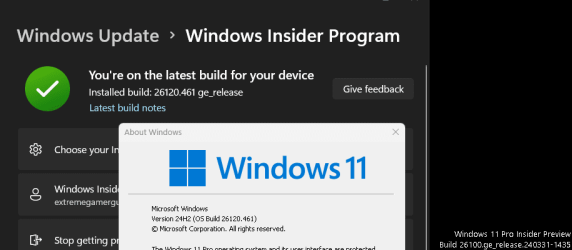
Updated differences in installed Dev .100 .120 Build versions?


Buschik

Well-known member
Local time
7:56 AM
Posts
32
Location
Surface .. I mean, Valley, The Valley of the Sun!!
OS
Win11Pro 2H2 Dev, Win11Pro Beta, Win10 22H2
Differences in build numbers, re: the .100 .120 Updates? I don't remember if the text said .100 but its actually .120 . hence the screenshot.. this is normal, right?

Paula
 

Attachments

  • Dev.VersionDifferences.png
    Dev.VersionDifferences.png
    14.3 KB · Views: 5

My Computers

System One System Two

  • OS
    Win11Pro 2H2 Dev, Win11Pro Beta, Win10 22H2
    Computer type
    PC/Desktop
    Manufacturer/Model
    Custom
    CPU
    Intel i7 9700K @ 3.60GHz Coffee Lake 14nm Tech
    Motherboard
    Gigabyte Z370 HD3-CF (U3E1)
    Memory
    64.0GB (32x2) Dual-Channel DDR4 @ 1334MHz
    Graphics Card(s)
    Radeon 8GB 5700XT, 3DP, 1HDMI ports
    Sound Card
    Realtek HD Audio
    Monitor(s) Displays
    (2x) VX3276-FHD on AMD Radeon RX5700 XT GME, DP, DVI, HDMI ports
    Screen Resolution
    1920x1080, Work Resolution 1920x1032 pixels
    Hard Drives
    WD Green 2tb M.2, Sandisk Ultra 2TB SATAIII, Targent 4TB SATAIII SSD, Sandisk Ultra 2TB SATAIII (24H2 DEV drive), Crucial 1TB SATAIII SSD, WD 6TB SATAIII Backup HD. 17TB ttl
    PSU
    RaidMax 850w
    Case
    Full Height Mesh Gamer 12bay case
    Cooling
    Thermaltake UX100 RGB Cooler, several 92, 120,140mm RGB fans
    Keyboard
    Fiddio RGB Gamer board
    Mouse
    Kensington Ergo Mouse
    Internet Speed
    Cox, 10gb 67mb/s
    Browser
    Chrome 64-bit
    Antivirus
    What could happen? ;) MS Defender
    Other Info
    Qualcomm Atheros AR9462 802.11a|b|g|n WiFi BT Adapter
  • Operating System
    W11Pro.Dev 26220.5770
    Computer type
    PC/Desktop
    Manufacturer/Model
    Custom
    CPU
    Intel i7-12700kf, @ 3.6ghz
    Motherboard
    ASRock Z790-S
    Memory
    16GB (8gbx2) Dual-Channel DDR5
    Graphics card(s)
    Radeon 8gb RX5700 XT, DVI port
    Sound Card
    NVidia HD Audio
    Monitor(s) Displays
    Acer G206HQL 27"
    Screen Resolution
    1600x900, VGA, HDMI, DVI ports
    Hard Drives
    Sandisk 2tb nvme, Sandisk 2tb SSD, SP 1tb SSD,
    PSU
    Thermaltake 700w
    Case
    HP Pavillion case, dented, not pretty, much like me
    Cooling
    Thermaltake UX100 RGB Cooler, several 92, 120, 140mm rgb case fans
    Keyboard
    HP oem
    Mouse
    Belkin mouse
    Internet Speed
    Cox 10gbs
    Browser
    Chrome 64bit
    Antivirus
    MS Defender
    Other Info
    Intel Wi-Fi 6 AX200 @160mhz 802.11a|b|g|n WiFi BT Adapter
Differences in build numbers, re: the .100 .120 Updates? I don't remember if the text said .100 but its actually .120 . hence the screenshot.. this is normal, right?

Paula
 

My Computers

System One System Two

  • OS
    All Branches but Release
    Computer type
    Laptop
    Manufacturer/Model
    Acer Nitro ANV15-51
    CPU
    AMD Ryzen 7 7735HS 3200-4500 Mhz 8 cores x 2
    Motherboard
    Sportage_RBH
    Memory
    32 GB DDR5
    Graphics Card(s)
    Radeon Graphic / NVIDIA GeForce RTX 4060 8 GB GDDR6
    Sound Card
    AMD/Realtek(R) Audio
    Monitor(s) Displays
    Integrated Monitor (15.3"vis)
    Screen Resolution
    FHD 1920X1080 16:9 144Hz
    Hard Drives
    KINGSTON OM8SEP4512Q-AA 1TB
    Western Digital 256GB
    PSU
    19V DC 6.32 A 120 W
    Cooling
    Dual Fans
    Mouse
    MS Bluetooth
    Internet Speed
    Fiber 1GB Cox -us & 1GB Orange-fr
    Browser
    Edge Canary- Firefox Nightly-Chrome Dev-Chrome Dev
    Antivirus
    Windows Defender
  • Operating System
    Windows 11 Beta
    Computer type
    Laptop
    Manufacturer/Model
    Asus X751BP
    CPU
    AMD A9-9420
    Memory
    8 GB of DDR4
    Graphics card(s)
    AMD Radeon R5
    Screen Resolution
    1600x900
    Hard Drives
    Seagate 1 TB
Ok, thanks, but the announcement does not say "you are getting .120 but will only say .100" which is what I am asking abt ..
 

My Computers

System One System Two

  • OS
    Win11Pro 2H2 Dev, Win11Pro Beta, Win10 22H2
    Computer type
    PC/Desktop
    Manufacturer/Model
    Custom
    CPU
    Intel i7 9700K @ 3.60GHz Coffee Lake 14nm Tech
    Motherboard
    Gigabyte Z370 HD3-CF (U3E1)
    Memory
    64.0GB (32x2) Dual-Channel DDR4 @ 1334MHz
    Graphics Card(s)
    Radeon 8GB 5700XT, 3DP, 1HDMI ports
    Sound Card
    Realtek HD Audio
    Monitor(s) Displays
    (2x) VX3276-FHD on AMD Radeon RX5700 XT GME, DP, DVI, HDMI ports
    Screen Resolution
    1920x1080, Work Resolution 1920x1032 pixels
    Hard Drives
    WD Green 2tb M.2, Sandisk Ultra 2TB SATAIII, Targent 4TB SATAIII SSD, Sandisk Ultra 2TB SATAIII (24H2 DEV drive), Crucial 1TB SATAIII SSD, WD 6TB SATAIII Backup HD. 17TB ttl
    PSU
    RaidMax 850w
    Case
    Full Height Mesh Gamer 12bay case
    Cooling
    Thermaltake UX100 RGB Cooler, several 92, 120,140mm RGB fans
    Keyboard
    Fiddio RGB Gamer board
    Mouse
    Kensington Ergo Mouse
    Internet Speed
    Cox, 10gb 67mb/s
    Browser
    Chrome 64-bit
    Antivirus
    What could happen? ;) MS Defender
    Other Info
    Qualcomm Atheros AR9462 802.11a|b|g|n WiFi BT Adapter
  • Operating System
    W11Pro.Dev 26220.5770
    Computer type
    PC/Desktop
    Manufacturer/Model
    Custom
    CPU
    Intel i7-12700kf, @ 3.6ghz
    Motherboard
    ASRock Z790-S
    Memory
    16GB (8gbx2) Dual-Channel DDR5
    Graphics card(s)
    Radeon 8gb RX5700 XT, DVI port
    Sound Card
    NVidia HD Audio
    Monitor(s) Displays
    Acer G206HQL 27"
    Screen Resolution
    1600x900, VGA, HDMI, DVI ports
    Hard Drives
    Sandisk 2tb nvme, Sandisk 2tb SSD, SP 1tb SSD,
    PSU
    Thermaltake 700w
    Case
    HP Pavillion case, dented, not pretty, much like me
    Cooling
    Thermaltake UX100 RGB Cooler, several 92, 120, 140mm rgb case fans
    Keyboard
    HP oem
    Mouse
    Belkin mouse
    Internet Speed
    Cox 10gbs
    Browser
    Chrome 64bit
    Antivirus
    MS Defender
    Other Info
    Intel Wi-Fi 6 AX200 @160mhz 802.11a|b|g|n WiFi BT Adapter
Ok, thanks, but the announcement does not say "you are getting .120 but will only say .100" which is what I am asking abt ..
Sorry where do you see that please?
As far as it is normal, whatever that means, yes it is.
 

My Computers

System One System Two

  • OS
    All Branches but Release
    Computer type
    Laptop
    Manufacturer/Model
    Acer Nitro ANV15-51
    CPU
    AMD Ryzen 7 7735HS 3200-4500 Mhz 8 cores x 2
    Motherboard
    Sportage_RBH
    Memory
    32 GB DDR5
    Graphics Card(s)
    Radeon Graphic / NVIDIA GeForce RTX 4060 8 GB GDDR6
    Sound Card
    AMD/Realtek(R) Audio
    Monitor(s) Displays
    Integrated Monitor (15.3"vis)
    Screen Resolution
    FHD 1920X1080 16:9 144Hz
    Hard Drives
    KINGSTON OM8SEP4512Q-AA 1TB
    Western Digital 256GB
    PSU
    19V DC 6.32 A 120 W
    Cooling
    Dual Fans
    Mouse
    MS Bluetooth
    Internet Speed
    Fiber 1GB Cox -us & 1GB Orange-fr
    Browser
    Edge Canary- Firefox Nightly-Chrome Dev-Chrome Dev
    Antivirus
    Windows Defender
  • Operating System
    Windows 11 Beta
    Computer type
    Laptop
    Manufacturer/Model
    Asus X751BP
    CPU
    AMD A9-9420
    Memory
    8 GB of DDR4
    Graphics card(s)
    AMD Radeon R5
    Screen Resolution
    1600x900
    Hard Drives
    Seagate 1 TB
Where do I see what?

Look at the screenshot:

Updated to .120
Winver says .100

The announcement does not say, "you'll see .100 but it's really .120"
 

My Computers

System One System Two

  • OS
    Win11Pro 2H2 Dev, Win11Pro Beta, Win10 22H2
    Computer type
    PC/Desktop
    Manufacturer/Model
    Custom
    CPU
    Intel i7 9700K @ 3.60GHz Coffee Lake 14nm Tech
    Motherboard
    Gigabyte Z370 HD3-CF (U3E1)
    Memory
    64.0GB (32x2) Dual-Channel DDR4 @ 1334MHz
    Graphics Card(s)
    Radeon 8GB 5700XT, 3DP, 1HDMI ports
    Sound Card
    Realtek HD Audio
    Monitor(s) Displays
    (2x) VX3276-FHD on AMD Radeon RX5700 XT GME, DP, DVI, HDMI ports
    Screen Resolution
    1920x1080, Work Resolution 1920x1032 pixels
    Hard Drives
    WD Green 2tb M.2, Sandisk Ultra 2TB SATAIII, Targent 4TB SATAIII SSD, Sandisk Ultra 2TB SATAIII (24H2 DEV drive), Crucial 1TB SATAIII SSD, WD 6TB SATAIII Backup HD. 17TB ttl
    PSU
    RaidMax 850w
    Case
    Full Height Mesh Gamer 12bay case
    Cooling
    Thermaltake UX100 RGB Cooler, several 92, 120,140mm RGB fans
    Keyboard
    Fiddio RGB Gamer board
    Mouse
    Kensington Ergo Mouse
    Internet Speed
    Cox, 10gb 67mb/s
    Browser
    Chrome 64-bit
    Antivirus
    What could happen? ;) MS Defender
    Other Info
    Qualcomm Atheros AR9462 802.11a|b|g|n WiFi BT Adapter
  • Operating System
    W11Pro.Dev 26220.5770
    Computer type
    PC/Desktop
    Manufacturer/Model
    Custom
    CPU
    Intel i7-12700kf, @ 3.6ghz
    Motherboard
    ASRock Z790-S
    Memory
    16GB (8gbx2) Dual-Channel DDR5
    Graphics card(s)
    Radeon 8gb RX5700 XT, DVI port
    Sound Card
    NVidia HD Audio
    Monitor(s) Displays
    Acer G206HQL 27"
    Screen Resolution
    1600x900, VGA, HDMI, DVI ports
    Hard Drives
    Sandisk 2tb nvme, Sandisk 2tb SSD, SP 1tb SSD,
    PSU
    Thermaltake 700w
    Case
    HP Pavillion case, dented, not pretty, much like me
    Cooling
    Thermaltake UX100 RGB Cooler, several 92, 120, 140mm rgb case fans
    Keyboard
    HP oem
    Mouse
    Belkin mouse
    Internet Speed
    Cox 10gbs
    Browser
    Chrome 64bit
    Antivirus
    MS Defender
    Other Info
    Intel Wi-Fi 6 AX200 @160mhz 802.11a|b|g|n WiFi BT Adapter
The watermark you mean?
Couldn't tell you, I remove those.
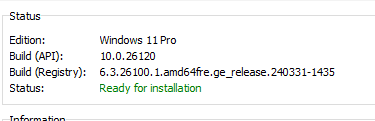
Your winver is correct and you are on the latest Dev.
The build API & build registry values are different if that's what you mean.


Screenshot 2024-05-06 154526.pngScreenshot 2024-05-06 154526.png
 

My Computers

System One System Two

  • OS
    All Branches but Release
    Computer type
    Laptop
    Manufacturer/Model
    Acer Nitro ANV15-51
    CPU
    AMD Ryzen 7 7735HS 3200-4500 Mhz 8 cores x 2
    Motherboard
    Sportage_RBH
    Memory
    32 GB DDR5
    Graphics Card(s)
    Radeon Graphic / NVIDIA GeForce RTX 4060 8 GB GDDR6
    Sound Card
    AMD/Realtek(R) Audio
    Monitor(s) Displays
    Integrated Monitor (15.3"vis)
    Screen Resolution
    FHD 1920X1080 16:9 144Hz
    Hard Drives
    KINGSTON OM8SEP4512Q-AA 1TB
    Western Digital 256GB
    PSU
    19V DC 6.32 A 120 W
    Cooling
    Dual Fans
    Mouse
    MS Bluetooth
    Internet Speed
    Fiber 1GB Cox -us & 1GB Orange-fr
    Browser
    Edge Canary- Firefox Nightly-Chrome Dev-Chrome Dev
    Antivirus
    Windows Defender
  • Operating System
    Windows 11 Beta
    Computer type
    Laptop
    Manufacturer/Model
    Asus X751BP
    CPU
    AMD A9-9420
    Memory
    8 GB of DDR4
    Graphics card(s)
    AMD Radeon R5
    Screen Resolution
    1600x900
    Hard Drives
    Seagate 1 TB
Yes, difference btwn watermark(registry) and winver(api) .100/.120 I did not see if/where it said they could/would be different that's all.
 

Attachments

  • Dev.VersionDifferences.jpg
    Dev.VersionDifferences.jpg
    36.9 KB · Views: 3

My Computers

System One System Two

  • OS
    Win11Pro 2H2 Dev, Win11Pro Beta, Win10 22H2
    Computer type
    PC/Desktop
    Manufacturer/Model
    Custom
    CPU
    Intel i7 9700K @ 3.60GHz Coffee Lake 14nm Tech
    Motherboard
    Gigabyte Z370 HD3-CF (U3E1)
    Memory
    64.0GB (32x2) Dual-Channel DDR4 @ 1334MHz
    Graphics Card(s)
    Radeon 8GB 5700XT, 3DP, 1HDMI ports
    Sound Card
    Realtek HD Audio
    Monitor(s) Displays
    (2x) VX3276-FHD on AMD Radeon RX5700 XT GME, DP, DVI, HDMI ports
    Screen Resolution
    1920x1080, Work Resolution 1920x1032 pixels
    Hard Drives
    WD Green 2tb M.2, Sandisk Ultra 2TB SATAIII, Targent 4TB SATAIII SSD, Sandisk Ultra 2TB SATAIII (24H2 DEV drive), Crucial 1TB SATAIII SSD, WD 6TB SATAIII Backup HD. 17TB ttl
    PSU
    RaidMax 850w
    Case
    Full Height Mesh Gamer 12bay case
    Cooling
    Thermaltake UX100 RGB Cooler, several 92, 120,140mm RGB fans
    Keyboard
    Fiddio RGB Gamer board
    Mouse
    Kensington Ergo Mouse
    Internet Speed
    Cox, 10gb 67mb/s
    Browser
    Chrome 64-bit
    Antivirus
    What could happen? ;) MS Defender
    Other Info
    Qualcomm Atheros AR9462 802.11a|b|g|n WiFi BT Adapter
  • Operating System
    W11Pro.Dev 26220.5770
    Computer type
    PC/Desktop
    Manufacturer/Model
    Custom
    CPU
    Intel i7-12700kf, @ 3.6ghz
    Motherboard
    ASRock Z790-S
    Memory
    16GB (8gbx2) Dual-Channel DDR5
    Graphics card(s)
    Radeon 8gb RX5700 XT, DVI port
    Sound Card
    NVidia HD Audio
    Monitor(s) Displays
    Acer G206HQL 27"
    Screen Resolution
    1600x900, VGA, HDMI, DVI ports
    Hard Drives
    Sandisk 2tb nvme, Sandisk 2tb SSD, SP 1tb SSD,
    PSU
    Thermaltake 700w
    Case
    HP Pavillion case, dented, not pretty, much like me
    Cooling
    Thermaltake UX100 RGB Cooler, several 92, 120, 140mm rgb case fans
    Keyboard
    HP oem
    Mouse
    Belkin mouse
    Internet Speed
    Cox 10gbs
    Browser
    Chrome 64bit
    Antivirus
    MS Defender
    Other Info
    Intel Wi-Fi 6 AX200 @160mhz 802.11a|b|g|n WiFi BT Adapter
Yes, difference btwn watermark(registry) and winver(api) .100/.120 I did not see if/where it said they could/would be different that's all.
The feature update to 26120.461 was by means of an enablement package. From the link OAT gave you earlier....

Microsoft said:
Windows Insiders in the Dev Channel will now receive updates based on Windows 11, version 24H2 via an enablement package (Build 26120.xxxx).

That means that build 26100.xxxx and 26120.xxxx share a common set of system files, the enablement package just turns on dormant features that are already in the 26100.xxxx system files. So yes, Winver now says 26120, but the watermark will show the base build which is still 26100.

The same thing happened for the RTM Win11 22H2 update to 23H2. This was by enablement package too, and raised the build shown in Winver from 22621 to 22631.


My Computers

System One System Two

  • OS
    Windows 11 Home
    Computer type
    Laptop
    Manufacturer/Model
    Acer Aspire 3 A315-23-R9VY
    CPU
    AMD Athlon Silver 3050U
    Memory
    8GB
    Graphics Card(s)
    Radeon Graphics
    Monitor(s) Displays
    laptop screen
    Screen Resolution
    1366x768 native resolution, up to 2560x1440 with Radeon Virtual Super Resolution
    Hard Drives
    1TB Samsung EVO 870 SSD (from April 2026: 250GB EVO 850)
    Internet Speed
    150 Mbps
    Browser
    Edge, Firefox
    Antivirus
    Defender
    Other Info
    fully 'Windows 11 ready' laptop. Windows 10 C: partition migrated from my old unsupported 'main machine' then upgraded to 11. A test migration ran Insider builds for 2 months. When 11 was released on 5th October 2021 it was re-imaged back to 10 and was offered the upgrade in Windows Update on 20th October. Windows Update offered the 22H2 Feature Update on 20th September 2022. It got the 23H2 Feature Update on 4th November 2023 through Windows Update, 24H2 on 3rd October 2024 through Windows Update by setting the Target Release Version for 24H2, and 25H2 on 30th September 2025 through Windows Update by setting the Target Release Version for 25H2.

    UPDATE - 11 April 2026: due to mechanical deterioration this PC has been retired from active duty. The OS with all software and files has been migrated to my System Seven below to carry on as my general purpose 'main machine'.

    My SYSTEM THREE is a Dell Latitude 5410, i7-10610U, 32GB RAM, 512GB NVMe ssd, supported device running Windows 11 Pro.

    My SYSTEM FOUR is a 2-in-1 convertible Lenovo Yoga 11e 20DA, Celeron N2930, 8GB RAM, 256GB ssd. Unsupported device: currently running Win10 Pro, plus Win11 Pro RTM and Insider Dev, Beta, and RP 24H2 as native boot vhdx.

    My SYSTEM FIVE is a Dell Latitude 3190 2-in-1, Pentium Silver N5030, 8GB RAM, 1TB NVMe ssd, supported device running Windows 11 Pro, plus Insider Beta, Dev, and Canary builds (and a few others) as a native boot .vhdx.

    My SYSTEM SIX is a Dell Latitude 5550, Core Ultra 7 165H, 64GB RAM, 1TB NVMe SSD, supported device, Windows 11 Pro 24H2, Hyper-V host machine. Updated to 25H2 on 30th September 2025.

    My SYSTEM SEVEN is a Lenovo Thinkpad T580, Intel Core i7-8650U, 16GB RAM, 512GB NVMe SSD + 2nd 512GB NVMe SSD, a supported device for Windows 11. This is my current general purpose 'main machine'. The installed Windows 11 Home from my System One has been migrated to this machine.
  • Operating System
    Windows 11 Pro
    Computer type
    Laptop
    Manufacturer/Model
    Dell Latitude E4310
    CPU
    Intel® Core™ i5-520M
    Motherboard
    0T6M8G
    Memory
    8GB
    Graphics card(s)
    (integrated graphics) Intel HD Graphics
    Screen Resolution
    1366x768
    Hard Drives
    500GB Crucial MX500 SSD
    Browser
    Firefox, Edge
    Antivirus
    Defender
    Other Info
    unsupported machine: Legacy bios, MBR, TPM 1.2, upgraded from W10 to W11 using W10/W11 hybrid install media workaround. In-place upgrade to 22H2 using ISO and a workaround. Feature Update to 23H2 by manually installing the Enablement Package. In-place upgrade to 24H2 using hybrid 23H2/24H2 install media. Upgraded to 25H2 by Enablement Package. Also running Insider Dev, and Canary builds and Windows 10 as native boot .vhdx.

    My SYSTEM THREE is a Dell Latitude 5410, i7-10610U, 32GB RAM, 512GB NVMe ssd, supported device running Windows 11 Pro.

    My SYSTEM FOUR is a 2-in-1 convertible Lenovo Yoga 11e 20DA, Celeron N2930, 8GB RAM, 256GB ssd. Unsupported device: currently running Win10 Pro, plus Win11 Pro RTM and Insider Dev, Beta, and RP 24H2 as native boot vhdx.

    My SYSTEM FIVE is a Dell Latitude 3190 2-in-1, Pentium Silver N5030, 8GB RAM, 1TB NVMe ssd, supported device running Windows 11 Pro, plus Insider Beta, Dev, and Canary builds (and a few others) as a native boot .vhdx.

    My SYSTEM SIX is a Dell Latitude 5550, Core Ultra 7 165H, 64GB RAM, 1TB NVMe SSD, supported device, Windows 11 Pro 24H2, Hyper-V host machine. Updated to 25H2 on 30th September 2025.

    My SYSTEM SEVEN is a Lenovo Thinkpad T580, Intel Core i7-8650U, 16GB RAM, 512GB NVMe SSD + 2nd 512GB NVMe SSD, a supported device for Windows 11. This is my current general purpose 'main machine'. The installed Windows 11 Home from my System One has been migrated to this machine.
Back
Top Bottom