Solved Updated to 25H2, how to hide the volume indicator?


Zoloft

Well-known member
Member
Local time
3:25 AM
Posts
97
OS
Windows 11 Pro x64 25H2 26200.9278
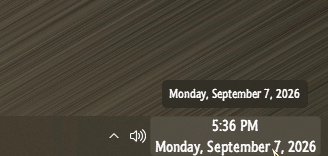
Only minor issue I've come across, I don't see an option for hiding the volume indicator? Running the latest ExplorerPatcher. Anything I'm just missing?

As always, thanks for reading!

-R
 

My Computer My Computer

At a glance

Windows 11 Pro x64 25H2 26200.9278Intel Core i5 9400 @ 2.90GHzDDR4 16384 MBytesIntel UHD Graphics 630
OS
Windows 11 Pro x64 25H2 26200.9278
Computer type
PC/Desktop
Manufacturer/Model
HP
CPU
Intel Core i5 9400 @ 2.90GHz
Motherboard
HP 8653 (U3E1) A (SMVB)
Memory
DDR4 16384 MBytes
Graphics Card(s)
Intel UHD Graphics 630
13950.gif
 

My Computers My Computers

  • At a glance

    Windows 11 Pro
    OS
    Windows 11 Pro
    Computer type
    PC/Desktop
    Manufacturer/Model
    ASUS ROG Strix
  • At a glance

    Windows 11 Pro
    Operating System
    Windows 11 Pro
    Computer type
    Laptop
    Manufacturer/Model
    ASUS VivoBook
  • ASUS VivoBook 'Lite' ~ Windows 11 Home

My Computer My Computer

At a glance

Windows 11 Pro x64 25H2 26200.9278Intel Core i5 9400 @ 2.90GHzDDR4 16384 MBytesIntel UHD Graphics 630
OS
Windows 11 Pro x64 25H2 26200.9278
Computer type
PC/Desktop
Manufacturer/Model
HP
CPU
Intel Core i5 9400 @ 2.90GHz
Motherboard
HP 8653 (U3E1) A (SMVB)
Memory
DDR4 16384 MBytes
Graphics Card(s)
Intel UHD Graphics 630
I don't see an option for hiding the volume indicator
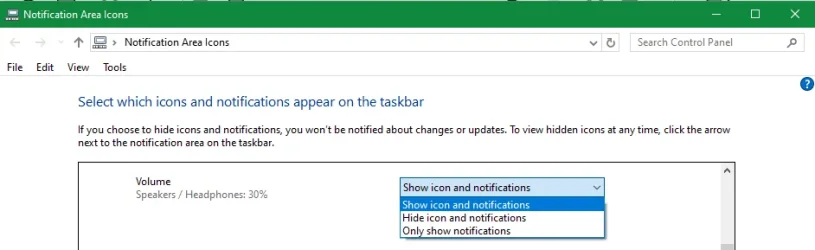
Create a shortcut to
explorer.exe shell:::{05d7b0f4-2121-4eff-bf6b-ed3f69b894d9}
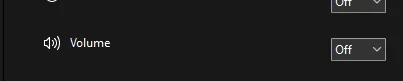
and you can use that dialog to hide the offending item.
Adjust Select which icons and notns appear on the taskbar.webp

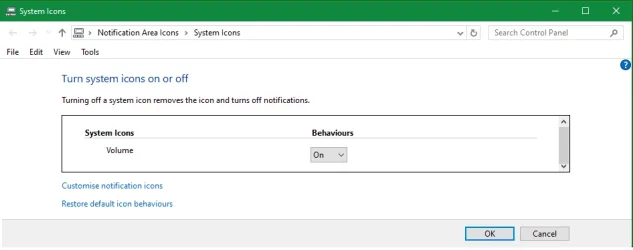
or you can use this shortcut to get to a dialog that lets you turn it off altogether.
explorer.exe shell:::{05d7b0f4-2121-4eff-bf6b-ed3f69b894d9}\SystemIcons
Adjust Turn system icons on or off.webp


Denis
 

My Computer My Computer

At a glance

Windows 11 Home x64 Version 25H2 Build 26200....
OS
Windows 11 Home x64 Version 25H2 Build 26200.9168
you can use that dialog to hide the offending item.
I was thinking the same thing, but, as the OP is using ExplorerPatcher, those settings might overridden.
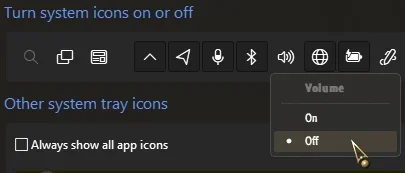
SAB overrides them but also has a separate switch...

13953.webp
 

My Computers My Computers

  • At a glance

    Windows 11 Pro
    OS
    Windows 11 Pro
    Computer type
    PC/Desktop
    Manufacturer/Model
    ASUS ROG Strix
  • At a glance

    Windows 11 Pro
    Operating System
    Windows 11 Pro
    Computer type
    Laptop
    Manufacturer/Model
    ASUS VivoBook
  • ASUS VivoBook 'Lite' ~ Windows 11 Home
I also use ExplorerPatcher and those dialogs remain the same.


Denis
 

My Computer My Computer

At a glance

Windows 11 Home x64 Version 25H2 Build 26200....
OS
Windows 11 Home x64 Version 25H2 Build 26200.9168
I also use ExplorerPatcher and those dialogs remain the same.
Hmmm..., :unsure:

Mine turn themselves Off as soon as I click OK! I'm pretty sure it's SAB.

13954.webp
 

My Computers My Computers

  • At a glance

    Windows 11 Pro
    OS
    Windows 11 Pro
    Computer type
    PC/Desktop
    Manufacturer/Model
    ASUS ROG Strix
  • At a glance

    Windows 11 Pro
    Operating System
    Windows 11 Pro
    Computer type
    Laptop
    Manufacturer/Model
    ASUS VivoBook
  • ASUS VivoBook 'Lite' ~ Windows 11 Home
Thank you all for the options and discussion!
 

My Computer My Computer

At a glance

Windows 11 Pro x64 25H2 26200.9278Intel Core i5 9400 @ 2.90GHzDDR4 16384 MBytesIntel UHD Graphics 630
OS
Windows 11 Pro x64 25H2 26200.9278
Computer type
PC/Desktop
Manufacturer/Model
HP
CPU
Intel Core i5 9400 @ 2.90GHz
Motherboard
HP 8653 (U3E1) A (SMVB)
Memory
DDR4 16384 MBytes
Graphics Card(s)
Intel UHD Graphics 630
Hmmm..., :unsure:

Mine turn themselves Off as soon as I click OK! I'm pretty sure it's SAB.
I do not know what you are talking about.


Denis
 

My Computer My Computer

At a glance

Windows 11 Home x64 Version 25H2 Build 26200....
OS
Windows 11 Home x64 Version 25H2 Build 26200.9168

Latest Support Threads

Back
Top Bottom