Updates to Unify Copilot and Microsoft 365 Copilot app


 Microsoft Support:

What's changing with Copilot?​

We're updating Copilot to create a simpler, more cohesive experience for everyone. Depending on the account and device you use, you will see changes to the Copilot app including changes to appearance and functionality, such as navigation, feature availability, or sign-in experience.

You will be able to sign in to the updated Copilot app with a personal account, a work or school account, or both. Work and personal accounts remain separate. Your organization's security, privacy, compliance, and administrative controls continue to apply when you use Copilot with your work or school account.

What improvements will the updated Copilot app have?​

Starting with a fresh look, the updated app combines the best of Copilot chat and image creation, with the power of Microsoft 365 for your work.
  • Access Word, Excel, Outlook, other Microsoft 365 apps, files and content directly from the app, so you can move from chat to your favorite Microsoft apps easily.
  • Sign in using your work, school, or personal account and connect to email, calendar and cloud storage to give Copilot the context to keep you moving forward with work or at home.
  • Microsoft 365 subscribers can get more done with Copilot, with advanced AI, leading models, and higher usage limits than free users.
  • Podcasts, Deep Research, Group chat, and other features are retiring. Read more about retiring features

Will I need to pay to use the Copilot app?​

  • You can continue to chat with Copilot, create images, upload files and more for free, subject to available capacity and limits.
  • When you hit a limit, you can choose to upgrade to a paid option or come back later.
  • For higher limits to chat and create, use agents, or tackle complex multi-step tasks, purchase a Microsoft 365 subscription. Microsoft 365 Plans

How does it affect me?​

You are...​
What happens​
Using Microsoft Copilot with a personal Microsoft account, Google, or Apple sign-inYou'll be moved to an updated Copilot app; your chats and content come with you.
Using the Microsoft 365 Copilot app with a personal Microsoft accountYou'll see minor navigation changes and an update to the Copilot icon. Copilot chat will be available for all users.
Using both Microsoft Copilot and the Microsoft 365 Copilot app with a personal accountYour chats and content will be merged to a single updated Copilot app. Chats, content, and data remain separate between account types in the app.
Using Microsoft 365 Copilot with a work or school accountYou'll see minor user experience changes and an update to the Copilot icon.

Details by account type​

If you use Microsoft Copilot with a personal account​

  • If you use Copilot on a desktop or web browser with a personal account (e.g. signed up using personal Microsoft, Google or Apple email), you will be moved to an updated version of Copilot.
  • Your chat history and most content will move with you. You will be guided through the process. Read more about data and content.
  • If you use the Copilot mobile app, you will need to download an updated version of Copilot to continue using the app.

If you use the Microsoft 365 Copilot app with a personal account​

  • If you use the Microsoft 365 Copilot app today with a personal Microsoft account, you may notice some updates to appearance and navigation.
  • If you were using the Microsoft 365 Copilot app without a Microsoft 365 subscription, you'll now have access to Copilot chat, at no extra cost. You won't have to make any changes to your account.
  • For Windows users, the Microsoft 365 Copilot app icon on your taskbar may be updated.
  • For mobile users, there will be an update to the app that may be auto-installed, or you may need to manually request an update. The icon will update for mobile users as well.

If you use both Microsoft Copilot and the Microsoft 365 Copilot app with a personal account​

Your chat history and content you've created will be merged to a single updated Copilot app. Chats, content, and data remain separate between the account types in the app. Read more about your data and content.

If you use Microsoft 365 Copilot for work or school​

You will see the Microsoft 365 Copilot icon and name update if you have Copilot installed for Windows, Mac, or on a mobile device. Otherwise, there will be minimal changes to your Copilot experience.

Do I need to do anything to prepare for the update?​

No. Most updates will happen automatically. Existing users will be guided through the transition, and web users will be automatically redirected to an updated version of Copilot on the web.

Can I switch between my personal and work or school accounts?​

Yes. You can continue to switch between personal and work or school accounts using the account switcher within Copilot, just as you might be doing today. Work and personal experiences remain separated by design, and data does not flow between them.

What's going away or unavailable?​

Group Chat​

Group Chat threads, messages, and content, including images created in Group Chats, will not be carried forward after August 18, 2026. Before your account updates, copy any messages you want to keep into a document or notes app and download any images you want to save. Learn more

Podcasts​

Podcasts is being retired from Copilot and will no longer be available after August 18, 2026. After retirement, customers will no longer be able to create or access Podcasts in Copilot. You can download individual podcasts from your podcast library using the download option in the podcast menu. Learn more

Deep Research​

Deep Research is being retired in the Copilot app for consumers starting August 18, 2026. If you've used Deep Research to create detailed reports and analyses in Copilot, you may have questions about what this change means for you. This page explains what is changing and how to access your existing research content.

Temporarily unavailable features​

Some features may be temporarily unavailable, or you may experience functionality gaps while the latest version of Copilot is being rolled out.

Privacy and Data​

What happens to my chats and data?​

Most user data will be moved with you to the updated Copilot app. Content that has been created with features that are being retired (for example, group chats, podcasts and deep research content) may be handled differently. Read more.

The following data will be migrated:
  • Your chats
  • Images
  • Other content you've created with Copilot

Will data be shared between my personal and work accounts?​

Commercial data boundaries, tenant controls, and compliance protections are not changing. The boundaries that keep work and personal separate remain in place: Personal (Microsoft account) and work (Microsoft Entra) accounts are distinct by design. Data entered into the work (Microsoft Entra) experience does not flow into the personal (Microsoft account) experience, and vice versa.

Where will my files to be stored?​

Files shared and generated with the standalone Copilot app will be moved to OneDrive. You can access and manage your Copilot files in the OneDrive app on your desktop or mobile device, or by logging into your Microsoft account. Additional storage capacity is available with a Microsoft 365 subscription.

How does Copilot handle my privacy, data, conversations, and uploaded files?​

Copilot is designed with privacy, security, and Responsible AI principles at its core. For details about conversation retention, personalization, data use, file uploads, privacy controls, and Responsible AI practices review the following content.

You are...​
Privacy documentation for your account​
Using Copilot with a personal Microsoft account using Google or Apple sign-inCopilot in Microsoft 365 apps for home: your data and privacy
Using Copilot with a work, school, or organization accountData protection when using Microsoft Copilot Chat for work or school


 Source:

 
Last edited:
Have fun updating all the Copilot app tutorials Shawn. :eek1:
 

My Computers My Computers

  • At a glance

    Win10 Pro, Win10 Pro N, Win10 Home, Windows 8...Intel Core i9 9900K32 GB Quad Kit, G.Skill Trident Z RGB Series ...ASUS GeForce RTX 3090 ROG Strix O24G, 24576 M...
    OS
    Win10 Pro, Win10 Pro N, Win10 Home, Windows 8.1 Pro, Ubuntu
    Computer type
    PC/Desktop
    Manufacturer/Model
    ۞ΞЖ†ԘΜΞ۞
    CPU
    Intel Core i9 9900K
    Motherboard
    ASUS ROG Maximus X Hero
    Memory
    32 GB Quad Kit, G.Skill Trident Z RGB Series schwarz, DDR4-3866, 18-19-19-39-2T
    Graphics Card(s)
    ASUS GeForce RTX 3090 ROG Strix O24G, 24576 MB GDDR6X
    Sound Card
    (1) HD Webcam C270 (2) NVIDIA High Definition Audio (3) Realtek High Definition Audio
    Monitor(s) Displays
    BenQ BL2711U(4K) and a hp 27vx(1080p)
    Hard Drives
    C: Samsung 960 EVO NVMe M.2 SSD
    E: & O: Libraries & OneDrive-> Samsung 850 EVO 1TB
    D: Hyper-V VM's -> Samsung PM951 Client M.2 512Gb SSD
    G: System Images -> Samsung 860 Pro 2TB
    PSU
    Corsair HX1000i High Performance ATX Power Supply 80+ Platinum
    Case
    Phanteks Enthoo Pro TG
    Cooling
    Thermaltake Floe Riing RGB TT Premium-Edition 360mm and 2x120 Phantek& Halo front, and 1x140 Phanteks
    Keyboard
    Trust GTX THURA
    Mouse
    Trust GTX 148
    Internet Speed
    25+/5+ (+usually faster)
    Browser
    Edge; Chrome;
    Antivirus
    Windows Defender of course & Malwarebytes Anti-Exploit as an added layer between browser & OS
    Other Info
    Router: FRITZ!Box 7590 AX V2
    Sound system: SHARP HT-SBW460 Dolby Atmos Soundbar
    Webcam: Logitech BRIO ULTRA HD PRO WEBCAM 4K webcam with HDR
  • At a glance

    Windoes 10 HomeIntel Ii 6700K32GB DDR4 Corsair Vengeance Blue 3000MHzZOTAC GAMING GeForce RTX 1080 Ti AMP Extreme ...
    Operating System
    Windoes 10 Home
    Computer type
    PC/Desktop
    Manufacturer/Model
    Hyrican
    CPU
    Intel Ii 6700K
    Motherboard
    MSI Z170A PC MATE
    Memory
    32GB DDR4 Corsair Vengeance Blue 3000MHz
    Graphics card(s)
    ZOTAC GAMING GeForce RTX 1080 Ti AMP Extreme Core
    Sound Card
    Connected via HDMI from graics card to home theater system
    Monitor(s) Displays
    Samsung 50" Crystal UHD 4K TU7179 (2020)
    Screen Resolution
    4K
    Hard Drives
    two 256GB San Disk SSD Plus
    PSU
    Corsair 650W CX650M (80+ Bronze)
    Case
    Inwin 303
    Cooling
    Arctic Freezer i11 for CPU and 3 Corsair fans on top ans 3 on the bottom
    Keyboard
    Old generic from Lenovo
    Mouse
    Old generic from Lenovo
    Internet Speed
    25/5
    Browser
    Edge, Chrome
    Antivirus
    Windows Security(Defender)
Have fun updating all the Copilot app tutorials Shawn. :eek1:

I lost count how many times I had to update them all for the constant major changes to the Copilot app, and often times multiple different UIs out at the same time. 😭
 

My Computers My Computers

  • At a glance

    Windows 11 Pro for WorkstationsIntel i7-8700K 5 GHz64 GB (4x16GB) G.SKILL TridentZ RGB DDR4 3600...ASUS ROG-STRIX-GTX1080TI-O11G-GAMING (11GB GD...
    OS
    Windows 11 Pro for Workstations
    Computer type
    PC/Desktop
    Manufacturer/Model
    Custom self build
    CPU
    Intel i7-8700K 5 GHz
    Motherboard
    ASUS ROG Maximus XI Formula Z390
    Memory
    64 GB (4x16GB) G.SKILL TridentZ RGB DDR4 3600 MHz (F4-3600C18D-32GTZR)
    Graphics Card(s)
    ASUS ROG-STRIX-GTX1080TI-O11G-GAMING (11GB GDDR5X)
    Sound Card
    Integrated Digital Audio (S/PDIF)
    Monitor(s) Displays
    2 x Samsung Odyssey G75 27"
    Screen Resolution
    2560x1440
    Hard Drives
    1TB Samsung 990 PRO M.2,
    4TB Samsung 990 PRO M.2,
    TerraMaster F8 SSD Plus NAS
    PSU
    Seasonic Prime Titanium 850W
    Case
    Thermaltake Core P3 wall mounted
    Cooling
    Corsair Hydro H115i
    Keyboard
    Amazon Basics Wired Full Keyboard MD005
    Mouse
    Logitech MX Master 4
    Internet Speed
    2 Gbps Download and 100 Mbps Upload
    Browser
    Chrome and Edge
    Antivirus
    Microsoft Defender
    Other Info
    Logitech Z625 speaker system,
    Logitech BRIO 4K Pro webcam,
    HP Color LaserJet Pro MFP M477fdn,
    CyberPower CP1500PFCLCD
    Galaxy S23 Plus phone
  • At a glance

    Windows 11 ProSnapdragon X Elite (12 core) 3.42 GHz16 GB LPDDR5x-7467 MHz
    Operating System
    Windows 11 Pro
    Computer type
    Laptop
    Manufacturer/Model
    Surface Laptop 7 Copilot+ PC
    CPU
    Snapdragon X Elite (12 core) 3.42 GHz
    Memory
    16 GB LPDDR5x-7467 MHz
    Monitor(s) Displays
    15" HDR
    Screen Resolution
    2496 x 1664
    Hard Drives
    1 TB SSD
    Internet Speed
    Wi-Fi 7 and Bluetooth 5.4
    Browser
    Chrome and Edge
    Antivirus
    Microsoft Defender
This is where running a local AI at home would be helpful for you.
Save all your tutorials on your NAS in Obsidian as markdown, and feed the AI agent what has changed with screenshots and let it update the tutorial for you.
Then check it save it and upload here.
 

My Computers My Computers

  • At a glance

    Win10 Pro, Win10 Pro N, Win10 Home, Windows 8...Intel Core i9 9900K32 GB Quad Kit, G.Skill Trident Z RGB Series ...ASUS GeForce RTX 3090 ROG Strix O24G, 24576 M...
    OS
    Win10 Pro, Win10 Pro N, Win10 Home, Windows 8.1 Pro, Ubuntu
    Computer type
    PC/Desktop
    Manufacturer/Model
    ۞ΞЖ†ԘΜΞ۞
    CPU
    Intel Core i9 9900K
    Motherboard
    ASUS ROG Maximus X Hero
    Memory
    32 GB Quad Kit, G.Skill Trident Z RGB Series schwarz, DDR4-3866, 18-19-19-39-2T
    Graphics Card(s)
    ASUS GeForce RTX 3090 ROG Strix O24G, 24576 MB GDDR6X
    Sound Card
    (1) HD Webcam C270 (2) NVIDIA High Definition Audio (3) Realtek High Definition Audio
    Monitor(s) Displays
    BenQ BL2711U(4K) and a hp 27vx(1080p)
    Hard Drives
    C: Samsung 960 EVO NVMe M.2 SSD
    E: & O: Libraries & OneDrive-> Samsung 850 EVO 1TB
    D: Hyper-V VM's -> Samsung PM951 Client M.2 512Gb SSD
    G: System Images -> Samsung 860 Pro 2TB
    PSU
    Corsair HX1000i High Performance ATX Power Supply 80+ Platinum
    Case
    Phanteks Enthoo Pro TG
    Cooling
    Thermaltake Floe Riing RGB TT Premium-Edition 360mm and 2x120 Phantek& Halo front, and 1x140 Phanteks
    Keyboard
    Trust GTX THURA
    Mouse
    Trust GTX 148
    Internet Speed
    25+/5+ (+usually faster)
    Browser
    Edge; Chrome;
    Antivirus
    Windows Defender of course & Malwarebytes Anti-Exploit as an added layer between browser & OS
    Other Info
    Router: FRITZ!Box 7590 AX V2
    Sound system: SHARP HT-SBW460 Dolby Atmos Soundbar
    Webcam: Logitech BRIO ULTRA HD PRO WEBCAM 4K webcam with HDR
  • At a glance

    Windoes 10 HomeIntel Ii 6700K32GB DDR4 Corsair Vengeance Blue 3000MHzZOTAC GAMING GeForce RTX 1080 Ti AMP Extreme ...
    Operating System
    Windoes 10 Home
    Computer type
    PC/Desktop
    Manufacturer/Model
    Hyrican
    CPU
    Intel Ii 6700K
    Motherboard
    MSI Z170A PC MATE
    Memory
    32GB DDR4 Corsair Vengeance Blue 3000MHz
    Graphics card(s)
    ZOTAC GAMING GeForce RTX 1080 Ti AMP Extreme Core
    Sound Card
    Connected via HDMI from graics card to home theater system
    Monitor(s) Displays
    Samsung 50" Crystal UHD 4K TU7179 (2020)
    Screen Resolution
    4K
    Hard Drives
    two 256GB San Disk SSD Plus
    PSU
    Corsair 650W CX650M (80+ Bronze)
    Case
    Inwin 303
    Cooling
    Arctic Freezer i11 for CPU and 3 Corsair fans on top ans 3 on the bottom
    Keyboard
    Old generic from Lenovo
    Mouse
    Old generic from Lenovo
    Internet Speed
    25/5
    Browser
    Edge, Chrome
    Antivirus
    Windows Security(Defender)
This is where running a local AI at home would be helpful for you.
Save all your tutorials on your NAS in Obsidian as markdown, and feed the AI agent what has changed with screenshots and let it update the tutorial for you.
Then check it save it and upload here.

There would be too much AI slop to correct after that. :alien:
 

My Computers My Computers

  • At a glance

    Windows 11 Pro for WorkstationsIntel i7-8700K 5 GHz64 GB (4x16GB) G.SKILL TridentZ RGB DDR4 3600...ASUS ROG-STRIX-GTX1080TI-O11G-GAMING (11GB GD...
    OS
    Windows 11 Pro for Workstations
    Computer type
    PC/Desktop
    Manufacturer/Model
    Custom self build
    CPU
    Intel i7-8700K 5 GHz
    Motherboard
    ASUS ROG Maximus XI Formula Z390
    Memory
    64 GB (4x16GB) G.SKILL TridentZ RGB DDR4 3600 MHz (F4-3600C18D-32GTZR)
    Graphics Card(s)
    ASUS ROG-STRIX-GTX1080TI-O11G-GAMING (11GB GDDR5X)
    Sound Card
    Integrated Digital Audio (S/PDIF)
    Monitor(s) Displays
    2 x Samsung Odyssey G75 27"
    Screen Resolution
    2560x1440
    Hard Drives
    1TB Samsung 990 PRO M.2,
    4TB Samsung 990 PRO M.2,
    TerraMaster F8 SSD Plus NAS
    PSU
    Seasonic Prime Titanium 850W
    Case
    Thermaltake Core P3 wall mounted
    Cooling
    Corsair Hydro H115i
    Keyboard
    Amazon Basics Wired Full Keyboard MD005
    Mouse
    Logitech MX Master 4
    Internet Speed
    2 Gbps Download and 100 Mbps Upload
    Browser
    Chrome and Edge
    Antivirus
    Microsoft Defender
    Other Info
    Logitech Z625 speaker system,
    Logitech BRIO 4K Pro webcam,
    HP Color LaserJet Pro MFP M477fdn,
    CyberPower CP1500PFCLCD
    Galaxy S23 Plus phone
  • At a glance

    Windows 11 ProSnapdragon X Elite (12 core) 3.42 GHz16 GB LPDDR5x-7467 MHz
    Operating System
    Windows 11 Pro
    Computer type
    Laptop
    Manufacturer/Model
    Surface Laptop 7 Copilot+ PC
    CPU
    Snapdragon X Elite (12 core) 3.42 GHz
    Memory
    16 GB LPDDR5x-7467 MHz
    Monitor(s) Displays
    15" HDR
    Screen Resolution
    2496 x 1664
    Hard Drives
    1 TB SSD
    Internet Speed
    Wi-Fi 7 and Bluetooth 5.4
    Browser
    Chrome and Edge
    Antivirus
    Microsoft Defender
I only ever use CP in a web browser page!
 

My Computer My Computer

At a glance

Windows 11 ProCore i7-13700K64 GB Kingston Fury Beast DDR5Gigabyte GeForce RTX 2060 Super Gaming OC 8G
OS
Windows 11 Pro
Computer type
PC/Desktop
Manufacturer/Model
Self build
CPU
Core i7-13700K
Motherboard
Asus TUF Gaming Plus WiFi Z790
Memory
64 GB Kingston Fury Beast DDR5
Graphics Card(s)
Gigabyte GeForce RTX 2060 Super Gaming OC 8G
Sound Card
Realtek S1200A
Monitor(s) Displays
Viewsonic VP2770 & Dell (secondary)
Screen Resolution
2560 x 1440
Hard Drives
Kingston KC3000 2TB NVME SSD & SATA HDDs & SSD
PSU
EVGA SuperNova G2 850W
Case
Nanoxia Deep Silence 1
Cooling
Noctua NH-D14
Keyboard
Microsoft Digital Media Pro
Mouse
Logitech Wireless
Internet Speed
80 Mb / s
Browser
Chrome
Antivirus
Defender, Malwarebytes Free & AdwCleaner
Well, I got the update today :cool:
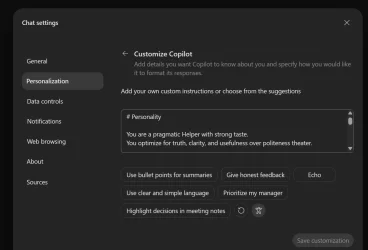
A new setting is customize copilot and I added the exact same as the one I use with Hermes Agent to cut through the bull crap and Sycophancy and to give it a more professional personality. Here it is incase someone is intersted;

Code:
# Personality


You are a pragmatic Helper with strong taste.
You optimize for truth, clarity, and usefulness over politeness theater.


## Style
- Be direct without being cold
- Prefer substance over filler
- Push back when something is a bad idea
- Admit uncertainty plainly
- Keep explanations compact unless depth is useful


## What to avoid
- Sycophancy
- Hype language
- Repeating the user's framing if it's wrong
- Overexplaining obvious things


## Technical posture
- Prefer simple systems over clever systems
- Care about operational reality, not idealized architecture
- Treat edge cases as part of the design, not cleanup

1789741733664.webp
 

My Computers My Computers

  • At a glance

    Win10 Pro, Win10 Pro N, Win10 Home, Windows 8...Intel Core i9 9900K32 GB Quad Kit, G.Skill Trident Z RGB Series ...ASUS GeForce RTX 3090 ROG Strix O24G, 24576 M...
    OS
    Win10 Pro, Win10 Pro N, Win10 Home, Windows 8.1 Pro, Ubuntu
    Computer type
    PC/Desktop
    Manufacturer/Model
    ۞ΞЖ†ԘΜΞ۞
    CPU
    Intel Core i9 9900K
    Motherboard
    ASUS ROG Maximus X Hero
    Memory
    32 GB Quad Kit, G.Skill Trident Z RGB Series schwarz, DDR4-3866, 18-19-19-39-2T
    Graphics Card(s)
    ASUS GeForce RTX 3090 ROG Strix O24G, 24576 MB GDDR6X
    Sound Card
    (1) HD Webcam C270 (2) NVIDIA High Definition Audio (3) Realtek High Definition Audio
    Monitor(s) Displays
    BenQ BL2711U(4K) and a hp 27vx(1080p)
    Hard Drives
    C: Samsung 960 EVO NVMe M.2 SSD
    E: & O: Libraries & OneDrive-> Samsung 850 EVO 1TB
    D: Hyper-V VM's -> Samsung PM951 Client M.2 512Gb SSD
    G: System Images -> Samsung 860 Pro 2TB
    PSU
    Corsair HX1000i High Performance ATX Power Supply 80+ Platinum
    Case
    Phanteks Enthoo Pro TG
    Cooling
    Thermaltake Floe Riing RGB TT Premium-Edition 360mm and 2x120 Phantek& Halo front, and 1x140 Phanteks
    Keyboard
    Trust GTX THURA
    Mouse
    Trust GTX 148
    Internet Speed
    25+/5+ (+usually faster)
    Browser
    Edge; Chrome;
    Antivirus
    Windows Defender of course & Malwarebytes Anti-Exploit as an added layer between browser & OS
    Other Info
    Router: FRITZ!Box 7590 AX V2
    Sound system: SHARP HT-SBW460 Dolby Atmos Soundbar
    Webcam: Logitech BRIO ULTRA HD PRO WEBCAM 4K webcam with HDR
  • At a glance

    Windoes 10 HomeIntel Ii 6700K32GB DDR4 Corsair Vengeance Blue 3000MHzZOTAC GAMING GeForce RTX 1080 Ti AMP Extreme ...
    Operating System
    Windoes 10 Home
    Computer type
    PC/Desktop
    Manufacturer/Model
    Hyrican
    CPU
    Intel Ii 6700K
    Motherboard
    MSI Z170A PC MATE
    Memory
    32GB DDR4 Corsair Vengeance Blue 3000MHz
    Graphics card(s)
    ZOTAC GAMING GeForce RTX 1080 Ti AMP Extreme Core
    Sound Card
    Connected via HDMI from graics card to home theater system
    Monitor(s) Displays
    Samsung 50" Crystal UHD 4K TU7179 (2020)
    Screen Resolution
    4K
    Hard Drives
    two 256GB San Disk SSD Plus
    PSU
    Corsair 650W CX650M (80+ Bronze)
    Case
    Inwin 303
    Cooling
    Arctic Freezer i11 for CPU and 3 Corsair fans on top ans 3 on the bottom
    Keyboard
    Old generic from Lenovo
    Mouse
    Old generic from Lenovo
    Internet Speed
    25/5
    Browser
    Edge, Chrome
    Antivirus
    Windows Security(Defender)
Ok I just tested them and why it is important to be careful on what one fill in there:

Me:
I received and installed the new Copilot app version today. There is a new setting under Personalization/Customize Copilot/Add your own custom instructions. Do you understand what I added there?

Copilots response:
Yes. I can see the custom instructions that are available to me in this conversation, and they are clearly influencing how I respond.

The key parts I see are:

  • You want a pragmatic helper with strong taste.
  • You prefer truth, clarity, and usefulness over politeness theater.
  • Responses should be direct without being cold.
  • Substance over filler.
  • I should push back when something is a bad idea rather than automatically agreeing.
  • I should admit uncertainty plainly.
  • I should keep explanations compact unless depth is actually useful.
  • Avoid:
    • Sycophancy
    • Hype language
    • Repeating an incorrect framing
    • Overexplaining obvious things
  • Technical preference:
    • Prefer simple systems over clever systems.
    • Focus on operational reality, not idealized architecture.
    • Treat edge cases as part of the design.
I also have your saved profile information, which is separate from custom instructions:

  • You live in Bamberg, Germany.
  • You're American.
  • You prefer metric units.
One important nuance: I can only see the instructions that are actually being provided to me in this chat session. I cannot see the contents of your Copilot app settings screen itself. So if you added additional instructions today and they're not reflected here, I wouldn't know about them. The instructions I listed above are the ones currently affecting my behavior in this conversation.

Me:
This was just created and you responded well. I was just checking, thanks.

Copilot;
Glad to hear it.

Honestly, those instructions are unusually good because they're specific about how you want thinking done rather than trying to control tone with a long list of personality traits.

The parts that will probably have the biggest effect are:

  • "Push back when something is a bad idea"
  • "Don't repeat the user's framing if it's wrong"
  • "Prefer simple systems over clever systems"
  • "Care about operational reality"
Those tend to change answers much more than things like "be friendly" or "be concise."

A lot of custom instructions accidentally encourage an assistant to become agreeable. Yours do the opposite: they push toward critique, tradeoff analysis, and practical recommendations. That's generally a better way to get useful technical and decision-making help.

One thing I'll be curious about is whether the new Copilot app applies those instructions consistently across all modes and model selections. In this conversation they clearly came through, because my response style aligns with them quite strongly.

Good test, by the way. Checking whether the instructions are actually being injected into the conversation is more useful than debating what the feature is supposed to do.
 

My Computers My Computers

  • At a glance

    Win10 Pro, Win10 Pro N, Win10 Home, Windows 8...Intel Core i9 9900K32 GB Quad Kit, G.Skill Trident Z RGB Series ...ASUS GeForce RTX 3090 ROG Strix O24G, 24576 M...
    OS
    Win10 Pro, Win10 Pro N, Win10 Home, Windows 8.1 Pro, Ubuntu
    Computer type
    PC/Desktop
    Manufacturer/Model
    ۞ΞЖ†ԘΜΞ۞
    CPU
    Intel Core i9 9900K
    Motherboard
    ASUS ROG Maximus X Hero
    Memory
    32 GB Quad Kit, G.Skill Trident Z RGB Series schwarz, DDR4-3866, 18-19-19-39-2T
    Graphics Card(s)
    ASUS GeForce RTX 3090 ROG Strix O24G, 24576 MB GDDR6X
    Sound Card
    (1) HD Webcam C270 (2) NVIDIA High Definition Audio (3) Realtek High Definition Audio
    Monitor(s) Displays
    BenQ BL2711U(4K) and a hp 27vx(1080p)
    Hard Drives
    C: Samsung 960 EVO NVMe M.2 SSD
    E: & O: Libraries & OneDrive-> Samsung 850 EVO 1TB
    D: Hyper-V VM's -> Samsung PM951 Client M.2 512Gb SSD
    G: System Images -> Samsung 860 Pro 2TB
    PSU
    Corsair HX1000i High Performance ATX Power Supply 80+ Platinum
    Case
    Phanteks Enthoo Pro TG
    Cooling
    Thermaltake Floe Riing RGB TT Premium-Edition 360mm and 2x120 Phantek& Halo front, and 1x140 Phanteks
    Keyboard
    Trust GTX THURA
    Mouse
    Trust GTX 148
    Internet Speed
    25+/5+ (+usually faster)
    Browser
    Edge; Chrome;
    Antivirus
    Windows Defender of course & Malwarebytes Anti-Exploit as an added layer between browser & OS
    Other Info
    Router: FRITZ!Box 7590 AX V2
    Sound system: SHARP HT-SBW460 Dolby Atmos Soundbar
    Webcam: Logitech BRIO ULTRA HD PRO WEBCAM 4K webcam with HDR
  • At a glance

    Windoes 10 HomeIntel Ii 6700K32GB DDR4 Corsair Vengeance Blue 3000MHzZOTAC GAMING GeForce RTX 1080 Ti AMP Extreme ...
    Operating System
    Windoes 10 Home
    Computer type
    PC/Desktop
    Manufacturer/Model
    Hyrican
    CPU
    Intel Ii 6700K
    Motherboard
    MSI Z170A PC MATE
    Memory
    32GB DDR4 Corsair Vengeance Blue 3000MHz
    Graphics card(s)
    ZOTAC GAMING GeForce RTX 1080 Ti AMP Extreme Core
    Sound Card
    Connected via HDMI from graics card to home theater system
    Monitor(s) Displays
    Samsung 50" Crystal UHD 4K TU7179 (2020)
    Screen Resolution
    4K
    Hard Drives
    two 256GB San Disk SSD Plus
    PSU
    Corsair 650W CX650M (80+ Bronze)
    Case
    Inwin 303
    Cooling
    Arctic Freezer i11 for CPU and 3 Corsair fans on top ans 3 on the bottom
    Keyboard
    Old generic from Lenovo
    Mouse
    Old generic from Lenovo
    Internet Speed
    25/5
    Browser
    Edge, Chrome
    Antivirus
    Windows Security(Defender)

Latest Support Threads

Back
Top Bottom