Solved use non MS mouse


Joop

Member
Local time
3:01 PM
Posts
39
Location
Alberta
OS
windows 11
I have a Kensington expert track ball mouse.
Every time I restart the PC the track ball mouse does not work.
I have to take out the dongle of the USB port and stick it in a different one.
then the next time I can stick it in the same USB port then it will work after re-Pairing it with the PC.
Would any one know how to keep it connected after a re-start.
The tech help from Kensington did not know, all he said it is strange.
He was the one to tell me to change to a different USB port.
 
Windows Build/Version
25H2

My Computer My Computer

At a glance

windows 11Processor Intel(R) Core(TM) Ultra 7 155H, 380...32 GB
OS
windows 11
Computer type
PC/Desktop
Manufacturer/Model
System Model HP OmniStudio X All-in-One Desktop 32-c0xxx
CPU
Processor Intel(R) Core(TM) Ultra 7 155H, 3800 Mhz, 16
Memory
32 GB
Hard Drives
one two tera bytes
Sounds like the dongle isn't reconnecting with the mouse once the OS reloads, or the computer doesn't register the dongle. Go to Kensington's website and see if there is an updated driver for your mouse.

Check your system files. Click on the search box or icon on your taskbar and type terminal. When it comes up, right-click on it and select Run as administrator. Then type sfc /scannow and wait for it to complete. This might take a few minutes to do, depending on the speed of your drives and CPU.

Also, look into your antivirus if you use something different from the built-in Windows Defender. It might have a setting that auto-scans the device and is causing conflicts. I've seen antivirus and malware scanners cause some weird issues with USB devices.
 

My Computer My Computer

At a glance

Windows 11 Pro For Workstations 25H2Intel Xeon W-10855M @ 4.9Ghz32GB OWC ECC DDR4-2666 RAMiGPU: Intel UHD Graphics P630 | Discrete GPU:...
OS
Windows 11 Pro For Workstations 25H2
Computer type
Laptop
Manufacturer/Model
Dell Precision 7550
CPU
Intel Xeon W-10855M @ 4.9Ghz
Memory
32GB OWC ECC DDR4-2666 RAM
Graphics Card(s)
iGPU: Intel UHD Graphics P630 | Discrete GPU: NVIDIA Quadro RTX 3000 6GB
Sound Card
Realtek Audio
Monitor(s) Displays
Integrated Ultrasharp
Screen Resolution
1920*1080
Hard Drives
OS: Samsung 980 PRO 500GB NVMe
Data: Western Digital Black SN750 1TB
PSU
Dell 180W
Internet Speed
1Gbps
Browser
Edge Chromium
Antivirus
Microsoft Defender
Other Info
OpenSUSE Leap 16 VM
Zorin OS 18 VM
Sounds like the dongle isn't reconnecting with the mouse once the OS reloads, or the computer doesn't register the dongle. Go to Kensington's website and see if there is an updated driver for your mouse.

Check your system files. Click on the search box or icon on your taskbar and type terminal. When it comes up, right-click on it and select Run as administrator. Then type sfc /scannow and wait for it to complete. This might take a few minutes to do, depending on the speed of your drives and CPU.

Also, look into your antivirus if you use something different from the built-in Windows Defender. It might have a setting that auto-scans the device and is causing conflicts. I've seen antivirus and malware scanners cause some weird issues with USB devices.
Thank you for the quick reply
I shall try that and report back.
I do have the latest driver for this mouse
 

My Computer My Computer

At a glance

windows 11Processor Intel(R) Core(TM) Ultra 7 155H, 380...32 GB
OS
windows 11
Computer type
PC/Desktop
Manufacturer/Model
System Model HP OmniStudio X All-in-One Desktop 32-c0xxx
CPU
Processor Intel(R) Core(TM) Ultra 7 155H, 3800 Mhz, 16
Memory
32 GB
Hard Drives
one two tera bytes
please try open the device manager
go to the entry for your mouse
right click and uninstall the mouse

then remove the USB mouse transmitter and then re-insert the transmitter
Windows will reload the required drivers for your mouse.

see if that gives any improvement when coming out of sleep
i have had to do that to 2 desktop computers once done it seems to hold.

best of luck Steve ..
 

My Computers My Computers

  • At a glance

    Debian 13 KDE .. Windows 11 HomeRyzen 7 5825u64GB DDR4 3200Ryzen 7 5825u
    OS
    Debian 13 KDE .. Windows 11 Home
    Computer type
    PC/Desktop
    Manufacturer/Model
    HP 24" AiO
    CPU
    Ryzen 7 5825u
    Motherboard
    HP
    Memory
    64GB DDR4 3200
    Graphics Card(s)
    Ryzen 7 5825u
    Sound Card
    RealTek
    Monitor(s) Displays
    24" HP AiO
    Screen Resolution
    1920 x 1080 @60 Hz
    Hard Drives
    1TB WD Blue SN580 M2 SSD Partitioned.
    2x 1TB USB HDD External Backup/Storage.
    PSU
    90W external power brick
    Case
    24" All in One
    Cooling
    Default Air Cooling
    Keyboard
    HP WiFi UK extended
    Mouse
    HP WiFi 3 Button
    Internet Speed
    1GB full fibre
    Browser
    Edge & Firefox
    Antivirus
    AVG Internet Security/Windows Defender
    Other Info
    Mainly Open Source Software
  • At a glance

    Ubuntu 22.04.5 LTSi5 7200u16GB DDR4Intel
    Operating System
    Ubuntu 22.04.5 LTS
    Computer type
    Laptop
    Manufacturer/Model
    Dell 13" Latitude 2017
    CPU
    i5 7200u
    Motherboard
    Dell
    Memory
    16GB DDR4
    Graphics card(s)
    Intel
    Sound Card
    Intel
    Monitor(s) Displays
    13" Dell Laptop
    Hard Drives
    250GB Crucial 2.5" SSD
    Mouse
    Generic WiFi 3 button
    Internet Speed
    WiFi only
    Browser
    Firefox
    Antivirus
    ClamAV TK
    Other Info
    Mainly Open Source Software
please try open the device manager
go to the entry for your mouse
right click and uninstall the mouse

then remove the USB mouse transmitter and then re-insert the transmitter
Windows will reload the required drivers for your mouse.

see if that gives any improvement when coming out of sleep
i have had to do that to 2 desktop computers once done it seems to hold.

best of luck Steve ..
I'll I try that as well, thanks.
 

My Computer My Computer

At a glance

windows 11Processor Intel(R) Core(TM) Ultra 7 155H, 380...32 GB
OS
windows 11
Computer type
PC/Desktop
Manufacturer/Model
System Model HP OmniStudio X All-in-One Desktop 32-c0xxx
CPU
Processor Intel(R) Core(TM) Ultra 7 155H, 3800 Mhz, 16
Memory
32 GB
Hard Drives
one two tera bytes
please try open the device manager
go to the entry for your mouse
right click and uninstall the mouse

then remove the USB mouse transmitter and then re-insert the transmitter
Windows will reload the required drivers for your mouse.

see if that gives any improvement when coming out of sleep
i have had to do that to 2 desktop computers once done it seems to hold.

best of luck Steve ..
Thank you, that worked.
 

My Computer My Computer

At a glance

windows 11Processor Intel(R) Core(TM) Ultra 7 155H, 380...32 GB
OS
windows 11
Computer type
PC/Desktop
Manufacturer/Model
System Model HP OmniStudio X All-in-One Desktop 32-c0xxx
CPU
Processor Intel(R) Core(TM) Ultra 7 155H, 3800 Mhz, 16
Memory
32 GB
Hard Drives
one two tera bytes
Thank you, that worked.
Glad you've solved it -- but for others the old PS/2 Mouse type of thing still believe it or not works even in 2025.

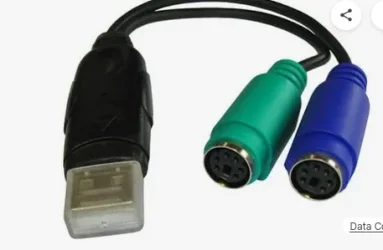
I connected an old thing I found (about 22 years old !! ) while cleaning out stuff destined for the local tip}which was a USB2 -> IBM ps2 mouse / keyboard connector -- connected an old IBM mouse with the ps2 connector and it worked perfectly.

Screenshot_20251015_145938.webp
I also used this to connect an old IBM typomatic keyboard -- I prefer those old ones to the modern day things when working at home.

I'd advise people not to always be too quick to throw out all old hardware -- you never know when you can use it again !!!.
cheers
jimbo
 

My Computer My Computer

At a glance

Windows XP,11 Linux Fedora Rawhide pre-releas...2 X Intel i7
OS
Windows XP,11 Linux Fedora Rawhide pre-release 45
Computer type
PC/Desktop
CPU
2 X Intel i7
Screen Resolution
4KUHD X 2
Back
Top Bottom