Used a projector, now my display no longer turns off


fotyc

Member
Local time
10:49 AM
Posts
19
OS
Windows 11 Home 64 bit
I have a Samsung GalaxyBook that has only USB-C ports.
I needed to give a presentation so I connected to a projector with a USB-C to HDMI cable. It worked wonderfully.
However, that was yesterday, and my computer was shut down clean last night so a shutdown has already been done.
Today, the screen timeout doesn't work. The thing insists on staying lit up all the time.
I checked my power settings, I ran the command line thing that checks for processes calling to the screen to stay lit, I did Win-P and made sure it said PC screen only.
What do I need to do to get that screen timeout to work again??
I haven't seen anything in a quick Google that seems to help.
I believe that I did shut the computer yesterday before pulling the cable, I hope that was not a FATAL MISTAKE.
Thanks for any other suggestions of what I should check.
 
Windows Build/Version
Win 11 home build 26100ge-release240331-1435

My Computer

System One

  • OS
    Windows 11 Home 64 bit
    Computer type
    Laptop
    Manufacturer/Model
    Samsung
    CPU
    11th Gen Intel(R) Core(TM) i7-1165G7 @ 2.80GHz (2.80 GH
    Memory
    16gb
    Graphics Card(s)
    Intel Iris xe 128mb
    Monitor(s) Displays
    just the built in one...
    Screen Resolution
    1920x1080
    Hard Drives
    1tb ssd
    Keyboard
    wireless keyboard w/USB
    Mouse
    wireless mouse w/USB
    Internet Speed
    almost 1gbps
    Browser
    Chrome usually
    Antivirus
    Emsisoft Antimalware and Windows Defender
Hi, welcome.

Try the following:

Open display (Right click desktop > Display) Make sure there isn’t a ghost monitor showing that doesn’t exist, if it does, “disconnect this display”

Also try the combination: Win + Ctrl + Shift + B (The GPU driver should reset, screen/s will kind of refresh/flash)

Let us know how you went.
 

My Computers

System One System Two

  • OS
    Windows 11 Pro 25H2 Build 26200.8524
    Computer type
    PC/Desktop
    Manufacturer/Model
    Sin-built 2013
    CPU
    Intel(R) Core(TM) i7-4770K CPU @ 3.50GHz
    Motherboard
    ASUS ROG Maximus VI Formula
    Memory
    32.0 GB of I forget and the box is in storage.
    Graphics Card(s)
    Gigabyte nVidia GeForce GTX 1660 Super OC 6GB
    Sound Card
    Onboard thingy
    Monitor(s) Displays
    5 x LG 25MS500-B - 1 x 24MK430H-B - 1 x Wacom Pro 22" Touch Screen Tablet
    Screen Resolution
    All over the place
    Hard Drives
    Too many to list.
    OS on Samsung 1TB 870 QVO SATA
    PSU
    Silverstone 1500
    Case
    NZXT Phantom 820 Full-Tower Case
    Cooling
    Noctua NH-D15 Elite Class Dual Tower CPU Cooler / 6 x EziDIY 120mm / 2 x Corsair 140mm somethings / 1 x 140mm Thermaltake something / 2 x 200mm Corsair.
    Keyboard
    Corsair K95 / Logitech diNovo Edge Wireless
    Mouse
    Logitech: G402 / G502 / Mx Masters / Mx Air Cordless
    Internet Speed
    2000/500Mbps
    Browser
    All sorts
    Antivirus
    Kaspersky Premium
    Other Info
    ㅤㅤㅤㅤㅤㅤㅤㅤㅤㅤㅤㅤㅤㅤㅤㅤㅤㅤㅤㅤㅤㅤㅤㅤㅤㅤㅤㅤㅤㅤㅤㅤㅤㅤㅤㅤㅤㅤㅤㅤ⠀⠀⠀⠀⠀⠀⠀⠀⠀⠀
    TP-Link BE9300 WiFi 7 Bluetooth 5.4 (Archer TBE550E)
    TP-Link TX201 V1 2.5GB Lan

    Grandstream HT812 - VoIP
    ASUS DSL-AX82U - Mesh
    ASUS RT-AC68U - Mesh
    ASUS RT-BE88U Router

    Brother MFC-L2880DW Printer

    I’m on a horse.
  • Operating System
    Windows 11 Pro 25H2 Build 26200.8524
    Computer type
    Laptop
    Manufacturer/Model
    LENOVO Yoga 7 14IRL8 - 7i EVO OLED 14" Touchscreen i5 12 Core 16GB/512GB
    CPU
    Intel Core 12th Gen i5-1240P Processor (1.7 - 4.4GHz)
    Memory
    16GB LPDDR5 RAM
    Graphics card(s)
    Intel Iris Xe Graphics Processor
    Sound Card
    Optimized with Dolby Atmos®
    Screen Resolution
    QHD 2880 x 1800 OLED
    Hard Drives
    M.2 512GB
    Antivirus
    Defender / Malwarebytes
    Other Info
    …still on a horse.
Alright it did flash, AND beep. I will report back as to whether my timeout is restored. Thanks!
 

My Computer

System One

  • OS
    Windows 11 Home 64 bit
    Computer type
    Laptop
    Manufacturer/Model
    Samsung
    CPU
    11th Gen Intel(R) Core(TM) i7-1165G7 @ 2.80GHz (2.80 GH
    Memory
    16gb
    Graphics Card(s)
    Intel Iris xe 128mb
    Monitor(s) Displays
    just the built in one...
    Screen Resolution
    1920x1080
    Hard Drives
    1tb ssd
    Keyboard
    wireless keyboard w/USB
    Mouse
    wireless mouse w/USB
    Internet Speed
    almost 1gbps
    Browser
    Chrome usually
    Antivirus
    Emsisoft Antimalware and Windows Defender
OK no it still doesn't time out, I was gone for 40 minutes and came back and the screen was still on :-( Anything else??
 

My Computer

System One

  • OS
    Windows 11 Home 64 bit
    Computer type
    Laptop
    Manufacturer/Model
    Samsung
    CPU
    11th Gen Intel(R) Core(TM) i7-1165G7 @ 2.80GHz (2.80 GH
    Memory
    16gb
    Graphics Card(s)
    Intel Iris xe 128mb
    Monitor(s) Displays
    just the built in one...
    Screen Resolution
    1920x1080
    Hard Drives
    1tb ssd
    Keyboard
    wireless keyboard w/USB
    Mouse
    wireless mouse w/USB
    Internet Speed
    almost 1gbps
    Browser
    Chrome usually
    Antivirus
    Emsisoft Antimalware and Windows Defender
Is the projector still connected?
 

My Computers

System One System Two

  • OS
    Windows 11 Pro 25H2 26200.8524
    Computer type
    Laptop
    Manufacturer/Model
    Acemagic LX15PRO
    CPU
    AMD Ryzen 7 5825U with Radeon Graphics
    Memory
    16GB
    Screen Resolution
    1920 x 1080
    Hard Drives
    SSD 2TB
    Internet Speed
    30 Mbps
    Browser
    Brave
    Antivirus
    Webroot Secure Anywhere
    Other Info
    System 3

    Acer Swift SF114-34 laptop
    OS Windows 11 Pro 26200.8524
    CPU Pentium Silver N6000
    RAM 4GB
    SSD Samsung 970 EVO Plus SSD 2TB (an upgrade)
  • Operating System
    Windows 11 Pro 23H2 22631.2506
    Computer type
    Laptop
    Manufacturer/Model
    HP Mini 210-1090NR PC (bought in late 2009!)
    CPU
    Atom N450 1.66GHz
    Memory
    2GB
    Browser
    Brave
    Antivirus
    Webroot
Not that I can tell. I mean, I disconnected it physically 48 hours ago....
 

My Computer

System One

  • OS
    Windows 11 Home 64 bit
    Computer type
    Laptop
    Manufacturer/Model
    Samsung
    CPU
    11th Gen Intel(R) Core(TM) i7-1165G7 @ 2.80GHz (2.80 GH
    Memory
    16gb
    Graphics Card(s)
    Intel Iris xe 128mb
    Monitor(s) Displays
    just the built in one...
    Screen Resolution
    1920x1080
    Hard Drives
    1tb ssd
    Keyboard
    wireless keyboard w/USB
    Mouse
    wireless mouse w/USB
    Internet Speed
    almost 1gbps
    Browser
    Chrome usually
    Antivirus
    Emsisoft Antimalware and Windows Defender
I pasted your post into ChatGPT and this was her response;

The behaviour you describe usually happens when Windows thinks it is still in “presentation mode.” When that mode is active, Windows deliberately prevents the display from timing out.

Connecting to a projector via USB-C → HDMI can trigger it, and sometimes it stays enabled even after disconnecting.

1. Check Presentation Mode (most likely)​

Press:

Win + X → Mobility Center

Look for “Presentation Settings.”

If it says “Presentation Settings: On”, turn it Off.

Or run this directly:

presentationsettings.exe /stop<br>
That immediately disables presentation mode.


2. Confirm nothing is requesting the display stay on​

You said you ran the check already, but the correct command is:

powercfg /requests<br>
Under DISPLAY, it should say None.

If something appears there, that process is forcing the screen to stay on.


3. Reset the power plan (often fixes stubborn cases)​

Open Command Prompt as Administrator and run:

powercfg -restoredefaultschemes<br>
This resets all Windows power schemes to defaults and clears odd flags that sometimes remain after external display use.


4. Quick graphics reset (sometimes needed after USB-C display use)​

Press:

Win + Ctrl + Shift + B

This resets the graphics driver without rebooting.


5. Last simple fix (if the above fails)​

Temporarily reconnect the projector or HDMI adapter, then:

  1. Press Win + P
  2. Select PC screen only
  3. Disconnect the cable
This forces Windows to rebuild the display state.


✅ Most likely fix:
presentationsettings.exe /stop


If it still refuses to time out, tell me one thing:

What does powercfg /requests actually show under DISPLAY?

That will pinpoint the exact cause in seconds.
 

My Computers

System One System Two

  • OS
    Windows 11 Pro 25H2 26200.8524
    Computer type
    Laptop
    Manufacturer/Model
    Acemagic LX15PRO
    CPU
    AMD Ryzen 7 5825U with Radeon Graphics
    Memory
    16GB
    Screen Resolution
    1920 x 1080
    Hard Drives
    SSD 2TB
    Internet Speed
    30 Mbps
    Browser
    Brave
    Antivirus
    Webroot Secure Anywhere
    Other Info
    System 3

    Acer Swift SF114-34 laptop
    OS Windows 11 Pro 26200.8524
    CPU Pentium Silver N6000
    RAM 4GB
    SSD Samsung 970 EVO Plus SSD 2TB (an upgrade)
  • Operating System
    Windows 11 Pro 23H2 22631.2506
    Computer type
    Laptop
    Manufacturer/Model
    HP Mini 210-1090NR PC (bought in late 2009!)
    CPU
    Atom N450 1.66GHz
    Memory
    2GB
    Browser
    Brave
    Antivirus
    Webroot
I will make a series of replies so I can fully answer your questions: I didn't see an option for Presentation Settings in win-X.

The command line attempt brought this:
The term 'presentationsettings.exe' is not recognized as the name of a cmdlet, function,
script file, or operable program. Check the spelling of the name, or if a path was included, verify that the path is
correct and try again.
powercfg output:
DISPLAY:
None.

SYSTEM:
None.

AWAYMODE:
None.

EXECUTION:
None.

PERFBOOST:
None.

ACTIVELOCKSCREEN:
None.
 

My Computer

System One

  • OS
    Windows 11 Home 64 bit
    Computer type
    Laptop
    Manufacturer/Model
    Samsung
    CPU
    11th Gen Intel(R) Core(TM) i7-1165G7 @ 2.80GHz (2.80 GH
    Memory
    16gb
    Graphics Card(s)
    Intel Iris xe 128mb
    Monitor(s) Displays
    just the built in one...
    Screen Resolution
    1920x1080
    Hard Drives
    1tb ssd
    Keyboard
    wireless keyboard w/USB
    Mouse
    wireless mouse w/USB
    Internet Speed
    almost 1gbps
    Browser
    Chrome usually
    Antivirus
    Emsisoft Antimalware and Windows Defender
Tried #4 twice already.
Do not have projector anymore it belonged to the venue.
Thanks for staying with me on this....
 

My Computer

System One

  • OS
    Windows 11 Home 64 bit
    Computer type
    Laptop
    Manufacturer/Model
    Samsung
    CPU
    11th Gen Intel(R) Core(TM) i7-1165G7 @ 2.80GHz (2.80 GH
    Memory
    16gb
    Graphics Card(s)
    Intel Iris xe 128mb
    Monitor(s) Displays
    just the built in one...
    Screen Resolution
    1920x1080
    Hard Drives
    1tb ssd
    Keyboard
    wireless keyboard w/USB
    Mouse
    wireless mouse w/USB
    Internet Speed
    almost 1gbps
    Browser
    Chrome usually
    Antivirus
    Emsisoft Antimalware and Windows Defender
The only thing you suggest that I haven't tried is the resetting of the power plan, which I will try in a bit.
 

My Computer

System One

  • OS
    Windows 11 Home 64 bit
    Computer type
    Laptop
    Manufacturer/Model
    Samsung
    CPU
    11th Gen Intel(R) Core(TM) i7-1165G7 @ 2.80GHz (2.80 GH
    Memory
    16gb
    Graphics Card(s)
    Intel Iris xe 128mb
    Monitor(s) Displays
    just the built in one...
    Screen Resolution
    1920x1080
    Hard Drives
    1tb ssd
    Keyboard
    wireless keyboard w/USB
    Mouse
    wireless mouse w/USB
    Internet Speed
    almost 1gbps
    Browser
    Chrome usually
    Antivirus
    Emsisoft Antimalware and Windows Defender
Nope, that doesn't help either.... I'm really stumped!
 

My Computer

System One

  • OS
    Windows 11 Home 64 bit
    Computer type
    Laptop
    Manufacturer/Model
    Samsung
    CPU
    11th Gen Intel(R) Core(TM) i7-1165G7 @ 2.80GHz (2.80 GH
    Memory
    16gb
    Graphics Card(s)
    Intel Iris xe 128mb
    Monitor(s) Displays
    just the built in one...
    Screen Resolution
    1920x1080
    Hard Drives
    1tb ssd
    Keyboard
    wireless keyboard w/USB
    Mouse
    wireless mouse w/USB
    Internet Speed
    almost 1gbps
    Browser
    Chrome usually
    Antivirus
    Emsisoft Antimalware and Windows Defender
I'm sorry that ChatGPT included <br> at the end of the commands. This should not be included.

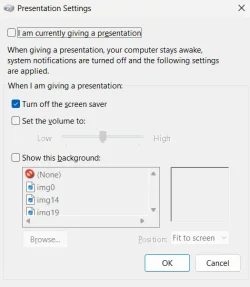
Try holding down the WIN key and pressing 'r' to bring up the 'Run' dialog. Then type 'presentationsettings.exe' without the single quotes. I get this.

1773074452050.webp
 

My Computers

System One System Two

  • OS
    Windows 11 Pro 25H2 26200.8524
    Computer type
    Laptop
    Manufacturer/Model
    Acemagic LX15PRO
    CPU
    AMD Ryzen 7 5825U with Radeon Graphics
    Memory
    16GB
    Screen Resolution
    1920 x 1080
    Hard Drives
    SSD 2TB
    Internet Speed
    30 Mbps
    Browser
    Brave
    Antivirus
    Webroot Secure Anywhere
    Other Info
    System 3

    Acer Swift SF114-34 laptop
    OS Windows 11 Pro 26200.8524
    CPU Pentium Silver N6000
    RAM 4GB
    SSD Samsung 970 EVO Plus SSD 2TB (an upgrade)
  • Operating System
    Windows 11 Pro 23H2 22631.2506
    Computer type
    Laptop
    Manufacturer/Model
    HP Mini 210-1090NR PC (bought in late 2009!)
    CPU
    Atom N450 1.66GHz
    Memory
    2GB
    Browser
    Brave
    Antivirus
    Webroot
Is it possible that Windows 11 Home doesn't HAVE presentationsettings? because I cannot find it, it does not seem to exist on my computer.
 

My Computer

System One

  • OS
    Windows 11 Home 64 bit
    Computer type
    Laptop
    Manufacturer/Model
    Samsung
    CPU
    11th Gen Intel(R) Core(TM) i7-1165G7 @ 2.80GHz (2.80 GH
    Memory
    16gb
    Graphics Card(s)
    Intel Iris xe 128mb
    Monitor(s) Displays
    just the built in one...
    Screen Resolution
    1920x1080
    Hard Drives
    1tb ssd
    Keyboard
    wireless keyboard w/USB
    Mouse
    wireless mouse w/USB
    Internet Speed
    almost 1gbps
    Browser
    Chrome usually
    Antivirus
    Emsisoft Antimalware and Windows Defender
I can strongly recommend asking an AI such as ChatGPT. It has endless patience and will ask questions to try and understand the issue. Answers are nigh on instant and it has a vast knowledge base all pinched from other websites!
 

My Computers

System One System Two

  • OS
    Windows 11 Pro 25H2 26200.8524
    Computer type
    Laptop
    Manufacturer/Model
    Acemagic LX15PRO
    CPU
    AMD Ryzen 7 5825U with Radeon Graphics
    Memory
    16GB
    Screen Resolution
    1920 x 1080
    Hard Drives
    SSD 2TB
    Internet Speed
    30 Mbps
    Browser
    Brave
    Antivirus
    Webroot Secure Anywhere
    Other Info
    System 3

    Acer Swift SF114-34 laptop
    OS Windows 11 Pro 26200.8524
    CPU Pentium Silver N6000
    RAM 4GB
    SSD Samsung 970 EVO Plus SSD 2TB (an upgrade)
  • Operating System
    Windows 11 Pro 23H2 22631.2506
    Computer type
    Laptop
    Manufacturer/Model
    HP Mini 210-1090NR PC (bought in late 2009!)
    CPU
    Atom N450 1.66GHz
    Memory
    2GB
    Browser
    Brave
    Antivirus
    Webroot
Is it possible that Windows 11 Home doesn't HAVE presentationsettings? because I cannot find it, it does not seem to exist on my computer.
Good question! And you are correct. The Home edition of Windows 11 does not have it.
 

My Computers

System One System Two

  • OS
    Windows 11 Pro 25H2 26200.8524
    Computer type
    Laptop
    Manufacturer/Model
    Acemagic LX15PRO
    CPU
    AMD Ryzen 7 5825U with Radeon Graphics
    Memory
    16GB
    Screen Resolution
    1920 x 1080
    Hard Drives
    SSD 2TB
    Internet Speed
    30 Mbps
    Browser
    Brave
    Antivirus
    Webroot Secure Anywhere
    Other Info
    System 3

    Acer Swift SF114-34 laptop
    OS Windows 11 Pro 26200.8524
    CPU Pentium Silver N6000
    RAM 4GB
    SSD Samsung 970 EVO Plus SSD 2TB (an upgrade)
  • Operating System
    Windows 11 Pro 23H2 22631.2506
    Computer type
    Laptop
    Manufacturer/Model
    HP Mini 210-1090NR PC (bought in late 2009!)
    CPU
    Atom N450 1.66GHz
    Memory
    2GB
    Browser
    Brave
    Antivirus
    Webroot
So I'm totally screwed and because I gave one presentation in my life I can never have my display time out again? This seems rather harsh...
 

My Computer

System One

  • OS
    Windows 11 Home 64 bit
    Computer type
    Laptop
    Manufacturer/Model
    Samsung
    CPU
    11th Gen Intel(R) Core(TM) i7-1165G7 @ 2.80GHz (2.80 GH
    Memory
    16gb
    Graphics Card(s)
    Intel Iris xe 128mb
    Monitor(s) Displays
    just the built in one...
    Screen Resolution
    1920x1080
    Hard Drives
    1tb ssd
    Keyboard
    wireless keyboard w/USB
    Mouse
    wireless mouse w/USB
    Internet Speed
    almost 1gbps
    Browser
    Chrome usually
    Antivirus
    Emsisoft Antimalware and Windows Defender
I don't subscribe to Claude or ChatGPT so I have no access for asking it, and it seems like it's already been asked and I tried all the things.
 

My Computer

System One

  • OS
    Windows 11 Home 64 bit
    Computer type
    Laptop
    Manufacturer/Model
    Samsung
    CPU
    11th Gen Intel(R) Core(TM) i7-1165G7 @ 2.80GHz (2.80 GH
    Memory
    16gb
    Graphics Card(s)
    Intel Iris xe 128mb
    Monitor(s) Displays
    just the built in one...
    Screen Resolution
    1920x1080
    Hard Drives
    1tb ssd
    Keyboard
    wireless keyboard w/USB
    Mouse
    wireless mouse w/USB
    Internet Speed
    almost 1gbps
    Browser
    Chrome usually
    Antivirus
    Emsisoft Antimalware and Windows Defender
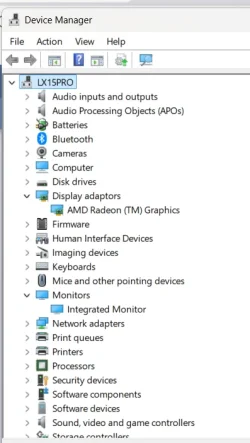
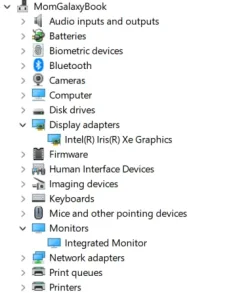
No, you are not totally screwed! It seems you have a ghost entry somewhere. What does Device Manager show under

1773075199108.webp
 

My Computers

System One System Two

  • OS
    Windows 11 Pro 25H2 26200.8524
    Computer type
    Laptop
    Manufacturer/Model
    Acemagic LX15PRO
    CPU
    AMD Ryzen 7 5825U with Radeon Graphics
    Memory
    16GB
    Screen Resolution
    1920 x 1080
    Hard Drives
    SSD 2TB
    Internet Speed
    30 Mbps
    Browser
    Brave
    Antivirus
    Webroot Secure Anywhere
    Other Info
    System 3

    Acer Swift SF114-34 laptop
    OS Windows 11 Pro 26200.8524
    CPU Pentium Silver N6000
    RAM 4GB
    SSD Samsung 970 EVO Plus SSD 2TB (an upgrade)
  • Operating System
    Windows 11 Pro 23H2 22631.2506
    Computer type
    Laptop
    Manufacturer/Model
    HP Mini 210-1090NR PC (bought in late 2009!)
    CPU
    Atom N450 1.66GHz
    Memory
    2GB
    Browser
    Brave
    Antivirus
    Webroot
1773075392615.webp
 

My Computer

System One

  • OS
    Windows 11 Home 64 bit
    Computer type
    Laptop
    Manufacturer/Model
    Samsung
    CPU
    11th Gen Intel(R) Core(TM) i7-1165G7 @ 2.80GHz (2.80 GH
    Memory
    16gb
    Graphics Card(s)
    Intel Iris xe 128mb
    Monitor(s) Displays
    just the built in one...
    Screen Resolution
    1920x1080
    Hard Drives
    1tb ssd
    Keyboard
    wireless keyboard w/USB
    Mouse
    wireless mouse w/USB
    Internet Speed
    almost 1gbps
    Browser
    Chrome usually
    Antivirus
    Emsisoft Antimalware and Windows Defender
I really appreciate people sticking with me and trying to solve this puzzle!
 

My Computer

System One

  • OS
    Windows 11 Home 64 bit
    Computer type
    Laptop
    Manufacturer/Model
    Samsung
    CPU
    11th Gen Intel(R) Core(TM) i7-1165G7 @ 2.80GHz (2.80 GH
    Memory
    16gb
    Graphics Card(s)
    Intel Iris xe 128mb
    Monitor(s) Displays
    just the built in one...
    Screen Resolution
    1920x1080
    Hard Drives
    1tb ssd
    Keyboard
    wireless keyboard w/USB
    Mouse
    wireless mouse w/USB
    Internet Speed
    almost 1gbps
    Browser
    Chrome usually
    Antivirus
    Emsisoft Antimalware and Windows Defender

Latest Support Threads

Back
Top Bottom