JavaScript is disabled. For a better experience, please enable JavaScript in your browser before proceeding.
You are using an out of date browser. It may not display this or other websites correctly.
You should upgrade or use an
alternative browser .
Solved Used to clone ok with Macrium 7. Installed 8 on another PC, now it seems to get stuck on windows partition clone
Well-known member
Member
VIP
Thread Starter
I found another 1 TB Hitachi drive here. Will put it in this machine. Desk is heavy and I have to keep sliding it away from the wall to work on the PC as I put it behind the desk out of sight invisible. And I am getting tired of sliding the desk out. Only the front PC face shows on the left side of the desk. I made a shelf to place PC inside the back part of the desk.
windows 11 PC/Desktop some kind of old ASUS MB old AMD B95 ASUS 8gb ssd WD 500 gb
Well-known member
Member
VIP
Thread Starter
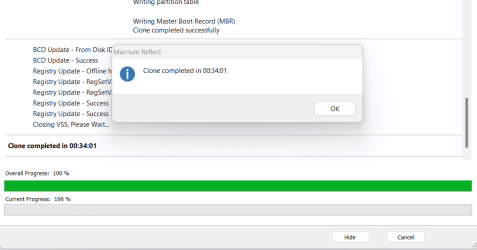
Success! Faster than on the other PC. This one is SATA 3, the other SATA 2
Over years I have accumulated lots of PC's so it is a good feeling to toss out a busted drive
windows 11 PC/Desktop some kind of old ASUS MB old AMD B95 ASUS 8gb ssd WD 500 gb
Well-known member
Power User
Version 8 works fine. Just see my other posts, try it and it will work.
Start it and walk away. Leave it alone and it'll do it's thing. I went back in the morning and it was done and perfect.
Windows 11 Pro 25H2 (OS Build 26200.8246) Intel(R) Xeon(R) CPU E3-1535M v5 @ 2.90 Max T... 64GB DDR4 ECC (Error-Correcting Code memory) NVIDIA Quadro M2000M 4GB GDDR5 & Intel(R) HD ... Windows 11 Pro 25H2 (OS Build 26200.8246) Laptop Dell Precision Mobile Workstation Intel(R) Xeon(R) CPU E3-1535M v5 @ 2.90 Max Turbo 3.80 00V5FJ 64GB DDR4 ECC (Error-Correcting Code memory) NVIDIA Quadro M2000M 4GB GDDR5 & Intel(R) HD Graphics P530 Realtek Audio 15.6" 4K UltraHD 4K UHD 3840x2160 2TB Crucial NVMe & 2TB Seagate SATA Dell 180W 19.5V-9.23A Backlit Logitech G703 & Logitech G305 WIFI: Intel(R) Wi-Fi 6E AX210NGW(Gig+) 160MHz Bands 2.4GHz(574Mbps), 5GHz 2.4Gbps, 6 GHz (160MHz) 2.4Gbps Mozilla Firefox Windows Defender/Microsoft Security + additional Anti Spyware, Anti Malware, etc. Thunderbolt 3
Windows 11 Pro 24H2 (OS Build 26100.6725) Dual (X2) Intel(R) Xeon(R) CPU E5-2690 0 @ 2.... 64GB DDR3 ECC (Error-Correcting Code memory) NVIDIA GeForce GTX 970 4GB of GDDR5 Windows 11 Pro 24H2 (OS Build 26100.6725) PC/Desktop Dell Precision Workstation T5610 Dual (X2) Intel(R) Xeon(R) CPU E5-2690 0 @ 2.90GHz Max Turbo 3.80 0WN7Y6 64GB DDR3 ECC (Error-Correcting Code memory) NVIDIA GeForce GTX 970 4GB of GDDR5 Realtek Audio & NVIDIA High Definition Audio 3 Acer Monitors 1920x1080 2 Seagate Barracuda ST2000DM008-2UB102 (RAID) Logitech G305