
USIING GREENSHOT VIA HIDDEN OVERFLOW BOX WILL NOT CLOSE AFTER OPENING


witchypoo

Member
Local time
9:33 PM
Posts
9
OS
windows 11 home
using greenshot (captures screen areas)
its in the overflow icon box on the taskbar (It always has been)
Recently, when I click greenshot to capture an area the hidden icon box on the taskbar stays on the desktop
so basically I get the hidden overflow icon box in the screen capture (to which I DONT want that)
Hopefully I have screenshot this action and included it in this post
 

Attachments
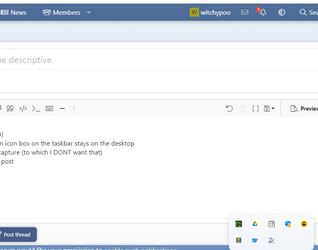
  • 2023-04-17 21_01_55-(1) Post thread _ Windows 11 Forum.png
    2023-04-17 21_01_55-(1) Post thread _ Windows 11 Forum.png
    12.9 KB · Views: 1

My Computer My Computer

At a glance

windows 11 home
OS
windows 11 home
when I click greenshot to capture an area the hidden icon box on the taskbar stays on the desktop
Why don't you assign PrtScn key to Greenshot?
 

My Computers My Computers

  • At a glance

    Windows 11 Pro
    OS
    Windows 11 Pro
    Computer type
    PC/Desktop
    Manufacturer/Model
    ASUS ROG Strix
  • At a glance

    Windows 11 Pro
    Operating System
    Windows 11 Pro
    Computer type
    Laptop
    Manufacturer/Model
    ASUS VivoBook
  • ASUS VivoBook 'Lite' ~ Windows 11 Home
Yes i could but I mostly only ever want to copy 'part' of the screen, sods law its always the bottom of the screen where overflow icon box appears..LOL
 

My Computer My Computer

At a glance

windows 11 home
OS
windows 11 home

My Computers My Computers

  • At a glance

    Windows 11 Pro
    OS
    Windows 11 Pro
    Computer type
    PC/Desktop
    Manufacturer/Model
    ASUS ROG Strix
  • At a glance

    Windows 11 Pro
    Operating System
    Windows 11 Pro
    Computer type
    Laptop
    Manufacturer/Model
    ASUS VivoBook
  • ASUS VivoBook 'Lite' ~ Windows 11 Home

Latest Support Threads

Back
Top Bottom




