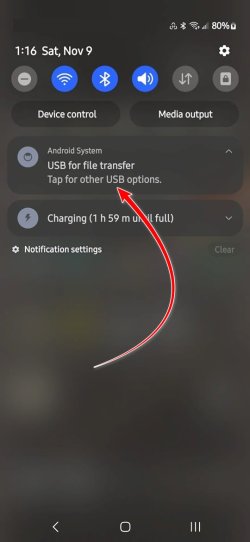
I get a new phone only every 4 or 5 years, so I forget all the particulars of connecting them to my PC as a USB device.
I have a new Samsung A54 and need to use it as a USB drive. Don't want to have it automatically sync with Windows Phone Link when connected or any of that kind of stuff, just let me either use Explorer or FreeFileSync with it acting as a USB drive.
A week or so ago, I set up a FFS batch job for it and then backed it up. Just now, I plugged it in. To be completely honest, there was a notification from Windows which I clicked and suspect that I changed some setting on the PC, because now FFS can't find the phone. Of course, when I unplug and replug it now, the Windows notification doesn't pop up.
FWIW, I never get a notification when my old phone is plugged in, just the "USB device connecting" sound. And it works fine with both Explorer and FreeFileSync.
Now, even though I ran the FFS job previously, it can't find the target folders on the new phone. Puzzling thing is that Explorer finds those same folders just fine and can use it correctly as a USB drive, copying files and that sort of thing.
FreeFileSync still works just fine with my other phone, not to mention all my other USB drives and memory sticks.
Ideas, anyone?
I have a new Samsung A54 and need to use it as a USB drive. Don't want to have it automatically sync with Windows Phone Link when connected or any of that kind of stuff, just let me either use Explorer or FreeFileSync with it acting as a USB drive.
A week or so ago, I set up a FFS batch job for it and then backed it up. Just now, I plugged it in. To be completely honest, there was a notification from Windows which I clicked and suspect that I changed some setting on the PC, because now FFS can't find the phone. Of course, when I unplug and replug it now, the Windows notification doesn't pop up.
FWIW, I never get a notification when my old phone is plugged in, just the "USB device connecting" sound. And it works fine with both Explorer and FreeFileSync.
Now, even though I ran the FFS job previously, it can't find the target folders on the new phone. Puzzling thing is that Explorer finds those same folders just fine and can use it correctly as a USB drive, copying files and that sort of thing.
FreeFileSync still works just fine with my other phone, not to mention all my other USB drives and memory sticks.
Ideas, anyone?
My Computer
At a glance
Windows 11 24H2i5-1240p16gbWhatever comes in it
- OS
- Windows 11 24H2
- Computer type
- Laptop
- Manufacturer/Model
- Lenovo ThinkPad X1 Carbon G10
- CPU
- i5-1240p
- Memory
- 16gb
- Graphics Card(s)
- Whatever comes in it
- Sound Card
- Whatever comes in it
- Monitor(s) Displays
- No external monitor. Yet.
- Screen Resolution
- 1920 x 1200
- Hard Drives
- Internal 512 GB SSD
Desktop 6 TB, 1 TB, 225 GB, all HDDs
Portable 4TB SSD, 2TB HDD
A whole army of USB flash memory sticks
- Mouse
- Logitech M317
- Internet Speed
- 500 mbps Fiber
- Browser
- Chrome
- Antivirus
- Windows Defender
- Other Info
- CalDigit TS4 dock for all my USB stuff, speakers, and connect to Android phone
HP MFP M277dw laser printer/scanner