

- Local time
- 6:11 PM
- Posts
- 18
- OS
- Windows 11 Pro
I downloaded Macrium Reflect v8 from trusted MajorGeeks and attempted to clone my SSD onto an external USB drive. Now the external USB drive is inaccessible. Grrrrr! Although I assigned the letter M when cloning, Macrium assigned the letter C to volume 0 that I suspect created the problem. Win ChkDsk reports the drive to be healthy. I tried the following without success:
~ Create a simple volume in Windows Disk Mgt (the option is grayed in all four partitions)
~ Macrium's Rescue Media (fails)
~ Paragon Partition Manager (fails)
~ Windows' DiskPart -> list disk -> select disk 1 -> list partition -> select partition 1 -> list volume -> select volume 0 -> assign letter=G. At this point, a notice appears:
"Virtual Disk Service error:
Assigning or removing drive letter on the current boot or pagefile volume is not allowed."
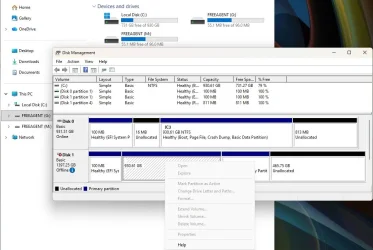
File Explorer does recognize the drive as (G:) and (M:), but neither are accessible (see attached pic).
I searched for software to change the drive letter or to fix an inaccessible drive. All I could find are data recovery tools. But I don't need to recover any data on the inaccessible drive. Is anything else I can try?
~ Create a simple volume in Windows Disk Mgt (the option is grayed in all four partitions)
~ Macrium's Rescue Media (fails)
~ Paragon Partition Manager (fails)
~ Windows' DiskPart -> list disk -> select disk 1 -> list partition -> select partition 1 -> list volume -> select volume 0 -> assign letter=G. At this point, a notice appears:
"Virtual Disk Service error:
Assigning or removing drive letter on the current boot or pagefile volume is not allowed."
File Explorer does recognize the drive as (G:) and (M:), but neither are accessible (see attached pic).
I searched for software to change the drive letter or to fix an inaccessible drive. All I could find are data recovery tools. But I don't need to recover any data on the inaccessible drive. Is anything else I can try?
Attachments
My Computer
At a glance
Windows 11 ProIntel Core Ultra 7 155H, 16 cores, 22 threads...64GB DDR5-5600 MT/sIntel Arc Graphics
- OS
- Windows 11 Pro
- Computer type
- Laptop
- Manufacturer/Model
- HP Envy 17t da000
- CPU
- Intel Core Ultra 7 155H, 16 cores, 22 threads, 4.8GHz.
- Motherboard
- HP?
- Memory
- 64GB DDR5-5600 MT/s
- Graphics Card(s)
- Intel Arc Graphics
- Sound Card
- Realtek Hi-def/Intel Smart Sound
- Monitor(s) Displays
- 17.3" touch screen
- Screen Resolution
- 1920 x 1080
- Hard Drives
- 1TB SSD
- PSU
- 20VDC, 3.25A.
- Case
- Silver
- Cooling
- Fans
- Keyboard
- Numeric
- Mouse
- Logitech wireless
- Internet Speed
- Upload: 330 Mb/s; Download: 438 Mb/s.
- Browser
- Avast Secure
- Antivirus
- Avast One
- Other Info
- My cat's name is Mr. Scruffins.






