Veracrypt full system disk encryption failure


I really do appreciate everyone's time and help, but there is a system partition in front of the C: boot partition that I cannot delete nor move. I am therefore going to start from the beginning by erasing my drive. If I partition it correctly, will windows 11 load into my partitions or will it just re-partition the drive ? How do I assure that the new C: boot partition is the first one on the drive ?
 

My Computer

System One

  • OS
    Windows 11
    Computer type
    PC/Desktop
    Manufacturer/Model
    Self-assembled
    CPU
    AMD Ryzen 5 7600X
    Motherboard
    MSI PRO B650M-A WIFI
    Memory
    Micron Tech 32 GB x 2, 64 GB
    Graphics Card(s)
    GeForce GT1030
    Sound Card
    None
    Monitor(s) Displays
    ASUS 26"
    Screen Resolution
    1920x1080
    Hard Drives
    Samsung 990 PRO 1 TB
I really do appreciate everyone's time and help, but there is a system partition in front of the C: boot partition that I cannot delete nor move. I am therefore going to start from the beginning by erasing my drive. If I partition it correctly, will windows 11 load into my partitions or will it just re-partition the drive ? How do I assure that the new C: boot partition is the first one on the drive ?

when you start the installation you will have the chance to delete all partitions
then in the free space let Windows set the default partition table.

then just Windows install you will then be able to encrypt the C: drive with VeraCrypt.
best of luck Steve ..
 

My Computers

System One System Two

  • OS
    Debian 13 KDE .. Windows 11 Home
    Computer type
    PC/Desktop
    Manufacturer/Model
    HP 24" AiO
    CPU
    Ryzen 7 5825u
    Motherboard
    HP
    Memory
    64GB DDR4 3200
    Graphics Card(s)
    Ryzen 7 5825u
    Sound Card
    RealTek
    Monitor(s) Displays
    24" HP AiO
    Screen Resolution
    1920 x 1080 @60 Hz
    Hard Drives
    1TB WD Blue SN580 M2 SSD Partitioned.
    2x 1TB USB HDD External Backup/Storage.
    PSU
    90W external power brick
    Case
    24" All in One
    Cooling
    Default Air Cooling
    Keyboard
    HP WiFi UK extended
    Mouse
    HP WiFi 3 Button
    Internet Speed
    1GB full fibre
    Browser
    Edge & Firefox
    Antivirus
    AVG Internet Security/Windows Defender
    Other Info
    Mainly Open Source Software
  • Operating System
    Ubuntu 22.04.5 LTS
    Computer type
    Laptop
    Manufacturer/Model
    Dell 13" Latitude 2017
    CPU
    i5 7200u
    Motherboard
    Dell
    Memory
    16GB DDR4
    Graphics card(s)
    Intel
    Sound Card
    Intel
    Monitor(s) Displays
    13" Dell Laptop
    Hard Drives
    250GB Crucial 2.5" SSD
    Mouse
    Generic WiFi 3 button
    Internet Speed
    WiFi only
    Browser
    Firefox
    Antivirus
    ClamAV TK
    Other Info
    Mainly Open Source Software
But my goal is not just to encrypt the system partition, the goal is to encrypt the entire system disk.
 

My Computer

System One

  • OS
    Windows 11
    Computer type
    PC/Desktop
    Manufacturer/Model
    Self-assembled
    CPU
    AMD Ryzen 5 7600X
    Motherboard
    MSI PRO B650M-A WIFI
    Memory
    Micron Tech 32 GB x 2, 64 GB
    Graphics Card(s)
    GeForce GT1030
    Sound Card
    None
    Monitor(s) Displays
    ASUS 26"
    Screen Resolution
    1920x1080
    Hard Drives
    Samsung 990 PRO 1 TB
But my goal is not just to encrypt the system partition, the goal is to encrypt the entire system disk.

if the C: drive for Windows is one disk and takes up the whole drive that is installed on
that's not a problem VeraCrypt will just encrypt the whole drive C: system drive.

best of luck Steve ..
 

My Computers

System One System Two

  • OS
    Debian 13 KDE .. Windows 11 Home
    Computer type
    PC/Desktop
    Manufacturer/Model
    HP 24" AiO
    CPU
    Ryzen 7 5825u
    Motherboard
    HP
    Memory
    64GB DDR4 3200
    Graphics Card(s)
    Ryzen 7 5825u
    Sound Card
    RealTek
    Monitor(s) Displays
    24" HP AiO
    Screen Resolution
    1920 x 1080 @60 Hz
    Hard Drives
    1TB WD Blue SN580 M2 SSD Partitioned.
    2x 1TB USB HDD External Backup/Storage.
    PSU
    90W external power brick
    Case
    24" All in One
    Cooling
    Default Air Cooling
    Keyboard
    HP WiFi UK extended
    Mouse
    HP WiFi 3 Button
    Internet Speed
    1GB full fibre
    Browser
    Edge & Firefox
    Antivirus
    AVG Internet Security/Windows Defender
    Other Info
    Mainly Open Source Software
  • Operating System
    Ubuntu 22.04.5 LTS
    Computer type
    Laptop
    Manufacturer/Model
    Dell 13" Latitude 2017
    CPU
    i5 7200u
    Motherboard
    Dell
    Memory
    16GB DDR4
    Graphics card(s)
    Intel
    Sound Card
    Intel
    Monitor(s) Displays
    13" Dell Laptop
    Hard Drives
    250GB Crucial 2.5" SSD
    Mouse
    Generic WiFi 3 button
    Internet Speed
    WiFi only
    Browser
    Firefox
    Antivirus
    ClamAV TK
    Other Info
    Mainly Open Source Software
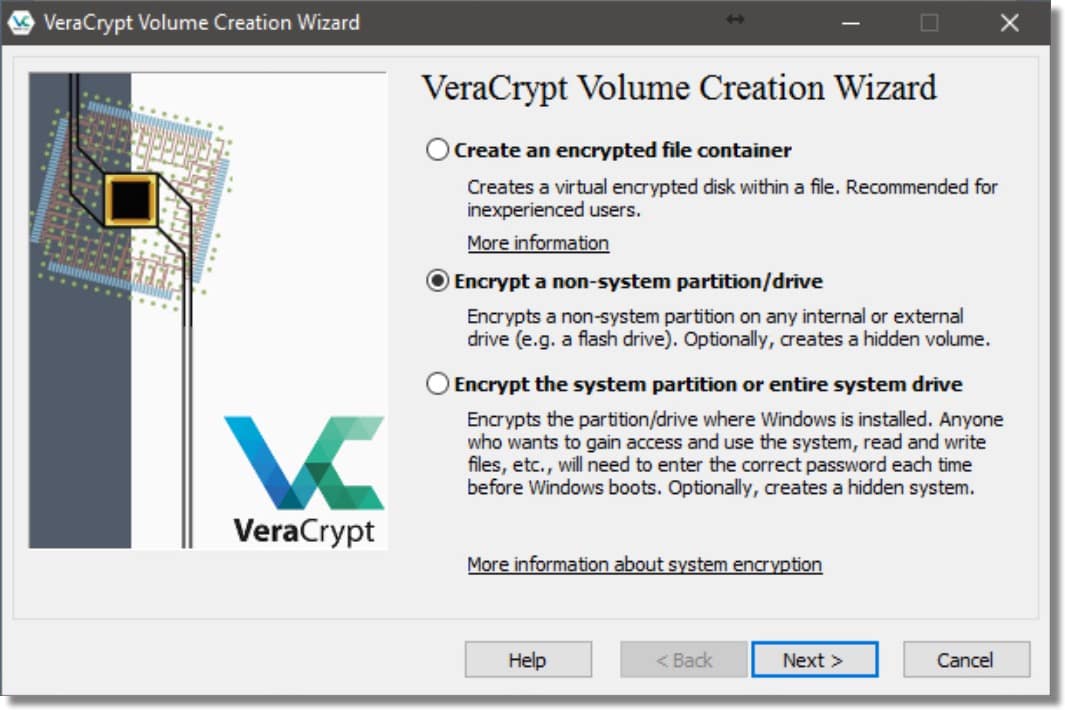
Unfortunately I am still having a problem, and "thank you" to XxXxX. I did just what he said, choosing SYSTEM at the top of Veracrypt, then 'encrypt system partition/drive', but when I get to the screen where I have to choose to encrypt just the system or the entire disk, the entire disk option is greyed out and can't be selected.
Your System appears to use the EFI boot mode. So I think this might be relevant with regard to trying to encrypt the whoe drive:

"Note: By default, Windows 7 and later boot from a special small partition. The partition contains files that are required to boot the system. Windows allows only applications that have administrator privileges to write to the partition (when the system is running). In
boot mode, which is the default on modern PCs, VeraCrypt can not encrypt this partition since it must remain unencrypted so that the BIOS can load the EFI bootloader from it. This in turn implies that in EFI boot mode, VeraCrypt offers only to encrypt the system partition where Windows is installed (the user can later manually encrypt other data partitions using VeraCrypt). In MBR legacy boot mode, VeraCrypt encrypts the partition only if you choose to encrypt the whole system drive (as opposed to choosing to encrypt only the partition where Windows is installed)."


My Computer

System One

  • OS
    Win 11 25H2
    Computer type
    PC/Desktop
    Manufacturer/Model
    custom
    CPU
    intel i7-8700
    Motherboard
    Asus Z370 TUF Gaming
    Memory
    32Gb
    Graphics Card(s)
    Intel iGPU
    Sound Card
    Realtek
    Hard Drives
    Samsung
    PSU
    Corsair
    Cooling
    Fans
Your System appears to use the EFI boot mode. So I think this might be relevant with regard to trying to encrypt the whoe drive:

"Note: By default, Windows 7 and later boot from a special small partition. The partition contains files that are required to boot the system. Windows allows only applications that have administrator privileges to write to the partition (when the system is running). In
boot mode, which is the default on modern PCs, VeraCrypt can not encrypt this partition since it must remain unencrypted so that the BIOS can load the EFI bootloader from it. This in turn implies that in EFI boot mode, VeraCrypt offers only to encrypt the system partition where Windows is installed (the user can later manually encrypt other data partitions using VeraCrypt). In MBR legacy boot mode, VeraCrypt encrypts the partition only if you choose to encrypt the whole system drive (as opposed to choosing to encrypt only the partition where Windows is installed)."

my system and wife's system are both UEFI and GPT both system drives are encrypted using VeraCrypt
its an encryption program i have used for many years.

both the NVMe M2 SSD's are partitioned C: drive and D: drive
VeraCrypt encrypts the C: system drive only using the default system encryption routine.
D: drive is also encrypted but that is added to favourites at boot and is also unencrypted at boot along with the C: system drive.

after the OP has re-installed with the default partition table VeraCrypt should be able encrypt the OP's C: system drive.
best of luck Steve ..
 

My Computers

System One System Two

  • OS
    Debian 13 KDE .. Windows 11 Home
    Computer type
    PC/Desktop
    Manufacturer/Model
    HP 24" AiO
    CPU
    Ryzen 7 5825u
    Motherboard
    HP
    Memory
    64GB DDR4 3200
    Graphics Card(s)
    Ryzen 7 5825u
    Sound Card
    RealTek
    Monitor(s) Displays
    24" HP AiO
    Screen Resolution
    1920 x 1080 @60 Hz
    Hard Drives
    1TB WD Blue SN580 M2 SSD Partitioned.
    2x 1TB USB HDD External Backup/Storage.
    PSU
    90W external power brick
    Case
    24" All in One
    Cooling
    Default Air Cooling
    Keyboard
    HP WiFi UK extended
    Mouse
    HP WiFi 3 Button
    Internet Speed
    1GB full fibre
    Browser
    Edge & Firefox
    Antivirus
    AVG Internet Security/Windows Defender
    Other Info
    Mainly Open Source Software
  • Operating System
    Ubuntu 22.04.5 LTS
    Computer type
    Laptop
    Manufacturer/Model
    Dell 13" Latitude 2017
    CPU
    i5 7200u
    Motherboard
    Dell
    Memory
    16GB DDR4
    Graphics card(s)
    Intel
    Sound Card
    Intel
    Monitor(s) Displays
    13" Dell Laptop
    Hard Drives
    250GB Crucial 2.5" SSD
    Mouse
    Generic WiFi 3 button
    Internet Speed
    WiFi only
    Browser
    Firefox
    Antivirus
    ClamAV TK
    Other Info
    Mainly Open Source Software
So, I wiped my disk with Killdisk, did a clean reinstall of Windows 11 but was still unable to choose the 'Encrypt the full system disk' option. I have therefore chosen to encrypt the system partition, which went normally, and I will then create a Veracrypt encrypted file container for almost all of the remaining space on the disk.
 

My Computer

System One

  • OS
    Windows 11
    Computer type
    PC/Desktop
    Manufacturer/Model
    Self-assembled
    CPU
    AMD Ryzen 5 7600X
    Motherboard
    MSI PRO B650M-A WIFI
    Memory
    Micron Tech 32 GB x 2, 64 GB
    Graphics Card(s)
    GeForce GT1030
    Sound Card
    None
    Monitor(s) Displays
    ASUS 26"
    Screen Resolution
    1920x1080
    Hard Drives
    Samsung 990 PRO 1 TB
edit.
please now go in to your BIOS setup and find the boot section
then the boot manager and set VeraCrypt as the first boot option in the boot menu.

this will ensure you don't get boot errors and enter auto boot recovery when it is not needed
which can sometimes happen if VeraCrypt is not set as first in the boot menu.

#####
i am glad you have the system partition encrypted now.
if you require any other partition or drive encrypted this maybe of help.


also it maybe worthwhile creating a recovery/rescue USB stick drive after you have
completed any and all your encryption needs.

best of luck Steve ..
 

My Computers

System One System Two

  • OS
    Debian 13 KDE .. Windows 11 Home
    Computer type
    PC/Desktop
    Manufacturer/Model
    HP 24" AiO
    CPU
    Ryzen 7 5825u
    Motherboard
    HP
    Memory
    64GB DDR4 3200
    Graphics Card(s)
    Ryzen 7 5825u
    Sound Card
    RealTek
    Monitor(s) Displays
    24" HP AiO
    Screen Resolution
    1920 x 1080 @60 Hz
    Hard Drives
    1TB WD Blue SN580 M2 SSD Partitioned.
    2x 1TB USB HDD External Backup/Storage.
    PSU
    90W external power brick
    Case
    24" All in One
    Cooling
    Default Air Cooling
    Keyboard
    HP WiFi UK extended
    Mouse
    HP WiFi 3 Button
    Internet Speed
    1GB full fibre
    Browser
    Edge & Firefox
    Antivirus
    AVG Internet Security/Windows Defender
    Other Info
    Mainly Open Source Software
  • Operating System
    Ubuntu 22.04.5 LTS
    Computer type
    Laptop
    Manufacturer/Model
    Dell 13" Latitude 2017
    CPU
    i5 7200u
    Motherboard
    Dell
    Memory
    16GB DDR4
    Graphics card(s)
    Intel
    Sound Card
    Intel
    Monitor(s) Displays
    13" Dell Laptop
    Hard Drives
    250GB Crucial 2.5" SSD
    Mouse
    Generic WiFi 3 button
    Internet Speed
    WiFi only
    Browser
    Firefox
    Antivirus
    ClamAV TK
    Other Info
    Mainly Open Source Software

Latest Support Threads

Back
Top Bottom