Volume slicer does not react - but mixer does Win11 Version10.0.22621


Cervvvv

New member
Local time
2:25 PM
Posts
3
OS
windows 11
Hi guys,

Can you help me please with following issue.
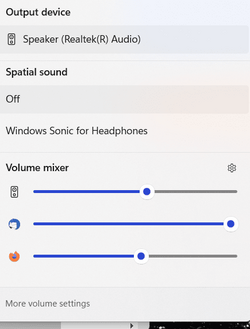
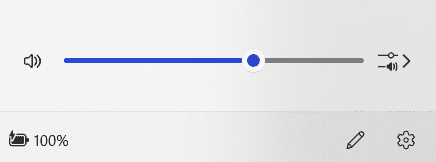
I've noticed that after installing amd-software-adrenalin-edition, my main volume slicer does not change anything ( pic.1) but I can change volume for particular elements in Volume mixer ( system sounds, Firefox ect) .
Also when bluethooth headphones are connected - main slicer works for them.
Can anyone advise please.
1697451442073.png


1697451527106.png
 

My Computer My Computer

At a glance

windows 11
OS
windows 11
the same thing happens to me
it is solved by doing a reboot
I haven't been able to find a solution yet, but I think it's a driver problem
 

My Computer My Computer

At a glance

windows 11Intel i5-3570Knone
OS
windows 11
Computer type
PC/Desktop
Manufacturer/Model
OEM
CPU
Intel i5-3570K
Motherboard
Asrock B75M-GL
Graphics Card(s)
none
Sound Card
none
Screen Resolution
1920x1080
Browser
Microsoft Edge
Antivirus
Microsoft
Other Info
22621.2428
I did restart my laptop
 

My Computer My Computer

At a glance

windows 11
OS
windows 11
I remembered that the problem started after doing a driver update
I deleted all third-part drivers with RAPR (after backing them up), so that I was only using the stock drivers
the problem seems to be solved for now
 

My Computer My Computer

At a glance

windows 11Intel i5-3570Knone
OS
windows 11
Computer type
PC/Desktop
Manufacturer/Model
OEM
CPU
Intel i5-3570K
Motherboard
Asrock B75M-GL
Graphics Card(s)
none
Sound Card
none
Screen Resolution
1920x1080
Browser
Microsoft Edge
Antivirus
Microsoft
Other Info
22621.2428
Still happens, so definitely not solved
 

My Computer My Computer

At a glance

windows 11Intel i5-3570Knone
OS
windows 11
Computer type
PC/Desktop
Manufacturer/Model
OEM
CPU
Intel i5-3570K
Motherboard
Asrock B75M-GL
Graphics Card(s)
none
Sound Card
none
Screen Resolution
1920x1080
Browser
Microsoft Edge
Antivirus
Microsoft
Other Info
22621.2428
it seems that only the audio icon in the bar does not work, as you can change the audio output device from Settings: restarting Explorer solves the problem
 

My Computer My Computer

At a glance

windows 11Intel i5-3570Knone
OS
windows 11
Computer type
PC/Desktop
Manufacturer/Model
OEM
CPU
Intel i5-3570K
Motherboard
Asrock B75M-GL
Graphics Card(s)
none
Sound Card
none
Screen Resolution
1920x1080
Browser
Microsoft Edge
Antivirus
Microsoft
Other Info
22621.2428

Latest Support Threads

Back
Top Bottom