VPN General Info


mrmatt

Member
Local time
4:08 PM
Posts
101
Location
UK
OS
Windows 11 Home 25H2 26200.8875
Hello all :)


This is maybe the wrong forum to ask, but as someone as a novice who doesn't know very much I'm wondering if someone could point me in the right direction please.


I'm looking just for a general introduction to VPNs, as I don't know much about them, and may need to in the future ? (such as when I'm away from home, and using public wi-fi, for example public libraries).


If anyone could give me any suggestions please (yes I have tried using G**g**, although there's loads of websites out there and I'm quite clueless).


Thank you.
 

My Computer My Computer

At a glance

Windows 11 Home 25H2 26200.8875
OS
Windows 11 Home 25H2 26200.8875
Computer type
PC/Desktop
Manufacturer/Model
HP
A VPN is typically a paid service that keeps your web browsing secure and private over public Wi-Fi hotspots. VPNs can also get past regional restrictions for video- and music-streaming sites and help you evade government censorship restrictions—though that last one is especially tricky.

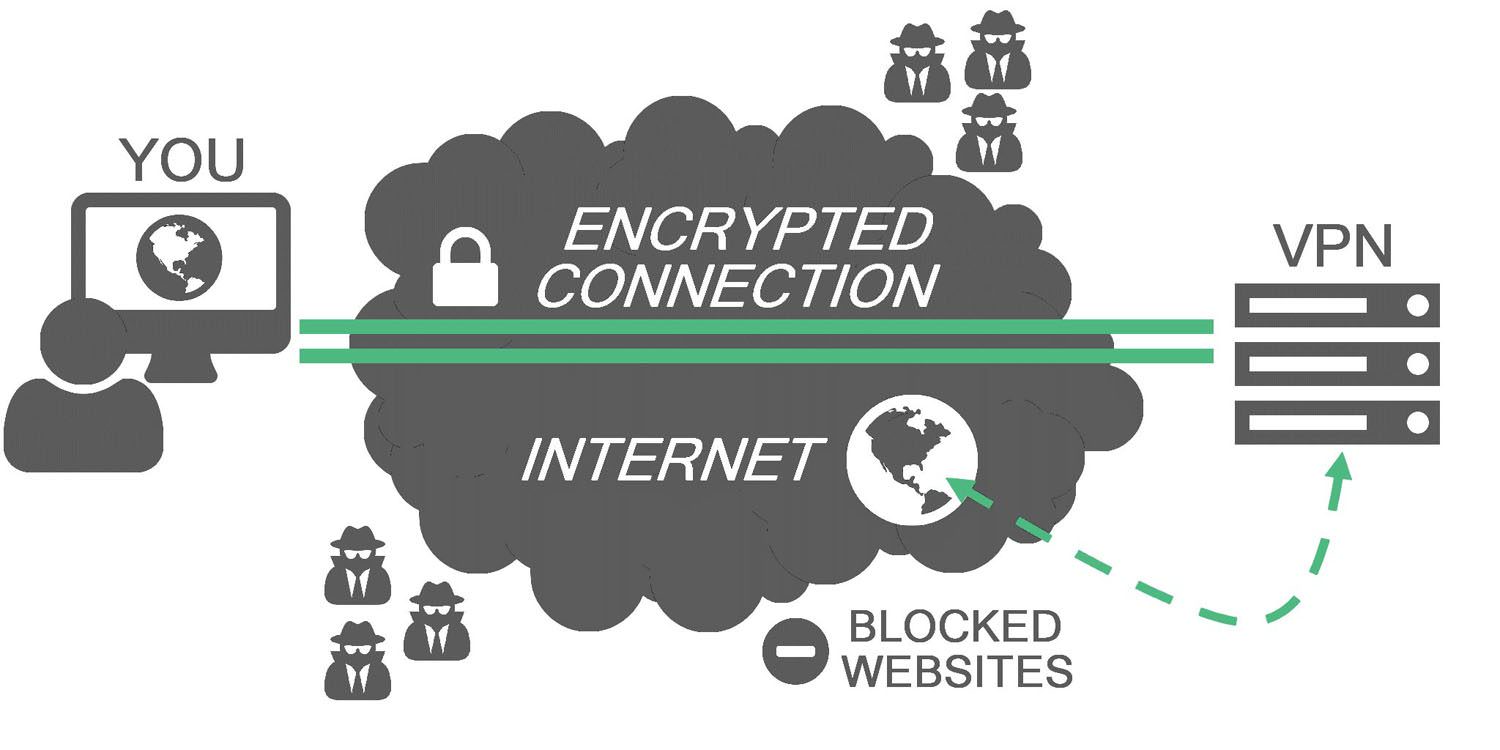
Your PC connects to a VPN server, which can be located in the United States or a foreign country like the United Kingdom, France, Sweden, or Thailand. Your web traffic then passes back and forth through that server. The end result: As far as most websites are concerned, you’re browsing from that server’s geographical location, not your computer’s location.

Once you’re connected to the VPN and are “inside the secure tunnel,” it becomes very difficult for anyone else to spy on your web-browsing activity. The only people who will know what you’re up to are you, the VPN provider (usually an HTTPS connection can mitigate this), and the website you’re visiting.

rMMRlr4.jpg


When you’re on public Wi-Fi at an airport or café, that means hackers will have a harder time stealing your login credentials or redirecting your PC to a phony banking site. Your Internet service provider (ISP), or anyone else trying to spy on you, will also have a near impossible time figuring out which websites you’re visiting.

On top of all that, you get the benefits of spoofing your location. If you’re in Los Angeles, for example, and the VPN server is in the U.K., it will look to most websites that you’re browsing from there, not southern California.

While VPNs are an important tool, they are far from foolproof. The problem with anonymity is there are so many issues to consider—most of which are beyond the scope of this tutorial. Does the VPN you want to use have any issues with data leakage or weak encryption that could expose your web browsing? How much information does your VPN provider log about your activity, and would that information be accessible to the government? Are you using an anonymous identity online on a PC that you never use in conjunction with your actual identity?

Anonymity online is a very difficult goal to achieve. If, however, you are trying to remain private from prying eyes or evade NSA-style bulk data collection as a matter of principle, a reputable VPN will probably be good enough.
 

My Computer My Computer

At a glance

Windows 11AMD Ryzen 7 5700GMicron Technology DDR4-3200 16GBNVIDIA GeForce RTX 3060
OS
Windows 11
Computer type
PC/Desktop
Manufacturer/Model
HP Pavilion
CPU
AMD Ryzen 7 5700G
Motherboard
Erica6
Memory
Micron Technology DDR4-3200 16GB
Graphics Card(s)
NVIDIA GeForce RTX 3060
Sound Card
Realtek ALC671
Monitor(s) Displays
Samsung SyncMaster U28E590
Screen Resolution
3840 x 2160
Hard Drives
SAMSUNG MZVLQ1T0HALB-000H1
Check out YT video on using the free version of Proton. Lacks a lot of settings to the paid version but it allows you to try using a VPN.


My Computers My Computers

  • At a glance

    Win 11 ProAMD Ryzen™ 7 7730U24GB Dual-Channel DDR4 @ 1596MHz (22-22-22-52)512MB ATI AMD Radeon Graphics (ASUStek Comput...
    OS
    Win 11 Pro
    Computer type
    Laptop
    Manufacturer/Model
    ASUS Vivobook
    CPU
    AMD Ryzen™ 7 7730U
    Motherboard
    M1605YA
    Memory
    24GB Dual-Channel DDR4 @ 1596MHz (22-22-22-52)
    Graphics Card(s)
    512MB ATI AMD Radeon Graphics (ASUStek Computer Inc)
    Monitor(s) Displays
    Generic PnP Monitor (1920x1200@60Hz) - P1 PLUS (1920x1080@59Hz)
    Screen Resolution
    1920 X 1200
    Hard Drives
    953GB Western Digital WD
    PSU
    45 Watts
    Mouse
    Lenovo Bluetooth.
    Internet Speed
    500 Mbps
    Browser
    Edge
    Antivirus
    Defender
  • At a glance

    Windows 11AMD Ryzen 7 5800H / 3.2 GHz32 GB DDR4 SDRAM 3200 MHzNVIDIA GeForce RTX 3060 6 GB GDDR6 SDRAM
    Operating System
    Windows 11
    Computer type
    Laptop
    Manufacturer/Model
    ACER NITRO
    CPU
    AMD Ryzen 7 5800H / 3.2 GHz
    Motherboard
    CZ Scala_CAS (FP6)
    Memory
    32 GB DDR4 SDRAM 3200 MHz
    Graphics card(s)
    NVIDIA GeForce RTX 3060 6 GB GDDR6 SDRAM
    Sound Card
    Realtek Audio. NVIDIA High Definition Audio
    Monitor(s) Displays
    15.6" LED backlight 1920 x 1080 (Full HD) 144 Hz
    Screen Resolution
    1920 x 1080 (Full HD)
    Hard Drives
    Samsung 970 Evo Plus 2TB NVMe M.2
    PSU
    180 Watt, 19.5 V
    Mouse
    Lenovo Bluetooth
    Internet Speed
    500 Mbps
    Browser
    Edge
    Antivirus
    Defender
This guide explores what OpenVPN is, how it works, and how to install and use it on Windows installation to have free VPN service.


My Computer My Computer

At a glance

Windows 11AMD Ryzen 7 5700GMicron Technology DDR4-3200 16GBNVIDIA GeForce RTX 3060
OS
Windows 11
Computer type
PC/Desktop
Manufacturer/Model
HP Pavilion
CPU
AMD Ryzen 7 5700G
Motherboard
Erica6
Memory
Micron Technology DDR4-3200 16GB
Graphics Card(s)
NVIDIA GeForce RTX 3060
Sound Card
Realtek ALC671
Monitor(s) Displays
Samsung SyncMaster U28E590
Screen Resolution
3840 x 2160
Hard Drives
SAMSUNG MZVLQ1T0HALB-000H1
Hi all :)


Apologies for delay in replying.


At the moment, it is still very much something I'm trying (but need to) learn about.

I am aware of a few - such as OpenVPN, Nord, Proton. There are many more, I'm sure. I'm just gradually trying to look at them and learn. I am aware I may have to pay to use one.


Having a quick G**g**, it seems these are some of things, I need to look out for:


Encryption (e.g. AES-256 ? Or any more advanced ?)

No-logs policy ?

a 'Kill Switch' ?

Number of devices ? (At the moment, it would just be a smartphone / or laptop; maybe both)


There is a guide I've just found which may help me:


And another one:


Yet another one:


Anoher one:


(and doubtless more.................................)


It will take some time to try and look at those. It is very confusing for a beginner, and so much to be aware of, especially when I don't know much.


I'll leave it there for now.


Thanks for your advice, assistance and time.
 

My Computer My Computer

At a glance

Windows 11 Home 25H2 26200.8875
OS
Windows 11 Home 25H2 26200.8875
Computer type
PC/Desktop
Manufacturer/Model
HP

Latest Support Threads

Back
Top Bottom