want to use usb c GAN charger PD 2.0 for laptop - need info from those in the know


perfection

Well-known member
Member
Local time
2:42 PM
Posts
45
OS
windows 11 64 bit
My laptop has a USB C PD 2 charging capable port
Currently using a 19V/2.1A brick adapter for power supply

Query one
What specifications must i look for in the usb c pd 2 charger that i buy to charge from the laptop usb c port that will supply the above voltage and current and wattage power that will not damage anything within the laptop? will any branded 65W charger work with or without PPS?

Can i use the above continuously plugged in like i do my brick adapter in the absence of the internal battery

Query two
i have another brick adapter with a USB c pin which i use for power/charging with my lenovo yoga whose specs are output ; 20V=2 A | 15V - 3A | 9V = 2A | 5V = 2A - will this work without issues? is this same as a PD 2 usb c charger?

Thank you for any help on this. I am not very familiar with these things
 

My Computer My Computer

At a glance

windows 11 64 bitintel i5 8th geeneration16GB
OS
windows 11 64 bit
Computer type
Laptop
Manufacturer/Model
HP x360 cd
CPU
intel i5 8th geeneration
Memory
16GB
Screen Resolution
1920
Hard Drives
one 500 GB SSD plus 1 TB hdd (2.5 inches)
Keyboard
inbuilt
Mouse
inbuilt trackpad
Internet Speed
500 Mbps
Browser
Edge chromium
Antivirus
Defender
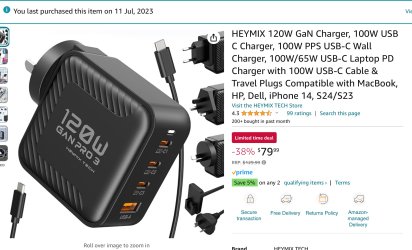
So many crap ones out there. My understanding after researching for my old laptop is that the laptop will only pull in as much as it needs. I ended up having to buy 2 because the first was rubbish.

This one can charge my old Dell laptop and my new Lenovo Yoga (Fast Charging) if I am away. At the same tiime charging other devices etc. Even two laptops simultaneously.

It comes with multi Country plug requirements and an extension cable if wanted.
Short Circuit protection.
Over Voltage protection

This is brilliant for my needs.

Click image to open product page. (This is an Australian link and price)

IMG_4470.jpeg
 
Last edited:

My Computers My Computers

  • At a glance

    Windows 11 Pro 25H2 Build 26200.8894Intel(R) Core(TM) i7-4770K CPU @ 3.50GHz32.0 GB of I forget and the box is in storage.Gigabyte nVidia GeForce GTX 1660 Super OC 6GB
    OS
    Windows 11 Pro 25H2 Build 26200.8894
    Computer type
    PC/Desktop
    Manufacturer/Model
    Sin-built 2013
    CPU
    Intel(R) Core(TM) i7-4770K CPU @ 3.50GHz
    Motherboard
    ASUS ROG Maximus VI Formula
    Memory
    32.0 GB of I forget and the box is in storage.
    Graphics Card(s)
    Gigabyte nVidia GeForce GTX 1660 Super OC 6GB
    Sound Card
    ROG SupremeFX Formula 8-Channel High Definition Audio
    Monitor(s) Displays
    5 x LG 25MS500-B - 1 x 24MK430H-B - 1 x Wacom Pro 22" Touch Screen Tablet
    Screen Resolution
    All over the place
    Hard Drives
    Too many to list. OS on Samsung 1TB 870 QVO SATA
    PSU
    Silverstone 1500
    Case
    NZXT Phantom 820 Full-Tower Case
    Cooling
    Noctua NH-D15 Elite Class Dual Tower CPU Cooler / 6 x EziDIY 120mm / 2 x Corsair 140mm somethings / 1 x 140mm Thermaltake something / 2 x 200mm Corsair.
    Keyboard
    Corsair K95 / Logitech diNovo Edge Wireless
    Mouse
    Logitech: G402 / G502 / Mx Masters / Mx Air Cordless
    Internet Speed
    2000/500Mbps
    Browser
    All sorts
    Antivirus
    Kaspersky Premium
    Other Info
    ㅤㅤㅤㅤㅤㅤㅤㅤㅤㅤㅤㅤㅤㅤㅤㅤㅤㅤㅤㅤㅤㅤㅤㅤㅤㅤㅤㅤㅤㅤㅤㅤㅤㅤㅤㅤㅤㅤㅤㅤ⠀⠀⠀⠀⠀⠀⠀⠀⠀⠀
    TP-Link BE9300 WiFi 7 Bluetooth 5.4 (Archer TBE550E)
    TP-Link TX201 V1 2.5GB Lan

    Grandstream HT812 - VoIP
    ASUS DSL-AX82U - Mesh
    ASUS RT-AC68U - Mesh
    ASUS RT-BE88U Router

    Brother MFC-L2880DW Printer

    I’m on a horse.
  • At a glance

    Windows 11 Pro 25H2 Build 26200.8894 (Wifes)13th Generation Intel® Core™ i5-1340P Process...16GB LPDDR5-52001x Intel® Iris® Xe Graphics
    Operating System
    Windows 11 Pro 25H2 Build 26200.8894 (Wifes)
    Computer type
    Laptop
    Manufacturer/Model
    LENOVO Yoga 7 14IRL8 - Type 82YL
    CPU
    13th Generation Intel® Core™ i5-1340P Processor(Core™ i5-1340P)
    Memory
    16GB LPDDR5-5200
    Graphics card(s)
    1x Intel® Iris® Xe Graphics
    Sound Card
    Optimized with Dolby Atmos®
    Screen Resolution
    QHD 2880 x 1800 OLED
    Hard Drives
    M.2 512 GB SSD PCIe
    Mouse
    Logiteck MX Master 3S
    Internet Speed
    2000/500
    Antivirus
    Defender / Malwarebytes
    Other Info
    …still on a horse.


    Wireless Network: Wi-Fi 6E 2x2 AX; Bluetooth® 5.1 or above
    Ports: 1x 1 Novo button; 2 in 1 Audio Combo jack; Micro SD Card Reader; HDMI 1.4b; 2 x USB Type-C (TBT4)
    USB 3.2 Gen 2 DP 1.4a
    PD 3.0); 1 x USB 3.2 Gen1 Type A
    Camera
    1x 1080P FHD IR/RGB Hybrid with Privacy Shutter and Dual Array Microphone
    Graphics
    1x Intel® Iris® Xe Graphics
    Monitor
    14" WUXGA
    Form Factor
    Convertible Notebook
  • Windows 11 Pro 25H2 Build 26200.8894 (Wifes)

    Yoga 7 2-in-1 14IML9 - Type 83DJ

    Processor: Intel® Core™ Ultra 7 155H Processor(Core™ Ultra 7 155H)

    Memory: 32GB LPD5X-7467

    Hard Drive: 1 TB SSD PCIe

    Wireless Network: 1x Wi-Fi 6E 2x2 AX; Bluetooth® 5.1 or above

    Ports: 1 x HDMI 2.1 TMDS; 1 x Novo Button; 1 x Combo Audio Jack
    2 x USB-C (USB 4.0)
    1 x USB-A 3.2 Gen 1

    Camera: 1080P FHD IR Hybrid with Dual Microphone

    Graphics: Intel® Arc™ Graphics

    Monitor: 14" 2.8K

    ...Where's my horse?
I assume your device can be charged via USB .... (he asks, embarrassingly red-faced after buying similar without first checking ...)
 

My Computers My Computers

  • At a glance

    Windows 11 2xH2 (latest update ... forever anal)Intel i5-124008GBNVIDIA GeForce GT730
    OS
    Windows 11 2xH2 (latest update ... forever anal)
    Computer type
    PC/Desktop
    Manufacturer/Model
    HP Slim S01
    CPU
    Intel i5-12400
    Memory
    8GB
    Graphics Card(s)
    NVIDIA GeForce GT730
    Sound Card
    OOBE
    Monitor(s) Displays
    Acer 32"
    Screen Resolution
    1920x1080
    Hard Drives
    512GB KIOXIA NVMe
    1TB SATA SSD
    PSU
    OOBE
    Case
    OOBE
    Cooling
    OOBE
    Keyboard
    BT
    Mouse
    BT
    Browser
    Brave FFox Chrome Opera
    Antivirus
    KIS
  • At a glance

    Windows 11 Pro 2xH2 (latest update ... 4ever ...i7-1165G7 @ 2.80GHzIntel Iris Xe Graphics
    Operating System
    Windows 11 Pro 2xH2 (latest update ... 4ever anal)
    Computer type
    Laptop
    Manufacturer/Model
    HP Pavillion 15
    CPU
    i7-1165G7 @ 2.80GHz
    Graphics card(s)
    Intel Iris Xe Graphics
    Hard Drives
    Samsung NVMe 512GB
    + numerous/multiple SSD Type C USB enclosures
    Internet Speed
    NBN FTTN 50
    Browser
    Brave
    Antivirus
    KIS
First, I assume that you have verified that your laptop is capable of being charged via a USB-C port. Just because a machine has a USB-C port(s), this does not necessarily mean that the system is capable of being charged via that port.

Since your system uses a 19V AC adapter, what you are looking for is a USB-C charger capable of outputting 19V at a minimum of 2.1A or 40 Watts (19V multiplied by the current of 2.1A = 39.9 Watts).

As @antspants correctly noted, the system will only draw as much current as it needs, so getting an adapter capable of outputting more than 40W will not hurt it at all.

Think of it like your water faucet. The lake or reservoir supplying your home is likely able to deliver millions of gallons, but that doesn't mean that every time you turn your faucet on you get millions of gallons of water. The amount of water delivered is limited by the carrying capacity of the pipes. Likewise, your laptop will not draw more power than it is designed to draw.

Advantages of using a smaller wattage adapter (so long as it still meets the minimum requirements of the system): Small size for portability

Advantages of using a larger wattage adapter: If your power supply has more than one connector, you can charge both your laptop and other device(s) at the same time. Also, some laptops are notoriously cheap with their factory provided chargers. As an example, I have a laptop that came from the factory with a 65W adapter, but the user guide notes that you can charge the laptop faster using a 100W+ adapter. So it's possible that you could get faster charging with a more capable adapter, but you will still be limited in how much power you draw from that adapter.

On the same laptop that I just mentioned, I use a 120W adapter. This allows me to charge my laptop and a phone at maximum speed simultaneously and the adapter I have now is still smaller than the 65W adapter that came from the factory.

Some other notes: 19V (or 20V, consider them to be the same) is pretty much a universal for laptops. As a result, pretty much every USB charger is capable of outputting 19V. However, please be aware that if you are reading this and have a system that uses 12V rather than 19V or 20V, you need to be very careful that the USB-C charger you get actually has the capability of outputting 12V. 12V is not used as often as 19V and as a result many USB-C chargers have no provision for outputting 12V.

In summary: Make sure that the USB-C charger that you get can output the correct voltage for your system (19V for your system) and that it can output a minimum of 2.1A for a total wattage of 40W. A higher wattage output capability is perfectly fine, just be aware that chargers with the ability to output more power will be larger in size and price.
 

My Computers My Computers

  • At a glance

    Win11 Pro 25H2 (RTM+)Intel i7-14650HX32 GBNo GPU - Built-in Intel Graphics
    OS
    Win11 Pro 25H2 (RTM+)
    Computer type
    PC/Desktop
    Manufacturer/Model
    Acemagic
    CPU
    Intel i7-14650HX
    Memory
    32 GB
    Graphics Card(s)
    No GPU - Built-in Intel Graphics
    Sound Card
    Integrated
    Monitor(s) Displays
    Varies as machine will often be moved to locations with different monitors
    Screen Resolution
    Varies
    Hard Drives
    1 x 1TB Gen 4 NVMe SSD
    PSU
    120W Power Brick
    Keyboard
    Corsair K70 Max RGB Magnetic Keyboard
    Mouse
    Logitech MX Master 3
    Internet Speed
    1Gb Up / 1 Gb Down
    Browser
    Edge
    Antivirus
    Windows Defender
  • At a glance

    Win11 Pro 25H2 (RTM+)Intel i7-1255U16 GBIntel Iris Xe Graphics
    Operating System
    Win11 Pro 25H2 (RTM+)
    Computer type
    Laptop
    Manufacturer/Model
    Lenovo ThinkBook 13x Gen 2
    CPU
    Intel i7-1255U
    Memory
    16 GB
    Graphics card(s)
    Intel Iris Xe Graphics
    Sound Card
    Realtek® ALC3306-CG codec
    Monitor(s) Displays
    13.3-inch IPS Display
    Screen Resolution
    WQXGA (2560 x 1600)
    Hard Drives
    2 TB 4 x 4 NVMe SSD
    PSU
    USB-C / Thunderbolt 4 Power / Charging
    Keyboard
    Backlit, spill resistant keyboard
    Mouse
    Buttonless Glass Precision Touchpad
    Internet Speed
    1Gb Up / 1Gb Down
    Browser
    Edge
    Antivirus
    Windows Defender
    Other Info
    WiFi 6e / Bluetooth 5.1 / Facial Recognition / Fingerprint Sensor / ToF (Time of Flight) Human Presence Sensor
I assume your device can be charged via USB .... (he asks, embarrassingly red-faced after buying similar without first checking ...)
Thank you for your encouraging reply idgat

No i did not BUY the other charger - i possess it because it came with my SECOND laptop. so was checking whether it would substitute/replace the brick adapter that has malfunctioned which belongs to my FIRST laptop
 

My Computer My Computer

At a glance

windows 11 64 bitintel i5 8th geeneration16GB
OS
windows 11 64 bit
Computer type
Laptop
Manufacturer/Model
HP x360 cd
CPU
intel i5 8th geeneration
Memory
16GB
Screen Resolution
1920
Hard Drives
one 500 GB SSD plus 1 TB hdd (2.5 inches)
Keyboard
inbuilt
Mouse
inbuilt trackpad
Internet Speed
500 Mbps
Browser
Edge chromium
Antivirus
Defender
FYI, you can use a USB-C PD charger with laptops that DON'T support USB charging by purchasing an inexpensive PD trigger cable.

As an example, I have an old HP laptop for which the power brick died. The original brick was a 19V 100W model with a barrel jack. I was able to purchase a PD trigger cable with a 19V output with the correct barrel jack so now I can use that laptop with any USB-C PD charger that outputs 100W or more.

This actually worked so well that I purchased PD trigger cables for other laptops even where my original power brick works fine so that I can now power all of them from USB-C chargers.

More Information

USB-C PD chargers use PD (the Power Delivery protocol) to negotiate a voltage to be used. For example, when you plug a charger into your laptop, the two devices "talk" to each and negotiate the use of 19V. A PD trigger cable does this for you. It talks to the PD charger and tells it to output 19V. Note that there are PD trigger cables capable of outputting other voltages than 19V so make sure to use one that triggers 19V specifically.
 

My Computers My Computers

  • At a glance

    Win11 Pro 25H2 (RTM+)Intel i7-14650HX32 GBNo GPU - Built-in Intel Graphics
    OS
    Win11 Pro 25H2 (RTM+)
    Computer type
    PC/Desktop
    Manufacturer/Model
    Acemagic
    CPU
    Intel i7-14650HX
    Memory
    32 GB
    Graphics Card(s)
    No GPU - Built-in Intel Graphics
    Sound Card
    Integrated
    Monitor(s) Displays
    Varies as machine will often be moved to locations with different monitors
    Screen Resolution
    Varies
    Hard Drives
    1 x 1TB Gen 4 NVMe SSD
    PSU
    120W Power Brick
    Keyboard
    Corsair K70 Max RGB Magnetic Keyboard
    Mouse
    Logitech MX Master 3
    Internet Speed
    1Gb Up / 1 Gb Down
    Browser
    Edge
    Antivirus
    Windows Defender
  • At a glance

    Win11 Pro 25H2 (RTM+)Intel i7-1255U16 GBIntel Iris Xe Graphics
    Operating System
    Win11 Pro 25H2 (RTM+)
    Computer type
    Laptop
    Manufacturer/Model
    Lenovo ThinkBook 13x Gen 2
    CPU
    Intel i7-1255U
    Memory
    16 GB
    Graphics card(s)
    Intel Iris Xe Graphics
    Sound Card
    Realtek® ALC3306-CG codec
    Monitor(s) Displays
    13.3-inch IPS Display
    Screen Resolution
    WQXGA (2560 x 1600)
    Hard Drives
    2 TB 4 x 4 NVMe SSD
    PSU
    USB-C / Thunderbolt 4 Power / Charging
    Keyboard
    Backlit, spill resistant keyboard
    Mouse
    Buttonless Glass Precision Touchpad
    Internet Speed
    1Gb Up / 1Gb Down
    Browser
    Edge
    Antivirus
    Windows Defender
    Other Info
    WiFi 6e / Bluetooth 5.1 / Facial Recognition / Fingerprint Sensor / ToF (Time of Flight) Human Presence Sensor
Back
Top Bottom