
Wanting to connect Sony Camcorder to Laptop bypassing HD without third party Viewer


Can it be done?

  • Yes

    Votes: 0 0.0%
  • No

    Votes: 0 0.0%

  • Total voters
    0

snapshot 2022

Banned
Local time
10:46 AM
Posts
130
OS
windows 11
I want to by passs the Laptop HD and also use a third party viewer, i first must connect the camcorders to laptop via usb and transfer the movies for camcorders to laptop here lies the problem.
Anyone on this Windows 11 Forum ever deal with something as this?
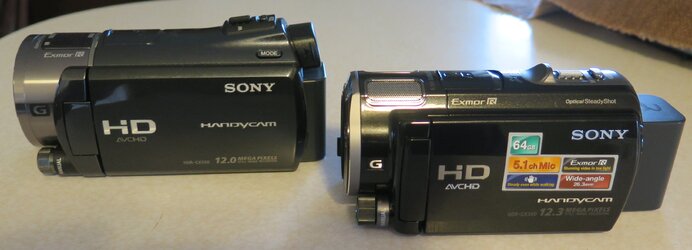
Sony Camcord.jpg.jpg
 

My Computer

System One

  • OS
    windows 11
    Computer type
    Laptop
    Manufacturer/Model
    MSI MSI - Stealth 16 studio A13v
    CPU
    Core Intel 13th Generation Core i7
    Motherboard
    Intel
    Memory
    32GB RAM DDRS
    Graphics Card(s)
    NVIDIA GeForce RTX RTX 4070
    Screen Resolution
    1920 x 1200 (WUXGA)
    Hard Drives
    1T SSD
    Cooling
    Fan
    Keyboard
    Tablet and Logtech used also
    Mouse
    Tablet and Logtech used also
    Internet Speed
    Fast
    Browser
    Opera and Chrome
    Antivirus
    Windows
I want to by passs the Laptop HD and also use a third party viewer,
Sorry, not sure what you mean by bypass HD. If what you are asking is "Can I connect my camera and use a 3rd party tool without Windows the answer is no. Third party tools are installed into the OS and the OS is on the hard drive. Therefore, you have to boot into the OS to use those tools. You also have to boot into the OS for your camera to even be recognized.
 

My Computers

System One System Two

  • OS
    Windows 11 Pro 25H2 26200.8655
    Computer type
    PC/Desktop
    Manufacturer/Model
    Dell Optiplex 7080
    CPU
    i9-10900 10 core 20 threads
    Motherboard
    DELL 0J37VM
    Memory
    32 gb
    Graphics Card(s)
    none-Intel UHD Graphics 630
    Sound Card
    Integrated Realtek
    Monitor(s) Displays
    Benq 27
    Screen Resolution
    2560x1440
    Hard Drives
    2x1tb Solidigm m.2 nvme /External drives 512gb Samsung m.2 sata+2tb Kingston m2.nvme
    PSU
    500w
    Case
    MT
    Cooling
    Dell Premium
    Keyboard
    Logitech wired
    Mouse
    Logitech wireless
    Internet Speed
    so slow I'm too embarrassed to tell
    Browser
    #1 Edge #2 Firefox
    Antivirus
    Defender+MWB Premium
  • Operating System
    Windows 11 Pro 24H2 26200.8457
    Computer type
    PC/Desktop
    Manufacturer/Model
    Beelink Mini PC SER5
    CPU
    AMD Ryzen 7 6800U
    Memory
    32 gb
    Graphics card(s)
    integrated
    Sound Card
    integrated
    Monitor(s) Displays
    Benq 27
    Screen Resolution
    2560x1440
    Hard Drives
    1TB Crucial nvme
    Keyboard
    Logitech wired
    Mouse
    Logitech wireless
    Internet Speed
    still too embarrassed to tell
    Browser
    Firefox
    Antivirus
    Defender
    Other Info
    System 3 is non compliant Dell 9020 i7-4770/24gb ram Win11 PRO 26200.8457
I am not sure how exactly an HD camera behaves when connected to the computer, but I guess it is like a USB hard disk. In this case simply copy-paste the video data to the computer. If it is similar to a mini DV camera, you can use Nero Video or OBS or other suitable application to copy the data either in native format or convert to MKV, MP4, MPEG etc.
 

My Computers

System One System Two

  • OS
    Windows 11 Pro 23H2 (5699), 25H2 (8655)
    Computer type
    Laptop
    Manufacturer/Model
    Acer Extensa 5630EZ
    CPU
    Mobile DualCore Intel Core 2 Duo T7250, 2000 MHz
    Motherboard
    Acer Extensa 5630
    Memory
    4GB
    Graphics Card(s)
    Mobile Intel(R) GMA 4500M (Mobile 4 series)
    Sound Card
    Realtek ALC268 @ Intel 82801IB ICH9 - High Definition Audio Controller
    Monitor(s) Displays
    1
    Screen Resolution
    1280x800
    Hard Drives
    Samsung SSD 850 EVO 250GB SATA Device (250 GB, SATA-III)
    Internet Speed
    VDSL 50 Mbps
    Browser
    MICROSOFT EDGE
    Antivirus
    WINDOWS DEFENDER
    Other Info
    Legacy MBR installation, no TPM, no Secure Boot, no WDDM 2.0 graphics drivers, no SSE4.2, cannot get more unsupported ;) This is only my test laptop. I had installed Windows 11 here before upgrading my main PC. For my main PC I use everyday see my 2nd system specs.
  • Operating System
    Windows 11 Pro v25H2 (build 26200.8655)
    Computer type
    PC/Desktop
    Manufacturer/Model
    Custom-built PC
    CPU
    Intel Core-i7 3770 3.40GHz s1155 (3rd generation)
    Motherboard
    Asus P8H61 s1155 ATX
    Memory
    2x Kingston Hyper-X Blu 8GB DDR3-1600
    Graphics card(s)
    GIGABYTE GeForce RTX 3050 WINDFORCE OC V2 6GB (GV-N3050WF2OCV2-6GD)
    Sound Card
    Realtek HD audio (ALC887)
    Monitor(s) Displays
    Sony Bravia KDL-19L4000 19" LCD TV via VGA
    Screen Resolution
    1440x900 32-bit 60Hz
    Hard Drives
    WD Blue SA510 2.5 1000GB SSD as system disk, Western Digital Caviar Purple 4TB SATA III (WD40PURZ) as second
    PSU
    Thermaltake Litepower RGB 550W Full Wired
    Case
    SUPERCASE MIDI-TOWER
    Cooling
    Deepcool Gamma Archer CPU cooler, 1x 8cm fan at the back
    Keyboard
    Mitsumi 101-key PS/2
    Mouse
    Sunnyline OptiEye PS/2
    Internet Speed
    100Mbps
    Browser
    Microsoft Edge, Mozilla Firefox
    Antivirus
    Microsoft Windows Defender
    Other Info
    Legacy BIOS (MBR) installation, no TPM, no Secure Boot, WDDM 3.0 graphics drivers, WEI score 7.4
Sorry, not sure what you mean by bypass HD. If what you are asking is "Can I connect my camera and use a 3rd party tool without Windows the answer is no. Third party tools are installed into the OS and the OS is on the hard drive. Therefore, you have to boot into the OS to use those tools. You also have to boot into the OS for your camera to even be recognized.
That's it i understand what you are say in your post, i was hoping i could use a external drive but as you pointed out i must use what Microsoft has installed.

In the past i take the videos then i connect camcorder to laptop it know the camcorder is connected and i see it in file tree, i then copy it to a file on HD then move it to the external HD.
If only there was another way to by pass the laptops HD, but so far i do not think it exists.

Anyway you are correct if i am going to use a laptop running Microsoft Windows 11, i must use what they provide.
I am not sure how exactly an HD camera behaves when connected to the computer, but I guess it is like a USB hard disk. In this case simply copy-paste the video data to the computer. If it is similar to a mini DV camera, you can use Nero Video or OBS or other suitable application to copy the data either in native format or convert to MKV, MP4, MPEG etc.
What i have been doing is connect the camcorder to computer it sees the camcorder, i take video file off the camcorder and move it to a file on computer, then transfer the video file to a external HD.
 

My Computer

System One

  • OS
    windows 11
    Computer type
    Laptop
    Manufacturer/Model
    MSI MSI - Stealth 16 studio A13v
    CPU
    Core Intel 13th Generation Core i7
    Motherboard
    Intel
    Memory
    32GB RAM DDRS
    Graphics Card(s)
    NVIDIA GeForce RTX RTX 4070
    Screen Resolution
    1920 x 1200 (WUXGA)
    Hard Drives
    1T SSD
    Cooling
    Fan
    Keyboard
    Tablet and Logtech used also
    Mouse
    Tablet and Logtech used also
    Internet Speed
    Fast
    Browser
    Opera and Chrome
    Antivirus
    Windows
Some camcorders can save the video to a micro SD card. In that case buy a card reader so you can read the card directly on the computer without having to connect the camcorder. For models that connect to the Wi-Fi you can even upload the video wirelessly from the camera without a computer. In case that you are concerned, don't worry the quality of the video is not affected when copying the original files to the computer, unless a conversion from camcorder's native format to another format is involved.
 

My Computers

System One System Two

  • OS
    Windows 11 Pro 23H2 (5699), 25H2 (8655)
    Computer type
    Laptop
    Manufacturer/Model
    Acer Extensa 5630EZ
    CPU
    Mobile DualCore Intel Core 2 Duo T7250, 2000 MHz
    Motherboard
    Acer Extensa 5630
    Memory
    4GB
    Graphics Card(s)
    Mobile Intel(R) GMA 4500M (Mobile 4 series)
    Sound Card
    Realtek ALC268 @ Intel 82801IB ICH9 - High Definition Audio Controller
    Monitor(s) Displays
    1
    Screen Resolution
    1280x800
    Hard Drives
    Samsung SSD 850 EVO 250GB SATA Device (250 GB, SATA-III)
    Internet Speed
    VDSL 50 Mbps
    Browser
    MICROSOFT EDGE
    Antivirus
    WINDOWS DEFENDER
    Other Info
    Legacy MBR installation, no TPM, no Secure Boot, no WDDM 2.0 graphics drivers, no SSE4.2, cannot get more unsupported ;) This is only my test laptop. I had installed Windows 11 here before upgrading my main PC. For my main PC I use everyday see my 2nd system specs.
  • Operating System
    Windows 11 Pro v25H2 (build 26200.8655)
    Computer type
    PC/Desktop
    Manufacturer/Model
    Custom-built PC
    CPU
    Intel Core-i7 3770 3.40GHz s1155 (3rd generation)
    Motherboard
    Asus P8H61 s1155 ATX
    Memory
    2x Kingston Hyper-X Blu 8GB DDR3-1600
    Graphics card(s)
    GIGABYTE GeForce RTX 3050 WINDFORCE OC V2 6GB (GV-N3050WF2OCV2-6GD)
    Sound Card
    Realtek HD audio (ALC887)
    Monitor(s) Displays
    Sony Bravia KDL-19L4000 19" LCD TV via VGA
    Screen Resolution
    1440x900 32-bit 60Hz
    Hard Drives
    WD Blue SA510 2.5 1000GB SSD as system disk, Western Digital Caviar Purple 4TB SATA III (WD40PURZ) as second
    PSU
    Thermaltake Litepower RGB 550W Full Wired
    Case
    SUPERCASE MIDI-TOWER
    Cooling
    Deepcool Gamma Archer CPU cooler, 1x 8cm fan at the back
    Keyboard
    Mitsumi 101-key PS/2
    Mouse
    Sunnyline OptiEye PS/2
    Internet Speed
    100Mbps
    Browser
    Microsoft Edge, Mozilla Firefox
    Antivirus
    Microsoft Windows Defender
    Other Info
    Legacy BIOS (MBR) installation, no TPM, no Secure Boot, WDDM 3.0 graphics drivers, WEI score 7.4
Some camcorders can save the video to a micro SD card. In that case buy a card reader so you can read the card directly on the computer without having to connect the camcorder. For models that connect to the Wi-Fi you can even upload the video wirelessly from the camera without a computer. In case that you are concerned, don't worry the quality of the video is not affected when copying the original files to the computer, unless a conversion from camcorder's native format to another format is involved.
A while back i bought a small Canon G16 it had Wf to transfer files direct to my computer, it was so slow i gave up using it just went to my trusty USB.
am sure today the Wf is a lot better but my Sony Camcorders are over 15 years old, and the new ones make you use memory cards, nothing wrong with that but mine came with a lot of on board memory.

I had them all packed away mostly like everyone today i use my iPhone for most videos and just pulled the old sonys out to play with and that's why i am looking at other ways to transfer the files.
 

My Computer

System One

  • OS
    windows 11
    Computer type
    Laptop
    Manufacturer/Model
    MSI MSI - Stealth 16 studio A13v
    CPU
    Core Intel 13th Generation Core i7
    Motherboard
    Intel
    Memory
    32GB RAM DDRS
    Graphics Card(s)
    NVIDIA GeForce RTX RTX 4070
    Screen Resolution
    1920 x 1200 (WUXGA)
    Hard Drives
    1T SSD
    Cooling
    Fan
    Keyboard
    Tablet and Logtech used also
    Mouse
    Tablet and Logtech used also
    Internet Speed
    Fast
    Browser
    Opera and Chrome
    Antivirus
    Windows
If you want to be able to transfer files on the go, you can use a small laptop 14" or even a netbook 10". You can find these refurbished or second hand at very low cost. Once back home or to the studio transfer the data to a bigger computer for processing.
 

My Computers

System One System Two

  • OS
    Windows 11 Pro 23H2 (5699), 25H2 (8655)
    Computer type
    Laptop
    Manufacturer/Model
    Acer Extensa 5630EZ
    CPU
    Mobile DualCore Intel Core 2 Duo T7250, 2000 MHz
    Motherboard
    Acer Extensa 5630
    Memory
    4GB
    Graphics Card(s)
    Mobile Intel(R) GMA 4500M (Mobile 4 series)
    Sound Card
    Realtek ALC268 @ Intel 82801IB ICH9 - High Definition Audio Controller
    Monitor(s) Displays
    1
    Screen Resolution
    1280x800
    Hard Drives
    Samsung SSD 850 EVO 250GB SATA Device (250 GB, SATA-III)
    Internet Speed
    VDSL 50 Mbps
    Browser
    MICROSOFT EDGE
    Antivirus
    WINDOWS DEFENDER
    Other Info
    Legacy MBR installation, no TPM, no Secure Boot, no WDDM 2.0 graphics drivers, no SSE4.2, cannot get more unsupported ;) This is only my test laptop. I had installed Windows 11 here before upgrading my main PC. For my main PC I use everyday see my 2nd system specs.
  • Operating System
    Windows 11 Pro v25H2 (build 26200.8655)
    Computer type
    PC/Desktop
    Manufacturer/Model
    Custom-built PC
    CPU
    Intel Core-i7 3770 3.40GHz s1155 (3rd generation)
    Motherboard
    Asus P8H61 s1155 ATX
    Memory
    2x Kingston Hyper-X Blu 8GB DDR3-1600
    Graphics card(s)
    GIGABYTE GeForce RTX 3050 WINDFORCE OC V2 6GB (GV-N3050WF2OCV2-6GD)
    Sound Card
    Realtek HD audio (ALC887)
    Monitor(s) Displays
    Sony Bravia KDL-19L4000 19" LCD TV via VGA
    Screen Resolution
    1440x900 32-bit 60Hz
    Hard Drives
    WD Blue SA510 2.5 1000GB SSD as system disk, Western Digital Caviar Purple 4TB SATA III (WD40PURZ) as second
    PSU
    Thermaltake Litepower RGB 550W Full Wired
    Case
    SUPERCASE MIDI-TOWER
    Cooling
    Deepcool Gamma Archer CPU cooler, 1x 8cm fan at the back
    Keyboard
    Mitsumi 101-key PS/2
    Mouse
    Sunnyline OptiEye PS/2
    Internet Speed
    100Mbps
    Browser
    Microsoft Edge, Mozilla Firefox
    Antivirus
    Microsoft Windows Defender
    Other Info
    Legacy BIOS (MBR) installation, no TPM, no Secure Boot, WDDM 3.0 graphics drivers, WEI score 7.4
Back
Top Bottom




