Web text colour


conrail

Well-known member
Member
Local time
12:32 PM
Posts
43
OS
windows 11 pro
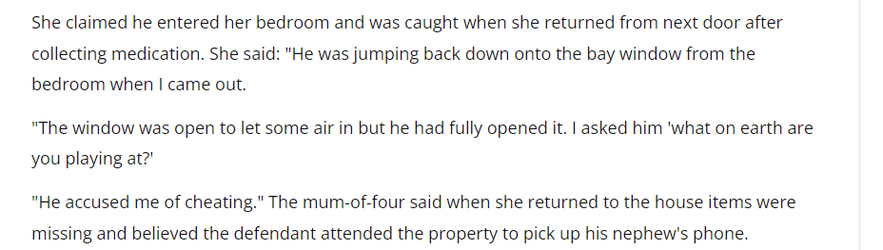
running windows 11 pro on a lenovo laptop with the Brave browser, is there anyway I can change the browser text colour, on previous windows 10 laptop the text was darker and easier to read, on this new laptop the text appears grey and I am having dificulty reading it, I did manage to set up dark mode which works on this page but not on all pages, the attached is from my local newspaper, apologies about the content but I just used the snipping tool to get some text, as you can see the text just looks grey, all help and advice appreciated

a.png
 

Attachments

  • a.png
    a.png
    16.1 KB · Views: 1

My Computer My Computer

At a glance

windows 11 pro1TB
OS
windows 11 pro
Computer type
Laptop
Manufacturer/Model
ASUS Vivobook
Memory
1TB
Screen Resolution
1920 x 1080
Hard Drives
1 Tb SSD
Mouse
hp wireless
Browser
brave
Antivirus
bitdefender
It looks fine on my screen, so it's probably a setting or (unlikely) a failing display. Is the problem only in your browser? If so, try Edge or Firefox.

If you open a document in Word or Notepad, is it easy to read?

Is the screen set to its recommended resolution?
 

My Computers My Computers

  • At a glance

    Windows 11 Pro 25H2 26200.8737AMD Ryzen 7 5825U with Radeon Graphics16GB
    OS
    Windows 11 Pro 25H2 26200.8737
    Computer type
    Laptop
    Manufacturer/Model
    Acemagic LX15PRO
    CPU
    AMD Ryzen 7 5825U with Radeon Graphics
    Motherboard
    BIOS CT_BI_AMI_LX15PRO_AB8139_A-004
    Memory
    16GB
    Screen Resolution
    1920 x 1080
    Hard Drives
    SSD 2TB
    Internet Speed
    30 Mbps
    Browser
    Brave
    Antivirus
    Webroot SecureAnywhere Complete beta
  • At a glance

    Windows 11 Pro 23H2 22631.2506Atom N450 1.66GHz2GB
    Operating System
    Windows 11 Pro 23H2 22631.2506
    Computer type
    Laptop
    Manufacturer/Model
    HP Mini 210-1090NR PC (bought in late 2009!)
    CPU
    Atom N450 1.66GHz
    Memory
    2GB
    Browser
    Brave
    Antivirus
    Webroot
  • Acer Swift SF114-34 laptop
    OS Windows 11 Pro 26200.8737
    CPU Pentium Silver N6000
    RAM 4GB
    BIOS v1.17
    SSD Samsung 970 EVO Plus SSD 2TB (an upgrade)
thank you kelper, it is fine in word and with firefox so problem appears to be brave which I have used for many hears on old laptop, screen resolution is as the laptop came a couple of weeks ago, 1980 x 1020 (recomended), I have coppied same test using firefox , definitely a difference for mea.png
 

My Computer My Computer

At a glance

windows 11 pro1TB
OS
windows 11 pro
Computer type
Laptop
Manufacturer/Model
ASUS Vivobook
Memory
1TB
Screen Resolution
1920 x 1080
Hard Drives
1 Tb SSD
Mouse
hp wireless
Browser
brave
Antivirus
bitdefender
It doesn't look fine to me. It's as he says,...gray...and big.

@conrail As @kelper says, try another browser. See what Edge looks like. I think it's a combination of your scale settings and your browser zoom level. Unlike using a large display, with a laptop one has to reach a happy medium with their font size due to lack of screen space.
You can test it by going to settings>display>Scale. Set scale at recommended level(100%) Then set your browser zoom level to 100%. If this makes your fonts black as expected, change scale to no more than 125% and tweak your browser zoom level a little at a time.
 

My Computers My Computers

  • At a glance

    Windows 11 Pro 25H2 26200.8655i9-10900 10 core 20 threads32 gbnone-Intel UHD Graphics 630
    OS
    Windows 11 Pro 25H2 26200.8655
    Computer type
    PC/Desktop
    Manufacturer/Model
    Dell Optiplex 7080
    CPU
    i9-10900 10 core 20 threads
    Motherboard
    DELL 0J37VM
    Memory
    32 gb
    Graphics Card(s)
    none-Intel UHD Graphics 630
    Sound Card
    Integrated Realtek
    Monitor(s) Displays
    Benq 27
    Screen Resolution
    2560x1440
    Hard Drives
    2x1tb Solidigm m.2 nvme /External drives 512gb Samsung m.2 sata+2tb Kingston m2.nvme
    PSU
    500w
    Case
    MT
    Cooling
    Dell Premium
    Keyboard
    Logitech wired
    Mouse
    Logitech wireless
    Internet Speed
    so slow I'm too embarrassed to tell
    Browser
    #1 Edge #2 Firefox
    Antivirus
    Defender+MWB Premium
  • At a glance

    Windows 11 Pro 24H2 26200.8457AMD Ryzen 7 6800U32 gbintegrated
    Operating System
    Windows 11 Pro 24H2 26200.8457
    Computer type
    PC/Desktop
    Manufacturer/Model
    Beelink Mini PC SER5
    CPU
    AMD Ryzen 7 6800U
    Memory
    32 gb
    Graphics card(s)
    integrated
    Sound Card
    integrated
    Monitor(s) Displays
    Benq 27
    Screen Resolution
    2560x1440
    Hard Drives
    1TB Crucial nvme
    Keyboard
    Logitech wired
    Mouse
    Logitech wireless
    Internet Speed
    still too embarrassed to tell
    Browser
    Firefox
    Antivirus
    Defender
    Other Info
    System 3 is non compliant Dell 9020 i7-4770/24gb ram Win11 PRO 26200.8457
thank you glasskutter, tried scale at 100% & browser also 100% but text so tiny I could barely read it so set scale back to 125% firefox fine at 90 or 100%, brave is the same but I get a darker text in firefox than brave, I appreciate both your and kelper's help, thank you both
 

My Computer My Computer

At a glance

windows 11 pro1TB
OS
windows 11 pro
Computer type
Laptop
Manufacturer/Model
ASUS Vivobook
Memory
1TB
Screen Resolution
1920 x 1080
Hard Drives
1 Tb SSD
Mouse
hp wireless
Browser
brave
Antivirus
bitdefender

Latest Support Threads

Back
Top Bottom