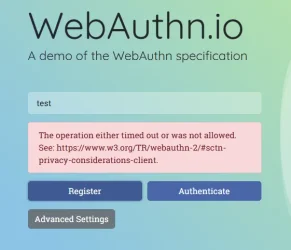
WebAuthn.io Error: 'The operation either timed out or was not allowed'


DrMopp

Well-known member
Local time
5:00 AM
Posts
54
OS
Windows 11 Pro 25H2
Hello everyone,

I am encountering a persistent issue when attempting to use WebAuthn.io and would appreciate any insights or assistance.

Problem
I consistently receive an error when interacting with WebAuthn.io.

Error Details
The specific error message displayed is:
The operation either timed out or was not allowed. See: https://www.w3.org/TR/webauthn-2/#sctn-privacy-considerations-client

I am desperate to hear from anyone who has experience with WebAuthn.io or this particular error. Any guidance on potential causes or troubleshooting steps would be greatly appreciated.
 

My Computer My Computer

At a glance

Windows 11 Pro 25H2Intel(R) Core(TM) i7-1070016GB
OS
Windows 11 Pro 25H2
Computer type
PC/Desktop
Manufacturer/Model
Dell Optiplex
CPU
Intel(R) Core(TM) i7-10700
Memory
16GB
Monitor(s) Displays
Dell U2722DE
Screen Resolution
2560x1440
Hard Drives
NVMe Kioxia 512GB
Keyboard
Logi MX Keys
Mouse
Logi MX Vertical
Internet Speed
76
Browser
Edge/Chrome/Firefox
Antivirus
Bitdefender
You're interacting with webauthn[.]io how?
 

My Computer My Computer

At a glance

Linux Mint
OS
Linux Mint
Computer type
Laptop
Manufacturer/Model
System76 Lemur Pro
I consistently receive an error when interacting with WebAuthn.io.
  1. What browser are you using?
  2. Are you working with passkeys stored on Windows hello?
  3. Are you having problems on alternate browsers?
  4. Do you have problems with other passkey sites, for example, ElevenForum itself?
  5. Are you encountering this on both Registration and Authentication?
I'm not having the same problem in either Edge or Firefox when using passkeys stored/authenticated with Windows Hello.
 

My Computer My Computer

At a glance

Windows 11 Pro 25H2
OS
Windows 11 Pro 25H2
Computer type
PC/Desktop
Thanks for your replies. To answer your questions:

1. I’m accessing webauthn.io using Edge on a Windows 11 Pro PC running 25H2.
2. All my passkeys, except the one for logging into my Microsoft account on the PC, are stored in NordPass, and I don’t have Microsoft Password Manager enabled.
3. In Firefox, I get a different message: “The authenticator was unable to process the specified options, or could not create a new credential.”
4. Other sites using passkeys work without any issues.

For background, I’ve been unable to set up biometric login on both NordPass and RoboForm. Both companies have suggested that if webauthn.io doesn’t work when their extensions are disabled or uninstalled, the problem lies with Windows itself. Since I’m having trouble with WebAuthn.io, I’m trying to identify the issue within Windows.

Thank you for your interest
 

My Computer My Computer

At a glance

Windows 11 Pro 25H2Intel(R) Core(TM) i7-1070016GB
OS
Windows 11 Pro 25H2
Computer type
PC/Desktop
Manufacturer/Model
Dell Optiplex
CPU
Intel(R) Core(TM) i7-10700
Memory
16GB
Monitor(s) Displays
Dell U2722DE
Screen Resolution
2560x1440
Hard Drives
NVMe Kioxia 512GB
Keyboard
Logi MX Keys
Mouse
Logi MX Vertical
Internet Speed
76
Browser
Edge/Chrome/Firefox
Antivirus
Bitdefender
Do you log in/unlock Windows with Windows Hello biometrics?

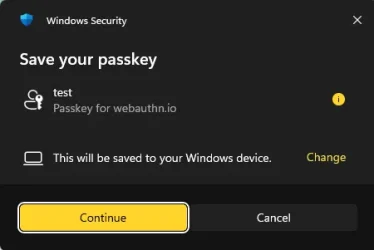
If you create a NEW profile in Edge, go to webauthn.io, enter a username, and click "Register," what screen do you get? I got this:

1777374477141.webp

If I click on Cancel in the above dialog, I got this:

1777374660382.webp
 

My Computer My Computer

At a glance

Windows 11 Pro 25H2
OS
Windows 11 Pro 25H2
Computer type
PC/Desktop
Yes I login to the machine using fingerprint sensor

I just get the second screen - no option to save a Passkey
 

My Computer My Computer

At a glance

Windows 11 Pro 25H2Intel(R) Core(TM) i7-1070016GB
OS
Windows 11 Pro 25H2
Computer type
PC/Desktop
Manufacturer/Model
Dell Optiplex
CPU
Intel(R) Core(TM) i7-10700
Memory
16GB
Monitor(s) Displays
Dell U2722DE
Screen Resolution
2560x1440
Hard Drives
NVMe Kioxia 512GB
Keyboard
Logi MX Keys
Mouse
Logi MX Vertical
Internet Speed
76
Browser
Edge/Chrome/Firefox
Antivirus
Bitdefender
I’ve seen Windows Hello/passkey issues like this in two forums. In both cases the OPs did a clean reinstall of Windows, which fixed the problems. If this were someone I was helping locally, I would:

1. Try fixing Windows corruption the normal way by running "cmd" in admin mode:
  • DISM /Online /Cleanup-Image /RestoreHealth
  • sfc /scannow
2. If that doesn't work, try the one easy fix: System > Recovery > Fix problems using Windows Update

3. If that doesn’t work, the options are usually: a) factory reset, b) upgrade in place, or c) clean reinstall. Like I said, the cases I saw were fixed by a clean reinstall.

You obviously want backups, license keys (when applicable), and saved credentials before doing 3).
 

My Computer My Computer

At a glance

Windows 11 Pro 25H2
OS
Windows 11 Pro 25H2
Computer type
PC/Desktop
Thanks, I've already been down that road - except the clean reinstall.
 

My Computer My Computer

At a glance

Windows 11 Pro 25H2Intel(R) Core(TM) i7-1070016GB
OS
Windows 11 Pro 25H2
Computer type
PC/Desktop
Manufacturer/Model
Dell Optiplex
CPU
Intel(R) Core(TM) i7-10700
Memory
16GB
Monitor(s) Displays
Dell U2722DE
Screen Resolution
2560x1440
Hard Drives
NVMe Kioxia 512GB
Keyboard
Logi MX Keys
Mouse
Logi MX Vertical
Internet Speed
76
Browser
Edge/Chrome/Firefox
Antivirus
Bitdefender
Back
Top Bottom