Solved What do I need to MIRACAST?


this says video card determines it. so is a gt640 HDCP compliant? I suppose not as even diagx said it was miracast ready non hdcp...
---------------------------------------------
edit
well nvidia control panel says it is HDCP capable. What other component is not HDCP compliant in the old desktop. I read the CPU is not important for Miracast to work, but what about HDCP miracasting? This cpu is an AMD
1686769392997.png
 

My Computer My Computer

At a glance

windows 11old AMD B958gb
OS
windows 11
Computer type
PC/Desktop
Manufacturer/Model
some kind of old ASUS MB
CPU
old AMD B95
Motherboard
ASUS
Memory
8gb
Hard Drives
ssd WD 500 gb
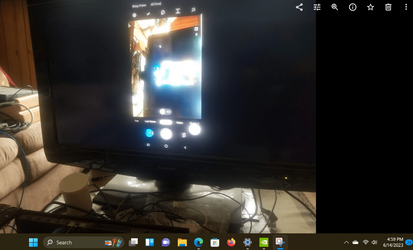
Interesting, but the old desktop, I just use the android s8 phone to miracast and use it as a screen and it connected and displayed the phone screen on the display. Went to Netflix to test a movie, and the audio and screen controls were there but no video as somehow the PC is determined to be non HDCP compliant for Miracast. BUT of course this old desktop can watch Netflix by itself just fine.

Old desktop ready to be used as wireless display
1686776276253.png


Android phone connected and using the screen wirelessly.

So what is going on with LED Projector, maybe should try it again after I installed wireless display app on the old desktop

I still think the HDCP issue may be preventing the connection for the LED projector to connect.
1686776363457.png
 

My Computer My Computer

At a glance

windows 11old AMD B958gb
OS
windows 11
Computer type
PC/Desktop
Manufacturer/Model
some kind of old ASUS MB
CPU
old AMD B95
Motherboard
ASUS
Memory
8gb
Hard Drives
ssd WD 500 gb
Do you suppose the OLD lcd Sharp TV I use as a computer monitor is not HDCP compliant for Miracast?
Even though I can watch Netflix or Prime Video on this old desktop without issues?

I am connected to the Sharp TV with an HDMI cable. I have no idea if the cable is compliant with HDCP
 

My Computer My Computer

At a glance

windows 11old AMD B958gb
OS
windows 11
Computer type
PC/Desktop
Manufacturer/Model
some kind of old ASUS MB
CPU
old AMD B95
Motherboard
ASUS
Memory
8gb
Hard Drives
ssd WD 500 gb

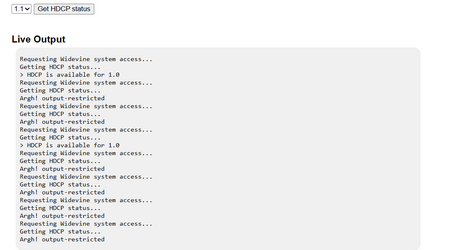
You can run a test to see what HDCP version is usable, on this older desktop, it only works for HDCP 1.0, all others give 'argh! output-restricted' error. Will check my Intel Asus notebook later
1686794625419.png
 

My Computer My Computer

At a glance

windows 11old AMD B958gb
OS
windows 11
Computer type
PC/Desktop
Manufacturer/Model
some kind of old ASUS MB
CPU
old AMD B95
Motherboard
ASUS
Memory
8gb
Hard Drives
ssd WD 500 gb
How is your monitor connected? HDCP requires either an HDMI or DVI connection.

What video card do you have? Have you tried reinstalling its driver?

Miracast came out in 2013 so I expect most devices made starting in 2014 or 2015 to support it.

If you are projecting to a TV then how old it is will determine how to connect to it. I have two different TVs I can project to.

1. Samsung TV (2012) is too old for Miracast. However, the BlueRay Player (2015) connected to it supports Miracast. The BlueRay Player has a Screen Mirroring app that has to be started before I mirror my laptop screen to it.

2. Samsung TV (2019) supports Miracast. The first time I try to connect to it from my laptop I have to use my TVs remote to give permission to connect to it. Once permission is granted to it I don't have to give permission again.

I have a number of computer but only my two laptops with WiFi can use Miracast. Laptop #1: Acer Swift 3 (Windows 10) and Laptop #2: ASUS Tuf Gaming (2022) Windows 11.
 

My Computers My Computers

  • At a glance

    Windows 11 Pro 25H2 (26200.6901)AMD Ryzen 7 6800H with Radeon 680M GPU (486MB...Crucial DDR5-4800 (2400MHz) 32GB (2 x 16GB)NVIDIA RTX 3060 Laptop (6GB RAM)
    OS
    Windows 11 Pro 25H2 (26200.6901)
    Computer type
    Laptop
    Manufacturer/Model
    ASUS TUF Gaming A15 (2022)
    CPU
    AMD Ryzen 7 6800H with Radeon 680M GPU (486MB RAM)
    Memory
    Crucial DDR5-4800 (2400MHz) 32GB (2 x 16GB)
    Graphics Card(s)
    NVIDIA RTX 3060 Laptop (6GB RAM)
    Sound Card
    n/a
    Monitor(s) Displays
    15.6-inch
    Screen Resolution
    1920x1080 300Hz
    Hard Drives
    2 x Samsung 990 Evo Plus (2TB M.2 NVME SSD)
    PSU
    n/a
    Mouse
    Wireless Mouse M510
    Internet Speed
    2100Mbps/300Mbps
    Browser
    Firefox
    Antivirus
    Malwarebytes
  • At a glance

    Windows 11 Pro 25H2 (26200.8246)AMD Ryzen 7 5700X3DG.SKILL Flare X 32GB (2x16GB) DDR4ASUS ROG-STRIX-RTX3060TI-08G-V2-GAMING (RTX 3...
    Operating System
    Windows 11 Pro 25H2 (26200.8246)
    Computer type
    PC/Desktop
    Manufacturer/Model
    Custom build
    CPU
    AMD Ryzen 7 5700X3D
    Motherboard
    ASUS ROG Strix B550-F Gaming WiFi II
    Memory
    G.SKILL Flare X 32GB (2x16GB) DDR4
    Graphics card(s)
    ASUS ROG-STRIX-RTX3060TI-08G-V2-GAMING (RTX 3060-Ti, 8GB RAM)
    Monitor(s) Displays
    Samsung G50D IPS 27"
    Screen Resolution
    1440p/180Hz
    Hard Drives
    SAMSUNG 990 EVO Plus (2TB] M.2 NVME SSD
    SAMSUNG 990 EVO Plus (4TB) M.2 NVME SSD
    PSU
    Corsair RM750x (750 watts)
    Case
    Cooler Master MasterCase 5
    Cooling
    Scythe Mugen 6
    Keyboard
    Logitech K520 (MK540 keyboard/mouse combo)
    Mouse
    Logitech M310 (MK540 keyboard/mouse combo)
    Internet Speed
    2100 Mbps down / 300 Mbps up
    Browser
    Firefox, Edge, Chrome
    Antivirus
    Malwarebytes (Premium)
    Other Info
    ASUS Blu-ray Burner BW-16D1HT (SATA) || Western Digital Easystore 20TB USB 3.0 external hard drive used with Acronis True Image 2025 backup software || HP OfficeJet Pro 6975 Printer/Scanner
How is your monitor connected? HDCP requires either an HDMI or DVI connection.

What video card do you have? Have you tried reinstalling its driver?

Miracast came out in 2013 so I expect most devices made starting in 2014 or 2015 to support it.

If you are projecting to a TV then how old it is will determine how to connect to it. I have two different TVs I can project to.

1. Samsung TV (2012) is too old for Miracast. However, the BlueRay Player (2015) connected to it supports Miracast. The BlueRay Player has a Screen Mirroring app that has to be started before I mirror my laptop screen to it.

2. Samsung TV (2019) supports Miracast. The first time I try to connect to it from my laptop I have to use my TVs remote to give permission to connect to it. Once permission is granted to it I don't have to give permission again.

I have a number of computer but only my two laptops with WiFi can use Miracast. Laptop #1: Acer Swift 3 (Windows 10) and Laptop #2: ASUS Tuf Gaming (2022) Windows 11.
My monitor is a Sharp TV connected with HDMI, it is older than 2012, but Netflix and Disney+ plays fine using it from the old desktop and a web browser. The TV used as a monitor says connects at 1080i
Video card is a GT 640
I would like to project to a new Jifar H6 LED projector using Miracast from the old desktop.
 

My Computer My Computer

At a glance

windows 11old AMD B958gb
OS
windows 11
Computer type
PC/Desktop
Manufacturer/Model
some kind of old ASUS MB
CPU
old AMD B95
Motherboard
ASUS
Memory
8gb
Hard Drives
ssd WD 500 gb
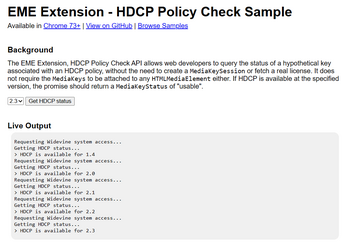
Just checked this Intel based Asus notebook 2 in1 PC and it passes all HDCP versions
1686831768099.png
 

My Computer My Computer

At a glance

windows 11old AMD B958gb
OS
windows 11
Computer type
PC/Desktop
Manufacturer/Model
some kind of old ASUS MB
CPU
old AMD B95
Motherboard
ASUS
Memory
8gb
Hard Drives
ssd WD 500 gb

Latest Support Threads

Back
Top Bottom