What does EaseUS ToDo backup protection do and how re: Ransomeware


TambourineMan

Member
Local time
6:42 AM
Posts
6
OS
Win 10/11
EaseUS Todo Home has an option to protect Win10/11 backups from Ransomware called "Backup Protection." Neither their manual nor their website details what this does and/or how it works. Is it only for an air-gapped cloud backup or can it be local internal and/or external? Does it use a volume mount/unmount, approved app list or an API or what? Is it similar to Acronis True Image's?
 

My Computer My Computer

At a glance

Win 10/11AMD/Intel16-64GBnVidia/Intel
OS
Win 10/11
Computer type
PC/Desktop
Manufacturer/Model
vrs desktyops/laptops
CPU
AMD/Intel
Motherboard
GigaBytes etal
Memory
16-64GB
Graphics Card(s)
nVidia/Intel
Monitor(s) Displays
Asus/AOC
Screen Resolution
vrs
Hard Drives
Nvme/SSD/HDD
PSU
gold/bricks
Case
Fractal etal
Cooling
Corsair H100i etal
EaseUS Todo Home has an option to protect Win10/11 backups from Ransomware called "Backup Protection." Neither their manual nor their website details what this does and/or how it works. Is it only for an air-gapped cloud backup or can it be local internal and/or external? Does it use a volume mount/unmount, approved app list or an API or what? Is it similar to Acronis True Image's?
 

My Computers My Computers

  • At a glance

    All Branches but ReleaseAMD Ryzen 7 7735HS 3200-4500 Mhz 8 cores x 232 GB DDR5Radeon Graphic / NVIDIA GeForce RTX 4060 8 GB...
    OS
    All Branches but Release
    Computer type
    Laptop
    Manufacturer/Model
    Acer Nitro ANV15-51
    CPU
    AMD Ryzen 7 7735HS 3200-4500 Mhz 8 cores x 2
    Motherboard
    Sportage_RBH
    Memory
    32 GB DDR5
    Graphics Card(s)
    Radeon Graphic / NVIDIA GeForce RTX 4060 8 GB GDDR6
    Sound Card
    AMD/Realtek(R) Audio
    Monitor(s) Displays
    Integrated Monitor (15.3"vis)
    Screen Resolution
    FHD 1920X1080 16:9 144Hz
    Hard Drives
    KINGSTON OM8SEP4512Q-AA 1TB
    Western Digital 256GB
    PSU
    19V DC 6.32 A 120 W
    Cooling
    Dual Fans
    Mouse
    MS Bluetooth
    Internet Speed
    Fiber 1GB Cox -us & 1GB Orange-fr
    Browser
    Edge Canary- Firefox Nightly-Chrome Dev-Chrome Dev
    Antivirus
    Windows Defender
  • At a glance

    Windows 11 BetaAMD A9-94208 GB of DDR4AMD Radeon R5
    Operating System
    Windows 11 Beta
    Computer type
    Laptop
    Manufacturer/Model
    Asus X751BP
    CPU
    AMD A9-9420
    Memory
    8 GB of DDR4
    Graphics card(s)
    AMD Radeon R5
    Screen Resolution
    1600x900
    Hard Drives
    Seagate 1 TB
@OAT - Thanks for your reply.

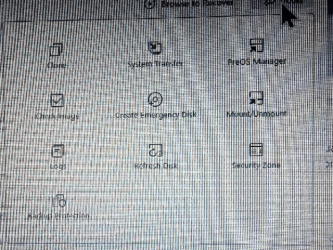
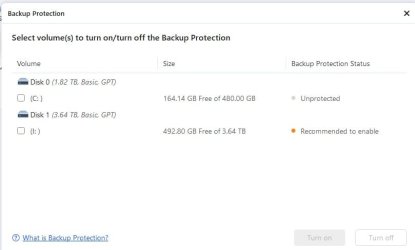
The info at the links is for EaseUS's "Security zone." I was inquiring about the other option in the "Tools" drop down menu: "BackUp Protection."

There is a link ( EaseUS Todo Backup ) when this is selected but it just describes how to set it up. I would like to know what is setup and how it works so I may gauge how effective it might be against ransomware.

EaseUS tools options.pngEASEUS Backup Protection.JPG
 

My Computer My Computer

At a glance

Win 10/11AMD/Intel16-64GBnVidia/Intel
OS
Win 10/11
Computer type
PC/Desktop
Manufacturer/Model
vrs desktyops/laptops
CPU
AMD/Intel
Motherboard
GigaBytes etal
Memory
16-64GB
Graphics Card(s)
nVidia/Intel
Monitor(s) Displays
Asus/AOC
Screen Resolution
vrs
Hard Drives
Nvme/SSD/HDD
PSU
gold/bricks
Case
Fractal etal
Cooling
Corsair H100i etal
I turned mine on... i do hate encryption for my home computer.. but am trying this feature
 

My Computer My Computer

At a glance

Win11i9-1390064 GBNvidia RTX 5070 TI OC
OS
Win11
Computer type
PC/Desktop
Manufacturer/Model
Asus Home built
CPU
i9-13900
Motherboard
ASUS Strix Z790-H
Memory
64 GB
Graphics Card(s)
Nvidia RTX 5070 TI OC
Monitor(s) Displays
Sony 55"
Hard Drives
SSD
PSU
850 watt EVGA
Case
Cooler Master Haf 932
Cooling
CoolerMaster
Keyboard
RedDragon
Mouse
CoolerMaster
Internet Speed
300/300
Antivirus
Defender
Other Info
VR, Virtual Reality
Having just read your LINK above, it appears they are providing ACCESS Protection (unauthorized modifications)... this should be more than adequate to prevent general RansomeWare.
 

My Computer My Computer

At a glance

Windows 10, Linux MINT (V-guests 7, 11, ZorinOS)Intel Core i7-1070032gB (DDR4)Intel UHD Graphics 630
OS
Windows 10, Linux MINT (V-guests 7, 11, ZorinOS)
Computer type
PC/Desktop
Manufacturer/Model
HP Z2 G5 Workstation
CPU
Intel Core i7-10700
Motherboard
HP Model# 8751
Memory
32gB (DDR4)
Graphics Card(s)
Intel UHD Graphics 630
Sound Card
Realtek basic audio
Monitor(s) Displays
32" (Viewsonic) UHD
Screen Resolution
3840 x 2160
Hard Drives
2-NvME (mainboard), 1-NvME (PCIe), 1-SATA3 SSD
Having just read your LINK above, it appears they are providing ACCESS Protection (unauthorized modifications)... this should be more than adequate to prevent general RansomeWare.
Yeah - I am pretty sure this is similar to Macrium Reflect Home's "Macrium Image Guardian" which basically protects images from being tampered with. Images cannot be deleted or modified unless physically running Macrium Reflect Home. They key point is that even if all other files get infected with malware/ransomware, you can still recover from it with your unaffected images.
 

My Computer My Computer

At a glance

Windows 11 Pro + Win11 Canary VM.I9 13th gen i9-13900H 2.60 GHZ16 GB solderedIntegrated Intel Iris XE
OS
Windows 11 Pro + Win11 Canary VM.
Computer type
Laptop
Manufacturer/Model
ASUS Zenbook 14
CPU
I9 13th gen i9-13900H 2.60 GHZ
Motherboard
Yep, Laptop has one.
Memory
16 GB soldered
Graphics Card(s)
Integrated Intel Iris XE
Sound Card
Realtek built in
Monitor(s) Displays
laptop OLED screen
Screen Resolution
2880x1800 touchscreen
Hard Drives
1 TB NVME SSD (only weakness is only one slot)
PSU
Internal + 65W thunderbolt USB4 charger
Case
Yep, got one
Cooling
Stella Artois (UK pint cans - 568 ml) - extra cost.
Keyboard
Built in UK keybd
Mouse
Bluetooth , wireless dongled, wired
Internet Speed
900 mbs (ethernet), wifi 6 typical 350-450 mb/s both up and down
Browser
Edge
Antivirus
Defender
Other Info
TPM 2.0, 2xUSB4 thunderbolt, 1xUsb3 (usb a), 1xUsb-c, hdmi out, 3.5 mm audio out/in combo, ASUS backlit trackpad (inc. switchable number pad)

Macrium Reflect Home V8
Office 365 Family (6 users each 1TB onedrive space)
Hyper-V (a vm runs almost as fast as my older laptop)
I do not understand how ransomware encrypts files, or does so so quickly, but seemingly it can easily change file attributes (read only, hidden, etc.) and/or just double encrypt an encrypted file (so encryption does not protect against ransomware).

A long time ago I did not understand how what Macrium Image Guardian did and was initially frustrated I could not move, copy make a backup of an image file (belts and suspenders / one is none and two is one) until that was disabled.

Seemingly the only way to protect a backup file is to locate it in an inaccessible place with manual air gapped being the only really safe one (although if someone doesn't know they've been attacked once connected it will just become encrypted also. Possibly a place that requires a password (that is not stored on the computer) to access it (including making anew backup) might work, but who knows?
 

My Computer My Computer

At a glance

Win 10/11AMD/Intel16-64GBnVidia/Intel
OS
Win 10/11
Computer type
PC/Desktop
Manufacturer/Model
vrs desktyops/laptops
CPU
AMD/Intel
Motherboard
GigaBytes etal
Memory
16-64GB
Graphics Card(s)
nVidia/Intel
Monitor(s) Displays
Asus/AOC
Screen Resolution
vrs
Hard Drives
Nvme/SSD/HDD
PSU
gold/bricks
Case
Fractal etal
Cooling
Corsair H100i etal

Latest Support Threads

Back
Top Bottom