Solved What is McAfeeOSDetection folder in Program Files?


Lenovo25

Member
Local time
3:39 PM
Posts
28
OS
Windows 11 Home 64-bit
I was looking through my files and folders to see if there is anything I can get rid of and I came across this one in Program Files. I thought it was strange because I don't have any Mcafee apps installed. I even did a search for it and found nothing even when I tried using Wise uninstaller. It makes me think it's a leftover folder that should be gotten rid of. I'd like to do it the proper way so there are no problems.
When I clicked the folder, there was a file in it called DADUpdater and is labeled as an application. I clicked it and then 3 additional folder appeared. I looked through everything trying to find an uninstaller but found nothing.
Could I simply delete the McAfeeOSDetection folder and that's it?
BTW, I did a google search for that folder name and I can't find a result that uses that exact term. Google keeps changing it to find matches. Here's a couple screenshots to show exactly what I'm referring to as to what the folders and files are.

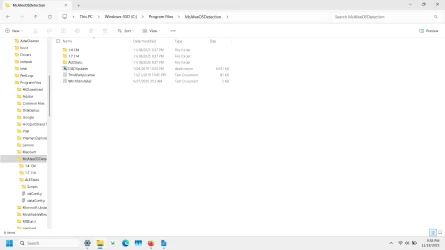
Screenshot (1).webpScreenshot (2).webp
 
Windows Build/Version
Win 11 25H2 build 26200.7171
Last edited:

My Computer

System One

  • OS
    Windows 11 Home 64-bit
    Computer type
    Laptop
    Manufacturer/Model
    Lenovo Ideapad 3
    CPU
    Intel Processor @ 1.20GHz i-3
    Motherboard
    LENOVO LNVNB161216 (U3E1) %1 Chipset
    Memory
    8GB DDR4
    Graphics Card(s)
    128MB Intel UHD Graphics (Lenovo)
    Sound Card
    Realtek High Definition Audio(SST)
    Monitor(s) Displays
    Generic PnP Monitor (1920x1080@60Hz)
    Screen Resolution
    (1920x1080@60Hz)
    Hard Drives
    238GB SKHynix_HFM256GDHTNI-87A0B (Unknown (SSD)) 236 usable GB
    Keyboard
    QWERTY
    Mouse
    Logitech wireless
    Internet Speed
    Broadband speed
    Browser
    Chrome/Edge, but most recently using Firefox
    Antivirus
    Windows Defender

I suspect it's a left over folder from a freeware/demoware version of McAfee that either came with the device or was installed with some other downloded software

Quite common for these invasive (often spyware) remnants to be left behind when just the standard Windows uninstallation program is used, and more than likely there are many other leftover file remnants and registry entries hanging about

Using RevUninstaller (just the freeware version is adequate) to uninstall (any) software, including using Revo's advanced option, usually gets rid of these remnants.

But, it might be a bit late now. Try renaming the folder (say, to McAfeeOSDetectionOLD) to see if affects your system. If nothing untoward happens after a week or so, delete it
 

My Computers

System One System Two

  • OS
    Windows 11 2xH2 (latest update ... forever anal)
    Computer type
    PC/Desktop
    Manufacturer/Model
    HP Slim S01
    CPU
    Intel i5-12400
    Memory
    8GB
    Graphics Card(s)
    NVIDIA GeForce GT730
    Sound Card
    OOBE
    Monitor(s) Displays
    Acer 32"
    Screen Resolution
    1920x1080
    Hard Drives
    512GB KIOXIA NVMe
    1TB SATA SSD
    PSU
    OOBE
    Case
    OOBE
    Cooling
    OOBE
    Keyboard
    BT
    Mouse
    BT
    Browser
    Brave FFox Chrome Opera
    Antivirus
    KIS
  • Operating System
    Windows 11 Pro 2xH2 (latest update ... 4ever anal)
    Computer type
    Laptop
    Manufacturer/Model
    HP Pavillion 15
    CPU
    i7-1165G7 @ 2.80GHz
    Graphics card(s)
    Intel Iris Xe Graphics
    Hard Drives
    Samsung NVMe 512GB
    + numerous/multiple SSD Type C USB enclosures
    Internet Speed
    NBN FTTN 50
    Browser
    Brave
    Antivirus
    KIS
These search results all seem to imply that you used to have McAfee

If that's the case then did you get an uninstall tool from their website and run it?
Is McAfee or DADUpdater mentioned in Settings, Apps?


Denis
 

My Computer

System One

  • OS
    Windows 11 Home x64 Version 25H2 Build 26200.8037
These search results all seem to imply that you used to have McAfee

If that's the case then did you get an uninstall tool from their website and run it?
Is McAfee or DADUpdater mentioned in Settings, Apps?


Denis
@idgat I have Revouninstaller. Just tried using it but McAfee doesn't show up in the apps list there either. I clicked the Options tab at the top, but didn't find anything after that which would let me find any of the mcafee files.

@Try3 Not that I can find. But I'm now in the process of running the uninstall tool from McAfee you mentioned. It's going slow....
By those Duckduckgo results, I probably shouldn't have clicked on that DADUpdater.
 

My Computer

System One

  • OS
    Windows 11 Home 64-bit
    Computer type
    Laptop
    Manufacturer/Model
    Lenovo Ideapad 3
    CPU
    Intel Processor @ 1.20GHz i-3
    Motherboard
    LENOVO LNVNB161216 (U3E1) %1 Chipset
    Memory
    8GB DDR4
    Graphics Card(s)
    128MB Intel UHD Graphics (Lenovo)
    Sound Card
    Realtek High Definition Audio(SST)
    Monitor(s) Displays
    Generic PnP Monitor (1920x1080@60Hz)
    Screen Resolution
    (1920x1080@60Hz)
    Hard Drives
    238GB SKHynix_HFM256GDHTNI-87A0B (Unknown (SSD)) 236 usable GB
    Keyboard
    QWERTY
    Mouse
    Logitech wireless
    Internet Speed
    Broadband speed
    Browser
    Chrome/Edge, but most recently using Firefox
    Antivirus
    Windows Defender

My Computer

System One

  • OS
    Windows 10
    Computer type
    Laptop
    Manufacturer/Model
    HP
    CPU
    Intel(R) Core(TM) i7-4800MQ CPU @ 2.70GHz
    Motherboard
    Product : 190A Version : KBC Version 94.56
    Memory
    16 GB Total: Manufacturer : Samsung MemoryType : DDR3 FormFactor : SODIMM Capacity : 8GB Speed : 1600
    Graphics Card(s)
    NVIDIA Quadro K3100M; Intel(R) HD Graphics 4600
    Sound Card
    IDT High Definition Audio CODEC; PNP Device ID HDAUDIO\FUNC_01&VEN_111D&DEV_76E0
    Hard Drives
    Model Hitachi HTS727575A9E364
    Antivirus
    Microsoft Defender
    Other Info
    Mobile Workstation
If free space is needed:


It's not so much free space that I need. I'm using a newer laptop now after upgrading to Win11 and having so much trouble with my previous laptop due to the OS getting corrupted that I thought it would be nice to clean up anything that might be on board that could cause problems in the future. Leftover files and things like that.

@Try3 The uninstall process is done, but now it wants me to restart my computer which is something I'll have to do tomorrow since it will cause me to close up things I'd like to have open at this point.
I'm gonna mark this as "solved" right now since I'm sure the process worked out.
Thank you to Try3 and idgat!
 

My Computer

System One

  • OS
    Windows 11 Home 64-bit
    Computer type
    Laptop
    Manufacturer/Model
    Lenovo Ideapad 3
    CPU
    Intel Processor @ 1.20GHz i-3
    Motherboard
    LENOVO LNVNB161216 (U3E1) %1 Chipset
    Memory
    8GB DDR4
    Graphics Card(s)
    128MB Intel UHD Graphics (Lenovo)
    Sound Card
    Realtek High Definition Audio(SST)
    Monitor(s) Displays
    Generic PnP Monitor (1920x1080@60Hz)
    Screen Resolution
    (1920x1080@60Hz)
    Hard Drives
    238GB SKHynix_HFM256GDHTNI-87A0B (Unknown (SSD)) 236 usable GB
    Keyboard
    QWERTY
    Mouse
    Logitech wireless
    Internet Speed
    Broadband speed
    Browser
    Chrome/Edge, but most recently using Firefox
    Antivirus
    Windows Defender
It's not so much free space that I need. I'm using a newer laptop now after upgrading to Win11 and having so much trouble with my previous laptop due to the OS getting corrupted that I thought it would be nice to clean up anything that might be on board that could cause problems in the future.


1) Please enable Regback:


2) Add WMIC:


3) Run Tuneup plus:


The PC healthcheck from 2023 may be able to be updated or deleted.
 

My Computer

System One

  • OS
    Windows 10
    Computer type
    Laptop
    Manufacturer/Model
    HP
    CPU
    Intel(R) Core(TM) i7-4800MQ CPU @ 2.70GHz
    Motherboard
    Product : 190A Version : KBC Version 94.56
    Memory
    16 GB Total: Manufacturer : Samsung MemoryType : DDR3 FormFactor : SODIMM Capacity : 8GB Speed : 1600
    Graphics Card(s)
    NVIDIA Quadro K3100M; Intel(R) HD Graphics 4600
    Sound Card
    IDT High Definition Audio CODEC; PNP Device ID HDAUDIO\FUNC_01&VEN_111D&DEV_76E0
    Hard Drives
    Model Hitachi HTS727575A9E364
    Antivirus
    Microsoft Defender
    Other Info
    Mobile Workstation
Just tried using it but McAfee doesn't show up in the apps list there either
No it won't if it's already been uninstalled. Revo looks for certain components, but they're the ones removed in the standard uninstall. Revo's strength lies in being to trace the left over nasties, but only in the it's process of uninstalling the general program components
It's not so much free space that I need. I'm using a newer laptop now after upgrading to Win11 and having so much trouble with my previous laptop due to the OS getting corrupted that I thought it would be nice to clean up anything that might be on board that could cause problems in the future.
Not sure I would have chosen the W11 upgrade option for a corrupted previous system, W10 or otherwise

Might be worth a clean install - a complete wipe of the drive (that's get rid of all the McAfee leftovers) and a fresh W11 start
 

My Computers

System One System Two

  • OS
    Windows 11 2xH2 (latest update ... forever anal)
    Computer type
    PC/Desktop
    Manufacturer/Model
    HP Slim S01
    CPU
    Intel i5-12400
    Memory
    8GB
    Graphics Card(s)
    NVIDIA GeForce GT730
    Sound Card
    OOBE
    Monitor(s) Displays
    Acer 32"
    Screen Resolution
    1920x1080
    Hard Drives
    512GB KIOXIA NVMe
    1TB SATA SSD
    PSU
    OOBE
    Case
    OOBE
    Cooling
    OOBE
    Keyboard
    BT
    Mouse
    BT
    Browser
    Brave FFox Chrome Opera
    Antivirus
    KIS
  • Operating System
    Windows 11 Pro 2xH2 (latest update ... 4ever anal)
    Computer type
    Laptop
    Manufacturer/Model
    HP Pavillion 15
    CPU
    i7-1165G7 @ 2.80GHz
    Graphics card(s)
    Intel Iris Xe Graphics
    Hard Drives
    Samsung NVMe 512GB
    + numerous/multiple SSD Type C USB enclosures
    Internet Speed
    NBN FTTN 50
    Browser
    Brave
    Antivirus
    KIS
No it won't if it's already been uninstalled. Revo looks for certain components, but they're the ones removed in the standard uninstall. Revo's strength lies in being to trace the left over nasties, but only in the it's process of uninstalling the general program components

Not sure I would have chosen the W11 upgrade option for a corrupted previous system, W10 or otherwise

Might be worth a clean install - a complete wipe of the drive (that's get rid of all the McAfee leftovers) and a fresh W11 start
I should have clarified that it was a different computer with a corruption problem. It was a Dell computer. I'm keeping that one as a backup now that it's running well enough, but the one I'm using as my main one is a Lenovo. The Dell wasn't eligible for the upgrade, but the Lenovo was. It's not corrupted and I'd like it to stay that way by avoiding past mistakes I made with the Dell. I was having some "Black Screen of Death" crashes previous to more problems which may have caused the corruption. Even a "Reset this PC" operation didn't fix everything. You can read about my ordeal here if you'd like: Dell computer lost internet connection - Windows 10 Help Forums
 

My Computer

System One

  • OS
    Windows 11 Home 64-bit
    Computer type
    Laptop
    Manufacturer/Model
    Lenovo Ideapad 3
    CPU
    Intel Processor @ 1.20GHz i-3
    Motherboard
    LENOVO LNVNB161216 (U3E1) %1 Chipset
    Memory
    8GB DDR4
    Graphics Card(s)
    128MB Intel UHD Graphics (Lenovo)
    Sound Card
    Realtek High Definition Audio(SST)
    Monitor(s) Displays
    Generic PnP Monitor (1920x1080@60Hz)
    Screen Resolution
    (1920x1080@60Hz)
    Hard Drives
    238GB SKHynix_HFM256GDHTNI-87A0B (Unknown (SSD)) 236 usable GB
    Keyboard
    QWERTY
    Mouse
    Logitech wireless
    Internet Speed
    Broadband speed
    Browser
    Chrome/Edge, but most recently using Firefox
    Antivirus
    Windows Defender
@zbook
That info looks very interesting since I was having BSOD problems before things got corrupted. Not sure I understand how to follow it all though.
Before the corruption problem started, I'd be using the computer and then the screen went completely black as if turned off. All I could do is cut the power. I think it happened 3 times. Then I lost internet connectivity and couldn't get it back until I did a PC reset, which fixed that problem but didn't work entirely as it was supposed to. Problems still exist, but it has internet and is usable.
 

My Computer

System One

  • OS
    Windows 11 Home 64-bit
    Computer type
    Laptop
    Manufacturer/Model
    Lenovo Ideapad 3
    CPU
    Intel Processor @ 1.20GHz i-3
    Motherboard
    LENOVO LNVNB161216 (U3E1) %1 Chipset
    Memory
    8GB DDR4
    Graphics Card(s)
    128MB Intel UHD Graphics (Lenovo)
    Sound Card
    Realtek High Definition Audio(SST)
    Monitor(s) Displays
    Generic PnP Monitor (1920x1080@60Hz)
    Screen Resolution
    (1920x1080@60Hz)
    Hard Drives
    238GB SKHynix_HFM256GDHTNI-87A0B (Unknown (SSD)) 236 usable GB
    Keyboard
    QWERTY
    Mouse
    Logitech wireless
    Internet Speed
    Broadband speed
    Browser
    Chrome/Edge, but most recently using Firefox
    Antivirus
    Windows Defender
Post #7

steps #1 and #2 are tutorials.

step #3 is a bat script that prompts AV for a manual approval then runs in the background.

When it completes there is a pop up with instructions.
 

My Computer

System One

  • OS
    Windows 10
    Computer type
    Laptop
    Manufacturer/Model
    HP
    CPU
    Intel(R) Core(TM) i7-4800MQ CPU @ 2.70GHz
    Motherboard
    Product : 190A Version : KBC Version 94.56
    Memory
    16 GB Total: Manufacturer : Samsung MemoryType : DDR3 FormFactor : SODIMM Capacity : 8GB Speed : 1600
    Graphics Card(s)
    NVIDIA Quadro K3100M; Intel(R) HD Graphics 4600
    Sound Card
    IDT High Definition Audio CODEC; PNP Device ID HDAUDIO\FUNC_01&VEN_111D&DEV_76E0
    Hard Drives
    Model Hitachi HTS727575A9E364
    Antivirus
    Microsoft Defender
    Other Info
    Mobile Workstation

Latest Support Threads

Back
Top Bottom