Excel Blog:
Welcome to the February 2025 update. We are excited to announce that Copilot in Excel with Python is now available on Windows platforms for all enterprise and consumer users. Also starting now, Excel users on Windows and web can get to Copilot faster from anywhere on the grid. Furthermore, Copilot can now bring web and organizational data into your spreadsheets—available for Windows and Mac Insider users.
Excel for Windows
Copilot in Excel with PythonCopilot in Excel with Python is available worldwide on Windows platform for all enterprise and consumer users in English, Simplified Chinese, French, German, Italian, Japanese, Brazilian Portuguese, and Spanish languages. Copilot in Excel with Python can help you gain deeper insights without needing to be a Python expert. Read more here >

GIF showing an example of Python being used within Copilot
Excel for Windows and web
Get to Copilot in Excel fasterWe’ve added a new Copilot button that lets you access Copilot from anywhere on the grid, so that you can stay in your flow. This button will appear next to your cell selection, and can be activated at anytime to see a list of suggestions. Selecting any of these options will open the Copilot side pane and automatically run that prompt as if you had typed it manually. And if you don’t need the Copilot icon, you can hide it until the file is reopened. This feature is currently rolling out to Windows and web users. Read more here >
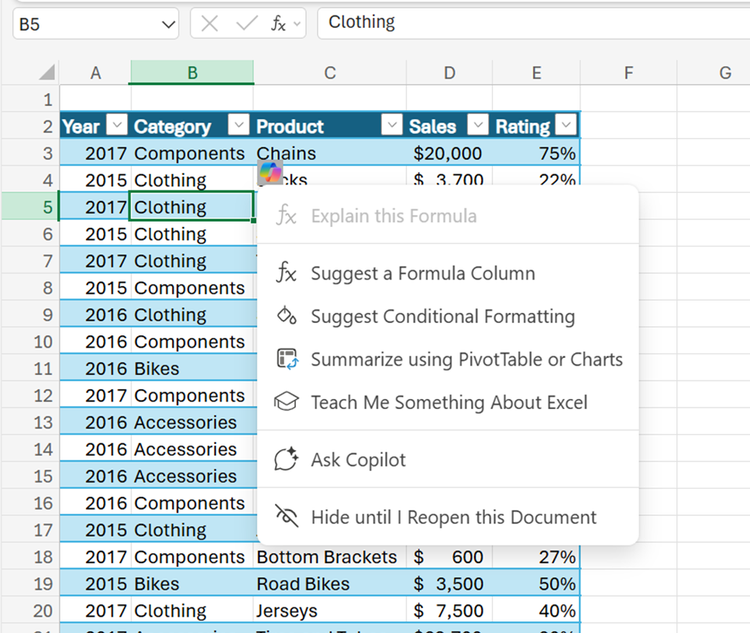
The Copilot icon has been selected, showing a menu of Copilot prompts
Excel for Windows and Mac
Search and import data with Copilot in Excel (Insiders)Copilot in Excel can now reference Word, Excel, PowerPoint, and PDF files, making the entire data collection and analysis process faster, simpler, and more intuitive. This new capability works for gathering information from sources such as web content, internal content, organization information, or data from another Excel file. Read more here >

Use Copilot to search through web results to insert into your Excel workbook
Many of these features are the result of your feedback. THANK YOU! Your continued Feedback in Action (#FIA) helps improve Excel for everyone. Please let us know how you like a particular feature and what we can improve upon—"Give a compliment" or "Make a suggestion".. You can also submit new ideas or vote for other ideas via Microsoft Feedback.
Subscribe to our Excel Blog and the Insiders Blog to get the latest updates. Stay connected with us and other Excel fans around the world – join our Excel Community and follow us on X, formerly Twitter.
Special thanks to our Excel MVPs David Benaim, Bill Jelen, Alan Murray, and John Michaloudis for their contribution to this month's What's New in Excel article. David publishes weekly YouTube videos and regular LinkedIn posts about the latest innovations in Excel and more. Bill is the founder and host of MrExcel.com and the author of several books about Excel. Alan is an Excel trainer, author and speaker, best known for his blog computergaga.com and YouTube channel with the same name. John is the Founder & Chief Inspirational Officer at MyExcelOnline.com where he passionately teaches thousands of professionals how to use Excel to stand out from the crowd.
Source:

What's New in Excel (February 2025) | Microsoft Community Hub
Copilot in Excel with Python is now available on Windows platforms for all enterprise and consumer users, and more!
 techcommunity.microsoft.com