Excel Blog:
Welcome to the November 2025 update. This month, we’re excited to share several enhancements across Excel. Announced at Ignite, Agent Mode in Excel now includes web search and Anthropic model support, and is available in Excel for Windows—via the Frontier program. Excel for Windows introduces a modernized Get Data dialog, providing a clean, simple starting point for connecting to data. Additionally, users on Windows, web, and iOS can preview comments on protected files directly in email notifications. For Insider users, Excel for iOS adds Liquid Glass styling and template filters, introducing a new, modern home experience.
Excel for Windows
Agent Mode in Excel enhancements (Frontier)
1. Web search. At Ignite last week, we introduced web search in Agent mode. Imagine pulling real-time information from the web straight into your spreadsheet workflows—market trends, historical stats, scientific figures—without juggling browser tabs or copy/pasting from a chat window.For example, you can ask Agent Mode to compile the latest GDP growth and CO₂ emissions data for G20 countries or create a table of this year's Nobel Prize winners with detailed attributes. Copilot can now pull this data from trusted sources into Agent mode's multi-step workflow and build directly in your spreadsheet, saving time and reducing manual effort. Plus, it supports citation links for transparency so you can have confidence in the output. This integration is perfect for analysts, researchers, and anyone who needs up-to-date external data to make informed decisions.
2. Anthropic model support. Choice matters, and we are committed to providing multi-model options in Microsoft 365. Building on Researcher agent and Copilot Studio, Agent mode now offers an option to choose Anthropic’s Claude models to power your experience. Just choose the "Try Claude" option to get started. For enterprise users: your admin must allow access to Anthropic AI models. Learn more about using Claude in Agent mode in Excel.
Claude brings a different approach to spreadsheet generation offering a distinct experience from the default OpenAI models powering Agent Mode. While Claude streams its chain-of-thought and explanations differently, ongoing improvements aim to deliver a smooth experience in this early preview. This flexibility ensures you can pick the model that best fits your needs—whether it’s speed, accuracy, or style.
3. Now available in Excel for Windows. Last month, we introduced Agent mode in Copilot in Excel for Web through the Frontier program. At Ignite, we announced that Agent mode is now available in Excel for Windows too, making AI assistance available for users and professionals who rely on Excel in the desktop app for their work. While Mac support is planned for later, Windows users will benefit immediately from this rollout. Users must be in the Insiders Beta Channel on Windows.
Get Data Dialog
The modern Get Data dialog gives you a clean, simple starting point for connecting to data. With built-in search and quick access to popular data sources, you can easily find the right source and start working on your data. This feature is currently rolling out to Windows Current Channel users. Read more here >Excel for Windows, web, and iOS
Comment previews on protected files #FIA
Excel now lets you preview comments on protected files directly from your email notifications. When someone adds a comment, the email includes the comment text and its context within the file, so you can quickly review feedback without unlocking or opening the document.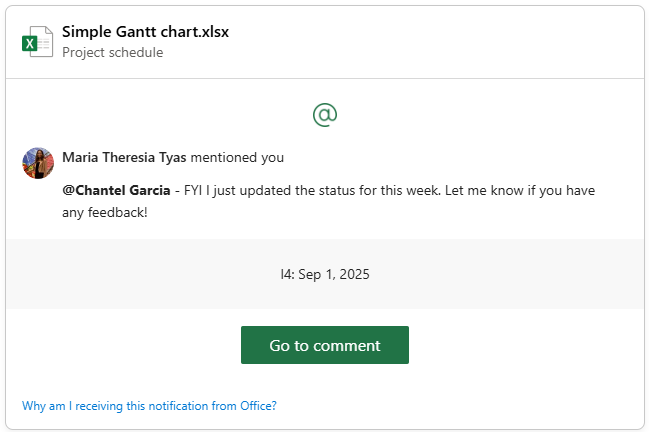
Excel for iOS
Liquid Glass and template filters (Insiders)
Your favorite Microsoft 365 apps on iPhone, iPad, and Apple Vision Pro now feature Liquid Glass styling. We’ve also made the search experience available from the bottom of the screen, to align with iOS 26’s search patterns and make it easier to use with one hand.When searching for templates, you’ll now also see quick filter buttons at the top that let you browse by category – like Flyers, Resumes, or Invoices – instead of scrolling through a single long list, so finding the perfect template is faster and more intuitive. Read more here >
Many of these features are the result of your feedback. THANK YOU! Your continued Feedback in Action (#FIA) helps improve Excel for everyone. Please let us know how you like a particular feature and what we can improve upon—"Give a compliment" or "Make a suggestion".. You can also submit new ideas or vote for other ideas via Microsoft Feedback.
Source:

What's New in Excel (November 2025) | Microsoft Community Hub
Welcome to the November 2025 update. This month, we’re excited to share several enhancements across Excel. Announced at Ignite, Agent Mode in Excel now...
 techcommunity.microsoft.com