Windows IT Pro Blog:
Windows 365 has turned five and we continue to focus on helping you get more from your Cloud PCs. Welcome to our new monthly roundup of Windows 365 and Azure Virtual Desktop updates together in one place- your guide to what’s new, why it matters, and how to get started. In this edition, explore September’s improvements to everyday experiences, security and recovery, IT management, and deployment flexibility.
Seamless user experience
This month, we're making Cloud PCs even more flexible and resilient, helping users work with the tools they use every day, initiate provisioning of Windows 365 Reserve Cloud PCs when needed, and stay productive with a seamless experience as network conditions change.TWAIN scanner redirection
With TWAIN scanners in remote sessions (Public Preview), supported scanners connected to a local Windows device can now be redirected to a Cloud PC using high-level redirection, providing an optimized scanning experience compared with USB redirection.

Figure 1: Scanner and USB device options in Windows App.
User provisioning for Windows 365 Reserve
User provisioning for Windows 365 Reserve (Generally Available) helps employees get back to work when their primary device is unavailable—without waiting for IT to provision a Cloud PC. Once IT enables the capability, eligible users can initiate provisioning directly from Windows App, reducing manual work for administrators while keeping access governed through Microsoft Intune and selected Microsoft Entra ID groups.
RDP Multipath and RDP Shortpath
Windows 365 is gaining more resilient connectivity with RDP Multipath availability in Azure Government (Generally Available) and RDP Shortpath with TURN availability in Azure Government (Phased General Availability Rollout). RDP Multipath helps maintain sessions as network conditions change, with redundant UDP paths now generally available and redundant TCP paths rolling out in phases. RDP Shortpath with TURN is also in a phased general availability rollout, providing relayed UDP connectivity when a direct connection isn’t possible. Together, these updates help users stay productive with fewer session interruptions, even as network conditions change or direct connections are unavailable.
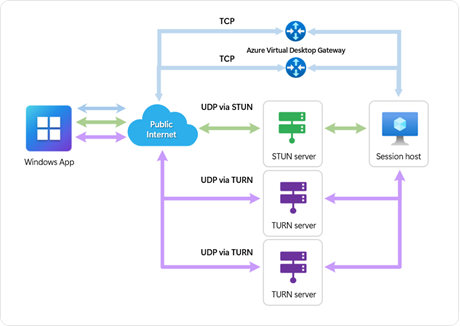
Figure 2: Redundant UDP and TCP paths help maintain Cloud PC session connectivity.
RDP Shortpath and RDP Multipath support in Windows App for macOS (beta) are now supported, bringing RDP Shortpath for public networks and RDP Multipath with UDP for Windows 365 and Azure Virtual Desktop. The update extends UDP-based connectivity and multipath resiliency to macOS.
External identities on macOS and iOS
Windows App is making it easier for external users to connect through macOS support (Generally Available) and iOS support (Preview), extending collaboration to invited users outside the organization without having to create a new user account for them.
Security & reliability
Keeping work secure and available takes both everyday protection and preparation for disruption. This month’s updates strengthen sensitive data protection, expand passwordless authentication, and give IT more options for recovery and regional resilience.Plan for disruption and simplify recovery
Preparing for disruption starts with a clear recovery plan. Business continuity and disaster recovery in Cloud PC settings (Generally Available) brings point-in-time restore, cross-region disaster recovery, and disaster recovery plus together through a centralized Cloud PC configuration, making recovery options easier to manage for IT admins. Alternate regions for business continuity and disaster recovery (Generally Available) give IT admins more choice in where they back up Cloud PCs. With cross-region disaster recovery and disaster recovery plus, they can now select Australia Southeast, South India, Canada East, or West US to support their recovery and data residency needs. Cloud PC recovery for Windows 365 Government (Generally Available) enables IT admins in GCC and GCCH to reprovision and restore eligible Cloud PCs deprovisioned after a license expired. This extends a recovery capability already available in commercial environments.

Figure 3: Select the Restore option under the Cloud PC overview section.
Protect sensitive content and simplify authentication
Protecting sensitive data goes hand in hand with secure authentication. In-session passwordless authentication on iOS (Preview) lets users respond to supported Microsoft Entra ID sign-in prompts within their Cloud PC session using passkeys through Windows App on their iOS device, without entering a password. Supported methods include physical security keys and QR code experiences. Display protection for Windows 365 (Public Preview) helps reduce the risk of unauthorized screen capture or display interception on the endpoint devices.
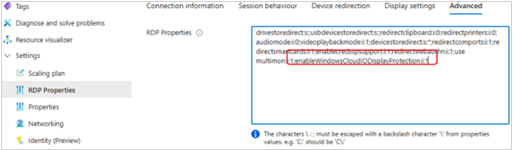
Figure 4: Server-side verification that Display Protection is enabled on the endpoint.
Strengthen regional resilience with Azure Virtual Desktop
Regional host pools (Generally Available) give customers a regional deployment option to support enhanced resiliency and additional data sovereignty. This option is generally available in East US 2 and Central US.
Easy manageability
Less time navigating settings means more time supporting your organization. September’s updates help IT teams identify where attention is needed, manage user permissions, and provide Cloud PC environments tailored to different workloads.Better insights and simpler access controls
To help IT admins see important signals more easily across Cloud PC environment, admin insights for Windows 365 (Generally Available) surfaces prioritized issues and optimization opportunities directly on the Cloud PC Overview page in the Microsoft Intune admin center. These service-generated insights link to relevant reports, where available, to help admins investigate and determine their next steps.
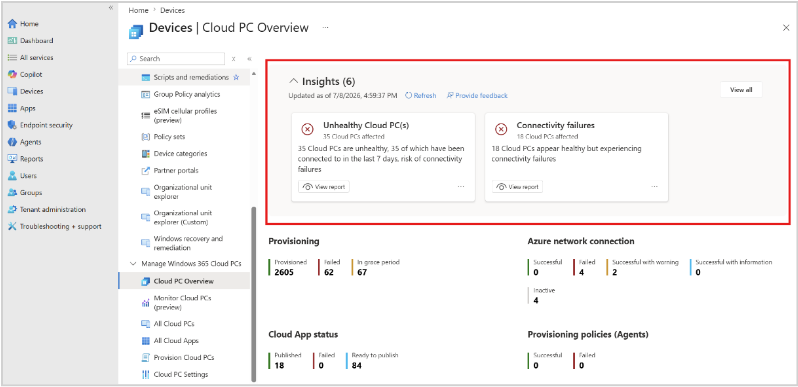
Figure 5: Admin insights on the Cloud PC Overview page.
Meanwhile, the enable local admin in Cloud PC configurations (Public Preview) setting lets IT admins grant selected users local administrator permissions on their Cloud PCs through the centralized Cloud PC configuration experience in Microsoft Intune. This allows users to perform tasks such as installing development tools that require elevated privileges, while IT centrally manages access through Microsoft Intune.
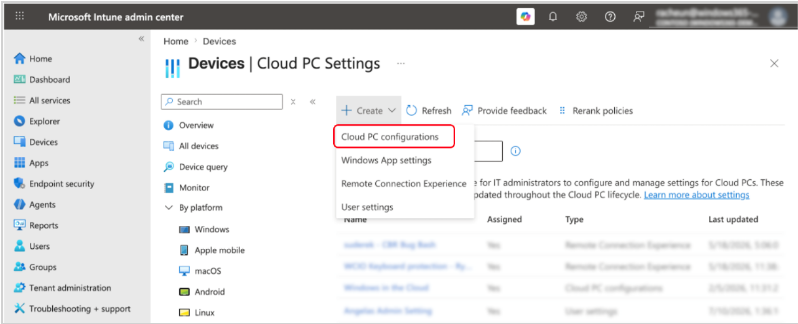
Figure 6: Create a Cloud PC configuration in Microsoft Intune.
Get started faster with Cloud PCs tailored to each workload
Developer configuration with pre-installed Microsoft 365 Apps (Generally Available) helps developers get productive faster by providing essential development tools, Microsoft 365 Apps, and required configurations from the start. The image is available for Windows 365 Enterprise and Windows 365 Flex in dedicated mode. For developers and other users who need separate environments, IT admins can assign multiple Windows 365 Flex Dedicated Cloud PCs to the same user (Generally Available), using either the same or different configurations. This supports scenarios where users need separate environments for different workloads, projects, configurations, or security boundaries while keeping those environments centrally managed.
Azure Virtual Desktop Hybrid
Azure Virtual Desktop Hybrid (Generally Available) lets organizations modernize their virtual desktop environments without moving every workload to the cloud at once. Azure Virtual Desktop Hybrid enables customers to run session hosts in their own datacenters without requiring the purchase of new hardware or changing their existing hypervisor. Partners including Login VSI, Nerdio, and Nutanix can provide additional lifecycle management functionality with their updated offerings.
Partner news
Building on the Azure Virtual Desktop Hybrid update above, Hydra by Login VSI manages Azure Virtual Desktop across Azure and on-premises Hyper-V, with capabilities for image management, session host lifecycle automation, monitoring, and day-to-day administration.Nerdio Manager for Enterprise adds support for Azure Virtual Desktop Hybrid on Nutanix AHV, including orchestration, automation, visibility, and management capabilities.
Nutanix AHV supports Azure Virtual Desktop Hybrid session hosts running on-premises while using the Azure Virtual Desktop cloud-based control plane.
For organizations exploring their next step, Nerdio Compass (Public Preview) is a VDI assessment tool that helps organizations evaluate existing environments and plan migration to Windows 365 or Azure Virtual Desktop.
Documentation updates
Windows 365 cloud-native and Zero Trust deployment guidance — New guidance brings recommended decisions across identity, networking, images, updates, management, user data, and clients into one cloud-native, Zero Trust-aligned blueprint.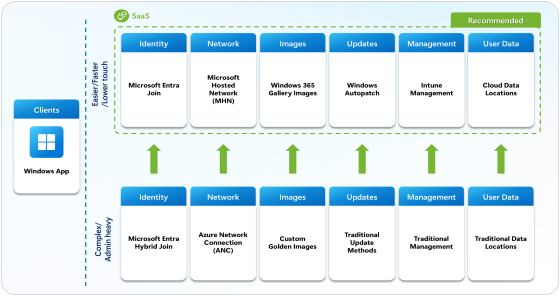
Figure 7: Comparative deployment pillars
Operational benefits of a cloud-native deployment — A companion article explains how cloud-native deployment decisions can reduce issues, increase administrator self-resolution, and help support cases resolve faster.
Source:
What's new in Windows 365
Catch up on what’s new with Windows 365, including updates that help users stay productive, strengthen security and resilience, and give IT greater...
 techcommunity.microsoft.com