What is the latest on backup and restore for Windows Terminal settings


SonicMojo

Well-known member
Member
Local time
4:29 AM
Posts
132
OS
Windows 11 PRO 25H2
I am about to rebuild my machine for the first time since 2021 and I am creating a VERY detailed deployment guide to ensure I am back up and running in the most orderly fashion possible.

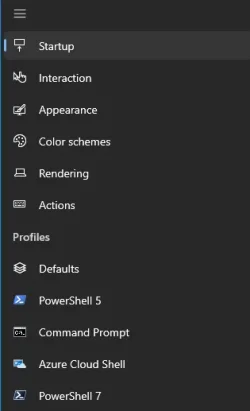
Right now - I am auditing my Windows Terminal layout - which is heavily customized across the usual different areas:
1738508282123.webp

Now - I have searched out and read all I can on what appears to be "typical" backup/restore for these settings - by copying all three files from here:

%LocalAppData%\Packages\Microsoft.WindowsTerminal_8wekyb3d8bbwe\LocalState

state.json
settings.json
elevated-state.json

to a safe location - and then simply copying these 3 back into the default folder above AFTER a new install.

However - I have examined all three of these files in VS Code - and there ain't a lot in here.

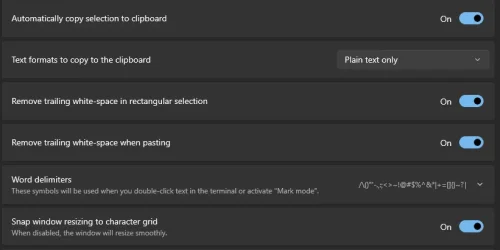
Certainly no where near the settings to ensure that say - sliders like this:
1738508660581.webp

Are set correctly during a restore.

Do not see any reference to my color schemes or actually anything in the settings.json file.

So - what am I missing here?

Is it even possible for a 100% failsafe restore - where I can clean install Terminal, apply a backup, open Terminal and have all settings to be exactly where I am right now on my current machine?

S
 

My Computer My Computer

At a glance

Windows 11 PRO 25H2Intel i5-10600KCorsair Vengeance LPX 64GB (2x32GB) (CMK64GX5...Intel UHD Graphics 630
OS
Windows 11 PRO 25H2
Computer type
PC/Desktop
Manufacturer/Model
ASUS
CPU
Intel i5-10600K
Motherboard
ProArt z490-Creator 10G
Memory
Corsair Vengeance LPX 64GB (2x32GB) (CMK64GX5M2B5600C40)
Graphics Card(s)
Intel UHD Graphics 630
Sound Card
RME ADI-2 FS DAC
Monitor(s) Displays
Dell U2415
Screen Resolution
1920x1080
Hard Drives
Samsung NMVE (990 Pro, 970 EVO)
PSU
Seasonic GX750
Case
Coolermaster CM-690II
Cooling
Noctua
Keyboard
Logitech MX Keys
Mouse
Logitech M510
Internet Speed
1 GBPS+
Browser
MS Edge
Antivirus
Windows Defender
Let's look at this from a slightly different angle since I am not familiar with saving settings from Terminal...

When you say that you are going to rebuild your system, how do you mean? Are you going to upgrade / replace hardware or do you simply want to reinstall Windows from scratch?

If it is hardware that you are changing, why not simply create a disk image using something like Macrium Reflect and then restore it on the new hardware? Restoration of an image can be done to different hardware, you may simply need to update some drivers and you are good to go with the exception of programs that may need to be deactivated then reactivated on the new hardware.

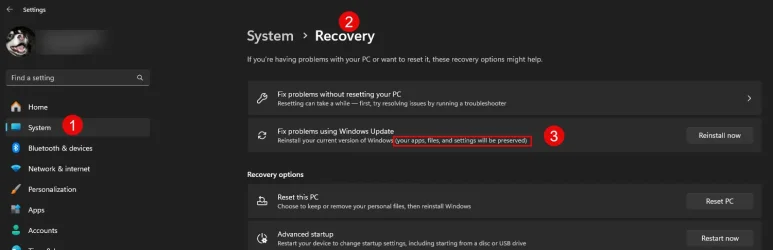
If your goal is to simply reinstall Windows, why not consider using the "Fix problems using Windows Update" option since this will keep all of your settings?

Image4.webp
 

My Computers My Computers

  • At a glance

    Win11 Pro 25H2 (RTM+)Intel i7-14650HX32 GBNo GPU - Built-in Intel Graphics
    OS
    Win11 Pro 25H2 (RTM+)
    Computer type
    PC/Desktop
    Manufacturer/Model
    Acemagic
    CPU
    Intel i7-14650HX
    Memory
    32 GB
    Graphics Card(s)
    No GPU - Built-in Intel Graphics
    Sound Card
    Integrated
    Monitor(s) Displays
    Varies as machine will often be moved to locations with different monitors
    Screen Resolution
    Varies
    Hard Drives
    1 x 1TB Gen 4 NVMe SSD
    PSU
    120W Power Brick
    Keyboard
    Corsair K70 Max RGB Magnetic Keyboard
    Mouse
    Logitech MX Master 3
    Internet Speed
    1Gb Up / 1 Gb Down
    Browser
    Edge
    Antivirus
    Windows Defender
  • At a glance

    Win11 Pro 25H2 (RTM+)Intel i7-1255U16 GBIntel Iris Xe Graphics
    Operating System
    Win11 Pro 25H2 (RTM+)
    Computer type
    Laptop
    Manufacturer/Model
    Lenovo ThinkBook 13x Gen 2
    CPU
    Intel i7-1255U
    Memory
    16 GB
    Graphics card(s)
    Intel Iris Xe Graphics
    Sound Card
    Realtek® ALC3306-CG codec
    Monitor(s) Displays
    13.3-inch IPS Display
    Screen Resolution
    WQXGA (2560 x 1600)
    Hard Drives
    2 TB 4 x 4 NVMe SSD
    PSU
    USB-C / Thunderbolt 4 Power / Charging
    Keyboard
    Backlit, spill resistant keyboard
    Mouse
    Buttonless Glass Precision Touchpad
    Internet Speed
    1Gb Up / 1Gb Down
    Browser
    Edge
    Antivirus
    Windows Defender
    Other Info
    WiFi 6e / Bluetooth 5.1 / Facial Recognition / Fingerprint Sensor / ToF (Time of Flight) Human Presence Sensor
Let's look at this from a slightly different angle since I am not familiar with saving settings from Terminal...

When you say that you are going to rebuild your system, how do you mean? Are you going to upgrade / replace hardware or do you simply want to reinstall Windows from scratch?

If it is hardware that you are changing, why not simply create a disk image using something like Macrium Reflect and then restore it on the new hardware? Restoration of an image can be done to different hardware, you may simply need to update some drivers and you are good to go with the exception of programs that may need to be deactivated then reactivated on the new hardware.

If your goal is to simply reinstall Windows, why not consider using the "Fix problems using Windows Update" option since this will keep all of your settings?

View attachment 124043
This is a full rebuild. New hardware. New OS. New everything.

And yes I do have Macrium here - but I won't be trying to replicate my existing 2021 Windows 10 layout to a machine that will be moving to Win 11.

On the Terminal question - just did a bit more testing - and strangely - I think I spoke too fast. Backing up and restoring these three files DOES seem to work. Given the almost nonexistant text within this Settings.json - I still cannot figure out how these files know to turn these sliders to specific positions etc - but as sparse as these files appear to be - it works.

Good enough for me.

S
 

My Computer My Computer

At a glance

Windows 11 PRO 25H2Intel i5-10600KCorsair Vengeance LPX 64GB (2x32GB) (CMK64GX5...Intel UHD Graphics 630
OS
Windows 11 PRO 25H2
Computer type
PC/Desktop
Manufacturer/Model
ASUS
CPU
Intel i5-10600K
Motherboard
ProArt z490-Creator 10G
Memory
Corsair Vengeance LPX 64GB (2x32GB) (CMK64GX5M2B5600C40)
Graphics Card(s)
Intel UHD Graphics 630
Sound Card
RME ADI-2 FS DAC
Monitor(s) Displays
Dell U2415
Screen Resolution
1920x1080
Hard Drives
Samsung NMVE (990 Pro, 970 EVO)
PSU
Seasonic GX750
Case
Coolermaster CM-690II
Cooling
Noctua
Keyboard
Logitech MX Keys
Mouse
Logitech M510
Internet Speed
1 GBPS+
Browser
MS Edge
Antivirus
Windows Defender
This is a full rebuild. New hardware. New OS. New everything.

And yes I do have Macrium here - but I won't be trying to replicate my existing 2021 Windows 10 layout to a machine that will be moving to Win 11.

On the Terminal question - just did a bit more testing - and strangely - I think I spoke too fast. Backing up and restoring these three files DOES seem to work. Given the almost nonexistant text within this Settings.json - I still cannot figure out how these files know to turn these sliders to specific positions etc - but as sparse as these files appear to be - it works.

Good enough for me.

S
Glad to see that you got it sorted out, but for reference, you can easily restore an image to completely different hardware. Works flawlessly. There may be rare cases where it does not work, but if you still have the old machine, no harm, no foul.

However, I can understand if your preference is to do a clean install. That is also my personal preference, but only because I have processes in place that can get me from bare metal to fully configured including all apps, settings - everything - in under 40 minutes.
 

My Computers My Computers

  • At a glance

    Win11 Pro 25H2 (RTM+)Intel i7-14650HX32 GBNo GPU - Built-in Intel Graphics
    OS
    Win11 Pro 25H2 (RTM+)
    Computer type
    PC/Desktop
    Manufacturer/Model
    Acemagic
    CPU
    Intel i7-14650HX
    Memory
    32 GB
    Graphics Card(s)
    No GPU - Built-in Intel Graphics
    Sound Card
    Integrated
    Monitor(s) Displays
    Varies as machine will often be moved to locations with different monitors
    Screen Resolution
    Varies
    Hard Drives
    1 x 1TB Gen 4 NVMe SSD
    PSU
    120W Power Brick
    Keyboard
    Corsair K70 Max RGB Magnetic Keyboard
    Mouse
    Logitech MX Master 3
    Internet Speed
    1Gb Up / 1 Gb Down
    Browser
    Edge
    Antivirus
    Windows Defender
  • At a glance

    Win11 Pro 25H2 (RTM+)Intel i7-1255U16 GBIntel Iris Xe Graphics
    Operating System
    Win11 Pro 25H2 (RTM+)
    Computer type
    Laptop
    Manufacturer/Model
    Lenovo ThinkBook 13x Gen 2
    CPU
    Intel i7-1255U
    Memory
    16 GB
    Graphics card(s)
    Intel Iris Xe Graphics
    Sound Card
    Realtek® ALC3306-CG codec
    Monitor(s) Displays
    13.3-inch IPS Display
    Screen Resolution
    WQXGA (2560 x 1600)
    Hard Drives
    2 TB 4 x 4 NVMe SSD
    PSU
    USB-C / Thunderbolt 4 Power / Charging
    Keyboard
    Backlit, spill resistant keyboard
    Mouse
    Buttonless Glass Precision Touchpad
    Internet Speed
    1Gb Up / 1Gb Down
    Browser
    Edge
    Antivirus
    Windows Defender
    Other Info
    WiFi 6e / Bluetooth 5.1 / Facial Recognition / Fingerprint Sensor / ToF (Time of Flight) Human Presence Sensor
Glad to see that you got it sorted out, but for reference, you can easily restore an image to completely different hardware. Works flawlessly. There may be rare cases where it does not work, but if you still have the old machine, no harm, no foul.

However, I can understand if your preference is to do a clean install. That is also my personal preference, but only because I have processes in place that can get me from bare metal to fully configured including all apps, settings - everything - in under 40 minutes.
Yeah - restoring Windows 10 back to this new machine makes little sense considering it's impending demise. But it is probably time to give Win 11 a shot - I have been sitting on the sidelines with this for 3.5 years now.

Would love it if I could get my machine configured with all the apps, custom settings, activations, work connnections, VPNs, data restoration etc etc in 40 minutes. But that is simply not possible. Hence this 29 page guide :)

S
 

My Computer My Computer

At a glance

Windows 11 PRO 25H2Intel i5-10600KCorsair Vengeance LPX 64GB (2x32GB) (CMK64GX5...Intel UHD Graphics 630
OS
Windows 11 PRO 25H2
Computer type
PC/Desktop
Manufacturer/Model
ASUS
CPU
Intel i5-10600K
Motherboard
ProArt z490-Creator 10G
Memory
Corsair Vengeance LPX 64GB (2x32GB) (CMK64GX5M2B5600C40)
Graphics Card(s)
Intel UHD Graphics 630
Sound Card
RME ADI-2 FS DAC
Monitor(s) Displays
Dell U2415
Screen Resolution
1920x1080
Hard Drives
Samsung NMVE (990 Pro, 970 EVO)
PSU
Seasonic GX750
Case
Coolermaster CM-690II
Cooling
Noctua
Keyboard
Logitech MX Keys
Mouse
Logitech M510
Internet Speed
1 GBPS+
Browser
MS Edge
Antivirus
Windows Defender
Maybe not in 40 minutes in your scenario, but you could always do the disk image, restorte it to the new machine, install proper drivers, then do an upgrade to 11 which will preserve all your apps, etc. I guess that's only really good if you have tons of customizations, and apps and it would simply be too much of a hassle to install from scratch.

But I really like the fact that you are planning this out very carefully. Too many people rush into things without any proper planning. I'm sure the results will be worth it.

Are you completely new to Win 11 or have you played with it at all?
 

My Computers My Computers

  • At a glance

    Win11 Pro 25H2 (RTM+)Intel i7-14650HX32 GBNo GPU - Built-in Intel Graphics
    OS
    Win11 Pro 25H2 (RTM+)
    Computer type
    PC/Desktop
    Manufacturer/Model
    Acemagic
    CPU
    Intel i7-14650HX
    Memory
    32 GB
    Graphics Card(s)
    No GPU - Built-in Intel Graphics
    Sound Card
    Integrated
    Monitor(s) Displays
    Varies as machine will often be moved to locations with different monitors
    Screen Resolution
    Varies
    Hard Drives
    1 x 1TB Gen 4 NVMe SSD
    PSU
    120W Power Brick
    Keyboard
    Corsair K70 Max RGB Magnetic Keyboard
    Mouse
    Logitech MX Master 3
    Internet Speed
    1Gb Up / 1 Gb Down
    Browser
    Edge
    Antivirus
    Windows Defender
  • At a glance

    Win11 Pro 25H2 (RTM+)Intel i7-1255U16 GBIntel Iris Xe Graphics
    Operating System
    Win11 Pro 25H2 (RTM+)
    Computer type
    Laptop
    Manufacturer/Model
    Lenovo ThinkBook 13x Gen 2
    CPU
    Intel i7-1255U
    Memory
    16 GB
    Graphics card(s)
    Intel Iris Xe Graphics
    Sound Card
    Realtek® ALC3306-CG codec
    Monitor(s) Displays
    13.3-inch IPS Display
    Screen Resolution
    WQXGA (2560 x 1600)
    Hard Drives
    2 TB 4 x 4 NVMe SSD
    PSU
    USB-C / Thunderbolt 4 Power / Charging
    Keyboard
    Backlit, spill resistant keyboard
    Mouse
    Buttonless Glass Precision Touchpad
    Internet Speed
    1Gb Up / 1Gb Down
    Browser
    Edge
    Antivirus
    Windows Defender
    Other Info
    WiFi 6e / Bluetooth 5.1 / Facial Recognition / Fingerprint Sensor / ToF (Time of Flight) Human Presence Sensor
Maybe not in 40 minutes in your scenario, but you could always do the disk image, restorte it to the new machine, install proper drivers, then do an upgrade to 11 which will preserve all your apps, etc. I guess that's only really good if you have tons of customizations, and apps and it would simply be too much of a hassle to install from scratch.

But I really like the fact that you are planning this out very carefully. Too many people rush into things without any proper planning. I'm sure the results will be worth it.

Are you completely new to Win 11 or have you played with it at all?
Been testing it for 3 years now. Probably ready for a real deployment :)

S
 

My Computer My Computer

At a glance

Windows 11 PRO 25H2Intel i5-10600KCorsair Vengeance LPX 64GB (2x32GB) (CMK64GX5...Intel UHD Graphics 630
OS
Windows 11 PRO 25H2
Computer type
PC/Desktop
Manufacturer/Model
ASUS
CPU
Intel i5-10600K
Motherboard
ProArt z490-Creator 10G
Memory
Corsair Vengeance LPX 64GB (2x32GB) (CMK64GX5M2B5600C40)
Graphics Card(s)
Intel UHD Graphics 630
Sound Card
RME ADI-2 FS DAC
Monitor(s) Displays
Dell U2415
Screen Resolution
1920x1080
Hard Drives
Samsung NMVE (990 Pro, 970 EVO)
PSU
Seasonic GX750
Case
Coolermaster CM-690II
Cooling
Noctua
Keyboard
Logitech MX Keys
Mouse
Logitech M510
Internet Speed
1 GBPS+
Browser
MS Edge
Antivirus
Windows Defender
I am about to rebuild my machine for the first time since 2021 and I am creating a VERY detailed deployment guide to ensure I am back up and running in the most orderly fashion possible.

Right now - I am auditing my Windows Terminal layout - which is heavily customized across the usual different areas:

View attachment 124040

Now - I have searched out and read all I can on what appears to be "typical" backup/restore for these settings - by copying all three files from here:

%LocalAppData%\Packages\Microsoft.WindowsTerminal_8wekyb3d8bbwe\LocalState

state.json
settings.json
elevated-state.json

to a safe location - and then simply copying these 3 back into the default folder above AFTER a new install.

However - I have examined all three of these files in VS Code - and there ain't a lot in here.

Certainly no where near the settings to ensure that say - sliders like this:


Are set correctly during a restore.

Do not see any reference to my color schemes or actually anything in the settings.json file.

So - what am I missing here?

Is it even possible for a 100% failsafe restore - where I can clean install Terminal, apply a backup, open Terminal and have all settings to be exactly where I am right now on my current machine?

S
@SonicMojo,
To return to your original question about Terminal,
All I have ever backed up was the settings-json as I switched machines and even Terminal versions (Release, Preview, Canary)
For backgrounds/icons, you have to make sure they remain properly pathed with double \.
I am not sure about the color scheme though as I prefer backgrounds to reflect what I am using.

terminal.webp
 

My Computers My Computers

  • At a glance

    All Branches but ReleaseAMD Ryzen 7 7735HS 3200-4500 Mhz 8 cores x 232 GB DDR5Radeon Graphic / NVIDIA GeForce RTX 4060 8 GB...
    OS
    All Branches but Release
    Computer type
    Laptop
    Manufacturer/Model
    Acer Nitro ANV15-51
    CPU
    AMD Ryzen 7 7735HS 3200-4500 Mhz 8 cores x 2
    Motherboard
    Sportage_RBH
    Memory
    32 GB DDR5
    Graphics Card(s)
    Radeon Graphic / NVIDIA GeForce RTX 4060 8 GB GDDR6
    Sound Card
    AMD/Realtek(R) Audio
    Monitor(s) Displays
    Integrated Monitor (15.3"vis)
    Screen Resolution
    FHD 1920X1080 16:9 144Hz
    Hard Drives
    KINGSTON OM8SEP4512Q-AA 1TB
    Western Digital 256GB
    PSU
    19V DC 6.32 A 120 W
    Cooling
    Dual Fans
    Mouse
    MS Bluetooth
    Internet Speed
    Fiber 1GB Cox -us & 1GB Orange-fr
    Browser
    Edge Canary- Firefox Nightly-Chrome Dev-Chrome Dev
    Antivirus
    Windows Defender
  • At a glance

    Windows 11 BetaAMD A9-94208 GB of DDR4AMD Radeon R5
    Operating System
    Windows 11 Beta
    Computer type
    Laptop
    Manufacturer/Model
    Asus X751BP
    CPU
    AMD A9-9420
    Memory
    8 GB of DDR4
    Graphics card(s)
    AMD Radeon R5
    Screen Resolution
    1600x900
    Hard Drives
    Seagate 1 TB
Back
Top Bottom