What powershell scripts are you using


user1010

Well-known member
Member
Local time
1:09 PM
Posts
167
OS
Windows 11
Need some more ideas and inspiration.
What powershell script are you using on your own computer or server?
 

My Computer My Computer

At a glance

Windows 11Intel Core i7-13700Corsair VENGEANCE DDR5 32GBMSI GeForce RTX 5070 12G VENTUS 2X OC
OS
Windows 11
Computer type
PC/Desktop
Manufacturer/Model
Asus
CPU
Intel Core i7-13700
Motherboard
ASUS TUF GAMING B760-PLUS WIFI
Memory
Corsair VENGEANCE DDR5 32GB
Graphics Card(s)
MSI GeForce RTX 5070 12G VENTUS 2X OC
Monitor(s) Displays
Samsung LS32AG504
Hard Drives
Kingston Fury Renegade M.2 2TB SSD
PSU
Corsair RM850X 2021 / 850W / 80+ Gold
Browser
Chrome
Antivirus
Defender
I use several, in my "Cleanup.bat" program. I don't program in Power Shell, but some members do, and they have been a great help to me, to do things that cannot be done in DOS Batch Language.

Like Emptying all the recycle bins on my PC:

PowerShell Clear-RecycleBin -force -ErrorAction:Ignore

TM :cool:
 
For example downloading software/drivers from official sites and then quietly installing them.
 

My Computer My Computer

At a glance

Microsoft Windows 11 HomeIntel Core i5-13490F2 x 16 Patriot Memory (PDP Systems) PSD516G56...GIGABYTE GeForce RTX 4070 WINDFORCE OC 12G (G...
OS
Microsoft Windows 11 Home
Computer type
PC/Desktop
Manufacturer/Model
MSI MS-7D98
CPU
Intel Core i5-13490F
Motherboard
MSI B760 GAMING PLUS WIFI
Memory
2 x 16 Patriot Memory (PDP Systems) PSD516G560081 6400MT (32-37-37-74); 1.35V)
Graphics Card(s)
GIGABYTE GeForce RTX 4070 WINDFORCE OC 12G (GV-N4070WF3OC-12GD)
Sound Card
Bluetooth Аудио
Monitor(s) Displays
INNOCN 15K1F
Screen Resolution
1920 x 1080
Hard Drives
WD_BLACK SN770 250GB
KINGSTON SNV2S1000G (ELFK0S.6)
PSU
Thermaltake Toughpower GF3 1000W
Case
CG560 - DeepCool
Cooling
ID-COOLING SE-224-XTS / 2 x 140Mm Fan - rear and top; 3 x 120Mm - front
Keyboard
Corsair K70 RGB TKL
Mouse
Corsair KATAR PRO XT
Internet Speed
100 Mbps
Browser
Firefox
Antivirus
Microsoft Defender Antivirus
Other Info
https://www.userbenchmark.com/UserRun/66553205
I don't need inspiration,,, I need a How To book on Power Shell programming.
Maybe, "Power Shell for Dummies".

And, here's Power Shell, cleaning out a temp folder:

PowerShell rm C:\Users\%UserName%\AppData\Local\Temp\* -Recurse -ErrorAction:Ignore

But:
Del /F /S /Q "C:\Users\%UserName%\AppData\Local\Temp\*.*"

Does a better job, and works on PC's that don't have Power Shell activated and working.
A DOS (only) batch file will work on any version of Windows going all the way back to DOS.


:cool:
 
Last edited:
I use several, in my "Cleanup.bat" program. I don't program in Power Shell, but some members do, and they have been a great help to me, to do things that cannot be done in DOS Batch Language.

Like Emptying all the recycle bins on my PC:

PowerShell Clear-RecycleBin -force -ErrorAction:Ignore

TM :cool:
You can program scripts on Notepad++
 

My Computers My Computers

  • At a glance

    Windows11 Pro 26200.8728Intel Core i9 14900F (24 -Core, 68 MB Total C...32GB DDR5RTX 4080 Super w/581.95
    OS
    Windows11 Pro 26200.8728
    Computer type
    PC/Desktop
    Manufacturer/Model
    Dell Alienware Aurora R16
    CPU
    Intel Core i9 14900F (24 -Core, 68 MB Total Cache)
    Motherboard
    Dell Alienware
    Memory
    32GB DDR5
    Graphics Card(s)
    RTX 4080 Super w/581.95
    Sound Card
    Realtec
    Monitor(s) Displays
    Corsair XENEON 32QHD165
    Screen Resolution
    2560 X 1440
    Hard Drives
    1-2TB Samsung 990 Pro PCIe NVMe M2 SSD
    1-4TB Samsung 990 Pro PCIe NVMe M2 SSD
    PSU
    1000 Watt Platinum Dell
    Case
    Alienware
    Cooling
    Liquid Closed Loop
    Keyboard
    Corsair Strafe RGB
    Mouse
    Logitech MK270 Wireless
    Internet Speed
    100Gb's Down-20 Up
    Browser
    Firefox 152.0.1
    Antivirus
    Defender
    Other Info
    Very Quiet And Fast
    CyberPower UPS CP1500PFCLCD
  • At a glance

    PClinuxOS Mate (2025.7)13th Gen Inter(R) Core(TM) i3-1315U64 GB DDR4 @3200 MHz.Internal
    Operating System
    PClinuxOS Mate (2025.7)
    Computer type
    PC/Desktop
    Manufacturer/Model
    Intel
    CPU
    13th Gen Inter(R) Core(TM) i3-1315U
    Motherboard
    Intel
    Memory
    64 GB DDR4 @3200 MHz.
    Graphics card(s)
    Internal
    Sound Card
    None
    Monitor(s) Displays
    Dell 2419HGCF
    Screen Resolution
    1920 X 1080
    Hard Drives
    SAMSUNG 980 PRO SSD 2TB, PCIe 4.0 M.2 2280
    PSU
    Chicony 30 Watt
    Case
    Small
    Keyboard
    Dell
    Mouse
    Razor
    Internet Speed
    1GB
    Browser
    Slimjet
I use several, in my "Cleanup.bat" program. I don't program in Power Shell, but some members do, and they have been a great help to me, to do things that cannot be done in DOS Batch Language.

Like Emptying all the recycle bins on my PC:

PowerShell Clear-RecycleBin -force -ErrorAction:Ignore

TM :cool:
Please could I have a copy of your Windows11Cleanup.bat program. Not sure how to send pm - still finding my way around this Forum. Thanks.
 

My Computer My Computer

At a glance

Windows 11 Professional 24H2Intel i5 8th Gen
OS
Windows 11 Professional 24H2
Computer type
Laptop
Manufacturer/Model
Thinkpad T480
CPU
Intel i5 8th Gen

My Computer My Computer

At a glance

Home26H2CanAMD Ryzen 5 8600G (07/24)2x32GB Kingston FURY DDR5 5600 MHz CL36 @5200...ASROCK Radeon RX 6600 Challenger D 8G @48FPS ...
OS
Home26H2Can
Computer type
PC/Desktop
CPU
AMD Ryzen 5 8600G (07/24)
Motherboard
ASROCK B650M-HDV/M.2 (07/24) BIOS 4.21 AGESA ComboAM5 1.3.0.1 (04/26)
Memory
2x32GB Kingston FURY DDR5 5600 MHz CL36 @5200 CL36 (07/24)
Graphics Card(s)
ASROCK Radeon RX 6600 Challenger D 8G @48FPS (08/24)
Sound Card
Creative Sound BlasterX AE-5 Plus (05/24)
Monitor(s) Displays
24" Philips 24M1N3200ZS/00 (05/24)
Screen Resolution
1920×1080@165Hz via DP1.4
Hard Drives
Kingston KC3000 NVMe 2TB (05/24)
ADATA XPG GAMMIX S11 Pro 512GB (07/19)
PSU
Seasonic Core GM 550 Gold (04/24)
Case
Fractal Design Define 7 Mini with 3x Noctua NF-P14s/12@555rpm (04/24)
Cooling
Noctua NH-U12S with Noctua NF-P12 (04/24)
Keyboard
HP Pavilion Wired Keyboard 300 (07/24) + Rabalux 76017 Parker (01/24)
Mouse
Logitech M330 Silent Plus (01/26)
Internet Speed
500/100 Mbps via RouterOS (05/21) & TCP Optimizer
Browser
Edge, Brave for YouTube, LibreWolf for FB
Antivirus
NextDNS blocking 1/3 Traffic
Other Info
Phone: Motorola Moto G86 (02/26)
Backup: Hasleo Backup Suite (PreOS)
Headphones: Sennheiser RS170 (09/10)
Chair: Huzaro Force 4.4 Grey Mesh (05/24)
Notifier: Xiaomi Mi Band 9 Milanese (10/24)
FlexCore USB-C 3.2 Gen 1 (M) to LAN (F) (08/25)

My Computers My Computers

  • At a glance

    Windows 11 Pro 23H2Intel 12th Gen Intel Core i5-12600KF, 3686 MHzCORSAIR Vengeance 32GB (2 x 16GB) 288-Pin PC ...GIGABYTE GeForce RTX 4060, 3x Fans, 8GB GDDR6 OC
    OS
    Windows 11 Pro 23H2
    Computer type
    PC/Desktop
    Manufacturer/Model
    Custom Build By Lance1
    CPU
    Intel 12th Gen Intel Core i5-12600KF, 3686 MHz
    Motherboard
    GIGABYTE Z790 AORUS ELITE AX LGA 1700 Intel Z790 ATX
    Memory
    CORSAIR Vengeance 32GB (2 x 16GB) 288-Pin PC RAM DDR5 6400 (PC5 51200) Dual-Channel
    Graphics Card(s)
    GIGABYTE GeForce RTX 4060, 3x Fans, 8GB GDDR6 OC
    Sound Card
    AMD High Definition
    Monitor(s) Displays
    Samsung 32" 60Hz 4ms Curved PLS LED
    Screen Resolution
    1920 X 1080
    Hard Drives
    WD Blue NVME M.2 1T Boot Drive
    WD Blue SSD 1T
    WD Blue NVME M.2 2T
    PSU
    EVGA SuperNOVA 850 GT, 80 Plus Gold 850W, Fully Modular,
    Case
    Fractal Design Pop XL Air RGB Black TG ATX High-Airflow Clear Tempered Glass Window Full Tower
    Cooling
    Noctua NH-D15 chromax black, Dual Tower CPU Cooler with Dual NF-A15 PWM 140mm Fans (Black)
    Keyboard
    Devistator 3
    Mouse
    Inphic PM6 Pro
    Internet Speed
    Telus Fiber Optic: Download 332.7 Mbps / Upload 331.5 Mbps
    Browser
    Vivaldi (64bit)
    Antivirus
    Windows Defender
  • At a glance

    Window 11 ProIntel(R) Core(TM) i3-2310M CPU @ 2.10GHz4 GB DDR3Intel(R) HD Graphics 3000
    Operating System
    Window 11 Pro
    Computer type
    Laptop
    Manufacturer/Model
    DELL Inspiron N7110
    CPU
    Intel(R) Core(TM) i3-2310M CPU @ 2.10GHz
    Motherboard
    Dell Inc. 0YH79Y
    Memory
    4 GB DDR3
    Graphics card(s)
    Intel(R) HD Graphics 3000
    Sound Card
    High Definition Audio
    Monitor(s) Displays
    17.3 Inch Display
    Screen Resolution
    1600 X 900
    Hard Drives
    Samsung SSD 860 EVO 500GB
    Internet Speed
    Fiber Optic: Download 332.7 Mbps / Upload 331.5 Mbps
    Browser
    Vivaldi 64 bit
    Antivirus
    Windows Defender
    Other Info
    YA! This the old backup. In case things go south. It'll give me access to everything I need.
At home, I've used PowerShell to backup all user profiles to a WIM file, compressing the size 40-50%. (I don't do system images.)

I use it to process large files, e.g. looking for certain data, or changing one value to another wherever it occurs. I also check hashes of downloaded files, or generate hashes for files I upload somewhere.

It's my system cleanup tool. Not only disk cleanup, making sure things stay out of the various system startup locations, services and scheduled tasks stay disabled, etc.

Create virtual disks for running test versions of Windows. Also use it to create custom Windows installation media, based on original MS media.

Some book recommendations: the PowerShell cookbook published by O'Reilly, and anything Chris Dent writes. There is also a PowerShell discord which used to be quite nice; haven't been on it in a while.
 

My Computer My Computer

At a glance

Windows 11 Pro 25H212th Gen Core i7-1260P64 GB Micron PC4-25600Intel Iris Xe Graphics
OS
Windows 11 Pro 25H2
Computer type
PC/Desktop
Manufacturer/Model
Intel NUC12WSHi7
CPU
12th Gen Core i7-1260P
Motherboard
NUC12WSBi7
Memory
64 GB Micron PC4-25600
Graphics Card(s)
Intel Iris Xe Graphics
Sound Card
on-board Realtek HD Audio
Monitor(s) Displays
Dell U3219Q
Screen Resolution
3840 x 2160
Hard Drives
Samsung SSD 990 PRO 1TB
Crucial MX500 2 TB
Antivirus
Microsoft Defender
Please could I have a copy of your Windows11Cleanup.bat program. Not sure how to send pm - still finding my way around this Forum. Thanks.
Dennis, there are several ways. The easiest, IMO, is to tap the avatar of the member. A panel will open that has a button at the bottom that says, Start a conversation. That does it. Later, to get back to that conversation, tap the envelope icon at the top of your pages. You’ll see a menu.
 

My Computers My Computers

  • At a glance

    11 Pro 24H2 26100.2454i7-9700 @ 3.00GHz32GBDDR4 @ 2666MHzIntel HD 630 Graphics onboard
    OS
    11 Pro 24H2 26100.2454
    Computer type
    PC/Desktop
    Manufacturer/Model
    Lenovo ThinkCentre M920S SFF
    CPU
    i7-9700 @ 3.00GHz
    Motherboard
    Lenovo 3132
    Memory
    32GBDDR4 @ 2666MHz
    Graphics Card(s)
    Intel HD 630 Graphics onboard
    Sound Card
    Realtek HD Audio
    Monitor(s) Displays
    LG E2442
    Screen Resolution
    1920x1080
    Hard Drives
    1 x Samsung 970 EVO PLUS 500GB NVMe SSD, 1 x WD_BLACK SN770
    250GB NVMe SSD (OS and programs), 1 x WD_BLACK SN770
    500GB NVMe SSD (Data)
    Case
    Lenovo SFF
    Keyboard
    Cherry Stream TKL JK-8600US-2 Wired
    Mouse
    LogiTech M510 wireless
    Internet Speed
    Fast (for fixed wireless!)
    Browser
    Chrome, sometimes Firefox
    Antivirus
    Malwarebytes Premium & Defender (working together beautifully!)
  • At a glance

    11 Pro 24H2 26100.2454i5-8400 @ 2.80GHz32GB DDR4 @ 2600MHzIntel HD 630 Graphics onboard
    Operating System
    11 Pro 24H2 26100.2454
    Computer type
    PC/Desktop
    Manufacturer/Model
    Lenovo ThinkCentre M920S SFF
    CPU
    i5-8400 @ 2.80GHz
    Motherboard
    Lenovo 3132
    Memory
    32GB DDR4 @ 2600MHz
    Graphics card(s)
    Intel HD 630 Graphics onboard
    Sound Card
    Realtek High Definition Audio onboard
    Monitor(s) Displays
    LG FULL HD (1920x1080@59Hz)
    Screen Resolution
    1920 x 1080
    Hard Drives
    1 x Samsung 970 EVO PLUS NVMe; 1 x Samsung 980 NVMe SSD
    Case
    Lenovo Think Centre SFF
    Keyboard
    Cherry Stream TKL JK-8600US-2 Wired
    Mouse
    LogiTech M510 wireless
    Internet Speed
    Fast (for fixed wireless!)
    Browser
    Chrome
    Antivirus
    Malwarebytes Premium and MS Defender, beautiful together
LOL. When it comes to scripts or regedits, I throw myself on the mercy of a few of my fellow forum members. I know only basics from the command line and I never learned PS at all. Same goes for altering the registry. I know just enough to be dangerous so I've never trusted myself well enough to get it right. I'm too darned old to begin learning it now.
I commend you for wanting to learn and I admire the hell out of anyone else who is profficient at it.
 

My Computers My Computers

  • At a glance

    Windows 11 Pro 25H2 26200.8655i9-10900 10 core 20 threads32 gbnone-Intel UHD Graphics 630
    OS
    Windows 11 Pro 25H2 26200.8655
    Computer type
    PC/Desktop
    Manufacturer/Model
    Dell Optiplex 7080
    CPU
    i9-10900 10 core 20 threads
    Motherboard
    DELL 0J37VM
    Memory
    32 gb
    Graphics Card(s)
    none-Intel UHD Graphics 630
    Sound Card
    Integrated Realtek
    Monitor(s) Displays
    Benq 27
    Screen Resolution
    2560x1440
    Hard Drives
    2x1tb Solidigm m.2 nvme /External drives 512gb Samsung m.2 sata+2tb Kingston m2.nvme
    PSU
    500w
    Case
    MT
    Cooling
    Dell Premium
    Keyboard
    Logitech wired
    Mouse
    Logitech wireless
    Internet Speed
    so slow I'm too embarrassed to tell
    Browser
    #1 Edge #2 Firefox
    Antivirus
    Defender+MWB Premium
  • At a glance

    Windows 11 Pro 24H2 26200.8457AMD Ryzen 7 6800U32 gbintegrated
    Operating System
    Windows 11 Pro 24H2 26200.8457
    Computer type
    PC/Desktop
    Manufacturer/Model
    Beelink Mini PC SER5
    CPU
    AMD Ryzen 7 6800U
    Memory
    32 gb
    Graphics card(s)
    integrated
    Sound Card
    integrated
    Monitor(s) Displays
    Benq 27
    Screen Resolution
    2560x1440
    Hard Drives
    1TB Crucial nvme
    Keyboard
    Logitech wired
    Mouse
    Logitech wireless
    Internet Speed
    still too embarrassed to tell
    Browser
    Firefox
    Antivirus
    Defender
    Other Info
    System 3 is non compliant Dell 9020 i7-4770/24gb ram Win11 PRO 26200.8457
I did manage to write some myself, but nothing too extraordinary. A few days ago I wrote one that uses inline C# to remember the folderpath, the window position and size, the minimized/maximized/restored state, the horizontal and vertical scrollbar positions, and the paths of selected items (if any) for each open File Explorer window, then closes each of these windows, and waits for me to restart the explorer process so, next, when I press the Enter key, it re-opens these windows in such a way that it re-applies all the aforementioned window properties to them. On Win11, it only works if using the tweak that brings back the classic File Explorer from Win10. (I use ExplorerPatcher for this, which has an option that also lets you achieve this same effect of bringing it back.)
 

My Computers My Computers

  • At a glance

    11 Homei7 13650HX16GB DDR5GeForce RTX 4060 Mobile
    OS
    11 Home
    Computer type
    Laptop
    Manufacturer/Model
    Asus TUF Gaming F16 (2024)
    CPU
    i7 13650HX
    Memory
    16GB DDR5
    Graphics Card(s)
    GeForce RTX 4060 Mobile
    Sound Card
    Eastern Electric MiniMax DAC Supreme; Emotiva UMC-200; Astell & Kern AK240
    Monitor(s) Displays
    Sony Bravia XR-55X90J
    Screen Resolution
    3840×2160
    Hard Drives
    512GB SSD internal
    37TB external
    PSU
    Li-ion
    Cooling
    2× Arc Flow Fans, 4× exhaust vents, 5× heatpipes
    Keyboard
    Logitech K800
    Mouse
    Logitech G402
    Internet Speed
    30Mbit/s up, 500Mbit/s down
    Browser
    FF
    Antivirus
    What's an antivirus?
  • At a glance

    11 Homei5 1135G716GB DDR4Intel Iris Xe
    Operating System
    11 Home
    Computer type
    Laptop
    Manufacturer/Model
    Medion S15450
    CPU
    i5 1135G7
    Memory
    16GB DDR4
    Graphics card(s)
    Intel Iris Xe
    Sound Card
    Eastern Electric MiniMax DAC Supreme; Emotiva UMC-200; Astell & Kern AK240
    Monitor(s) Displays
    Sony Bravia XR-55X90J
    Screen Resolution
    3840×2160
    Hard Drives
    2TB SSD internal
    37TB external
    PSU
    Li-ion
    Keyboard
    Logitech K800
    Mouse
    Logitech G402
    Internet Speed
    30Mbit/s up, 500Mbit/s down
    Browser
    FF
I use several, in my "Cleanup.bat" program. I don't program in Power Shell, but some members do, and they have been a great help to me, to do things that cannot be done in DOS Batch Language.

Like Emptying all the recycle bins on my PC:

PowerShell Clear-RecycleBin -force -ErrorAction:Ignore

TM :cool:
Yeah, I have also seen that there is some scripts for collecting and uploading logs/information for forum members when they got a problem and wants help. :)

For example downloading software/drivers from official sites and then quietly installing them.
That is a good one. Do you have any example of PS functions/cmdlets do you use for that? The only updates I install with PS is from Windows update (PSWindowsUpdate). Sometimes I use the gui as well. How do you handle windows updates?

I don't need inspiration,,, I need a How To book on Power Shell programming.
Maybe, "Power Shell for Dummies".

And, here's Power Shell, cleaning out a temp folder:

PowerShell rm C:\Users\%UserName%\AppData\Local\Temp\* -Recurse -ErrorAction:Ignore

But:
Del /F /S /Q "C:\Users\%UserName%\AppData\Local\Temp\*.*"

Does a better job, and works on PC's that don't have Power Shell activated and working.
A DOS (only) batch file will work on any version of Windows going all the way back to DOS.


:cool:
A book is not a bad idea. I have started earlier with "Mastering PowerShell Scripting", fourth edition by Chris Dent. Maybe to advanced for me just now but you allways something to learn. I'll have more time on my vacation to deeper my knowledge.

What are the benefits of cleaning out the temp folder?

You can program scripts on Notepad++
I use Notepad++ all the time. Any special function you like?

Indeed, I also avoid PS, CMD is much simpler.


Code:
del "C:\$Recycle.bin" /s /f /q
del "D:\$Recycle.bin" /s /f /q
CMD are also welcomed. I think both are very usable. If it possible - the topic can be changed to Powershell/CMD or similar.

At home, I've used PowerShell to backup all user profiles to a WIM file, compressing the size 40-50%. (I don't do system images.)

I use it to process large files, e.g. looking for certain data, or changing one value to another wherever it occurs. I also check hashes of downloaded files, or generate hashes for files I upload somewhere.

It's my system cleanup tool. Not only disk cleanup, making sure things stay out of the various system startup locations, services and scheduled tasks stay disabled, etc.

Create virtual disks for running test versions of Windows. Also use it to create custom Windows installation media, based on original MS media.

Some book recommendations: the PowerShell cookbook published by O'Reilly, and anything Chris Dent writes. There is also a PowerShell discord which used to be quite nice; haven't been on it in a while.
Ok - interesting. I haven't thought about compressing the files to wim. I have robocopy scripts for my pictures to another disk for backup. Also a generated csv with installed programs. Using 1TB (main disk) and 2TB(backup and hyper-v vhdx) m2 sata disks.

Where do you download files from?
What do you do with the test versions of windows? I'm running two virtual machines on Hyper-V, one with windows 10 to test with and one with Ubuntu for Apache.

I recommend the Copilot for learning PS.
It can explain the whole code. You can also describe what you want to have in code.

LOL. When it comes to scripts or regedits, I throw myself on the mercy of a few of my fellow forum members. I know only basics from the command line and I never learned PS at all. Same goes for altering the registry. I know just enough to be dangerous so I've never trusted myself well enough to get it right. I'm too darned old to begin learning it now.
I commend you for wanting to learn and I admire the hell out of anyone else who is profficient at it.
I think I'm to old too and a bit late starting/continueing. CMD is easier to understand but Powershell seems more powerfull and worth trying to learn.

I did manage to write some myself, but nothing too extraordinary. A few days ago I wrote one that uses inline C# to remember the folderpath, the window position and size, the minimized/maximized/restored state, the horizontal and vertical scrollbar positions, and the paths of selected items (if any) for each open File Explorer window, then closes each of these windows, and waits for me to restart the explorer process so, next, when I press the Enter key, it re-opens these windows in such a way that it re-applies all the aforementioned window properties to them. On Win11, it only works if using the tweak that brings back the classic File Explorer from Win10. (I use ExplorerPatcher for this, which has an option that also lets you achieve this same effect of bringing it back.)
All scripts are welcomed. Is it possible to show with a screenshot what you mean? I have thinked about C# further forward. It can be combined with PS. :)


One example of scripts that I have is to show the latest 100 system events and list them. Then I have created a alias in profile.ps1

Set-Alias -Name eventsystem -Value C:\Scripts\eventsystem.ps1

So I just need to type evensystem
Powershell:
Get-WinEvent -LogName 'System' -MaxEvents 100 | Select-Object TimeCreated, ID, ProviderName, LevelDisplayName, Message | Format-Table -AutoSize

How do you try to find what you want in the logs? I think that can be complicated sometimes.
 

My Computer My Computer

At a glance

Windows 11Intel Core i7-13700Corsair VENGEANCE DDR5 32GBMSI GeForce RTX 5070 12G VENTUS 2X OC
OS
Windows 11
Computer type
PC/Desktop
Manufacturer/Model
Asus
CPU
Intel Core i7-13700
Motherboard
ASUS TUF GAMING B760-PLUS WIFI
Memory
Corsair VENGEANCE DDR5 32GB
Graphics Card(s)
MSI GeForce RTX 5070 12G VENTUS 2X OC
Monitor(s) Displays
Samsung LS32AG504
Hard Drives
Kingston Fury Renegade M.2 2TB SSD
PSU
Corsair RM850X 2021 / 850W / 80+ Gold
Browser
Chrome
Antivirus
Defender
Yeah, I have also seen that there is some scripts for collecting and uploading logs/information for forum members when they got a problem and wants help. :)


That is a good one. Do you have any example of PS functions/cmdlets do you use for that? The only updates I install with PS is from Windows update (PSWindowsUpdate). Sometimes I use the gui as well. How do you handle windows updates?


A book is not a bad idea. I have started earlier with "Mastering PowerShell Scripting", fourth edition by Chris Dent. Maybe to advanced for me just now but you allways something to learn. I'll have more time on my vacation to deeper my knowledge.

What are the benefits of cleaning out the temp folder?


I use Notepad++ all the time. Any special function you like?


CMD are also welcomed. I think both are very usable. If it possible - the topic can be changed to Powershell/CMD or similar.


Ok - interesting. I haven't thought about compressing the files to wim. I have robocopy scripts for my pictures to another disk for backup. Also a generated csv with installed programs. Using 1TB (main disk) and 2TB(backup and hyper-v vhdx) m2 sata disks.

Where do you download files from?
What do you do with the test versions of windows? I'm running two virtual machines on Hyper-V, one with windows 10 to test with and one with Ubuntu for Apache.

I recommend the Copilot for learning PS.
It can explain the whole code. You can also describe what you want to have in code.


I think I'm to old too and a bit late starting/continueing. CMD is easier to understand but Powershell seems more powerfull and worth trying to learn.


All scripts are welcomed. Is it possible to show with a screenshot what you mean? I have thinked about C# further forward. It can be combined with PS. :)


One example of scripts that I have is to show the latest 100 system events and list them. Then I have created a alias in profile.ps1

Set-Alias -Name eventsystem -Value C:\Scripts\eventsystem.ps1

So I just need to type evensystem
Powershell:
Get-WinEvent -LogName 'System' -MaxEvents 100 | Select-Object TimeCreated, ID, ProviderName, LevelDisplayName, Message | Format-Table -AutoSize

How do you try to find what you want in the logs? I think that can be complicated sometimes.
I just like the Program, I feel that it is far superior than MS's Notepad.
 

My Computers My Computers

  • At a glance

    Windows11 Pro 26200.8728Intel Core i9 14900F (24 -Core, 68 MB Total C...32GB DDR5RTX 4080 Super w/581.95
    OS
    Windows11 Pro 26200.8728
    Computer type
    PC/Desktop
    Manufacturer/Model
    Dell Alienware Aurora R16
    CPU
    Intel Core i9 14900F (24 -Core, 68 MB Total Cache)
    Motherboard
    Dell Alienware
    Memory
    32GB DDR5
    Graphics Card(s)
    RTX 4080 Super w/581.95
    Sound Card
    Realtec
    Monitor(s) Displays
    Corsair XENEON 32QHD165
    Screen Resolution
    2560 X 1440
    Hard Drives
    1-2TB Samsung 990 Pro PCIe NVMe M2 SSD
    1-4TB Samsung 990 Pro PCIe NVMe M2 SSD
    PSU
    1000 Watt Platinum Dell
    Case
    Alienware
    Cooling
    Liquid Closed Loop
    Keyboard
    Corsair Strafe RGB
    Mouse
    Logitech MK270 Wireless
    Internet Speed
    100Gb's Down-20 Up
    Browser
    Firefox 152.0.1
    Antivirus
    Defender
    Other Info
    Very Quiet And Fast
    CyberPower UPS CP1500PFCLCD
  • At a glance

    PClinuxOS Mate (2025.7)13th Gen Inter(R) Core(TM) i3-1315U64 GB DDR4 @3200 MHz.Internal
    Operating System
    PClinuxOS Mate (2025.7)
    Computer type
    PC/Desktop
    Manufacturer/Model
    Intel
    CPU
    13th Gen Inter(R) Core(TM) i3-1315U
    Motherboard
    Intel
    Memory
    64 GB DDR4 @3200 MHz.
    Graphics card(s)
    Internal
    Sound Card
    None
    Monitor(s) Displays
    Dell 2419HGCF
    Screen Resolution
    1920 X 1080
    Hard Drives
    SAMSUNG 980 PRO SSD 2TB, PCIe 4.0 M.2 2280
    PSU
    Chicony 30 Watt
    Case
    Small
    Keyboard
    Dell
    Mouse
    Razor
    Internet Speed
    1GB
    Browser
    Slimjet
That is a good one. Do you have any example of PS functions/cmdlets do you use for that? The only updates I install with PS is from Windows update (PSWindowsUpdate). Sometimes I use the gui as well. How do you handle windows updates?
1. Direct link (Firefox)
Powershell:
# Check PowerShell is running as Administrator
$Principal = ([Security.Principal.WindowsPrincipal] [Security.Principal.WindowsIdentity]::GetCurrent())

If (-Not ($Principal.IsInRole([Security.Principal.WindowsBuiltInRole]::Administrator))) {
    Write-Warning "You do not have Administrator rights to run this script.  Please run PowerShell as an Administrator."
    Break
}

$f=Get-Item "$env:TEMP\Firefox Setup*.exe"
if ($f) { Remove-Item -Path "$env:TEMP\Firefox Setup*.exe" -Force}

$dmanager = "C:\Windows\aria2c.exe"
Start-Process -FilePath $dmanager -NoNewWindow -ArgumentList "https://download.mozilla.org/?product=firefox-latest-ssl&os=win64&lang=en-US --dir=$env:TEMP" -Wait
$f = Get-Item "$env:TEMP\firefox*.exe"
$LatestVersion = $f.Name.SubString(14,6)
Write-Host "Current version `t`t$Version" -ForegroundColor Magenta
Write-Host "Latest version `t`t$LatestVersion" -ForegroundColor Magenta
$i = Read-Host -Prompt 'Install (Y,N) ?'
if ($i -eq 'Y' -Or $i -eq 'y') {
    
#$wc=New-Object System.Net.WebClient
#$wc.DownloadFile("https://download.mozilla.org/?product=firefox-latest-ssl&os=win64&lang=en-US", "E:\TEMP\ff.exe")

# if FF is already installed, then /TaskbarShortcut=false
Start-Process -FilePath $f.FullName -Args "/MaintenanceService=false /DesktopShortcut=false /PrivateBrowsingShortcut=false /StartMenuShortcut=false /OptionalExtensions=false /RegisterDefaultAgent=false /TaskbarShortcut=false" -Wait

if (!(Test-Path "HKCR:")) {
    New-PSDrive -Name "HKCR" -PSProvider "Registry" -Root "HKEY_CLASSES_ROOT" | Out-Null
}


if (Get-Service -Name "MozillaMaintenance" -ErrorAction SilentlyContinue)
{
    Set-Service -Name "MozillaMaintenance" -StartupType Disabled
}

Get-ScheduledTask "Firefox Default Browser Agent 308046B0AF4A39CB" | Disable-ScheduledTask

}

Read-Host "Press any key to continue..."

2. Page parsing (intel-graphics)
Powershell:
$dmanager = "C:\Windows\aria2c.exe"
$extractFolder = "$env:Temp"
$gpu = "Intel(R) Iris(R) Xe Graphics"

# to check the driver version
$Version = (Get-CimInstance Win32_PnPSignedDriver | Select-Object DeviceName, DriverVersion, Manufacturer | Where-Object {$_.DeviceName -like $gpu}).DriverVersion

$link = 'https://www.intel.com/content/www/us/en/download/19344/intel-graphics-windows-10-windows-11-dch-drivers.html'

$result = Test-NetConnection "www.intel.com" -CommonTCPPort HTTP -ErrorAction "SilentlyContinue"

if ($False -eq $result.TcpTestSucceeded)
{
  Write-Host "No internet connection" -ForegroundColor Magenta
  Exit
}

$DriverWebContent = (Invoke-WebRequest $link -UseBasicParsing).Content

$DriverWebContent -match "<meta name=`"RecommendedDownloadUrl`" content=`"([^<]+?)`""

if ($matches -eq $null)
{
  Write-Host "Driver not found" -ForegroundColor Magenta
  Exit
}

$link = $matches[0].SubString(45,65)+".zip"

$name = $link.SubString(40,29)

$DriverWebContent -match "<meta name=`"DownloadVersion`" content=`"([^<]+?)`""

$LatestVersion = $matches[0].SubString(38,18)

Write-Host "Current version `t`t$Version" -ForegroundColor Magenta
Write-Host "Latest version `t`t$LatestVersion" -ForegroundColor Magenta

# -s, --silent       Silently install.
# -f, --fresh        Forces clean/fresh installation of the driver. Used with the silent installation.

$i = Read-Host -Prompt 'Download (Y,N) ?'
if ($i -eq 'Y' -Or $i -eq 'y') {
    Start-Process -FilePath $dmanager -NoNewWindow -ArgumentList "$link --dir=$extractFolder" -Wait
    if ($? -eq 'True') {     
        $i = Read-Host -Prompt 'Install (Y,N) ?'
        if ($i -eq 'Y' -Or $i -eq 'y') {
         Expand-Archive -Path "$extractFolder\$name" -DestinationPath "$extractFolder" -Force -Verbose
         Start-Process -FilePath $extractFolder\Installer.exe -NoNewWindow -ArgumentList "-s --noExtras --report $extractFolder\IntelGFX.log" -Wait
        }
    }
}

Read-Host -Prompt 'Press any key to continue...'
 

My Computer My Computer

At a glance

Microsoft Windows 11 HomeIntel Core i5-13490F2 x 16 Patriot Memory (PDP Systems) PSD516G56...GIGABYTE GeForce RTX 4070 WINDFORCE OC 12G (G...
OS
Microsoft Windows 11 Home
Computer type
PC/Desktop
Manufacturer/Model
MSI MS-7D98
CPU
Intel Core i5-13490F
Motherboard
MSI B760 GAMING PLUS WIFI
Memory
2 x 16 Patriot Memory (PDP Systems) PSD516G560081 6400MT (32-37-37-74); 1.35V)
Graphics Card(s)
GIGABYTE GeForce RTX 4070 WINDFORCE OC 12G (GV-N4070WF3OC-12GD)
Sound Card
Bluetooth Аудио
Monitor(s) Displays
INNOCN 15K1F
Screen Resolution
1920 x 1080
Hard Drives
WD_BLACK SN770 250GB
KINGSTON SNV2S1000G (ELFK0S.6)
PSU
Thermaltake Toughpower GF3 1000W
Case
CG560 - DeepCool
Cooling
ID-COOLING SE-224-XTS / 2 x 140Mm Fan - rear and top; 3 x 120Mm - front
Keyboard
Corsair K70 RGB TKL
Mouse
Corsair KATAR PRO XT
Internet Speed
100 Mbps
Browser
Firefox
Antivirus
Microsoft Defender Antivirus
Other Info
https://www.userbenchmark.com/UserRun/66553205
All scripts are welcomed. Is it possible to show with a screenshot what you mean? I have thinked about C# further forward. It can be combined with PS. :)
Why would you need a screenshot, though? Its only purpose (for now) is to wait for me to force-terminate the explorer process, which not only causes the desktop and taskbar to disappear, but at the same time also causes all open File Explorer windows to be killed. So I can start the explorer process again next. After that, when I press the Enter key, it re-opens the File Explorer windows that were killed. However, the thing that sets it apart from other scripts that are similar to it is, it re-opens the File Explorer windows in such a way that some of their window properties will also be restored, like how I described in my first reply. I.e., their folderpath, their window position and size, their minimized/maximized/restored state, their horizontal and vertical scrollbar positions, and their selected items paths (if any).

Powershell:
Add-Type -RA UIAutomationClient, UIAutomationTypes, Microsoft.CSharp -TypeDef @'
  using System;
  using System.Collections.Generic;
  using System.Diagnostics;
  using System.IO;
  using System.Linq;
  using System.Text;
  using System.Threading;
  using System.Windows;
  using System.Windows.Automation;
  using System.Runtime.InteropServices;

  public static class Constants {
    public const uint WM_CLOSE = 16;
    public const uint WM_HSCROLL = 276;
    public const uint WM_VSCROLL = 277;

    public const int SB_CTL = 2;
    public const int SB_THUMBPOSITION = 4;
    public const int SB_ENDSCROLL = 8;

    public const uint FLASHW_STOP = 0;
  }

  public enum ShowWindowCommand {
    Hide = 0,
    Normal = 1,
    ShowMinimized = 2,
    Maximize = 3,
    ShowMaximized = 3,
    ShowNoActivate = 4,
    Show = 5,
    Minimize = 6,
    ShowMinNoActive = 7,
    ShowNA = 8,
    Restore = 9,
    ShowDefault = 10,
    ForceMinimize = 11
  }

  public class NativeStructs {
    [StructLayout(LayoutKind.Sequential)]
    public struct FLASHWINFO {
      public UInt32 cbSize;
      public IntPtr hwnd;
      public UInt32 dwFlags;
      public UInt32 uCount;
      public UInt32 dwTimeout;
    }
  }

  public class NativeMethods {
    [DllImport("user32.dll")]
    [return: MarshalAs(UnmanagedType.Bool)]
    public static extern bool IsIconic(IntPtr hWnd);

    [DllImport("user32.dll")]
    [return: MarshalAs(UnmanagedType.Bool)]
    public static extern bool IsZoomed(IntPtr hWnd);

    [DllImport("user32.dll")]
    public static extern bool ShowWindowAsync(IntPtr hWnd, ShowWindowCommand cmdShow);

    [DllImport("user32.dll")]
    public static extern IntPtr SendMessage(IntPtr hWnd, uint msg, IntPtr wParam, IntPtr lParam);

    [DllImport("User32.Dll")]
    [return: MarshalAs(UnmanagedType.Bool)]
    public static extern bool PostMessageA(IntPtr hWnd, uint msg, int wParam, int lParam);

    [DllImport("user32.dll")]
    public static extern int GetScrollPos(IntPtr hWnd, int nBar);

    [DllImport("user32.dll")]
    public static extern int SetScrollPos(IntPtr hWnd, int nBar, int nPos, bool bRedraw);

    [DllImport("user32.dll")]
    [return: MarshalAs(UnmanagedType.Bool)]
    public static extern bool FlashWindowEx(ref NativeStructs.FLASHWINFO pwfi);

    [DllImport("user32.dll")]
    [return: MarshalAs(UnmanagedType.Bool)]
    public static extern bool EnumChildWindows(IntPtr hWnd, EnumWindowProc callback, IntPtr lParam);

    [DllImport("user32.dll")]
    public static extern int GetClassName(IntPtr hWnd, StringBuilder lpClassName, int nMaxCount);
  }

  public delegate bool EnumWindowProc(IntPtr hWnd, IntPtr lParam);

  public class WindowWatcher {
    public static bool cont;

    public static List<IntPtr> GetChildWindows(IntPtr parent) {
      List<IntPtr> result = new List<IntPtr>();
      GCHandle listHandle = GCHandle.Alloc(result);
      try {
        EnumWindowProc childProc = new EnumWindowProc(EnumWindow);
        NativeMethods.EnumChildWindows(parent, childProc, GCHandle.ToIntPtr(listHandle));
      }
      finally {
        if (listHandle.IsAllocated)
          listHandle.Free();
      }
      return result;
    }

    private static bool EnumWindow(IntPtr handle, IntPtr pointer) {
      GCHandle gch = GCHandle.FromIntPtr(pointer);
      List<IntPtr> list = gch.Target as List<IntPtr>;
      if (list == null)
        throw new InvalidCastException("GCHandle Target could not be cast as List<IntPtr>");
      list.Add(handle);        
      return true;
    }

    public static void AddHandler(object[] o) {
      cont = true;
      Automation.AddAutomationEventHandler(
        WindowPattern.WindowOpenedEvent,
        AutomationElement.RootElement,
        TreeScope.Children,
        (sender, e) => {
          var element = sender as AutomationElement;
          Process process = Process.GetProcessById(element.Current.ProcessId);
          if (process.ProcessName == "explorer") {
            dynamic shell = Activator.CreateInstance(Type.GetTypeFromProgID("Shell.Application"));
            var win = shell.Windows[shell.Windows.Count - 1];
            String p = o[0].ToString();
            if (win.Document.Folder.Self.Path == p && win.HWND == (int)process.MainWindowHandle) {
              win.Left = o[2];
              win.Top = o[3];
              win.Width = o[4];
              win.Height = o[5];
              IntPtr ptH = new IntPtr(win.HWND);
              if ((int)o[1] == (int)ShowWindowCommand.ShowMinimized || (int)o[1] == (int)ShowWindowCommand.ShowMaximized)
                NativeMethods.ShowWindowAsync(ptH, (ShowWindowCommand)o[1]);
              NativeStructs.FLASHWINFO fInfo = new NativeStructs.FLASHWINFO();
              fInfo.cbSize = Convert.ToUInt32(Marshal.SizeOf(fInfo));
              fInfo.hwnd = ptH;
              fInfo.dwFlags = Constants.FLASHW_STOP;
              fInfo.uCount = 0;
              fInfo.dwTimeout = 0;
              NativeMethods.FlashWindowEx(ref fInfo);
              AutomationElement elem;
              List<IntPtr> list = WindowWatcher.GetChildWindows(ptH);
              foreach (IntPtr handle in list) {
                string name = AutomationElement.FromHandle(handle).GetCurrentPropertyValue(AutomationElement.ClassNameProperty).ToString();
                if (name == "LineHScrollBar") {
                  elem = AutomationElement.FromHandle(handle);
                  NativeMethods.SetScrollPos(handle, Constants.SB_CTL, (int)o[6], false);
                  NativeMethods.PostMessageA(handle, Constants.WM_HSCROLL, Constants.SB_THUMBPOSITION | (int)o[6] << 16, 0);
                  NativeMethods.PostMessageA(handle, Constants.WM_HSCROLL, Constants.SB_ENDSCROLL, 0);
                }
                else
                if (name == "LineVScrollBar") {
                  elem = AutomationElement.FromHandle(handle);
                  NativeMethods.SetScrollPos(handle, Constants.SB_CTL, (int)o[7], false);
                  NativeMethods.PostMessageA(handle, Constants.WM_VSCROLL, Constants.SB_THUMBPOSITION | (int)o[7] << 16, 0);
                  NativeMethods.PostMessageA(handle, Constants.WM_VSCROLL, Constants.SB_ENDSCROLL, 0);
                  break;
                }
              }
              foreach (var item in win.Document.Folder.Items())
                if (((List<string>)o[8]).Contains(item.Path))
                  win.Document.SelectItem(item, 1);
            }
            cont = false;
          }
        }
      );
    }

    public static void Watch() {
      int c = 0;
      IntPtr ptH;
      dynamic shell = Activator.CreateInstance(Type.GetTypeFromProgID("Shell.Application"));
      object[] arr = new object[shell.Windows.Count];
      foreach (var win in shell.Windows) {
        ptH = new IntPtr(win.HWND);
        ShowWindowCommand shcmd = ShowWindowCommand.Normal;
        if (NativeMethods.IsIconic(ptH)) {
          NativeMethods.ShowWindowAsync(ptH, ShowWindowCommand.Restore);
          shcmd = ShowWindowCommand.ShowMinimized;
        }
        else
        if (NativeMethods.IsZoomed(ptH)) {
          NativeMethods.ShowWindowAsync(ptH, ShowWindowCommand.Restore);
          shcmd = ShowWindowCommand.ShowMaximized;
        }
        List<string> sel = new List<string>();
        foreach (var item in win.Document.SelectedItems())
          sel.Add(item.Path);
        int hpos = 0;
        int vpos = 0;
        AutomationElement elem;
        List<IntPtr> list = WindowWatcher.GetChildWindows(ptH);
        foreach (IntPtr handle in list) {
          string name = AutomationElement.FromHandle(handle).GetCurrentPropertyValue(AutomationElement.ClassNameProperty).ToString();
          if (name == "LineHScrollBar") {
            elem = AutomationElement.FromHandle(handle);
            hpos = NativeMethods.GetScrollPos(handle, Constants.SB_CTL);
          }
          else
          if (name == "LineVScrollBar") {
            elem = AutomationElement.FromHandle(handle);
            vpos = NativeMethods.GetScrollPos(handle, Constants.SB_CTL);
            break;
          }
        }
        arr[c] = new object[9] {win.Document.Folder.Self.Path, shcmd, win.Left, win.Top, win.Width, win.Height, hpos, vpos, sel};
        c++;
      }

      Console.WriteLine("The number of File Explorer windows currently open: {0}", shell.Windows.Count);

      foreach (var win in shell.Windows)
        NativeMethods.SendMessage(new IntPtr(win.HWND), Constants.WM_CLOSE, IntPtr.Zero, IntPtr.Zero);

      Thread.Sleep(200);
      if (shell.Windows.Count == 0) {
        Console.WriteLine("All File Explorer windows were closed successfully.");
      else
        Console.WriteLine("The number of File Explorer windows that were not closed: {0}", shell.Windows.Count);
      shell = null;

      Console.WriteLine("Press ENTER to re-open the File Explorer windows . . .");
      Console.ReadLine();

      for (int i = 0; i < c; i++) {
        AddHandler((object[])arr[i]);
        Process.Start("explorer.exe", ((object[])arr[i])[0].ToString());
        for (int j = 40; j >= 0 && cont; j--)
          Thread.Sleep(250);
        Thread.Sleep(200);
        Automation.RemoveAllEventHandlers();
      }
    }
  }
'@
[WindowWatcher]::Watch()

How do you try to find what you want in the logs? I think that can be complicated sometimes.
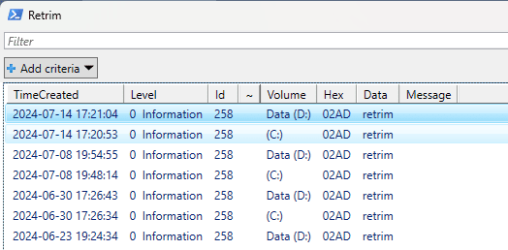
Here is an example I wrote some time ago. It retrieves the relevant data from events that occurred when Microsoft Drive Optimizer was run.
The |? {$_.Hex -eq '02AD'} part near the end is what causes it to limit the output to events that are directly related to SSD retrims. So, if you remove that part of the script code and you run the script again, you'll see what I mean. In case you were wondering what the tilde (~) character is for, it just marks the beginning of each group of rows that most likely are linked logically to each other due to the very small time difference between the events when they occurred for (one of) the Volume(s) you have.

Powershell:
Get-WinEvent -FilterHashtable @{LogName='Application';ProviderName='Microsoft-Windows-Defrag'} |% {$x=[xml]$_.ToXml(); If($_.Id -eq 258 -Or $_.Id -eq 264) {If($x.Event.EventData.Data[1] -ne $z) {$z=$x.Event.EventData.Data[1];$y='~'} else{$y=''}; $_ |select @{l='TimeCreated';e={$_.TimeCreated}}, @{l='Level';e={"$($_.Level)  $($_.LevelDisplayName)"}}, Id, @{l='~';e={$y}}, @{l='Volume';e={$z}}, @{l='Hex';e={"$([String]$x.Event.EventData.Binary[10])$([String]$x.Event.EventData.Binary[11])$([String]$x.Event.EventData.Binary[8])$([String]$x.Event.EventData.Binary[9])"}}, @{l='Data';e={$x.Event.EventData.Data[0]}}, @{l='Message';e={$x.Event.EventData.Data[2]}} }} |? {$_.Hex -eq '02AD'} |ogv -Title 'Retrim'
 

My Computers My Computers

  • At a glance

    11 Homei7 13650HX16GB DDR5GeForce RTX 4060 Mobile
    OS
    11 Home
    Computer type
    Laptop
    Manufacturer/Model
    Asus TUF Gaming F16 (2024)
    CPU
    i7 13650HX
    Memory
    16GB DDR5
    Graphics Card(s)
    GeForce RTX 4060 Mobile
    Sound Card
    Eastern Electric MiniMax DAC Supreme; Emotiva UMC-200; Astell & Kern AK240
    Monitor(s) Displays
    Sony Bravia XR-55X90J
    Screen Resolution
    3840×2160
    Hard Drives
    512GB SSD internal
    37TB external
    PSU
    Li-ion
    Cooling
    2× Arc Flow Fans, 4× exhaust vents, 5× heatpipes
    Keyboard
    Logitech K800
    Mouse
    Logitech G402
    Internet Speed
    30Mbit/s up, 500Mbit/s down
    Browser
    FF
    Antivirus
    What's an antivirus?
  • At a glance

    11 Homei5 1135G716GB DDR4Intel Iris Xe
    Operating System
    11 Home
    Computer type
    Laptop
    Manufacturer/Model
    Medion S15450
    CPU
    i5 1135G7
    Memory
    16GB DDR4
    Graphics card(s)
    Intel Iris Xe
    Sound Card
    Eastern Electric MiniMax DAC Supreme; Emotiva UMC-200; Astell & Kern AK240
    Monitor(s) Displays
    Sony Bravia XR-55X90J
    Screen Resolution
    3840×2160
    Hard Drives
    2TB SSD internal
    37TB external
    PSU
    Li-ion
    Keyboard
    Logitech K800
    Mouse
    Logitech G402
    Internet Speed
    30Mbit/s up, 500Mbit/s down
    Browser
    FF
Why would you need a screenshot, though? Its only purpose (for now) is to wait for me to force-terminate the explorer process, which not only causes the desktop and taskbar to disappear, but at the same time also causes all open File Explorer windows to be killed. So I can start the explorer process again next. After that, when I press the Enter key, it re-opens the File Explorer windows that were killed. However, the thing that sets it apart from other scripts that are similar to it is, it re-opens the File Explorer windows in such a way that some of their window properties will also be restored, like how I described in my first reply. I.e., their folderpath, their window position and size, their minimized/maximized/restored state, their horizontal and vertical scrollbar positions, and their selected items paths (if any).

Powershell:
Add-Type -RA UIAutomationClient, UIAutomationTypes, Microsoft.CSharp -TypeDef @'
  using System;
  using System.Collections.Generic;
  using System.Diagnostics;
  using System.IO;
  using System.Linq;
  using System.Text;
  using System.Threading;
  using System.Windows;
  using System.Windows.Automation;
  using System.Runtime.InteropServices;

  public static class Constants {
    public const uint WM_CLOSE = 16;
    public const uint WM_HSCROLL = 276;
    public const uint WM_VSCROLL = 277;

    public const int SB_CTL = 2;
    public const int SB_THUMBPOSITION = 4;
    public const int SB_ENDSCROLL = 8;

    public const uint FLASHW_STOP = 0;
  }

  public enum ShowWindowCommand {
    Hide = 0,
    Normal = 1,
    ShowMinimized = 2,
    Maximize = 3,
    ShowMaximized = 3,
    ShowNoActivate = 4,
    Show = 5,
    Minimize = 6,
    ShowMinNoActive = 7,
    ShowNA = 8,
    Restore = 9,
    ShowDefault = 10,
    ForceMinimize = 11
  }

  public class NativeStructs {
    [StructLayout(LayoutKind.Sequential)]
    public struct FLASHWINFO {
      public UInt32 cbSize;
      public IntPtr hwnd;
      public UInt32 dwFlags;
      public UInt32 uCount;
      public UInt32 dwTimeout;
    }
  }

  public class NativeMethods {
    [DllImport("user32.dll")]
    [return: MarshalAs(UnmanagedType.Bool)]
    public static extern bool IsIconic(IntPtr hWnd);

    [DllImport("user32.dll")]
    [return: MarshalAs(UnmanagedType.Bool)]
    public static extern bool IsZoomed(IntPtr hWnd);

    [DllImport("user32.dll")]
    public static extern bool ShowWindowAsync(IntPtr hWnd, ShowWindowCommand cmdShow);

    [DllImport("user32.dll")]
    public static extern IntPtr SendMessage(IntPtr hWnd, uint msg, IntPtr wParam, IntPtr lParam);

    [DllImport("User32.Dll")]
    [return: MarshalAs(UnmanagedType.Bool)]
    public static extern bool PostMessageA(IntPtr hWnd, uint msg, int wParam, int lParam);

    [DllImport("user32.dll")]
    public static extern int GetScrollPos(IntPtr hWnd, int nBar);

    [DllImport("user32.dll")]
    public static extern int SetScrollPos(IntPtr hWnd, int nBar, int nPos, bool bRedraw);

    [DllImport("user32.dll")]
    [return: MarshalAs(UnmanagedType.Bool)]
    public static extern bool FlashWindowEx(ref NativeStructs.FLASHWINFO pwfi);

    [DllImport("user32.dll")]
    [return: MarshalAs(UnmanagedType.Bool)]
    public static extern bool EnumChildWindows(IntPtr hWnd, EnumWindowProc callback, IntPtr lParam);

    [DllImport("user32.dll")]
    public static extern int GetClassName(IntPtr hWnd, StringBuilder lpClassName, int nMaxCount);
  }

  public delegate bool EnumWindowProc(IntPtr hWnd, IntPtr lParam);

  public class WindowWatcher {
    public static bool cont;

    public static List<IntPtr> GetChildWindows(IntPtr parent) {
      List<IntPtr> result = new List<IntPtr>();
      GCHandle listHandle = GCHandle.Alloc(result);
      try {
        EnumWindowProc childProc = new EnumWindowProc(EnumWindow);
        NativeMethods.EnumChildWindows(parent, childProc, GCHandle.ToIntPtr(listHandle));
      }
      finally {
        if (listHandle.IsAllocated)
          listHandle.Free();
      }
      return result;
    }

    private static bool EnumWindow(IntPtr handle, IntPtr pointer) {
      GCHandle gch = GCHandle.FromIntPtr(pointer);
      List<IntPtr> list = gch.Target as List<IntPtr>;
      if (list == null)
        throw new InvalidCastException("GCHandle Target could not be cast as List<IntPtr>");
      list.Add(handle);       
      return true;
    }

    public static void AddHandler(object[] o) {
      cont = true;
      Automation.AddAutomationEventHandler(
        WindowPattern.WindowOpenedEvent,
        AutomationElement.RootElement,
        TreeScope.Children,
        (sender, e) => {
          var element = sender as AutomationElement;
          Process process = Process.GetProcessById(element.Current.ProcessId);
          if (process.ProcessName == "explorer") {
            dynamic shell = Activator.CreateInstance(Type.GetTypeFromProgID("Shell.Application"));
            var win = shell.Windows[shell.Windows.Count - 1];
            String p = o[0].ToString();
            if (win.Document.Folder.Self.Path == p && win.HWND == (int)process.MainWindowHandle) {
              win.Left = o[2];
              win.Top = o[3];
              win.Width = o[4];
              win.Height = o[5];
              IntPtr ptH = new IntPtr(win.HWND);
              if ((int)o[1] == (int)ShowWindowCommand.ShowMinimized || (int)o[1] == (int)ShowWindowCommand.ShowMaximized)
                NativeMethods.ShowWindowAsync(ptH, (ShowWindowCommand)o[1]);
              NativeStructs.FLASHWINFO fInfo = new NativeStructs.FLASHWINFO();
              fInfo.cbSize = Convert.ToUInt32(Marshal.SizeOf(fInfo));
              fInfo.hwnd = ptH;
              fInfo.dwFlags = Constants.FLASHW_STOP;
              fInfo.uCount = 0;
              fInfo.dwTimeout = 0;
              NativeMethods.FlashWindowEx(ref fInfo);
              AutomationElement elem;
              List<IntPtr> list = WindowWatcher.GetChildWindows(ptH);
              foreach (IntPtr handle in list) {
                string name = AutomationElement.FromHandle(handle).GetCurrentPropertyValue(AutomationElement.ClassNameProperty).ToString();
                if (name == "LineHScrollBar") {
                  elem = AutomationElement.FromHandle(handle);
                  NativeMethods.SetScrollPos(handle, Constants.SB_CTL, (int)o[6], false);
                  NativeMethods.PostMessageA(handle, Constants.WM_HSCROLL, Constants.SB_THUMBPOSITION | (int)o[6] << 16, 0);
                  NativeMethods.PostMessageA(handle, Constants.WM_HSCROLL, Constants.SB_ENDSCROLL, 0);
                }
                else
                if (name == "LineVScrollBar") {
                  elem = AutomationElement.FromHandle(handle);
                  NativeMethods.SetScrollPos(handle, Constants.SB_CTL, (int)o[7], false);
                  NativeMethods.PostMessageA(handle, Constants.WM_VSCROLL, Constants.SB_THUMBPOSITION | (int)o[7] << 16, 0);
                  NativeMethods.PostMessageA(handle, Constants.WM_VSCROLL, Constants.SB_ENDSCROLL, 0);
                  break;
                }
              }
              foreach (var item in win.Document.Folder.Items())
                if (((List<string>)o[8]).Contains(item.Path))
                  win.Document.SelectItem(item, 1);
            }
            cont = false;
          }
        }
      );
    }

    public static void Watch() {
      int c = 0;
      IntPtr ptH;
      dynamic shell = Activator.CreateInstance(Type.GetTypeFromProgID("Shell.Application"));
      object[] arr = new object[shell.Windows.Count];
      foreach (var win in shell.Windows) {
        ptH = new IntPtr(win.HWND);
        ShowWindowCommand shcmd = ShowWindowCommand.Normal;
        if (NativeMethods.IsIconic(ptH)) {
          NativeMethods.ShowWindowAsync(ptH, ShowWindowCommand.Restore);
          shcmd = ShowWindowCommand.ShowMinimized;
        }
        else
        if (NativeMethods.IsZoomed(ptH)) {
          NativeMethods.ShowWindowAsync(ptH, ShowWindowCommand.Restore);
          shcmd = ShowWindowCommand.ShowMaximized;
        }
        List<string> sel = new List<string>();
        foreach (var item in win.Document.SelectedItems())
          sel.Add(item.Path);
        int hpos = 0;
        int vpos = 0;
        AutomationElement elem;
        List<IntPtr> list = WindowWatcher.GetChildWindows(ptH);
        foreach (IntPtr handle in list) {
          string name = AutomationElement.FromHandle(handle).GetCurrentPropertyValue(AutomationElement.ClassNameProperty).ToString();
          if (name == "LineHScrollBar") {
            elem = AutomationElement.FromHandle(handle);
            hpos = NativeMethods.GetScrollPos(handle, Constants.SB_CTL);
          }
          else
          if (name == "LineVScrollBar") {
            elem = AutomationElement.FromHandle(handle);
            vpos = NativeMethods.GetScrollPos(handle, Constants.SB_CTL);
            break;
          }
        }
        arr[c] = new object[9] {win.Document.Folder.Self.Path, shcmd, win.Left, win.Top, win.Width, win.Height, hpos, vpos, sel};
        c++;
      }

      Console.WriteLine("The number of File Explorer windows currently open: {0}", shell.Windows.Count);

      foreach (var win in shell.Windows)
        NativeMethods.SendMessage(new IntPtr(win.HWND), Constants.WM_CLOSE, IntPtr.Zero, IntPtr.Zero);

      Thread.Sleep(200);
      if (shell.Windows.Count == 0) {
        Console.WriteLine("All File Explorer windows were closed successfully.");
      else
        Console.WriteLine("The number of File Explorer windows that were not closed: {0}", shell.Windows.Count);
      shell = null;

      Console.WriteLine("Press ENTER to re-open the File Explorer windows . . .");
      Console.ReadLine();

      for (int i = 0; i < c; i++) {
        AddHandler((object[])arr[i]);
        Process.Start("explorer.exe", ((object[])arr[i])[0].ToString());
        for (int j = 40; j >= 0 && cont; j--)
          Thread.Sleep(250);
        Thread.Sleep(200);
        Automation.RemoveAllEventHandlers();
      }
    }
  }
'@
[WindowWatcher]::Watch()


Here is an example I wrote some time ago. It retrieves the relevant data from events that occurred when Microsoft Drive Optimizer was run.
The |? {$_.Hex -eq '02AD'} part near the end is what causes it to limit the output to events that are directly related to SSD retrims. So, if you remove that part of the script code and you run the script again, you'll see what I mean. In case you were wondering what the tilde (~) character is for, it just marks the beginning of each group of rows that most likely are linked logically to each other due to the very small time difference between the events when they occurred for (one of) the Volume(s) you have.

Powershell:
Get-WinEvent -FilterHashtable @{LogName='Application';ProviderName='Microsoft-Windows-Defrag'} |% {$x=[xml]$_.ToXml(); If($_.Id -eq 258 -Or $_.Id -eq 264) {If($x.Event.EventData.Data[1] -ne $z) {$z=$x.Event.EventData.Data[1];$y='~'} else{$y=''}; $_ |select @{l='TimeCreated';e={$_.TimeCreated}}, @{l='Level';e={"$($_.Level)  $($_.LevelDisplayName)"}}, Id, @{l='~';e={$y}}, @{l='Volume';e={$z}}, @{l='Hex';e={"$([String]$x.Event.EventData.Binary[10])$([String]$x.Event.EventData.Binary[11])$([String]$x.Event.EventData.Binary[8])$([String]$x.Event.EventData.Binary[9])"}}, @{l='Data';e={$x.Event.EventData.Data[0]}}, @{l='Message';e={$x.Event.EventData.Data[2]}} }} |? {$_.Hex -eq '02AD'} |ogv -Title 'Retrim'
I didn't understand what you meant with the text in the previous post.

Not sure how to use that powershell code you posted with Get-WinEvent. Some of the values do I recognize.
 

My Computer My Computer

At a glance

Windows 11Intel Core i7-13700Corsair VENGEANCE DDR5 32GBMSI GeForce RTX 5070 12G VENTUS 2X OC
OS
Windows 11
Computer type
PC/Desktop
Manufacturer/Model
Asus
CPU
Intel Core i7-13700
Motherboard
ASUS TUF GAMING B760-PLUS WIFI
Memory
Corsair VENGEANCE DDR5 32GB
Graphics Card(s)
MSI GeForce RTX 5070 12G VENTUS 2X OC
Monitor(s) Displays
Samsung LS32AG504
Hard Drives
Kingston Fury Renegade M.2 2TB SSD
PSU
Corsair RM850X 2021 / 850W / 80+ Gold
Browser
Chrome
Antivirus
Defender
I didn't understand what you meant with the text in the previous post.
Yeah, I tried to re-explain. It's still only a work in progress though, as it doesn't work yet for those specific File Explorer windows that show various "other" types of content, i.e., other than just an open folder (like, e.g., Search results, etc.). I am planning to make some adaptations of this script as soon as I feel up to it, to make it more useful than it is now. The reason why it doesn't kill/restart the explorer process automatically by itself is because otherwise I would have to wait for the desktop and taskbar to appear again each time when I run the script again to test it.

Instead, to make it more versatile and more useful, I am planning to just split it up into 2 separate .exe utilities (one that lets me save the properties to a file, one that reads the file before it re-opens the File Explorer windows and applies the properties to them). And make it automatically adjust the folderpath of the open folder if it is located in the current user's personal folder (i.e., the %userprofile% environment variable) so that the saved file can then also be read back on another computer if necessary. Etc., etc... any suggestions are welcome.
Not sure how to use that powershell code you posted with Get-WinEvent. Some of the values do I recognize.
You could always decide to open a new Powershell window. Then simply copy-paste the code into it.
 

My Computers My Computers

  • At a glance

    11 Homei7 13650HX16GB DDR5GeForce RTX 4060 Mobile
    OS
    11 Home
    Computer type
    Laptop
    Manufacturer/Model
    Asus TUF Gaming F16 (2024)
    CPU
    i7 13650HX
    Memory
    16GB DDR5
    Graphics Card(s)
    GeForce RTX 4060 Mobile
    Sound Card
    Eastern Electric MiniMax DAC Supreme; Emotiva UMC-200; Astell & Kern AK240
    Monitor(s) Displays
    Sony Bravia XR-55X90J
    Screen Resolution
    3840×2160
    Hard Drives
    512GB SSD internal
    37TB external
    PSU
    Li-ion
    Cooling
    2× Arc Flow Fans, 4× exhaust vents, 5× heatpipes
    Keyboard
    Logitech K800
    Mouse
    Logitech G402
    Internet Speed
    30Mbit/s up, 500Mbit/s down
    Browser
    FF
    Antivirus
    What's an antivirus?
  • At a glance

    11 Homei5 1135G716GB DDR4Intel Iris Xe
    Operating System
    11 Home
    Computer type
    Laptop
    Manufacturer/Model
    Medion S15450
    CPU
    i5 1135G7
    Memory
    16GB DDR4
    Graphics card(s)
    Intel Iris Xe
    Sound Card
    Eastern Electric MiniMax DAC Supreme; Emotiva UMC-200; Astell & Kern AK240
    Monitor(s) Displays
    Sony Bravia XR-55X90J
    Screen Resolution
    3840×2160
    Hard Drives
    2TB SSD internal
    37TB external
    PSU
    Li-ion
    Keyboard
    Logitech K800
    Mouse
    Logitech G402
    Internet Speed
    30Mbit/s up, 500Mbit/s down
    Browser
    FF
Yeah, I tried to re-explain. It's still only a work in progress though, as it doesn't work yet for those specific File Explorer windows that show various "other" types of content, i.e., other than just an open folder (like, e.g., Search results, etc.). I am planning to make some adaptations of this script as soon as I feel up to it, to make it more useful than it is now. The reason why it doesn't kill/restart the explorer process automatically by itself is because otherwise I would have to wait for the desktop and taskbar to appear again each time when I run the script again to test it.

Instead, to make it more versatile and more useful, I am planning to just split it up into 2 separate .exe utilities (one that lets me save the properties to a file, one that reads the file before it re-opens the File Explorer windows and applies the properties to them). And make it automatically adjust the folderpath of the open folder if it is located in the current user's personal folder (i.e., the %userprofile% environment variable) so that the saved file can then also be read back on another computer if necessary. Etc., etc... any suggestions are welcome.

You could always decide to open a new Powershell window. Then simply copy-paste the code into it.
 

Attachments

  • retrim.png
    retrim.png
    8.4 KB · Views: 4

My Computer My Computer

At a glance

Windows 11Intel Core i7-13700Corsair VENGEANCE DDR5 32GBMSI GeForce RTX 5070 12G VENTUS 2X OC
OS
Windows 11
Computer type
PC/Desktop
Manufacturer/Model
Asus
CPU
Intel Core i7-13700
Motherboard
ASUS TUF GAMING B760-PLUS WIFI
Memory
Corsair VENGEANCE DDR5 32GB
Graphics Card(s)
MSI GeForce RTX 5070 12G VENTUS 2X OC
Monitor(s) Displays
Samsung LS32AG504
Hard Drives
Kingston Fury Renegade M.2 2TB SSD
PSU
Corsair RM850X 2021 / 850W / 80+ Gold
Browser
Chrome
Antivirus
Defender
^^ Hallelujah
 

My Computers My Computers

  • At a glance

    11 Homei7 13650HX16GB DDR5GeForce RTX 4060 Mobile
    OS
    11 Home
    Computer type
    Laptop
    Manufacturer/Model
    Asus TUF Gaming F16 (2024)
    CPU
    i7 13650HX
    Memory
    16GB DDR5
    Graphics Card(s)
    GeForce RTX 4060 Mobile
    Sound Card
    Eastern Electric MiniMax DAC Supreme; Emotiva UMC-200; Astell & Kern AK240
    Monitor(s) Displays
    Sony Bravia XR-55X90J
    Screen Resolution
    3840×2160
    Hard Drives
    512GB SSD internal
    37TB external
    PSU
    Li-ion
    Cooling
    2× Arc Flow Fans, 4× exhaust vents, 5× heatpipes
    Keyboard
    Logitech K800
    Mouse
    Logitech G402
    Internet Speed
    30Mbit/s up, 500Mbit/s down
    Browser
    FF
    Antivirus
    What's an antivirus?
  • At a glance

    11 Homei5 1135G716GB DDR4Intel Iris Xe
    Operating System
    11 Home
    Computer type
    Laptop
    Manufacturer/Model
    Medion S15450
    CPU
    i5 1135G7
    Memory
    16GB DDR4
    Graphics card(s)
    Intel Iris Xe
    Sound Card
    Eastern Electric MiniMax DAC Supreme; Emotiva UMC-200; Astell & Kern AK240
    Monitor(s) Displays
    Sony Bravia XR-55X90J
    Screen Resolution
    3840×2160
    Hard Drives
    2TB SSD internal
    37TB external
    PSU
    Li-ion
    Keyboard
    Logitech K800
    Mouse
    Logitech G402
    Internet Speed
    30Mbit/s up, 500Mbit/s down
    Browser
    FF

Latest Support Threads

Back
Top Bottom