Solved Where have the nice startup photos and info gone? Replaced with a boring blue squiggle.


Trapperr

Well-known member
Member
Local time
3:35 PM
Posts
37
Location
Hertfordshire UK
OS
Win 11Pro 24H2
All of a sudden my startup screen has started showing the boring blue screen instead of the nice photos it did before. I have looked at this forum and the Personalization section of the settings. but have not found how to get this back.
Any suggestions?
 
Windows Build/Version
24H2 26.100.3476

My Computer My Computer

At a glance

Win 11Pro 24H2AMD Ryzensets 5 7600X32GBGforce RTX 360
OS
Win 11Pro 24H2
Computer type
PC/Desktop
Manufacturer/Model
Self Build 2025
CPU
AMD Ryzensets 5 7600X
Motherboard
MSI Pro B850-P WIFI
Memory
32GB
Graphics Card(s)
Gforce RTX 360
Sound Card
On Board
Monitor(s) Displays
AOC 2460 [Monitor] (24.0"vis, October 2019)
Hard Drives
1 Internal 5 External
PSU
ENERMAX REvolution 850W
Case
Be quiet Pure Base 600
Cooling
Thermalright Assassin X 120R
Keyboard
Logi K540
Mouse
Logi M310
Browser
Firefox
Antivirus
Bitdefender
@Trapperr

And here's ten points just for filling out your computer specs. :-)
 

My Computers My Computers

  • At a glance

    Win 11 Home ♦♦♦26300.9550 ♦♦♦♦♦♦♦26H2AMD Ryzen 7 3700XG.Skill (F4-3200C14D-16GTZKW)EVGA RTX 2070 (08G-P4-2171-KR)
    OS
    Win 11 Home ♦♦♦26300.9550 ♦♦♦♦♦♦♦26H2
    Computer type
    PC/Desktop
    Manufacturer/Model
    Built by Ghot® [May 2020]
    CPU
    AMD Ryzen 7 3700X
    Motherboard
    Asus Pro WS X570-ACE (BIOS 5302)
    Memory
    G.Skill (F4-3200C14D-16GTZKW)
    Graphics Card(s)
    EVGA RTX 2070 (08G-P4-2171-KR)
    Sound Card
    Realtek ALC1220P / ALC S1220A
    Monitor(s) Displays
    Dell U3011 30"
    Screen Resolution
    2560 x 1600
    Hard Drives
    2x Samsung 860 EVO 500GB,
    WD 4TB Black FZBX - SATA III,
    WD 8TB Black FZBX - SATA III,
    DRW-24B1ST CD/DVD Burner
    PSU
    PC Power & Cooling 750W Quad EPS12V
    Case
    Cooler Master ATCS 840 Tower
    Cooling
    CM Hyper 212 EVO (push/pull)
    Keyboard
    Ducky DK9008 Shine II Blue LED
    Mouse
    Logitech Optical M-100
    Internet Speed
    300/300
    Browser
    Firefox (latest)
    Antivirus
    Bitdefender Total Security
    Other Info
    Speakers: Klipsch Pro Media 2.1
  • At a glance

    Windows XP Pro 32bit w/SP3AMD Athlon 64 X2 5000+ (OC'd @ 3.2Ghz)TWIN2X2048-6400C4DHX (2 x 1GB, DDR2 800)EVGA 256-P2-N758-TR GeForce 8600GT SSC
    Operating System
    Windows XP Pro 32bit w/SP3
    Computer type
    PC/Desktop
    Manufacturer/Model
    Built by Ghot® (not in use)
    CPU
    AMD Athlon 64 X2 5000+ (OC'd @ 3.2Ghz)
    Motherboard
    ASUS M2N32-SLI Deluxe Wireless Edition
    Memory
    TWIN2X2048-6400C4DHX (2 x 1GB, DDR2 800)
    Graphics card(s)
    EVGA 256-P2-N758-TR GeForce 8600GT SSC
    Sound Card
    Onboard
    Monitor(s) Displays
    ViewSonic G90FB Black 19" Professional (CRT)
    Screen Resolution
    up to 2048 x 1536
    Hard Drives
    WD 36GB 10,000rpm Raptor SATA
    Seagate 80GB 7200rpm SATA
    Lite-On LTR-52246S CD/RW
    Lite-On LH-18A1P CD/DVD Burner
    PSU
    PC Power & Cooling Silencer 750 Quad EPS12V
    Case
    Generic Beige case, 80mm fans
    Cooling
    ZALMAN 9500A 92mm CPU Cooler
    Keyboard
    Logitech Classic Keybooard 200
    Mouse
    Logitech Optical M-BT96a
    Internet Speed
    300/300
    Browser
    Firefox 3.x ??
    Antivirus
    Symantec (Norton)
    Other Info
    Still assembled, still runs. Haven't turned it on for 15 years?
Thank you for the link, however I do not have a clue as to what I should do. Why on earth do I have to go through all these instructions (Which I will probably mess up) when I didn't ask for the photos to be removed? An old phrase it is but here it is very appropriate; 'If it aint busted don't fix it.' The photos that I liked and were shown are not in any of my 'photo' folders, they were, I assume, in a folder or in a download/update/????
I am not going to start playing with the registry, so I must, I assume, say goodbye to those nice photos.

Also thanks for the 10 points Ghot.
 

My Computer My Computer

At a glance

Win 11Pro 24H2AMD Ryzensets 5 7600X32GBGforce RTX 360
OS
Win 11Pro 24H2
Computer type
PC/Desktop
Manufacturer/Model
Self Build 2025
CPU
AMD Ryzensets 5 7600X
Motherboard
MSI Pro B850-P WIFI
Memory
32GB
Graphics Card(s)
Gforce RTX 360
Sound Card
On Board
Monitor(s) Displays
AOC 2460 [Monitor] (24.0"vis, October 2019)
Hard Drives
1 Internal 5 External
PSU
ENERMAX REvolution 850W
Case
Be quiet Pure Base 600
Cooling
Thermalright Assassin X 120R
Keyboard
Logi K540
Mouse
Logi M310
Browser
Firefox
Antivirus
Bitdefender
Thank you for the link, however I do not have a clue as to what I should do. Why on earth do I have to go through all these instructions (Which I will probably mess up) when I didn't ask for the photos to be removed? An old phrase it is but here it is very appropriate; 'If it aint busted don't fix it.' The photos that I liked and were shown are not in any of my 'photo' folders, they were, I assume, in a folder or in a download/update/????
I am not going to start playing with the registry, so I must, I assume, say goodbye to those nice photos.

Also thanks for the 10 points Ghot.
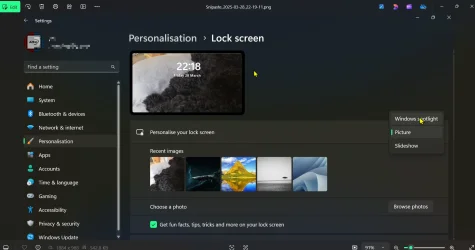
All you need to do is open the settings app. Select personalisation on the left, then Lock Screen. Then personalise your lock screen and make sure it's on Windows spotlight. It can take some time to kick in.
You can have the same on the desktop if you select Background instead of Lock Screen. There is a bug in that it sometimes opens the Lock Screen
to that default screen. Rebooting fixes it temporarily.


Snipaste_2025-03-28_22-30-35.webp
 

My Computers My Computers

  • At a glance

    Win 11 ProAMD Ryzen™ 7 7730U24GB Dual-Channel DDR4 @ 1596MHz (22-22-22-52)512MB ATI AMD Radeon Graphics (ASUStek Comput...
    OS
    Win 11 Pro
    Computer type
    Laptop
    Manufacturer/Model
    ASUS Vivobook
    CPU
    AMD Ryzen™ 7 7730U
    Motherboard
    M1605YA
    Memory
    24GB Dual-Channel DDR4 @ 1596MHz (22-22-22-52)
    Graphics Card(s)
    512MB ATI AMD Radeon Graphics (ASUStek Computer Inc)
    Monitor(s) Displays
    Generic PnP Monitor (1920x1200@60Hz) - P1 PLUS (1920x1080@59Hz)
    Screen Resolution
    1920 X 1200
    Hard Drives
    953GB Western Digital WD
    PSU
    45 Watts
    Mouse
    Lenovo Bluetooth.
    Internet Speed
    500 Mbps
    Browser
    Edge
    Antivirus
    Defender
  • At a glance

    Windows 11AMD Ryzen 7 5800H / 3.2 GHz32 GB DDR4 SDRAM 3200 MHzNVIDIA GeForce RTX 3060 6 GB GDDR6 SDRAM
    Operating System
    Windows 11
    Computer type
    Laptop
    Manufacturer/Model
    ACER NITRO
    CPU
    AMD Ryzen 7 5800H / 3.2 GHz
    Motherboard
    CZ Scala_CAS (FP6)
    Memory
    32 GB DDR4 SDRAM 3200 MHz
    Graphics card(s)
    NVIDIA GeForce RTX 3060 6 GB GDDR6 SDRAM
    Sound Card
    Realtek Audio. NVIDIA High Definition Audio
    Monitor(s) Displays
    15.6" LED backlight 1920 x 1080 (Full HD) 144 Hz
    Screen Resolution
    1920 x 1080 (Full HD)
    Hard Drives
    Samsung 970 Evo Plus 2TB NVMe M.2
    PSU
    180 Watt, 19.5 V
    Mouse
    Lenovo Bluetooth
    Internet Speed
    500 Mbps
    Browser
    Edge
    Antivirus
    Defender
Today I got a nice photo on the lock screen again, so maybe the problem was the bug. I don't think I changed any settings in personalization when I looked through the options but hey, it's back (y):-)
 

My Computer My Computer

At a glance

Win 11Pro 24H2AMD Ryzensets 5 7600X32GBGforce RTX 360
OS
Win 11Pro 24H2
Computer type
PC/Desktop
Manufacturer/Model
Self Build 2025
CPU
AMD Ryzensets 5 7600X
Motherboard
MSI Pro B850-P WIFI
Memory
32GB
Graphics Card(s)
Gforce RTX 360
Sound Card
On Board
Monitor(s) Displays
AOC 2460 [Monitor] (24.0"vis, October 2019)
Hard Drives
1 Internal 5 External
PSU
ENERMAX REvolution 850W
Case
Be quiet Pure Base 600
Cooling
Thermalright Assassin X 120R
Keyboard
Logi K540
Mouse
Logi M310
Browser
Firefox
Antivirus
Bitdefender
Back
Top Bottom