

bluedxca93
Member
- Local time
- 3:47 PM
- Posts
- 23
- OS
- 24h2 , 24.10
Somehow i got this logic:
But it shows also some crap or duplicates as shown below:
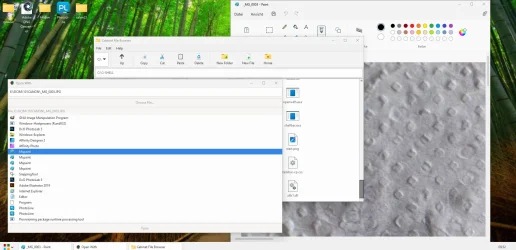
Any idea how to make it more logical? And yes i did remove explorer as default shell and now im trying to rewrite the not working open with dialog. kind regards bluedxca93
Code:
## Summary of Registry Paths Searched:
- `HKEY_CLASSES_ROOT\.<extension>` (for ProgID)
- `HKEY_CLASSES_ROOT\SystemFileAssociations\. <extension>\shell`
- `HKEY_CLASSES_ROOT\.<extension>\OpenWithProgids`
- `HKEY_CLASSES_ROOT\.<extension>\OpenWithList`
- `HKEY_CLASSES_ROOT\Applications`
This multi-step search allows the code to gather a comprehensive list of applications that can handle the specified file type.Any idea how to make it more logical? And yes i did remove explorer as default shell and now im trying to rewrite the not working open with dialog. kind regards bluedxca93
My Computer
At a glance
24h2 , 24.10
- OS
- 24h2 , 24.10
- Computer type
- PC/Desktop
- Manufacturer/Model
- Amd






