
Why different PowerShell commands get different versions for the exact same file ??


suatcini54

Well-known member
Power User
VIP
Local time
9:43 PM
Posts
598
OS
Windows 11 Pro build 26200.8524
The title says it all..

I do not understand if files bear two different versions in them. I checked "Winload.efi" file and "bootmgfw_EX.efi" files. They exhibit different file versions when slightly different powershell commands are used. Versions of these files can not be checked by examining their properties. So I must use PowerShell commands.

For Winload.efi file, I get version 10.0.26100.7705 and 10.0.26100.8457.

For bootmgfw_EX.efi file, I get version 10.0.28000.322 and 10.0.28000.326.

I believe there is a simple explanation which I am unaware of.
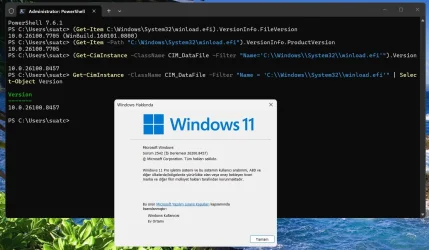
winload.efi_file_ver.webp


bootmgfw.efi.webp
 

My Computers

System One System Two

  • OS
    Windows 11 Pro build 26200.8524
    Computer type
    PC/Desktop
    Manufacturer/Model
    Home Built
    CPU
    Intel i7-4790
    Motherboard
    Asus H97 Pro Gamer with add-on TPM1.2 module
    Memory
    Teams DDR3-1600 4x4 GB
    Graphics Card(s)
    MSI Nvidia GeForce GTX 1050Ti
    Sound Card
    Realtek ALC1150
    Monitor(s) Displays
    Dell P2425D
    Screen Resolution
    2560 by 1440 pixels
    Hard Drives
    Corsair NVMe M.2 Core XT 1000 GB (Windows 11 v.25H2); Samsung SATA Evo 870 500 GB (Windows 11 v.25H2);
    PSU
    Corsair HX850
    Case
    Gigabyte Solo 210
    Cooling
    Zalman CNPS7X Tower
    Keyboard
    Microsoft AIO Wireless (includes touchpad)
    Mouse
    HP S1000 Plus Wireless
    Internet Speed
    500 Mb fiber optic
    Browser
    Chrome; MS Edge
    Antivirus
    Windows Defender
  • Operating System
    MacOS 12 Monterey
    Computer type
    Laptop
    Manufacturer/Model
    Apple Macbook Air
    CPU
    Intel Core i5
    Memory
    8 GB
    Graphics card(s)
    Intel integrated
    Screen Resolution
    1440 by 900 pixels
    Hard Drives
    128 GB
    Keyboard
    Built-in
    Mouse
    Microsoft Wireless
    Internet Speed
    802.11 ac
    Browser
    Chrome; Safari
    Antivirus
    N/A
If I remember correctly and my Googling is correct, VersionInfo.FileVersion reads from the VERSIONINFO block. It does not seem that winload.efi has such a block like a typical EXE or DLL would. So the FileVersion code is going to either return empty, return 0.0.0.0, or read the PE header to figure something out.

CIM_DataFile is pretty old, CIM 2.x era maybe, so it's going to do things differently probably. Something like read the PE header, read the file's ProductVersion if it has one, or pull version info from the WinSxS manifests.

Anyway, short answer is they work different ways and read different things.
 

My Computer

System One

  • OS
    Windows 11 Pro 25H2
    Computer type
    PC/Desktop
    Manufacturer/Model
    Intel NUC12WSHi7
    CPU
    12th Gen Core i7-1260P
    Motherboard
    NUC12WSBi7
    Memory
    64 GB Micron PC4-25600
    Graphics Card(s)
    Intel Iris Xe Graphics
    Sound Card
    on-board Realtek HD Audio
    Monitor(s) Displays
    Dell U3219Q
    Screen Resolution
    3840 x 2160
    Hard Drives
    Samsung SSD 990 PRO 1TB
    Crucial MX500 2 TB
    Antivirus
    Microsoft Defender
Thanks for this explanation. CIM_DataFile should be reading the correct version of Winload.efi, I guess, as it is the currently-installed Windows version.

For bootmgfw.efi, again CIM_DataFile is reading the correct version since its build number is higher 28000.326 than what is read by VersionInfo.FileVersion, which is 28000.322. Why I say this ? Because I believe it can not read a future, non-existent build number if it was not there.
 

My Computers

System One System Two

  • OS
    Windows 11 Pro build 26200.8524
    Computer type
    PC/Desktop
    Manufacturer/Model
    Home Built
    CPU
    Intel i7-4790
    Motherboard
    Asus H97 Pro Gamer with add-on TPM1.2 module
    Memory
    Teams DDR3-1600 4x4 GB
    Graphics Card(s)
    MSI Nvidia GeForce GTX 1050Ti
    Sound Card
    Realtek ALC1150
    Monitor(s) Displays
    Dell P2425D
    Screen Resolution
    2560 by 1440 pixels
    Hard Drives
    Corsair NVMe M.2 Core XT 1000 GB (Windows 11 v.25H2); Samsung SATA Evo 870 500 GB (Windows 11 v.25H2);
    PSU
    Corsair HX850
    Case
    Gigabyte Solo 210
    Cooling
    Zalman CNPS7X Tower
    Keyboard
    Microsoft AIO Wireless (includes touchpad)
    Mouse
    HP S1000 Plus Wireless
    Internet Speed
    500 Mb fiber optic
    Browser
    Chrome; MS Edge
    Antivirus
    Windows Defender
  • Operating System
    MacOS 12 Monterey
    Computer type
    Laptop
    Manufacturer/Model
    Apple Macbook Air
    CPU
    Intel Core i5
    Memory
    8 GB
    Graphics card(s)
    Intel integrated
    Screen Resolution
    1440 by 900 pixels
    Hard Drives
    128 GB
    Keyboard
    Built-in
    Mouse
    Microsoft Wireless
    Internet Speed
    802.11 ac
    Browser
    Chrome; Safari
    Antivirus
    N/A
Code:
Get-Item
OriginalFilename  : osloader.exe
FileDescription   : OS Loader
ProductName       : Microsoft® Windows® Operating System
Comments          :
CompanyName       : Microsoft Corporation
FileName          : C:\Windows\System32\winload.efi
FileVersion       : 10.0.26100.8457 (WinBuild.160101.0800) <--
ProductVersion    : 10.0.26100.8457
IsDebug           : False
IsPatched         : False
IsPreRelease      : False
IsPrivateBuild    : False
IsSpecialBuild    : False
Language          : English (United States)
LegalCopyright    : © Microsoft Corporation. All rights reserved.
LegalTrademarks   :
PrivateBuild      :
SpecialBuild      :
FileVersionRaw    : 10.0.26100.8457 <-- Same
ProductVersionRaw : 10.0.26100.8457

Cim_DataFile
10.0.26100.8457

fsutil
\Windows\WinSxS\amd64_microsoft-windows-b..vironment-os-loader_31bf3856ad364e35_10.0.26100.8457_none_f6ed08b71ca9bc16\winload.efi
Code:
Get-Item
OriginalFilename  : bootmgr.exe
FileDescription   : Boot Manager
ProductName       : Microsoft® Windows® Operating System
Comments          :
CompanyName       : Microsoft Corporation
FileName          : C:\Windows\Boot\EFI_EX\bootmgfw_EX.efi
FileVersion       : 10.0.28000.322 (WinBuild.160101.0800) <--
ProductVersion    : 10.0.28000.322
IsDebug           : False
IsPatched         : False
IsPreRelease      : False
IsPrivateBuild    : False
IsSpecialBuild    : False
Language          : English (United States)
LegalCopyright    : © Microsoft Corporation. All rights reserved.
LegalTrademarks   :
PrivateBuild      :
SpecialBuild      :
FileVersionRaw    : 10.0.28000.326 <-- Different
ProductVersionRaw : 10.0.28000.326

Cim_DataFile
10.0.28000.326

fsutil
\Windows\WinSxS\amd64_microsoft-windows-b..ore-bootmanager-efi_31bf3856ad364e35_10.0.26100.8328_none_234eefa24c5d6891\bootmgfw_EX.efi

1. The important question is which version (FileVersion or FileVersionRaw) is the one checked by Code Integrity? There's no mention I can find that you're supposed to feed your policy the Raw version number. But I dunno.

2. Files have arbitrary build numbers which are embedded by the MS compilers. They're not invented, but provided by the devs when building a code project.
 

My Computer

System One

  • OS
    Windows 7

My Computer

System One

  • OS
    Windows 7
Thanks. Good information.

Here FileVersionRaw/ProductVersionRaw is the correct version info matching the installed version of Windows 11.

It seems I am using a RAW version of Windows 11.

file-version-1.webp
 

My Computers

System One System Two

  • OS
    Windows 11 Pro build 26200.8524
    Computer type
    PC/Desktop
    Manufacturer/Model
    Home Built
    CPU
    Intel i7-4790
    Motherboard
    Asus H97 Pro Gamer with add-on TPM1.2 module
    Memory
    Teams DDR3-1600 4x4 GB
    Graphics Card(s)
    MSI Nvidia GeForce GTX 1050Ti
    Sound Card
    Realtek ALC1150
    Monitor(s) Displays
    Dell P2425D
    Screen Resolution
    2560 by 1440 pixels
    Hard Drives
    Corsair NVMe M.2 Core XT 1000 GB (Windows 11 v.25H2); Samsung SATA Evo 870 500 GB (Windows 11 v.25H2);
    PSU
    Corsair HX850
    Case
    Gigabyte Solo 210
    Cooling
    Zalman CNPS7X Tower
    Keyboard
    Microsoft AIO Wireless (includes touchpad)
    Mouse
    HP S1000 Plus Wireless
    Internet Speed
    500 Mb fiber optic
    Browser
    Chrome; MS Edge
    Antivirus
    Windows Defender
  • Operating System
    MacOS 12 Monterey
    Computer type
    Laptop
    Manufacturer/Model
    Apple Macbook Air
    CPU
    Intel Core i5
    Memory
    8 GB
    Graphics card(s)
    Intel integrated
    Screen Resolution
    1440 by 900 pixels
    Hard Drives
    128 GB
    Keyboard
    Built-in
    Mouse
    Microsoft Wireless
    Internet Speed
    802.11 ac
    Browser
    Chrome; Safari
    Antivirus
    N/A

Latest Support Threads

Back
Top Bottom





