why DP port of the monitor connection is recognized as hdmi in pc. what is the fix


jraju

Well-known member
Member
Local time
10:57 AM
Posts
300
OS
windows 11pro version 23H2
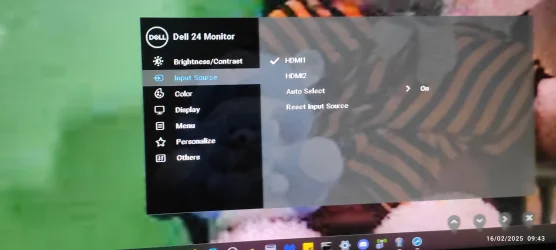
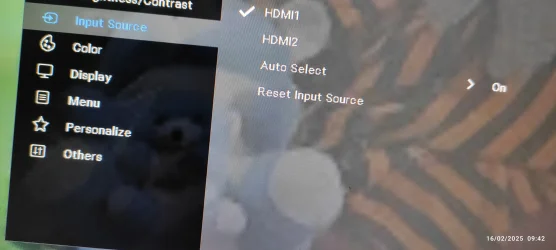
Hi, I have two monitors and extended display option . The cpu has a display port and a hdmi port. The hdmi port is connected to the hdmi of the monitor 1 and the display port is connected to the other monitor in its display port. But both are recognized as hdmi port. The OSD monitor menu does not list dp at all. It gives hdmi 1 , and hdmi 2. both monitors are working as it should. I will have different tabs in two monitors. But why the systemis not recognizing the dp port as dp ports.both monitors are of same brand and same model of dell 24 inch monitors.I have intel uhd 730 video card and has trhe latest driver from dell. Similarly,I have the latest driver for both monitors from dell based on the monitor tag number and drivers for both are the same. Is there a fix for it. I have a doubt, and if i click hdmi2, the second monitor becomes blank.
 

Attachments
  • monitor 1.webp
    monitor 1.webp
    1.2 MB · Views: 1
  • monitor 2.webp
    monitor 2.webp
    773.5 KB · Views: 1

My Computer My Computer

At a glance

windows 11pro version 23H2i5 processor8 gb
OS
windows 11pro version 23H2
Computer type
PC/Desktop
Manufacturer/Model
Dell Inspiron 3910
CPU
i5 processor
Memory
8 gb
Without knowing the actual model number of the monitors you have it's hard to be of any help.

peace
wanna
 

My Computers My Computers

  • At a glance

    Windows 11 ProIntel® Core™ i5-14600KG.SKILL Ripjaws S5 Series DDR5 (2x16GB) 6400M...PNY RTX 5060 Ti OC 16GB
    OS
    Windows 11 Pro
    Computer type
    PC/Desktop
    Manufacturer/Model
    Acme Mail Order (meep meep)
    CPU
    Intel® Core™ i5-14600K
    Motherboard
    MSI PRO Z790-A MAX WiFi bios 7E07vMA
    Memory
    G.SKILL Ripjaws S5 Series DDR5 (2x16GB) 6400MT/s CL32
    Graphics Card(s)
    PNY RTX 5060 Ti OC 16GB
    Sound Card
    Onboard Realtek® ALC4080 Codec
    Monitor(s) Displays
    2 x Dell - S3222DGM 32" LED Curved QHD FreeSync Gaming Monitor
    Screen Resolution
    2560x1440
    Hard Drives
    990 PRO PCIe 4.0 NVMe®1TB OS
    970 EVO PCIe 3.0 NVMe® SSD 500GB Games
    860 EVO SATA 2.5" SSD 1TB Storage
    PSU
    RMx Series™ RM850x — 80 PLUS® Gold
    Case
    LIAN LI PC-G70B Black Aluminum Full Tower
    Cooling
    Custom loop Optimus Foundation Block, MCP655-PWM D5 pump, MCR320 QP rad
    Keyboard
    Razer Black Widow Ultimate
    Mouse
    Razer Death Adder Elite
    Internet Speed
    500 down 20 up
    Browser
    Edge / Chrome
    Antivirus
    Microsoft Defender
    Other Info
    Always switching installs testing out the latest and greatest.
  • At a glance

    Windows 11 ProIntel® Core™ i5-11600KG.SKILL Ripjaws V Series 16GB DDR4 3600 (16-1...EVGA GeForce RTX 3060 XC GAMING 12GB
    Operating System
    Windows 11 Pro
    Computer type
    PC/Desktop
    Manufacturer/Model
    Acme Mail Order (meep meep) Wife's PC Edition
    CPU
    Intel® Core™ i5-11600K
    Motherboard
    MSI - Z590 A Pro - bios 7D09v1B1
    Memory
    G.SKILL Ripjaws V Series 16GB DDR4 3600 (16-16-16-36)
    Graphics card(s)
    EVGA GeForce RTX 3060 XC GAMING 12GB
    Sound Card
    Onboard Realtek® ALC897 Codec
    Monitor(s) Displays
    2 x 27'' ACER S271HL
    Screen Resolution
    1920x1080
    Hard Drives
    980 PRO PCIe 4.0 NVMe® SSD 250GB OS
    Samsung 128GB 850 PRO SATA III for Storage
    PSU
    CORSAIR - CX-M Series 650W
    Case
    LIAN LI PC-A16B Black Aluminum ATX Mid Tower
    Cooling
    Thermalright Phantom Spirit 120SE Air Cooler
    Keyboard
    Logitech - K740 Illuminated
    Mouse
    Razer Death Adder Elite
    Internet Speed
    500 down 20 up
    Browser
    Chrome
    Antivirus
    Windows Defender
    Other Info
    Stock clocked, over cooled, and unmolested for a rock solid, whisper quiet, Wifey approved user experience.
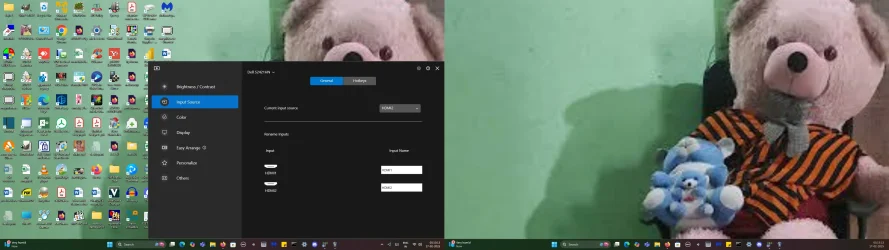
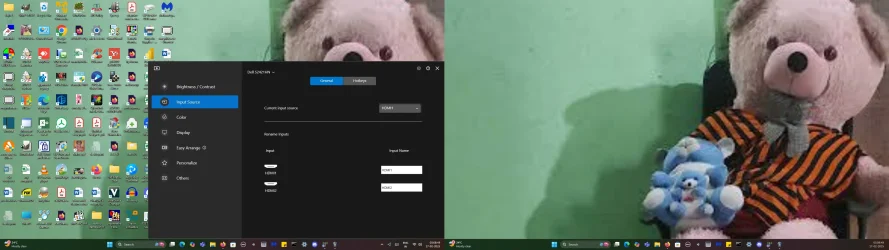
yes. the monitor model is 24 inch dell S2421HN. I have a doubt of course. Since, I have enabled extended display , the tabs on one monitor is just extended and shown in the second monitor and the second monitor is not at all in use. But, it lits up during boot and if i click , it identifies 1 and 2nd monitor . There is no DP menu at all in the OSD of each monitor and only hdmi 1 is ticked. If i click the hdmi 2, which is also shown as on option in the OSD, then the second monitor becomes blank , while first that is connected with cpu works. I also enclosed the task view of the monitor for clarity. Ony desktop1 isshown in two monitors , and another one monitor is shown with + in middle
 

Attachments

  • if i click hdmi 2.webp
    if i click hdmi 2.webp
    234.5 KB · Views: 2
  • dell display manager.webp
    dell display manager.webp
    235.2 KB · Views: 2
  • task view of the monitors.webp
    task view of the monitors.webp
    64.9 KB · Views: 2
Last edited:

My Computer My Computer

At a glance

windows 11pro version 23H2i5 processor8 gb
OS
windows 11pro version 23H2
Computer type
PC/Desktop
Manufacturer/Model
Dell Inspiron 3910
CPU
i5 processor
Memory
8 gb
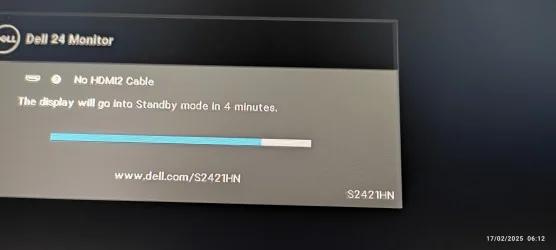
Please also see what the monitor prompts about hdmi2.I get this alert that the monitor will go to standby mode in 5 minutes
 

Attachments

  • hdmi2 warning.webp
    hdmi2 warning.webp
    84.3 KB · Views: 1

My Computer My Computer

At a glance

windows 11pro version 23H2i5 processor8 gb
OS
windows 11pro version 23H2
Computer type
PC/Desktop
Manufacturer/Model
Dell Inspiron 3910
CPU
i5 processor
Memory
8 gb
Looking up those monitors online, I didn't see anything about DP support.
 

My Computers My Computers

  • At a glance

    Windows 11 Pro
    OS
    Windows 11 Pro
    Computer type
    PC/Desktop
    Manufacturer/Model
    ASUS ROG Strix
  • At a glance

    Windows 11 Pro
    Operating System
    Windows 11 Pro
    Computer type
    Laptop
    Manufacturer/Model
    ASUS VivoBook
  • ASUS VivoBook 'Lite' ~ Windows 11 Home
That monitor has 2 HDMI inputs according to Dell specs.

Those are only default names in the Dell Display Manager, just Rename to suit you.

" The OSD monitor menu does not list dp at all."
Why should it with 2 HDMI inputs.
 

My Computer My Computer

At a glance

Windows 11
OS
Windows 11
Hi, Helmut, I also noticed that now. But My desktop has one hdmi, and one dp port. I did not notice that my cable could be a dp to hdmi cable.Since, when i click hdmi 2, shown, one of the monitor goes blank and alerted that no hdmi 2. i do not know, why? here the confusion arises. thanks for the monitor clarification.
 

My Computer My Computer

At a glance

windows 11pro version 23H2i5 processor8 gb
OS
windows 11pro version 23H2
Computer type
PC/Desktop
Manufacturer/Model
Dell Inspiron 3910
CPU
i5 processor
Memory
8 gb
Looking up those monitors online, I didn't see anything about DP support.

That’s correct. The Dell S2421HN has 2 x HDMI.

There is no DP menu at all in the OSD of each monitor

Why would they if they only have HDMI input?
Using a HDMI to DP cable will not magically enable DP settings in the monitors OSD
 

My Computers My Computers

  • At a glance

    Windows 11 Pro 25H2 Build 26200.8894Intel(R) Core(TM) i7-4770K CPU @ 3.50GHz32.0 GB of I forget and the box is in storage.Gigabyte nVidia GeForce GTX 1660 Super OC 6GB
    OS
    Windows 11 Pro 25H2 Build 26200.8894
    Computer type
    PC/Desktop
    Manufacturer/Model
    Sin-built 2013
    CPU
    Intel(R) Core(TM) i7-4770K CPU @ 3.50GHz
    Motherboard
    ASUS ROG Maximus VI Formula
    Memory
    32.0 GB of I forget and the box is in storage.
    Graphics Card(s)
    Gigabyte nVidia GeForce GTX 1660 Super OC 6GB
    Sound Card
    ROG SupremeFX Formula 8-Channel High Definition Audio
    Monitor(s) Displays
    5 x LG 25MS500-B - 1 x 24MK430H-B - 1 x Wacom Pro 22" Touch Screen Tablet
    Screen Resolution
    All over the place
    Hard Drives
    Too many to list. OS on Samsung 1TB 870 QVO SATA
    PSU
    Silverstone 1500
    Case
    NZXT Phantom 820 Full-Tower Case
    Cooling
    Noctua NH-D15 Elite Class Dual Tower CPU Cooler / 6 x EziDIY 120mm / 2 x Corsair 140mm somethings / 1 x 140mm Thermaltake something / 2 x 200mm Corsair.
    Keyboard
    Corsair K95 / Logitech diNovo Edge Wireless
    Mouse
    Logitech: G402 / G502 / Mx Masters / Mx Air Cordless
    Internet Speed
    2000/500Mbps
    Browser
    All sorts
    Antivirus
    Kaspersky Premium
    Other Info
    ㅤㅤㅤㅤㅤㅤㅤㅤㅤㅤㅤㅤㅤㅤㅤㅤㅤㅤㅤㅤㅤㅤㅤㅤㅤㅤㅤㅤㅤㅤㅤㅤㅤㅤㅤㅤㅤㅤㅤㅤ⠀⠀⠀⠀⠀⠀⠀⠀⠀⠀
    TP-Link BE9300 WiFi 7 Bluetooth 5.4 (Archer TBE550E)
    TP-Link TX201 V1 2.5GB Lan

    Grandstream HT812 - VoIP
    ASUS DSL-AX82U - Mesh
    ASUS RT-AC68U - Mesh
    ASUS RT-BE88U Router

    Brother MFC-L2880DW Printer

    I’m on a horse.
  • At a glance

    Windows 11 Pro 25H2 Build 26200.8894 (Wifes)13th Generation Intel® Core™ i5-1340P Process...16GB LPDDR5-52001x Intel® Iris® Xe Graphics
    Operating System
    Windows 11 Pro 25H2 Build 26200.8894 (Wifes)
    Computer type
    Laptop
    Manufacturer/Model
    LENOVO Yoga 7 14IRL8 - Type 82YL
    CPU
    13th Generation Intel® Core™ i5-1340P Processor(Core™ i5-1340P)
    Memory
    16GB LPDDR5-5200
    Graphics card(s)
    1x Intel® Iris® Xe Graphics
    Sound Card
    Optimized with Dolby Atmos®
    Screen Resolution
    QHD 2880 x 1800 OLED
    Hard Drives
    M.2 512 GB SSD PCIe
    Mouse
    Logiteck MX Master 3S
    Internet Speed
    2000/500
    Antivirus
    Defender / Malwarebytes
    Other Info
    …still on a horse.


    Wireless Network: Wi-Fi 6E 2x2 AX; Bluetooth® 5.1 or above
    Ports: 1x 1 Novo button; 2 in 1 Audio Combo jack; Micro SD Card Reader; HDMI 1.4b; 2 x USB Type-C (TBT4)
    USB 3.2 Gen 2 DP 1.4a
    PD 3.0); 1 x USB 3.2 Gen1 Type A
    Camera
    1x 1080P FHD IR/RGB Hybrid with Privacy Shutter and Dual Array Microphone
    Graphics
    1x Intel® Iris® Xe Graphics
    Monitor
    14" WUXGA
    Form Factor
    Convertible Notebook
  • Windows 11 Pro 25H2 Build 26200.8894 (Wifes)

    Yoga 7 2-in-1 14IML9 - Type 83DJ

    Processor: Intel® Core™ Ultra 7 155H Processor(Core™ Ultra 7 155H)

    Memory: 32GB LPD5X-7467

    Hard Drive: 1 TB SSD PCIe

    Wireless Network: 1x Wi-Fi 6E 2x2 AX; Bluetooth® 5.1 or above

    Ports: 1 x HDMI 2.1 TMDS; 1 x Novo Button; 1 x Combo Audio Jack
    2 x USB-C (USB 4.0)
    1 x USB-A 3.2 Gen 1

    Camera: 1080P FHD IR Hybrid with Dual Microphone

    Graphics: Intel® Arc™ Graphics

    Monitor: 14" 2.8K

    ...Where's my horse?
If you’re going to buy a DP to HDMI cable, I suggest you get one that is labeled “Active”
 
Last edited:

My Computers My Computers

  • At a glance

    Windows 11 Pro 25H2 Build 26200.8894Intel(R) Core(TM) i7-4770K CPU @ 3.50GHz32.0 GB of I forget and the box is in storage.Gigabyte nVidia GeForce GTX 1660 Super OC 6GB
    OS
    Windows 11 Pro 25H2 Build 26200.8894
    Computer type
    PC/Desktop
    Manufacturer/Model
    Sin-built 2013
    CPU
    Intel(R) Core(TM) i7-4770K CPU @ 3.50GHz
    Motherboard
    ASUS ROG Maximus VI Formula
    Memory
    32.0 GB of I forget and the box is in storage.
    Graphics Card(s)
    Gigabyte nVidia GeForce GTX 1660 Super OC 6GB
    Sound Card
    ROG SupremeFX Formula 8-Channel High Definition Audio
    Monitor(s) Displays
    5 x LG 25MS500-B - 1 x 24MK430H-B - 1 x Wacom Pro 22" Touch Screen Tablet
    Screen Resolution
    All over the place
    Hard Drives
    Too many to list. OS on Samsung 1TB 870 QVO SATA
    PSU
    Silverstone 1500
    Case
    NZXT Phantom 820 Full-Tower Case
    Cooling
    Noctua NH-D15 Elite Class Dual Tower CPU Cooler / 6 x EziDIY 120mm / 2 x Corsair 140mm somethings / 1 x 140mm Thermaltake something / 2 x 200mm Corsair.
    Keyboard
    Corsair K95 / Logitech diNovo Edge Wireless
    Mouse
    Logitech: G402 / G502 / Mx Masters / Mx Air Cordless
    Internet Speed
    2000/500Mbps
    Browser
    All sorts
    Antivirus
    Kaspersky Premium
    Other Info
    ㅤㅤㅤㅤㅤㅤㅤㅤㅤㅤㅤㅤㅤㅤㅤㅤㅤㅤㅤㅤㅤㅤㅤㅤㅤㅤㅤㅤㅤㅤㅤㅤㅤㅤㅤㅤㅤㅤㅤㅤ⠀⠀⠀⠀⠀⠀⠀⠀⠀⠀
    TP-Link BE9300 WiFi 7 Bluetooth 5.4 (Archer TBE550E)
    TP-Link TX201 V1 2.5GB Lan

    Grandstream HT812 - VoIP
    ASUS DSL-AX82U - Mesh
    ASUS RT-AC68U - Mesh
    ASUS RT-BE88U Router

    Brother MFC-L2880DW Printer

    I’m on a horse.
  • At a glance

    Windows 11 Pro 25H2 Build 26200.8894 (Wifes)13th Generation Intel® Core™ i5-1340P Process...16GB LPDDR5-52001x Intel® Iris® Xe Graphics
    Operating System
    Windows 11 Pro 25H2 Build 26200.8894 (Wifes)
    Computer type
    Laptop
    Manufacturer/Model
    LENOVO Yoga 7 14IRL8 - Type 82YL
    CPU
    13th Generation Intel® Core™ i5-1340P Processor(Core™ i5-1340P)
    Memory
    16GB LPDDR5-5200
    Graphics card(s)
    1x Intel® Iris® Xe Graphics
    Sound Card
    Optimized with Dolby Atmos®
    Screen Resolution
    QHD 2880 x 1800 OLED
    Hard Drives
    M.2 512 GB SSD PCIe
    Mouse
    Logiteck MX Master 3S
    Internet Speed
    2000/500
    Antivirus
    Defender / Malwarebytes
    Other Info
    …still on a horse.


    Wireless Network: Wi-Fi 6E 2x2 AX; Bluetooth® 5.1 or above
    Ports: 1x 1 Novo button; 2 in 1 Audio Combo jack; Micro SD Card Reader; HDMI 1.4b; 2 x USB Type-C (TBT4)
    USB 3.2 Gen 2 DP 1.4a
    PD 3.0); 1 x USB 3.2 Gen1 Type A
    Camera
    1x 1080P FHD IR/RGB Hybrid with Privacy Shutter and Dual Array Microphone
    Graphics
    1x Intel® Iris® Xe Graphics
    Monitor
    14" WUXGA
    Form Factor
    Convertible Notebook
  • Windows 11 Pro 25H2 Build 26200.8894 (Wifes)

    Yoga 7 2-in-1 14IML9 - Type 83DJ

    Processor: Intel® Core™ Ultra 7 155H Processor(Core™ Ultra 7 155H)

    Memory: 32GB LPD5X-7467

    Hard Drive: 1 TB SSD PCIe

    Wireless Network: 1x Wi-Fi 6E 2x2 AX; Bluetooth® 5.1 or above

    Ports: 1 x HDMI 2.1 TMDS; 1 x Novo Button; 1 x Combo Audio Jack
    2 x USB-C (USB 4.0)
    1 x USB-A 3.2 Gen 1

    Camera: 1080P FHD IR Hybrid with Dual Microphone

    Graphics: Intel® Arc™ Graphics

    Monitor: 14" 2.8K

    ...Where's my horse?
I bought 3 of these for 3 of my monitors that do not have DP, my Video card has 3 x DP and 1 x HDMI input.


The Motherboard onboard graphics card has 1 x HDMI and 1 x DP. The onboard card will operate with a standard DP to HDMI cable where as my GTX 1660 Super OC 6GB GPU will not. It only works with the above active convertor.

I run 6 monitors and care not of what the PC assumes the connection is as I know the performance will still be HDMI. Unless I am using a DP monitor, which I do not have.
But even if I convert DP (GPU) to HDMI (Monitor), I still expect the PC to recognise HDMI input as it’s eventually resting in the monitors HDMI input. So HDMI is the signal the monitor will send to the GPU/PC
 
Last edited:

My Computers My Computers

  • At a glance

    Windows 11 Pro 25H2 Build 26200.8894Intel(R) Core(TM) i7-4770K CPU @ 3.50GHz32.0 GB of I forget and the box is in storage.Gigabyte nVidia GeForce GTX 1660 Super OC 6GB
    OS
    Windows 11 Pro 25H2 Build 26200.8894
    Computer type
    PC/Desktop
    Manufacturer/Model
    Sin-built 2013
    CPU
    Intel(R) Core(TM) i7-4770K CPU @ 3.50GHz
    Motherboard
    ASUS ROG Maximus VI Formula
    Memory
    32.0 GB of I forget and the box is in storage.
    Graphics Card(s)
    Gigabyte nVidia GeForce GTX 1660 Super OC 6GB
    Sound Card
    ROG SupremeFX Formula 8-Channel High Definition Audio
    Monitor(s) Displays
    5 x LG 25MS500-B - 1 x 24MK430H-B - 1 x Wacom Pro 22" Touch Screen Tablet
    Screen Resolution
    All over the place
    Hard Drives
    Too many to list. OS on Samsung 1TB 870 QVO SATA
    PSU
    Silverstone 1500
    Case
    NZXT Phantom 820 Full-Tower Case
    Cooling
    Noctua NH-D15 Elite Class Dual Tower CPU Cooler / 6 x EziDIY 120mm / 2 x Corsair 140mm somethings / 1 x 140mm Thermaltake something / 2 x 200mm Corsair.
    Keyboard
    Corsair K95 / Logitech diNovo Edge Wireless
    Mouse
    Logitech: G402 / G502 / Mx Masters / Mx Air Cordless
    Internet Speed
    2000/500Mbps
    Browser
    All sorts
    Antivirus
    Kaspersky Premium
    Other Info
    ㅤㅤㅤㅤㅤㅤㅤㅤㅤㅤㅤㅤㅤㅤㅤㅤㅤㅤㅤㅤㅤㅤㅤㅤㅤㅤㅤㅤㅤㅤㅤㅤㅤㅤㅤㅤㅤㅤㅤㅤ⠀⠀⠀⠀⠀⠀⠀⠀⠀⠀
    TP-Link BE9300 WiFi 7 Bluetooth 5.4 (Archer TBE550E)
    TP-Link TX201 V1 2.5GB Lan

    Grandstream HT812 - VoIP
    ASUS DSL-AX82U - Mesh
    ASUS RT-AC68U - Mesh
    ASUS RT-BE88U Router

    Brother MFC-L2880DW Printer

    I’m on a horse.
  • At a glance

    Windows 11 Pro 25H2 Build 26200.8894 (Wifes)13th Generation Intel® Core™ i5-1340P Process...16GB LPDDR5-52001x Intel® Iris® Xe Graphics
    Operating System
    Windows 11 Pro 25H2 Build 26200.8894 (Wifes)
    Computer type
    Laptop
    Manufacturer/Model
    LENOVO Yoga 7 14IRL8 - Type 82YL
    CPU
    13th Generation Intel® Core™ i5-1340P Processor(Core™ i5-1340P)
    Memory
    16GB LPDDR5-5200
    Graphics card(s)
    1x Intel® Iris® Xe Graphics
    Sound Card
    Optimized with Dolby Atmos®
    Screen Resolution
    QHD 2880 x 1800 OLED
    Hard Drives
    M.2 512 GB SSD PCIe
    Mouse
    Logiteck MX Master 3S
    Internet Speed
    2000/500
    Antivirus
    Defender / Malwarebytes
    Other Info
    …still on a horse.


    Wireless Network: Wi-Fi 6E 2x2 AX; Bluetooth® 5.1 or above
    Ports: 1x 1 Novo button; 2 in 1 Audio Combo jack; Micro SD Card Reader; HDMI 1.4b; 2 x USB Type-C (TBT4)
    USB 3.2 Gen 2 DP 1.4a
    PD 3.0); 1 x USB 3.2 Gen1 Type A
    Camera
    1x 1080P FHD IR/RGB Hybrid with Privacy Shutter and Dual Array Microphone
    Graphics
    1x Intel® Iris® Xe Graphics
    Monitor
    14" WUXGA
    Form Factor
    Convertible Notebook
  • Windows 11 Pro 25H2 Build 26200.8894 (Wifes)

    Yoga 7 2-in-1 14IML9 - Type 83DJ

    Processor: Intel® Core™ Ultra 7 155H Processor(Core™ Ultra 7 155H)

    Memory: 32GB LPD5X-7467

    Hard Drive: 1 TB SSD PCIe

    Wireless Network: 1x Wi-Fi 6E 2x2 AX; Bluetooth® 5.1 or above

    Ports: 1 x HDMI 2.1 TMDS; 1 x Novo Button; 1 x Combo Audio Jack
    2 x USB-C (USB 4.0)
    1 x USB-A 3.2 Gen 1

    Camera: 1080P FHD IR Hybrid with Dual Microphone

    Graphics: Intel® Arc™ Graphics

    Monitor: 14" 2.8K

    ...Where's my horse?
As has already been stated those monitors only have 2x HDMI inputs.
One of them definately has to be connected with a DP to HDMI cable.
Which explains the reason why there is nothing about DP in the OSD menu.

peace
wanna
 

My Computers My Computers

  • At a glance

    Windows 11 ProIntel® Core™ i5-14600KG.SKILL Ripjaws S5 Series DDR5 (2x16GB) 6400M...PNY RTX 5060 Ti OC 16GB
    OS
    Windows 11 Pro
    Computer type
    PC/Desktop
    Manufacturer/Model
    Acme Mail Order (meep meep)
    CPU
    Intel® Core™ i5-14600K
    Motherboard
    MSI PRO Z790-A MAX WiFi bios 7E07vMA
    Memory
    G.SKILL Ripjaws S5 Series DDR5 (2x16GB) 6400MT/s CL32
    Graphics Card(s)
    PNY RTX 5060 Ti OC 16GB
    Sound Card
    Onboard Realtek® ALC4080 Codec
    Monitor(s) Displays
    2 x Dell - S3222DGM 32" LED Curved QHD FreeSync Gaming Monitor
    Screen Resolution
    2560x1440
    Hard Drives
    990 PRO PCIe 4.0 NVMe®1TB OS
    970 EVO PCIe 3.0 NVMe® SSD 500GB Games
    860 EVO SATA 2.5" SSD 1TB Storage
    PSU
    RMx Series™ RM850x — 80 PLUS® Gold
    Case
    LIAN LI PC-G70B Black Aluminum Full Tower
    Cooling
    Custom loop Optimus Foundation Block, MCP655-PWM D5 pump, MCR320 QP rad
    Keyboard
    Razer Black Widow Ultimate
    Mouse
    Razer Death Adder Elite
    Internet Speed
    500 down 20 up
    Browser
    Edge / Chrome
    Antivirus
    Microsoft Defender
    Other Info
    Always switching installs testing out the latest and greatest.
  • At a glance

    Windows 11 ProIntel® Core™ i5-11600KG.SKILL Ripjaws V Series 16GB DDR4 3600 (16-1...EVGA GeForce RTX 3060 XC GAMING 12GB
    Operating System
    Windows 11 Pro
    Computer type
    PC/Desktop
    Manufacturer/Model
    Acme Mail Order (meep meep) Wife's PC Edition
    CPU
    Intel® Core™ i5-11600K
    Motherboard
    MSI - Z590 A Pro - bios 7D09v1B1
    Memory
    G.SKILL Ripjaws V Series 16GB DDR4 3600 (16-16-16-36)
    Graphics card(s)
    EVGA GeForce RTX 3060 XC GAMING 12GB
    Sound Card
    Onboard Realtek® ALC897 Codec
    Monitor(s) Displays
    2 x 27'' ACER S271HL
    Screen Resolution
    1920x1080
    Hard Drives
    980 PRO PCIe 4.0 NVMe® SSD 250GB OS
    Samsung 128GB 850 PRO SATA III for Storage
    PSU
    CORSAIR - CX-M Series 650W
    Case
    LIAN LI PC-A16B Black Aluminum ATX Mid Tower
    Cooling
    Thermalright Phantom Spirit 120SE Air Cooler
    Keyboard
    Logitech - K740 Illuminated
    Mouse
    Razer Death Adder Elite
    Internet Speed
    500 down 20 up
    Browser
    Chrome
    Antivirus
    Windows Defender
    Other Info
    Stock clocked, over cooled, and unmolested for a rock solid, whisper quiet, Wifey approved user experience.
Just because it is connected to a DP port on PC, your monitor's port will change to DP. If you use an adapter, the output will be HDMI not DP.
 

My Computers My Computers

  • At a glance

    Windows 11 ProAMD Ryzen 7 9800X3D32GB DDR5 CL30 Kingston FuryASUS Prime Radeon RX 9060 XT OC Edition 16GB
    OS
    Windows 11 Pro
    Computer type
    PC/Desktop
    CPU
    AMD Ryzen 7 9800X3D
    Motherboard
    MSI PRO B850-P Wifi
    Memory
    32GB DDR5 CL30 Kingston Fury
    Graphics Card(s)
    ASUS Prime Radeon RX 9060 XT OC Edition 16GB
    Monitor(s) Displays
    LG Ultrawide 34" 1440p+ MSI 27" 4K UHD
    Screen Resolution
    3440x1440
    Hard Drives
    Main Boot Drive : 512GB Adata XPG RGB Gen3x4 NVMe M.2 SSD
    PSU
    EVGA 750 Watts 80+ Gold
    Case
    Deepcool Genome II
    Cooling
    Thermalright Burst Assassin 120
    Internet Speed
    FTTH 3Gbps
    Browser
    Chrome
    Antivirus
    "Moderna"
  • At a glance

    Windows 11 Proi7-4790K16GB Corsair Vengeance ProMSI R9 290
    Operating System
    Windows 11 Pro
    Computer type
    PC/Desktop
    CPU
    i7-4790K
    Motherboard
    ASRock Xtreme6 Z97
    Memory
    16GB Corsair Vengeance Pro
    Graphics card(s)
    MSI R9 290
    Monitor(s) Displays
    LG Ultrawide 34"
    Screen Resolution
    3440x1440
    Hard Drives
    500GB Adata SSD (OS Only)
    PSU
    Thermaltake 475 Watts 80 Bronze
    Case
    Thermaltake Commander I Snow Edition
    Cooling
    Deep Cool Archer Air Cooler
    Keyboard
    Armageddon MKA-5R RGB-Hornet
    Mouse
    Logitech G402
    Internet Speed
    1Gbps
    Browser
    Chrome
    Antivirus
    Moderna :)
hi, badrobot, then why clicking on the hdmi 2, alerts , no hdmi 2 and your computer will go to standby mode in five minutes as I have enclosed in the picture.
 

My Computer My Computer

At a glance

windows 11pro version 23H2i5 processor8 gb
OS
windows 11pro version 23H2
Computer type
PC/Desktop
Manufacturer/Model
Dell Inspiron 3910
CPU
i5 processor
Memory
8 gb
Back
Top Bottom