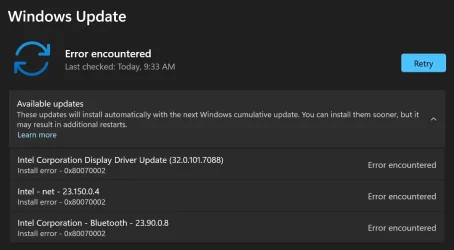
Why is this happening?


Birk

Well-known member
Member
VIP
Local time
9:59 AM
Posts
339
OS
Win11 Pro
1.webp

My system is AMD based - it has a Ryzan5 CPU, an AMD video chipset, a RealTek network adapter, and a MediaTek BlueTooth adapter. It does not have any requirement for Intel drivers or software that I am aware of. Nevertheless, Windows Update frequently tells me I need to install the above items.

Sometimes the installation completes OK, but more often I get results like the above image shows. I've not been able to find a way to get around this annoyance. I've read things like "Oh don't bother, Windows loads Intel stuff just because most PC's are Intel based." Is that really the answer? Or is there some way to tell Windows Update to not load things it doesn't use or need?
 

My Computer My Computer

At a glance

Win11 ProAMD Ryzen 5 5500U16 GBRadeon 2100
OS
Win11 Pro
Computer type
PC/Desktop
Manufacturer/Model
BeeLink SER Mini
CPU
AMD Ryzen 5 5500U
Motherboard
BeeLink SER
Memory
16 GB
Graphics Card(s)
Radeon 2100
Sound Card
none
Monitor(s) Displays
Primary: Phillips 4K; Secondary: LG 4K
Screen Resolution
Both 3860 x 2160
Hard Drives
C: NVme 500 GB Windows only
D: 128 GB NVme User data + Windows Temp via Junction Link
PSU
External
Case
Mini
Cooling
Internal fan
Keyboard
Logitech Wireless Lighted
Mouse
Kensington ExpertMouse wireless trackball
Internet Speed
500/500
Browser
Brave
Antivirus
Windows Defender
Hi,

Why? Maybe the driver update offered by WU is inapplicable or not customised for your system - see below.

More generally, though, the error number tells you this:
The Windows Update error 80070002 (or 0x80070002) typically means that a specific file needed by the update process cannot be found, often due to corrupted cache files or incorrect date and time settings
- suggesting you might try resetting Windows Update (tutorial available)


Or is there some way to tell Windows Update to not load things it doesn't use or need?

Yes. Tutorial available in the Tutorials section.

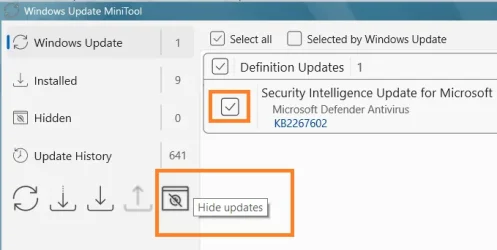
An easy way is to get a copy of WUMT (free).
Launch that, scan for updates.
The updates are listed with a checkbox.
Select the one(s) you're interested in and want to hide (e.g.)
Click the Hide button.

Note this:
1.webp

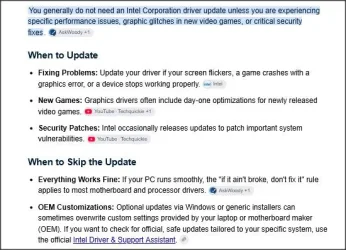
Thus you may prefer to try scanning with the tool listed at the bottom, or in particular go to your MOBO/PCs driver download page and consult that and check what if anything is applicable to your PC.

(Note- no one asking about drivers ever thinks to post the URL for their PC's driver downloads).

More FYI:
all driver updates via WU:
 
Last edited:

My Computer My Computer

At a glance

Windows 11 Proi7-8650U16GBIntel UHD 620
OS
Windows 11 Pro
Computer type
Laptop
Manufacturer/Model
Lenovo t480s
CPU
i7-8650U
Memory
16GB
Graphics Card(s)
Intel UHD 620
Screen Resolution
1920x1080
Hard Drives
C SN810 SDCPNRY-512G-1006
Browser
Edge, Firefox
Antivirus
Defender
Thanks Dalchina - that Show or Hide Updates in Windows 11 tutorial fixed the problem.

The tutorial itself looks a bit different now, but I was able to get to the indicated screens after poking around a bit. I wonder what will happen if/when MS physically removes that troubleshooter from it's library.

I also tried the WMUT utility, but all I could get it to do was list the 3 Intel drivers that failed to install along with a few others that did install OK. It seems to me that WMUT's UI could use a few tweaks, but maybe I'm just too old school for things like that.

Thanks again for pointing me to a nice solution. I've been running my first AMD based PC for several months now and have seen no reason to ever go back to Intel based machines.
 

My Computer My Computer

At a glance

Win11 ProAMD Ryzen 5 5500U16 GBRadeon 2100
OS
Win11 Pro
Computer type
PC/Desktop
Manufacturer/Model
BeeLink SER Mini
CPU
AMD Ryzen 5 5500U
Motherboard
BeeLink SER
Memory
16 GB
Graphics Card(s)
Radeon 2100
Sound Card
none
Monitor(s) Displays
Primary: Phillips 4K; Secondary: LG 4K
Screen Resolution
Both 3860 x 2160
Hard Drives
C: NVme 500 GB Windows only
D: 128 GB NVme User data + Windows Temp via Junction Link
PSU
External
Case
Mini
Cooling
Internal fan
Keyboard
Logitech Wireless Lighted
Mouse
Kensington ExpertMouse wireless trackball
Internet Speed
500/500
Browser
Brave
Antivirus
Windows Defender
Good, thanks.

I also tried the WMUT utility, but all I could get it to do was list the 3 Intel drivers that failed to install

That's exactly what I'd expect it to do.... they failed to install, so after a scan for updates, they were offered again.

You then click the check boxes by the updates as I said, then click the Hide button.

The updates are then removed from the list shown.

Seems like you didn't do the necessary steps I mentioned to hide the updates.

Example:
Untitled.webp
 

My Computer My Computer

At a glance

Windows 11 Proi7-8650U16GBIntel UHD 620
OS
Windows 11 Pro
Computer type
Laptop
Manufacturer/Model
Lenovo t480s
CPU
i7-8650U
Memory
16GB
Graphics Card(s)
Intel UHD 620
Screen Resolution
1920x1080
Hard Drives
C SN810 SDCPNRY-512G-1006
Browser
Edge, Firefox
Antivirus
Defender
Seems like you didn't do the necessary steps I mentioned to hide the updates.
Yup, I did not do that. It simply wasn't clear to me what any of those icons near the bottom were supposed to do, or when they should be clicked on.
 

My Computer My Computer

At a glance

Win11 ProAMD Ryzen 5 5500U16 GBRadeon 2100
OS
Win11 Pro
Computer type
PC/Desktop
Manufacturer/Model
BeeLink SER Mini
CPU
AMD Ryzen 5 5500U
Motherboard
BeeLink SER
Memory
16 GB
Graphics Card(s)
Radeon 2100
Sound Card
none
Monitor(s) Displays
Primary: Phillips 4K; Secondary: LG 4K
Screen Resolution
Both 3860 x 2160
Hard Drives
C: NVme 500 GB Windows only
D: 128 GB NVme User data + Windows Temp via Junction Link
PSU
External
Case
Mini
Cooling
Internal fan
Keyboard
Logitech Wireless Lighted
Mouse
Kensington ExpertMouse wireless trackball
Internet Speed
500/500
Browser
Brave
Antivirus
Windows Defender
The Windows Update error 80070002 (or 0x80070002) typically means that a specific file needed by the update process cannot be found, often due to corrupted cache files or incorrect date and time settings
Sometimes the installation completes OK, but more often I get results like the above image shows. I've not been able to find a way to get around this annoyance.
Note it's possible that the RAM needs to be reseated with that error code. RAM stability loss can cause false file-not-found errors. Especially if it happens with multiple files. Randomness makes it more likely that the RAM isn't stable, or a networking hardware problem on your end or the ISP's end.
 

My Computers My Computers

  • At a glance

    Windows 11 Pro x64 25H2Ryzen 9 5900X64 GB G.Skill RipJaws V F4-3200C16D-64GVKASRock Steel Legend Arc B580 12 GB
    OS
    Windows 11 Pro x64 25H2
    Computer type
    PC/Desktop
    CPU
    Ryzen 9 5900X
    Motherboard
    ASRock B550 PG Velocita (UEFI-BIOS 3.90)
    Memory
    64 GB G.Skill RipJaws V F4-3200C16D-64GVK
    Graphics Card(s)
    ASRock Steel Legend Arc B580 12 GB
    Monitor(s) Displays
    Alienware AW3423DWF OLED ultrawide
    Hard Drives
    Samsung 990 Pro 1 TB NVMe SSD
    PSU
    eVGA Supernova 750 G3
    Case
    Corsair 275R
    Internet Speed
    VTel FTTH 1 Gb down and 1 Gb up
  • At a glance

    Windows 11 Home x64 25H2Ryzen 7 5800X3D32 GB (2x16 GB G.Skill TridentZ Neo)Sapphire Nitro+ Radeon RX 6750 XT
    Operating System
    Windows 11 Home x64 25H2
    Computer type
    PC/Desktop
    CPU
    Ryzen 7 5800X3D
    Motherboard
    Asus ROG Strix B550-F Gaming (UEFI-BIOS version 3644)
    Memory
    32 GB (2x16 GB G.Skill TridentZ Neo)
    Graphics card(s)
    Sapphire Nitro+ Radeon RX 6750 XT
    Hard Drives
    Samsung 970 Pro 512 GB NVMe SSD
    PSU
    Corsair RM850x
    Case
    Fractal Focus G
Back
Top Bottom