Solved Wifi issues cannot connect or no devices


asuswin11guy

Member
Local time
12:24 PM
Posts
17
OS
windows11
Win11 24H2

Hello,

my wifi seems very flaky even before i upgraded to win11 when i was in win10. Even after upgrade to Win11 this still happens.
1. On bootup sometimes there is no connection at all to any devices and I followed the windows11 feature to reinstall driver and after reboot it works fine
2. on somedays like today it seems my router but there is no connection, but when i try to connect to it , it says "cannot connect..." but after reboot wifi also works fine.
3. on other days reboot didn't work at all . this was when i still was in win10 and I had to plug in directly into the router and then it got worse and worse until I recently upgraded to win11....but I found out its happening again under win11 even after updated drivers and windows.

Doesn't happen everytime so far, but just wondering am I facing a driver issue or a hardware issue, since my laptop already 5 years old. thanks in advance.
 
Windows Build/Version
win11 24h2

My Computer

System One

  • OS
    windows11
    Computer type
    Laptop
    Manufacturer/Model
    Asus
    CPU
    TUF Gaming 705DT
    Motherboard
    AMD Ryzen7
    Memory
    16GB
    Graphics Card(s)
    GEForce
Try to find out what wireless adaptor you have and see if it can be upgraded.
 

My Computers

System One System Two

  • OS
    Windows 11 Enterprise 25H2 26200 7462
    Computer type
    PC/Desktop
    Manufacturer/Model
    Custom Build
    CPU
    Intel XEON E5-2699 v3
    Motherboard
    ASUS X99-A
    Memory
    64GB Teamgroup UD4-3600
    Graphics Card(s)
    NVIDIA GeForce GTX 1080 Ti
    Sound Card
    Integrated
    Monitor(s) Displays
    ACER X34 Predator
    Screen Resolution
    3440 x 1440
    Hard Drives
    Crucial CT1000P 3P SSD8 1TB
    Crucial CT1000 BX500 SSD 1TB
    PSU
    GameMax Pro
    Case
    Fractal Design
    Cooling
    Corsair H110iGT + 6 140mm Fans
    Keyboard
    Corsair K4
    Mouse
    G-Skill G502
    Internet Speed
    300MBs
    Browser
    Chrome
    Antivirus
    OEM
    Other Info
    ASUS RT-AC87U Router
  • Operating System
    25H2 26200.5074
    Computer type
    Laptop
    Manufacturer/Model
    ASUS X555LA
    Memory
    8GB
    Browser
    Chrome
    Antivirus
    OEM
Can you please fix your PC System Specs?
As it is a laptop, you only really need to fill out the following:
(But you can take it a step further if you chose to. It can help members sometimes)

OS:
Computer Type:
Manufacturer/Model: (Should be underneath the laptop)
 

My Computers

System One System Two

  • OS
    Windows 11 Pro 25H2 Build 26200.8524
    Computer type
    PC/Desktop
    Manufacturer/Model
    Sin-built 2013
    CPU
    Intel(R) Core(TM) i7-4770K CPU @ 3.50GHz
    Motherboard
    ASUS ROG Maximus VI Formula
    Memory
    32.0 GB of I forget and the box is in storage.
    Graphics Card(s)
    Gigabyte nVidia GeForce GTX 1660 Super OC 6GB
    Sound Card
    Onboard thingy
    Monitor(s) Displays
    5 x LG 25MS500-B - 1 x 24MK430H-B - 1 x Wacom Pro 22" Touch Screen Tablet
    Screen Resolution
    All over the place
    Hard Drives
    Too many to list.
    OS on Samsung 1TB 870 QVO SATA
    PSU
    Silverstone 1500
    Case
    NZXT Phantom 820 Full-Tower Case
    Cooling
    Noctua NH-D15 Elite Class Dual Tower CPU Cooler / 6 x EziDIY 120mm / 2 x Corsair 140mm somethings / 1 x 140mm Thermaltake something / 2 x 200mm Corsair.
    Keyboard
    Corsair K95 / Logitech diNovo Edge Wireless
    Mouse
    Logitech: G402 / G502 / Mx Masters / Mx Air Cordless
    Internet Speed
    2000/500Mbps
    Browser
    All sorts
    Antivirus
    Kaspersky Premium
    Other Info
    ㅤㅤㅤㅤㅤㅤㅤㅤㅤㅤㅤㅤㅤㅤㅤㅤㅤㅤㅤㅤㅤㅤㅤㅤㅤㅤㅤㅤㅤㅤㅤㅤㅤㅤㅤㅤㅤㅤㅤㅤ⠀⠀⠀⠀⠀⠀⠀⠀⠀⠀
    TP-Link BE9300 WiFi 7 Bluetooth 5.4 (Archer TBE550E)
    TP-Link TX201 V1 2.5GB Lan

    Grandstream HT812 - VoIP
    ASUS DSL-AX82U - Mesh
    ASUS RT-AC68U - Mesh
    ASUS RT-BE88U Router

    Brother MFC-L2880DW Printer

    I’m on a horse.
  • Operating System
    Windows 11 Pro 25H2 Build 26200.8524
    Computer type
    Laptop
    Manufacturer/Model
    LENOVO Yoga 7 14IRL8 - 7i EVO OLED 14" Touchscreen i5 12 Core 16GB/512GB
    CPU
    Intel Core 12th Gen i5-1240P Processor (1.7 - 4.4GHz)
    Memory
    16GB LPDDR5 RAM
    Graphics card(s)
    Intel Iris Xe Graphics Processor
    Sound Card
    Optimized with Dolby Atmos®
    Screen Resolution
    QHD 2880 x 1800 OLED
    Hard Drives
    M.2 512GB
    Antivirus
    Defender / Malwarebytes
    Other Info
    …still on a horse.
It would also be helpful if you tell us the Manufacturer/Model of your Router.

  • I’d start with rebooting the router.
    • Turn it off for 1 minute then turn it back on again
    • Check your Wireless after the router reconnects to your ISP, there should be indicator lights on the router.

  • If you’re confident, doing a hard reset and setting up your router again is often helpful.
    • You will likely need the settings (User/Pass) or some information from your service provider.
    • If the router is from your ISP then it’s most likely embedded with the settings.
    • I am not sure how it is where you are, but 3rd party routers in Australia, most have the common internet service providers available to choose from in the router when setting up.

If that fails, (as mentioned above) consider checking if you can upgrade the laptops wireless/network card (best done by a professional)
Alternatively, you could consider using a wireless adapter for your laptop, they can be relatively cheap.
 
Last edited:

My Computers

System One System Two

  • OS
    Windows 11 Pro 25H2 Build 26200.8524
    Computer type
    PC/Desktop
    Manufacturer/Model
    Sin-built 2013
    CPU
    Intel(R) Core(TM) i7-4770K CPU @ 3.50GHz
    Motherboard
    ASUS ROG Maximus VI Formula
    Memory
    32.0 GB of I forget and the box is in storage.
    Graphics Card(s)
    Gigabyte nVidia GeForce GTX 1660 Super OC 6GB
    Sound Card
    Onboard thingy
    Monitor(s) Displays
    5 x LG 25MS500-B - 1 x 24MK430H-B - 1 x Wacom Pro 22" Touch Screen Tablet
    Screen Resolution
    All over the place
    Hard Drives
    Too many to list.
    OS on Samsung 1TB 870 QVO SATA
    PSU
    Silverstone 1500
    Case
    NZXT Phantom 820 Full-Tower Case
    Cooling
    Noctua NH-D15 Elite Class Dual Tower CPU Cooler / 6 x EziDIY 120mm / 2 x Corsair 140mm somethings / 1 x 140mm Thermaltake something / 2 x 200mm Corsair.
    Keyboard
    Corsair K95 / Logitech diNovo Edge Wireless
    Mouse
    Logitech: G402 / G502 / Mx Masters / Mx Air Cordless
    Internet Speed
    2000/500Mbps
    Browser
    All sorts
    Antivirus
    Kaspersky Premium
    Other Info
    ㅤㅤㅤㅤㅤㅤㅤㅤㅤㅤㅤㅤㅤㅤㅤㅤㅤㅤㅤㅤㅤㅤㅤㅤㅤㅤㅤㅤㅤㅤㅤㅤㅤㅤㅤㅤㅤㅤㅤㅤ⠀⠀⠀⠀⠀⠀⠀⠀⠀⠀
    TP-Link BE9300 WiFi 7 Bluetooth 5.4 (Archer TBE550E)
    TP-Link TX201 V1 2.5GB Lan

    Grandstream HT812 - VoIP
    ASUS DSL-AX82U - Mesh
    ASUS RT-AC68U - Mesh
    ASUS RT-BE88U Router

    Brother MFC-L2880DW Printer

    I’m on a horse.
  • Operating System
    Windows 11 Pro 25H2 Build 26200.8524
    Computer type
    Laptop
    Manufacturer/Model
    LENOVO Yoga 7 14IRL8 - 7i EVO OLED 14" Touchscreen i5 12 Core 16GB/512GB
    CPU
    Intel Core 12th Gen i5-1240P Processor (1.7 - 4.4GHz)
    Memory
    16GB LPDDR5 RAM
    Graphics card(s)
    Intel Iris Xe Graphics Processor
    Sound Card
    Optimized with Dolby Atmos®
    Screen Resolution
    QHD 2880 x 1800 OLED
    Hard Drives
    M.2 512GB
    Antivirus
    Defender / Malwarebytes
    Other Info
    …still on a horse.
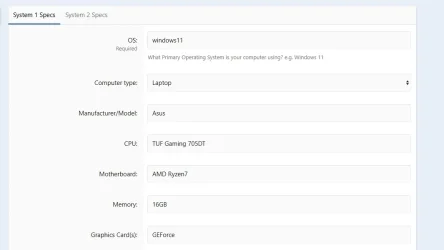
that's very weird... that is not my system specs. Where is that coming from ??? The specs in My Computers are not mine. I'm not able to edit that. Attached is my laptop as I have .

Its not my router. I also connect my phone and tablet via wifi and never had an issue there. Also I've rebooted the router anyways. Today the laptop wifi works fine. I still think its the laptop.
 

Attachments

  • laptop.webp
    laptop.webp
    15.9 KB · Views: 2

My Computer

System One

  • OS
    windows11
    Computer type
    Laptop
    Manufacturer/Model
    Asus
    CPU
    TUF Gaming 705DT
    Motherboard
    AMD Ryzen7
    Memory
    16GB
    Graphics Card(s)
    GEForce
that's very weird... that is not my system specs. Where is that coming from ???
What’s very weird? Where is what coming from?
You have your system specs in the wrong places:
  • OS: windows11
  • Computer type: Laptop
  • Manufacturer/Model: Asus TUF Gaming 705DT
  • CPU: TUF Gaming 705DT AMD Ryzen7
  • Motherboard: AMD Ryzen7
  • Memory16GB
  • Graphics Card(s): GEForce

I didn’t say there was anything wrong with your router, but there is a communication issue between your laptop and your routers Wifi signal.
Yes it could be the network card in the laptop, hence my suggestion of a Wireless adapter.
Where did you get the Wireless driver from, that you installed on your laptop?


Try this tutorial:


.
 

My Computers

System One System Two

  • OS
    Windows 11 Pro 25H2 Build 26200.8524
    Computer type
    PC/Desktop
    Manufacturer/Model
    Sin-built 2013
    CPU
    Intel(R) Core(TM) i7-4770K CPU @ 3.50GHz
    Motherboard
    ASUS ROG Maximus VI Formula
    Memory
    32.0 GB of I forget and the box is in storage.
    Graphics Card(s)
    Gigabyte nVidia GeForce GTX 1660 Super OC 6GB
    Sound Card
    Onboard thingy
    Monitor(s) Displays
    5 x LG 25MS500-B - 1 x 24MK430H-B - 1 x Wacom Pro 22" Touch Screen Tablet
    Screen Resolution
    All over the place
    Hard Drives
    Too many to list.
    OS on Samsung 1TB 870 QVO SATA
    PSU
    Silverstone 1500
    Case
    NZXT Phantom 820 Full-Tower Case
    Cooling
    Noctua NH-D15 Elite Class Dual Tower CPU Cooler / 6 x EziDIY 120mm / 2 x Corsair 140mm somethings / 1 x 140mm Thermaltake something / 2 x 200mm Corsair.
    Keyboard
    Corsair K95 / Logitech diNovo Edge Wireless
    Mouse
    Logitech: G402 / G502 / Mx Masters / Mx Air Cordless
    Internet Speed
    2000/500Mbps
    Browser
    All sorts
    Antivirus
    Kaspersky Premium
    Other Info
    ㅤㅤㅤㅤㅤㅤㅤㅤㅤㅤㅤㅤㅤㅤㅤㅤㅤㅤㅤㅤㅤㅤㅤㅤㅤㅤㅤㅤㅤㅤㅤㅤㅤㅤㅤㅤㅤㅤㅤㅤ⠀⠀⠀⠀⠀⠀⠀⠀⠀⠀
    TP-Link BE9300 WiFi 7 Bluetooth 5.4 (Archer TBE550E)
    TP-Link TX201 V1 2.5GB Lan

    Grandstream HT812 - VoIP
    ASUS DSL-AX82U - Mesh
    ASUS RT-AC68U - Mesh
    ASUS RT-BE88U Router

    Brother MFC-L2880DW Printer

    I’m on a horse.
  • Operating System
    Windows 11 Pro 25H2 Build 26200.8524
    Computer type
    Laptop
    Manufacturer/Model
    LENOVO Yoga 7 14IRL8 - 7i EVO OLED 14" Touchscreen i5 12 Core 16GB/512GB
    CPU
    Intel Core 12th Gen i5-1240P Processor (1.7 - 4.4GHz)
    Memory
    16GB LPDDR5 RAM
    Graphics card(s)
    Intel Iris Xe Graphics Processor
    Sound Card
    Optimized with Dolby Atmos®
    Screen Resolution
    QHD 2880 x 1800 OLED
    Hard Drives
    M.2 512GB
    Antivirus
    Defender / Malwarebytes
    Other Info
    …still on a horse.
Hi antspants,

I got the wireless driver from the Asus site, same as all other drivers, and installed first before Windows update. But thanks , will try the reset network Adapters in Windows11 tutorial . Wireless was working generally fine last few days but yesterday again not working at all, could not find anything in the network. Will see what happens, and update in this post.
 

My Computer

System One

  • OS
    windows11
    Computer type
    Laptop
    Manufacturer/Model
    Asus
    CPU
    TUF Gaming 705DT
    Motherboard
    AMD Ryzen7
    Memory
    16GB
    Graphics Card(s)
    GEForce
Hi antspants,

It worked! I just tried options1 network reset and after reboot I was able to reconnect to to wifi. Awesome. I've bookmarked the tutorial if I need to use it again in future. I'll mark this as solved. :-)
 

My Computer

System One

  • OS
    windows11
    Computer type
    Laptop
    Manufacturer/Model
    Asus
    CPU
    TUF Gaming 705DT
    Motherboard
    AMD Ryzen7
    Memory
    16GB
    Graphics Card(s)
    GEForce

Latest Support Threads

Back
Top Bottom